- Top Pick: Thermalright Peerless Assassin 120 SE CPU Cooler, 6 Heat Pipes AGHP Technology, Dual 120mm PWM Fans, 1550RPM Speed, for AMD:AM4 AM5/Intel LGA 1700/1150/1151/1200/1851,PC Cooler
- Best Value: Thermalright Assassin X120 Refined SE CPU Air Cooler, 4 Heat Pipes, TL-C12C PWM Fan, Aluminium Heatsink Cover, AGHP Technology, for AMD AM4/AM5/Intel LGA 1150/1151/1155/1200/1700/1851(AX120 R SE)
- Premium Choice: Thermalright Peerless Assassin 120 SE ARGB CPU Air Cooler,6 Heat Pipes CPU Cooler, Dual TL-C12C-S PWM Fan, Aluminium Heatsink Cover,AGHP Technology,for AMD AM4/AM5/Intel LGA1700/115X/1155/1200/1851
Modern gaming CPUs are hungrier than ever. The 2026 crop of high-core-count chips from both Intel and AMD will happily draw well north of 200W under a sustained all-core load, and unlike a few years ago, that heat now arrives concentrated in small, dense compute tiles. The stock cooler in the box — if there even is one — is no longer a serious option for anyone running a high-refresh gaming rig, streaming while they play, or occasionally rendering on the side. The cooler you choose is the single component that decides whether your CPU holds its boost clocks or quietly throttles away performance you already paid for.
That leaves most builders staring at the same fork in the road: an all-in-one (AIO) liquid cooler with a radiator and pump, or a traditional tower air cooler with heat pipes and fans. Both can keep a modern CPU comfortable. They just get there differently, and they fail differently too. Below we break down how AIOs and air coolers actually compare in 2026 — on thermals, acoustics, cost, case compatibility, and long-term reliability — so you can pick the one that fits your build instead of the one that looks best in a render.
As an Amazon Associate we earn from qualifying purchases at no extra cost to you.




⚡ Save on Your Next PC — Amazon Prime
Prime members get fast free shipping on the systems above, plus early access to Prime Day & Black Friday PC deals. New members get a 30-day free trial.
Watch: AIO vs Air Cooler: Which Is Best in 2026? — Video Review
Quick Verdict
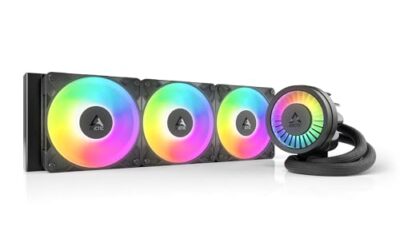
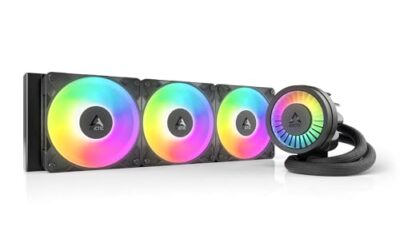
Choose an AIO like the ARCTIC Liquid Freezer III Pro 360 if you are running a flagship CPU, pushing overclocks or heavy multi-core workloads, or building in a case where a tall tower simply will not fit over your RAM or under the side panel. Choose a tower air cooler like the Thermalright Peerless Assassin 120 SE or Phantom Spirit 120 SE if you want near-identical gaming temperatures for a fraction of the money, with no pump to fail and nothing to maintain for the next decade. For the overwhelming majority of gaming builds, a good dual-tower air cooler is the smarter buy — the AIO earns its price only at the top end.
Key Differences
- Thermal ceiling: A 360mm AIO moves heat into a much larger radiator surface, giving it real headroom above roughly 250W. Air coolers close most of that gap under gaming loads but fall behind in sustained all-core work.
- Noise behaviour: Air coolers are near-silent at idle and ramp gradually. AIOs add pump noise that never fully goes away, though quality units keep it below fan noise.
- Price per degree: Air cooling is dramatically better value. A six or seven heat-pipe tower typically costs a third of what a decent 360mm AIO does while trailing by only a handful of degrees in games.
- Clearance and fitment: Towers need vertical space and RAM clearance; AIOs need a case with proper radiator mounting and enough front or top room for a 360mm rad plus fans.
- Longevity: An air cooler’s only wear item is its fan bearings, which are trivially replaceable. An AIO has a pump, coolant that slowly permeates, and a realistic service life of five to seven years.
- Aesthetics: AIOs free up the space above your motherboard and show off the board itself. Air coolers dominate the view, though models like the Peerless Assassin 120 Vision MAX ARGB now fight back with ARGB and an integrated 5-inch IPS display.
AIO Liquid Coolers: Maximum Headroom for Flagship Chips
An AIO’s advantage is thermal mass and surface area. The ARCTIC Liquid Freezer III Pro 360 pairs a thick triple-120mm radiator with a cold plate designed for current AMD and Intel sockets, and the result is a cooler that barely flinches at loads which push air towers to their limit. If you are running a top-tier CPU with an aggressive power limit, doing long Blender or compile runs, or chasing an overclock, this is where liquid genuinely wins rather than just looking like it should.
The trade-offs are real, though. You are paying meaningfully more, you need a case that properly supports a 360mm radiator, and installation is a longer job involving fan cabling, pump power, and careful routing. You also accept a wear component: pumps do eventually fail, usually without warning, and when they do the cooler is done rather than repairable. For a flagship build that will be replaced in four or five years anyway, that is an acceptable bargain. For a machine you expect to run for a decade, it is worth thinking about.
Air Coolers: The Value and Reliability Champion
Thermalright has spent the last few generations making air cooling embarrassingly good value, and the lineup shows it. The Peerless Assassin 120 SE puts six AGHP heat pipes and dual 120mm PWM fans on a twin-tower heatsink, and the Phantom Spirit 120 SE pushes that to seven pipes with AGHP 4.0 and S-FDB bearing fans. Both handle mainstream and upper-mid-range gaming CPUs without breaking a sweat, and in actual gameplay — where loads are bursty and rarely all-core — they land within a few degrees of a 360mm AIO.
Smaller builds and tighter budgets are covered too. The single-tower Assassin X120 Refined SE uses four heat pipes and a single TL-C12C fan, making it a sensible pick for mid-range chips and cramped cases. If you want the aesthetics without the pump, the Peerless Assassin 120 SE ARGB adds lighting to the six-pipe design, while the Peerless Assassin 120 Vision MAX ARGB tops the range with 2150RPM fans and a 5-inch IPS screen for temperature readouts. Installation on all of them is a ten-minute job, and after that there is nothing to service.
Which Should You Buy?
- For flagship CPUs and heavy multi-core work: pick the ARCTIC Liquid Freezer III Pro 360 — the extra headroom is the difference between holding boost and throttling.
- For a mainstream gaming build: pick the Peerless Assassin 120 SE or Phantom Spirit 120 SE. You save a lot of money and lose almost nothing in games.
- For a budget or mid-range rig: pick the Assassin X120 Refined SE. Four heat pipes is plenty for a 65–125W chip.
- For a showcase build with RGB: pick the Peerless Assassin 120 SE ARGB, or the Vision MAX ARGB if you want the IPS display as the centrepiece.
- For a small-form-factor or low-clearance case: measure first — an AIO often fits where a 155mm tower does not, but check radiator support before you buy.
Frequently Asked Questions
Is an AIO actually cooler than a good air cooler?
Under sustained all-core loads, yes — a 360mm AIO typically leads a top air tower by a noticeable margin. In gaming, where the CPU rarely sees full multi-core load for long, the gap usually shrinks to low single digits.
Do AIOs leak?
Modern sealed units from reputable brands very rarely leak. The far more common failure mode is pump degradation after several years, which shows up as rising temperatures rather than damage to your hardware.
Will a Thermalright tower block my RAM?
The dual-tower Peerless Assassin and Phantom Spirit models can overhang the first DIMM slot depending on board layout. Standard-height memory is fine; tall RGB heat spreaders may require shifting the front fan upward.
Does the fan or pump wear out first?
On air coolers, fans go first and cost very little to replace. On AIOs, the pump is the limiting component and effectively ends the cooler’s life when it fails.
Final Verdict
In 2026, air cooling remains the default recommendation for gaming builds: a Peerless Assassin 120 SE or Phantom Spirit 120 SE delivers the vast majority of an AIO’s real-world gaming performance for a fraction of the outlay, with none of the long-term wear concerns. Step up to the ARCTIC Liquid Freezer III Pro 360 when your CPU’s power draw, your workload, or your case layout genuinely demands it — and buy it knowing exactly what you are paying the premium for.