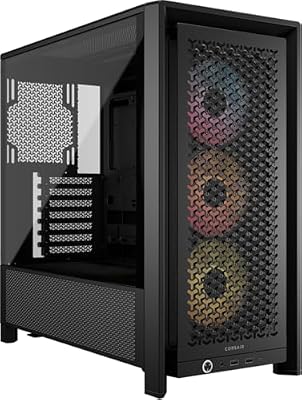
- Top Pick: MUSETEX Y6 PC Case, Pre-Installed 7 Infinity Mirror PWM ARGB Fans, ATX Mid Tower Computer Case, Gaming PC Case with Type-C, 270° Full View Tempered Glass, Black
- Best Value: CORSAIR 4000D RS ARGB Frame Modular Mid-Tower ATX PC Case, High Airflow, 3X Pre-Installed RS Fans, InfiniRail™ Mounting System, ASUS BTF, MSI Zero, Gigabyte Stealth, Black
- Premium Choice: NZXT H5 Flow – Compact ATX Mid-Tower PC Case – Black
The PC case is the one component you look at every single day, and in 2026 there is a stronger case than ever for treating it as more than an afterthought. Airflow-first designs, panoramic glass, and modular layouts have transformed the humble chassis into a defining part of any build’s performance and personality.
- Watch: Best PC Case 2026 — Video Review
- How to Choose a PC Case
- The Best PC Cases Reviewed
- What to Look For Beyond the Spec Sheet
- Which One Should You Buy?
- Common Mistakes When Buying a PC Case
- A Practical Build Order That Avoids Rework
- A Short Compatibility Worksheet
- Keeping the Case Cool and Clean Over Time
- Frequently Asked Questions
- Final Thoughts
- Related Articles
From dual-chamber showpieces to no-nonsense mesh mid-towers, the right case keeps your components cool, quiet, and easy to work on. This roundup walks through the buying factors that matter most and the ATX cases that impressed us this year.
As an Amazon Associate we earn from qualifying purchases at no extra cost to you.


⚡ Save on Your Next PC — Amazon Prime
Prime members get fast free shipping on the systems above, plus early access to Prime Day & Black Friday PC deals. New members get a 30-day free trial.
Watch: Best PC Case 2026 — Video Review
How to Choose a PC Case
- Motherboard support: Confirm the case fits your board size, whether that is ATX, Micro-ATX, or the larger E-ATX layouts favored by high-end builds.
- Airflow design: Prioritize mesh front panels and generous fan mounts, since strong airflow keeps modern high-wattage CPUs and GPUs from thermal throttling.
- GPU and cooler clearance: Check maximum GPU length and CPU cooler height so today’s large triple-slot cards and tall air coolers actually fit inside.
- Build quality and layout: Look for tool-free panels, cable management channels, and a clean interior that makes assembly and future upgrades painless.
- Aesthetics and glass: Decide how much you want to show off. Panoramic or dual-chamber glass cases spotlight your hardware, while subtle designs keep things understated.
The Best PC Cases Reviewed
HYTE Y70 Touch
The Y70 Touch is a statement piece, wrapping your build in panoramic glass and adding an integrated touchscreen. It is for enthusiasts who want their PC to double as a centerpiece with room for premium hardware.
Lian Li O11D EVO RGB
This dual-chamber E-ATX case is a builder’s dream, separating the main components from cables and offering endless cooling and layout flexibility with striking ARGB lighting.
NZXT H5 Flow
A compact and clean ATX mid-tower, the H5 Flow focuses on strong airflow and simple, elegant looks, making it a superb value pick for a tidy performance build.
Corsair 4000D RS ARGB
The updated 4000D RS pairs a high-airflow frame with pre-installed ARGB fans and Corsair’s famously easy cable management, an excellent all-rounder for most gaming rigs.
Fractal Design North
With its genuine walnut front and tempered glass side, the North brings warm, furniture-like design to the PC case world without sacrificing the airflow enthusiasts demand.
What to Look For Beyond the Spec Sheet
Match the Form Factor to the Motherboard
Every case lists the motherboard sizes it accepts, and a board can always go into a case built for something larger, never the other way around. The standard dimensions are fixed by industry convention, so they make a quick sanity check before anything else.
| Board size | Dimensions | Expansion slots |
|---|---|---|
| ATX | 305 x 244 mm | Up to 7 |
| Micro-ATX | 244 x 244 mm | Up to 4 |
| Mini-ITX | 170 x 170 mm | Up to 2 |
A mid-tower that takes ATX is the safest choice if you might change motherboards later. Smaller cases save desk space but give up slots, fan mounts, and room for your hands during assembly.
Clearance Numbers That Decide Compatibility
Most failed case purchases come down to a few millimeters. Before you commit, write down four figures from the product specifications and compare them with your parts: maximum graphics card length, maximum CPU cooler height, radiator support for each mounting position, and power supply length.
Radiators deserve a worked example. A 360 mm radiator is roughly 27 to 30 mm thick, and fans add about 25 mm more, so a top-mounted unit needs around 55 mm of vertical room. If your memory modules have tall heat spreaders, that stack can collide with them, which is why a case may advertise 360 mm support but only with low-profile RAM. Front-mounted radiators avoid this problem but can collide with long graphics cards.
Airflow Starts at the Front Panel
A glass front looks dramatic, but intake fans need an open path. Mesh or perforated fronts let a 120 mm or 140 mm fan pull air without fighting a solid panel. A common layout is two or three intake fans at the front, one exhaust fan at the rear, and optional exhaust at the top. Slightly more intake than exhaust keeps pressure positive, which pushes air out through gaps instead of pulling dust in through them.
Fan size matters too. A 140 mm fan can move a similar volume of air to a 120 mm fan at lower rotational speed, which usually means less noise. Removable dust filters on the front, top, and power supply intake make a bigger difference to long-term temperatures than most people expect.
Front I/O and Everyday Details
A front USB-C port is convenient, but it only works if your motherboard has a matching internal header. The case connector must fit that header, so confirm it before assuming the port will be usable. Also check for a headset jack, the number of USB-A ports, and whether the power button is easy to reach if the case sits under a desk.
Behind the motherboard tray, 20 mm or more of space makes cable routing far less stressful, and tie-down points and Velcro straps keep the back panel closed. Tool-free side panels and removable drive cages are small touches that save time when you upgrade later.
Which One Should You Buy?
| If you… | Choose… |
|---|---|
| Want a showpiece with a built-in display and have the desk space | HYTE Y70 Touch |
| Plan a custom loop, many fans, or a build you want to show off from every angle | Lian Li O11D EVO RGB |
| Want a compact, airflow-focused mid-tower with a simple build | NZXT H5 Flow |
| Want pre-installed addressable RGB fans and an easy first build | Corsair 4000D RS ARGB |
| Prefer a quieter, furniture-style look with wood accents | Fractal Design North |
Fan counts, drive bays, and clearance limits change between revisions, so confirm the exact figures on the listing before ordering.
Common Mistakes When Buying a PC Case
- Ignoring graphics card length. Many modern cards run past 300 mm and some are four slots thick, so measure available space with the front fans and any radiator in place.
- Choosing looks over airflow. A sealed glass front with two small intake gaps can leave a high-wattage graphics card running hot and loud.
- Mixing up RGB connectors. Addressable RGB uses a 5V three-pin header, while standard RGB uses a 12V four-pin header. Plugging one into the other can damage lighting, so match the connector.
- Assuming the included fans are enough. Some cases ship with one rear fan only; budget for intake fans if the case arrives light.
- Forgetting the power supply size. Compact cases may only accept shorter supplies or the smaller SFX format, which narrows your options.
- Overlooking desk fit. A tall dual-chamber case is heavy once loaded, so check its dimensions against the space where it will sit.
A Practical Build Order That Avoids Rework
The sequence you follow inside the case matters, because some parts block access to others. This order keeps the tight steps early, while the interior is still open.
- Install the motherboard standoffs that match your board size, and leave out any extra ones that do not line up with a mounting hole.
- Mount the processor, memory, and any M.2 drive on the motherboard while it sits on its box, which is easier than working inside the case.
- Fit the I/O shield if it is separate, then lower the board into the case and fasten every screw loosely before tightening.
- Install front and top radiators or fans before the graphics card, since the card blocks access to the bottom edge.
- Mount the power supply and route the thickest cables first: the 24-pin motherboard cable, the CPU power cable, and the graphics power cables.
- Seat the graphics card last, check that it is fully clicked into the slot, and secure it to the rear bracket.
- Connect the front panel header, USB, and audio cables, using the motherboard manual for the pin layout.
- Tidy cables with straps before closing the side panels, keeping them clear of fan blades.
A Short Compatibility Worksheet
Write these four numbers down before you buy, then compare each against the case specifications.
| Part | Figure to find | Where to look |
|---|---|---|
| Graphics card | Length and slot thickness | Product specification page |
| CPU cooler | Total height | Cooler specification page |
| Radiator or fans | Size and thickness | Case support list for each mounting position |
| Power supply | Length and form factor | Power supply specification page |
Keeping the Case Cool and Clean Over Time
Dust slowly narrows airflow, so even a well-designed case loses cooling performance if its filters are neglected. A monthly glance at the front and bottom filters is usually enough, and a rinse with water followed by complete drying brings them back to normal. Use short bursts of compressed air on fan blades and heatsink fins while holding the fan still, because spinning a fan freely with a strong air jet can damage its bearing. If temperatures creep upward over several months, check fan curves in the motherboard firmware before assuming a hardware problem.
Frequently Asked Questions
Does the PC case affect performance?
Indirectly, yes. A case with good airflow keeps your CPU and GPU cooler, which prevents thermal throttling and allows components to sustain higher performance under load.
What size case should I buy?
Match it to your motherboard and cooling plans. ATX mid-towers suit most builds, while E-ATX cases like the O11D EVO give extra room for large boards and heavy cooling.
Are glass panel cases worth it?
If you want to showcase RGB and hardware, absolutely. Just remember that airflow-focused mesh designs often cool slightly better than fully enclosed glass fronts.
How many fans do I need?
A common starting point is two intake and one exhaust fan. Cases like the 4000D RS include ARGB fans out of the box, saving you an extra purchase.
Final Thoughts
A great case ties a build together in both looks and thermals. The HYTE Y70 Touch and Lian Li O11D EVO cater to enthusiasts who want a showpiece, while the NZXT H5 Flow and Corsair 4000D RS deliver airflow-first value. Prioritize cooling and clearance for your specific parts, and the rest comes down to the style you want on your desk.