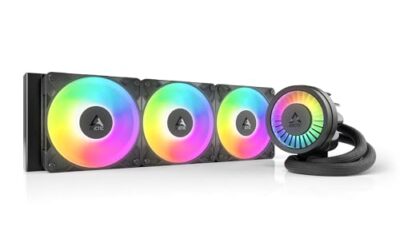
- Top Pick: ARCTIC Liquid Freezer III Pro 360 A-RGB – AIO CPU Cooler, Water Cooling
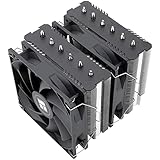
- Best Value: Thermalright Peerless Assassin 120 SE CPU Cooler, 6 Heat Pipes AGHP Technology, Dual 120mm PWM Fans, 1550RPM Speed, for AMD:AM4 AM5/Intel LGA 1700/1150/1151/1200/1851,PC Cooler
- Premium Choice: CORSAIR Nautilus 360 RS Liquid CPU Cooler – 360mm AIO – Low-Noise – Direct Motherboard Connection – Daisy-Chain – Intel LGA 1851/1700, AMD AM5/AM4 – 3X RS120 Fans Included – Black
Keeping a modern processor cool is more important than ever in 2026. Today’s high-core-count CPUs can dump serious heat under load, and the difference between a mediocre cooler and a great one shows up directly in boost clocks, noise levels, and long-term stability. Whether you are building a quiet productivity rig or a hard-charging gaming machine, the cooler you choose sets the ceiling for performance.
The market splits neatly into two camps: massive air towers that never need maintenance, and all-in-one liquid coolers that move heat efficiently with a slim radiator. Both can be excellent when matched to the right chip and case. Below we round up the best CPU coolers of the year and break down exactly how to pick one that fits your build.
As an Amazon Associate we earn from qualifying purchases at no extra cost to you. Product prices and availability are accurate as of the date shown and are subject to change.




⚡ Save on Your Next PC — Amazon Prime
Prime members get fast free shipping on the systems above, plus early access to Prime Day & Black Friday PC deals. New members get a 30-day free trial.
Watch: Best CPU Cooler 2026 — Video Review
How to Choose a CPU Cooler in 2026
- Air or liquid: Air coolers are reliable, maintenance-free, and often quieter for the money, while AIO liquid coolers handle high-TDP chips and add a clean look with optional screens and RGB.
- Socket compatibility: Confirm support for your platform, such as AMD AM5/AM4 or Intel LGA 1851/1700. Most modern coolers include brackets for both, but always double-check before buying.
- Case clearance: Tall air towers can block RAM or hit the side panel, and 360mm radiators need a case with proper mounting space. Measure your clearance before committing.
- Thermal headroom: Match the cooler’s capacity to your CPU’s heat output. A flagship chip under heavy load benefits from a 360mm AIO or a large dual-tower air cooler.
- Noise and aesthetics: Look for high-quality PWM fans for quiet operation, and decide whether ARGB lighting or an LCD screen matters for your build’s style.
The Best CPU Coolers Reviewed
ARCTIC Liquid Freezer III Pro 360 A-RGB
The Liquid Freezer III Pro 360 is the value champion of high-end cooling. Its thick radiator, strong pump, and integrated VRM fan deliver outstanding thermals that rival pricier units, and the A-RGB accents add a touch of flair. For enthusiasts who want maximum cooling per dollar, this is the one to beat.
Thermalright Peerless Assassin 120 SE
If you prefer air, the Peerless Assassin 120 SE is legendary for punching far above its price. Six heat pipes and dual 120mm PWM fans keep mainstream and even high-end CPUs in check quietly, and its broad socket support covers modern AMD and Intel platforms. It is the smart budget pick.
CORSAIR Nautilus 360 RS
The Nautilus 360 RS keeps things clean and simple with a direct motherboard connection, daisy-chained RS120 fans, and low-noise operation. It supports Intel LGA 1851/1700 and AMD AM5/AM4, making it an easy, tidy 360mm option for builders who want strong cooling without cable clutter.
CORSAIR Nautilus 360 RS ARGB (White)
For a brighter build, the white ARGB version of the Nautilus 360 RS adds vivid lighting to the same low-noise, easy-install formula. Three RS120 ARGB fans light up the loop while the daisy-chain design keeps wiring minimal, making it a stylish centerpiece for a themed system.
TRYX Panorama SE 360mm
The Panorama SE 360mm is the show-stealer, pairing an Asetek-based 280W pump with a striking curved screen. It delivers serious cooling for high-end chips while the built-in display shows animations and system stats, giving flagship builds a genuine wow factor.
Frequently Asked Questions
Is an air cooler or AIO better for gaming?
Both work great for gaming, since games rarely max out a CPU the way rendering does. A quality air cooler like the Peerless Assassin handles most gaming chips silently, while a 360mm AIO gives extra headroom and style for high-end or overclocked builds.
Do I need a 360mm radiator?
A 360mm radiator is ideal for flagship, high-TDP processors or overclocking, offering the most cooling and quietest fan speeds. Mainstream CPUs are well served by a strong air cooler or a 240mm AIO, so match the size to your chip.
Are AIO coolers hard to install?
Modern AIOs like the CORSAIR Nautilus are designed for simple installation, often with tool-light brackets and daisy-chain cabling. The main step is mounting the radiator securely, which most mid-tower and larger cases accommodate without trouble.
Will these coolers fit my CPU socket?
Every cooler here supports current AMD AM5/AM4 and Intel LGA 1851/1700 sockets via included brackets. Always verify your specific socket on the product listing, especially for older or niche platforms, before purchasing.
Final Thoughts
The best CPU cooler depends on your chip, case, and taste. Budget builders should grab the Peerless Assassin 120 SE for silent, worry-free air cooling, while enthusiasts will love the value of the ARCTIC Liquid Freezer III Pro and the flashy TRYX Panorama SE for flagship setups. Match the cooling capacity to your processor, confirm clearance, and your CPU will run cooler, quieter, and faster.