In 2026, 1440p has cemented itself as the definitive sweet spot for gaming. It delivers a huge visual leap over 1080p, sharper textures, more screen real estate, and cleaner anti-aliasing, without the brutal hardware tax and steep monitor prices that native 4K still demands. For the vast majority of players chasing high frame rates in competitive shooters and immersive AAA worlds alike, a 1440p rig hits the ideal balance of fidelity, performance, and price. A well-built prebuilt takes the guesswork out of the equation, arriving assembled, covered by a warranty, and ready to run the moment it hits your desk.
- Best Prebuilt Gaming PCs for 1440p Gaming: Quick Answer
- Watch: Best 1440p Prebuilt Gaming PC — Video Review
- How to Choose a 1440p Prebuilt Gaming PC
- The Best 1440p Prebuilt Gaming PCs
- Related Prebuilt Gaming PC Guides
- How to Read a Prebuilt Gaming PC Listing
- Brand and Seller Support: Who Actually Stands Behind the Machine
- Warranty Terms Worth Comparing
- Red Flags in Power Supply, Cooling and Memory
- Return Windows and Upgrade Risk
- Checks to Make When the Box Arrives
- Questions to Ask the Seller Before Ordering
- Boutique Builder, Big Brand or Retailer Bundle: Choosing a Seller Type
- Weighing Price Against Parts Without Chasing a Number
- First-Boot Setup: Drivers, Preinstalled Software and BIOS Settings
- Noise, Heat and Case Airflow in Daily Use
- Ports, Wireless and Display Outputs Worth Checking
- Platform Age and How Long a Prebuilt Stays Relevant
- Streaming, Creative Work and VR on a Gaming Prebuilt
- Which Pick Fits Which Buyer
- Common Mistakes When Buying a Prebuilt for 1440p
- 1440p Prebuilt Spec Comparison
- Which GPU Tier Fits Your Monitor
- Prebuilt Checklist Most Buyers Skip
- Mistakes to Avoid When Buying a Prebuilt
- Who Should Skip a Prebuilt
- More 1440p Prebuilt PC Questions
- Frequently Asked Questions
- Final Thoughts
- Related Articles
The GPU is the single most important component for 1440p, and in 2026 that means an RTX 5060 Ti at minimum for a smooth 60-100 FPS experience, or an RTX 5070 if you want to comfortably saturate a 144Hz or higher panel with headroom to spare. Pair that with a modern 6 to 8-core CPU such as a Ryzen 7 9700X, Ryzen 7 7800X3D, or Intel Core i7 to avoid bottlenecks, and back it with 16GB of RAM at the absolute floor, though 32GB is the smart choice for longevity. Below are our top picks across the price and performance tiers.

KOTIN Prebuilt Gaming PC RTX 5070 12GB, Ryzen 7 9700X, 32GB DDR5, 1TB SSD | 11.3in Smart Display, 850W 80+ Gold PSU, 360mm Liquid Cooler, WiFi 7, 1440p 4K ARGB Windows 11 Gaming Desktop Computer
Included for 'Best 1440p Prebuilt Gaming PCs' as a representative consumer electronics in this roundup; selection reflects the product set returned for this topic.
View on Amazon
STORMCRAFT Falcon Prebuilt RTX 5070 Gaming PC,R7 7800X3D,32GB DDR5,1TB SSD | Best Ryzen CPU,AMD B850 Chipset,6000MHz RGB RAM,850W PSU,360mm AIO,1440p/4K Desktop Tower Computer for Esports, Streaming, VR
Included for 'Best 1440p Prebuilt Gaming PCs' as a representative consumer electronics in this roundup; selection reflects the product set returned for this topic.
View on Amazon
CyberPowerPC Gaming PC, Intel Core i7-14700F, GeForce RTX 5060 Ti 8GB | Gamer Xtreme, 16GB DDR5, 1TB PCIe 4.0 SSD, WiFi Ready & Windows 11 Home (GXiVR8040A19)
Included for 'Best 1440p Prebuilt Gaming PCs' as a representative consumer electronics in this roundup; selection reflects the product set returned for this topic.
View on Amazon
msi Codex Z2 Gaming Desktop, AMD R7-8700F, RTX 5070, 32GB DDR5, 2TB SSD | NVIDIA GeForce RTX 5070, USB Type-C, VR-Ready, Windows 11 Home. Model A8NVP-436US
Included for 'Best 1440p Prebuilt Gaming PCs' as a representative consumer electronics in this roundup; selection reflects the product set returned for this topic.
View on Amazon
ZOTAC MEK Gaming PC Desktop, Ryzen 7 9700X, NVIDIA GeForce RTX 5060 Ti 16GB | 32GB DDR5, 1TB NVMe SSD, 850W 80+ Gold PSU, WiFi 6E, Windows 11 Home, GDDR7, up to 5.5GHz
Included for 'Best 1440p Prebuilt Gaming PCs' as a representative consumer electronics in this roundup; selection reflects the product set returned for this topic.
View on AmazonUpdated October 2026 – models and configurations compiled from published listings and manufacturer specifications.
Best Prebuilt Gaming PCs for 1440p Gaming: Quick Answer
The KOTIN RTX 5070 (Ryzen 7 9700X), STORMCRAFT Falcon RTX 5070 (Ryzen 7 7800X3D) and MSI Codex Z2 RTX 5070 (Ryzen 7 8700F) are the three strongest picks below.
Best 1440p Prebuilt at a Glance
- Best all-around: KOTIN RTX 5070 · Ryzen 7 9700X · 32GB DDR5 · 1TB SSD · 360mm liquid cooler
- Best for competitive frame rates: STORMCRAFT Falcon RTX 5070 · Ryzen 7 7800X3D · 32GB DDR5 · 1TB SSD
- Best brand support: MSI Codex Z2 RTX 5070 · Ryzen 7 8700F · 32GB DDR5 · 2TB SSD
- Best 16GB-VRAM value: CyberPowerPC Gamer Supreme RTX 5060 Ti 16GB · Ryzen 7 8700F · 32GB DDR5 · 2TB SSD
- Best AMD alternative: KOTIN Ryzen 7 9700X · RX 9070 XT 16GB · 32GB DDR5 · 1TB SSD
How We Chose
This ranking is based on research, not first-hand play: we compared manufacturer specifications, current listings, published competitor roundups and recurring buyer feedback. We prioritized RTX 5070-class or faster graphics, 32GB of DDR5 where available, a real NVMe SSD and a power supply that suits the graphics card.
8GB, 12GB or 16GB of Graphics Memory for 1440p?
Graphics memory matters more at 1440p than most spec sheets suggest. An 8GB card handles 1440p at high settings in most games but can force lower texture quality in the newest releases. A 12GB RTX 5070 is comfortable for high to ultra settings, and 16GB cards such as the RTX 5060 Ti 16GB or RX 9070 XT leave the most headroom for texture packs and ray tracing.
NVIDIA vs. AMD for a 1440p Prebuilt
NVIDIA RTX 5070 systems are the common default thanks to DLSS and strong ray-tracing support. The AMD RX 9070 XT answers with 16GB of graphics memory and typically lower prices for similar raster performance. If you stream or care about ray tracing, lean toward NVIDIA; if you want the most VRAM per dollar, look at the AMD option.
🎮 Get More From Your Setup — Free
Prime Gaming gives you free PC games every month, in-game loot, and a free Twitch sub — plus fast free shipping on the rigs above. New members get a 30-day free trial.
Watch: Best 1440p Prebuilt Gaming PC — Video Review
How to Choose a 1440p Prebuilt Gaming PC
- GPU tier for your refresh rate: For steady 1440p at 60-100 FPS, an RTX 5060 Ti is plenty. If you’re pairing with a 144Hz or 165Hz monitor and want maxed-out frame rates in demanding titles, step up to an RTX 5070, which has the horsepower and VRAM to keep those numbers high.
- Balance the CPU: A strong GPU wastes its potential behind a weak processor. Aim for a modern 6 to 8-core chip like the Ryzen 7 9700X, Ryzen 5 9600X, Ryzen 7 7800X3D, or an Intel Core i7-14700F. The 7800X3D in particular is a gaming specialist thanks to its 3D V-Cache.
- RAM: 16GB minimum, 32GB ideal: 16GB will run virtually every game today, but modern titles and multitasking increasingly reward 32GB. If you keep browser tabs, Discord, and streaming software running, the extra headroom pays off immediately.
- Storage speed matters: Insist on an NVMe SSD, ideally 1TB or larger, as your boot and game drive. Fast storage slashes load times and is essential for DirectStorage-enabled titles. Modern games routinely eat 100GB+, so plan for capacity.
- Pair it with the right monitor: Your PC is only half the equation. Match a 5060 Ti build with a quality 1440p 144Hz display, and a 5070 rig with a 1440p 165Hz+ panel to actually see the frames you’re paying for. Look for VRR support (FreeSync or G-Sync) to eliminate tearing.
The Best 1440p Prebuilt Gaming PCs
KOTIN RTX 5070 (Ryzen 7 9700X)
This is our top all-around pick for serious 1440p high-FPS gaming. The RTX 5070 paired with the 8-core Ryzen 7 9700X is a beautifully balanced combination that chews through modern AAA titles at high-to-max settings while keeping frame rates well above 100 FPS on a 144Hz panel. The generous 32GB of RAM means you’ll never think about memory limits, whether gaming, streaming, or multitasking.
STORMCRAFT Falcon RTX 5070 (Ryzen 7 7800X3D)
If maximum gaming performance is your only priority, the STORMCRAFT Falcon makes a compelling case. It pairs the same RTX 5070 with the Ryzen 7 7800X3D, widely regarded as one of the best pure gaming CPUs available thanks to its stacked 3D V-Cache. In CPU-sensitive titles and competitive esports, that cache translates into noticeably higher and more consistent frame rates.
MSI Codex Z2 RTX 5070
For buyers who prize brand reliability and refined build quality, the MSI Codex Z2 delivers the RTX 5070 in a polished, well-cooled chassis backed by MSI’s support network. It’s a fantastic pick for those who want a turnkey 1440p powerhouse and value long-term support over squeezing out the absolute lowest price.
CyberPowerPC RTX 5060 Ti (i7-14700F)
CyberPowerPC brings Intel to the party with this RTX 5060 Ti build anchored by the Core i7-14700F, a high-core-count chip that suits both gaming and productivity. Confirm the graphics memory on the listing, since the RTX 5060 Ti ships in both 8GB and 16GB versions and the 16GB version is the safer 1440p choice. The extra CPU muscle makes it a versatile machine for streamers and creators who game seriously but also edit video or run heavier workloads on the side.
ZOTAC MEK RTX 5060 Ti 16GB (Ryzen 7 9700X)
This ZOTAC MEK pairs the RTX 5060 Ti 16GB with the 8-core Ryzen 7 9700X, 32GB of DDR5, a 1TB NVMe SSD and an 850W Gold power supply. The 16GB of graphics memory is the key detail: it gives 1440p high-settings play more headroom in texture-heavy games than the 8GB versions of the same card. It is a strong fit for anyone who plans to keep the PC for several years.
CyberPowerPC Gamer Supreme RTX 5060 Ti 16GB – Best Value With 16GB of VRAM

CyberPowerPC Gaming PC, AMD Ryzen 7 8700F, GeForce RTX 5060 Ti 16GB | Gamer Supreme, 32GB DDR5, 2TB PCIe 4.0 SSD, WiFi Ready & Windows 11 Home (SLCAI9300A3)
Included for 'Best 1440p Prebuilt Gaming PCs' as a representative consumer electronics in this roundup; selection reflects the product set returned for this topic.
View on AmazonThis CyberPowerPC build is the budget-minded way to get 16GB of graphics memory and generous storage for 1440p. It suits buyers who want a tidy, ready-to-run machine without stepping up to RTX 5070 prices.
- AMD Ryzen 7 8700F processor
- GeForce RTX 5060 Ti 16GB
- 32GB DDR5 memory
- 2TB PCIe 4.0 SSD
- Windows 11 Home, WiFi ready
Pros:
Cons: Slower than an RTX 5070 in raw frame rates; the Ryzen 7 8700F is an older platform than the 9000-series chips.
Skip it if you want the highest frame rates for a 165Hz or faster monitor.
Skytech Gaming O11 Vision RTX 5070 – Best Showcase Case
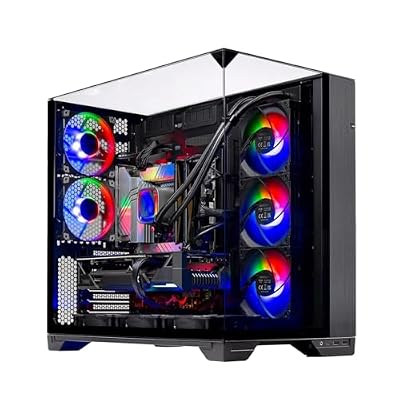
Skytech Gaming O11 Vision Gaming PC, Ryzen 7 9700X, RTX 5070 | 16GB DDR5 RAM 6000, 1TB NVMe M.2 SSD, Windows 11, 850W GOLD ATX 3 PSU, 360 ARGB AIO , Wi-Fi 5, Desktop
Included for 'Best 1440p Prebuilt Gaming PCs' as a representative consumer electronics in this roundup; selection reflects the product set returned for this topic.
View on AmazonThe Skytech O11 Vision pairs an RTX 5070 with a Ryzen 7 9700X in a glass-fronted showcase build, aimed at buyers who want their 1440p rig to look as good as it plays.
- AMD Ryzen 7 9700X processor
- NVIDIA GeForce RTX 5070
- Showcase-style O11 Vision chassis
- Windows 11 preinstalled
Pros:
Cons: The listing gives limited memory and storage detail, so confirm RAM and SSD size before you buy.
Skip it if you prefer a plain, quiet case or need confirmed 32GB of RAM out of the box.
ZOTAC MEK RTX 5070 (Ryzen 7 9700X) – Best Compact-Brand Alternative
ZOTAC’s MEK desktop puts an RTX 5070 beside a Ryzen 7 9700X with 32GB of DDR5, a close match for the KOTIN pick at a slightly different price.
- AMD Ryzen 7 9700X, up to 5.5GHz
- NVIDIA GeForce RTX 5070 12GB GDDR7
- 32GB DDR5 and 1TB NVMe SSD
- 750W 80+ Gold power supply
- WiFi 6E, Bluetooth 5.3, Windows 11 Pro
Pros:
Cons: 750W power supply leaves less upgrade room than the 850W units in some rivals; 1TB of storage fills quickly.
Skip it if you plan to add a much larger graphics card later.
iBUYPOWER Element RTX 5070 (Ryzen 9 7900X) – Best for Multitasking

iBUYPOWER Element Gaming PC Desktop Computer AMD Ryzen 9 7900X CPU, NVIDIA GeForce RTX 5070 12GB GPU, 32GB DDR5 RAM, 1TB NVMe SSD, Windows 11 Home, Gamer Keyboard and Mouse - EWA9N5702
Included for 'Best 1440p Prebuilt Gaming PCs' as a representative consumer electronics in this roundup; selection reflects the product set returned for this topic.
View on AmazonThe iBUYPOWER Element suits players who also stream, edit or run heavy background apps, because its 12-core Ryzen 9 7900X has more cores than the other RTX 5070 systems here.
- AMD Ryzen 9 7900X processor
- NVIDIA GeForce RTX 5070 12GB
- 32GB DDR5 RAM and 1TB NVMe SSD
- Includes gamer keyboard and mouse
- Windows 11 Home
Pros:
Cons: Higher price for the same RTX 5070 graphics card; the 7900X is not a gaming-first chip like the X3D models.
Skip it if you only game and want the best frame rates per dollar.
KOTIN Ryzen 7 9700X + RX 9070 XT 16GB – Best AMD Pick

KOTIN Gaming PC, Ryzen 7 9700X, RX 9070 XT 16GB, 32GB DDR5, 1TB SSD | Prebuilt Gaming Computer, 11.3In Smart Display, 360mm Liquid Cooler, WiFi 7, 850W Gold PSU, Windows 11, ARGB, 1440p 4K
Included for 'Best 1440p Prebuilt Gaming PCs' as a representative consumer electronics in this roundup; selection reflects the product set returned for this topic.
View on AmazonThis KOTIN build swaps NVIDIA for the AMD RX 9070 XT, a strong 1440p card with 16GB of graphics memory, and keeps the same Ryzen 7 9700X processor as the top pick.
- AMD Ryzen 7 9700X processor
- AMD Radeon RX 9070 XT 16GB
- 32GB DDR5 and 1TB SSD
- 360mm liquid cooler, 850W Gold power supply
- WiFi 7, 11.3-inch smart display, Windows 11
Pros:
Cons: Ray tracing and upscaling are weaker than on the NVIDIA RTX 5070; the smart display is a nice extra but not a performance feature.
Skip it if you rely on DLSS or NVIDIA-only streaming features.
Also Consider
- MSI Codex Z2 RTX 5060 Ti · Ryzen 7 8700F · 16GB DDR5 · 1TB SSD · brand support at a lower tier

msi Codex Z2 Gaming Desktop, AMD R7-8700F, RTX 5060Ti, 16GB DDR5, 1TB SSD | NVIDIA GeForce RTX 5060 Ti, USB Type-C, VR-Ready, Windows 11 Home. Model A8NVM-671US
Included for 'Best 1440p Prebuilt Gaming PCs' as a representative consumer electronics in this roundup; selection reflects the product set returned for this topic.
View on Amazon - Skytech Gaming Archangel 5 RTX 5060 Ti 8GB · Ryzen 7 9700X · 24GB DDR5 · 1TB SSD · 360mm AIO
- Skytech Gaming Azure 3 RTX 5070 · Ryzen 7 7700X · 24GB RAM · 1TB SSD · 850W Gold power supply
ZOTAC MEK Ryzen 7 9700X with RTX 5060 Ti 16GB
This ZOTAC MEK desktop pairs a Ryzen 7 9700X with an RTX 5060 Ti with 16GB of GDDR7 memory, 32GB of DDR5 RAM, a 1TB NVMe SSD, an 850W 80+ Gold power supply and WiFi 6E. The 16GB graphics memory is the headline: some 5060 Ti cards ship with only 8GB, and 1440p texture settings in recent games can use more than that.
It suits buyers who want a mid-range 1440p machine that will not run out of video memory in a couple of years. The 850W power supply is generous for this tier, which leaves room for a future graphics upgrade. A 1TB drive fills up quickly with modern games, so plan on adding a second drive.
Strengths: 16GB graphics memory, 32GB RAM, and an oversized power supply. Drawbacks: the Ryzen 7 9700X is a solid but not a gaming-specialist chip, and storage is modest. Compared with the CyberPowerPC 5060 Ti above, which is a different memory configuration, check the memory size on any 5060 Ti you consider.
ZOTAC MEK Ryzen 7 9700X with RTX 5070 Ti 16GB

ZOTAC MEK Gaming PC Desktop, Ryzen 7 9700X, NVIDIA GeForce RTX 5070 Ti 16GB | 32GB DDR5, 1TB NVMe SSD, 750W 80+ Gold PSU, WiFi 6E, Bluetooth 5.3, Windows 11 Pro, GDDR7, up to 5.5GHz
Included for 'Best 1440p Prebuilt Gaming PCs' as a representative consumer electronics in this roundup; selection reflects the product set returned for this topic.
View on AmazonStep up one tier and the ZOTAC MEK with an RTX 5070 Ti gives you 16GB of GDDR7 memory, the same Ryzen 7 9700X, 32GB DDR5, a 1TB NVMe SSD, a 750W 80+ Gold power supply, WiFi 6E, Bluetooth 5.3 and Windows 11 Pro. It is the strongest 1440p option in this guide and has headroom for entry-level 4K.
It suits players with a 165Hz or faster 1440p monitor who want to turn settings up and keep high frame rates in demanding games. It also suits creators who need more graphics power for editing and rendering. The Windows 11 Pro license helps people who use remote desktop and business features.
Drawbacks: it is the most expensive pick here, and a 750W supply is adequate rather than generous. Storage is 1TB. If your monitor is only 60 or 100Hz, the 5070 builds above give you nearly the same experience for less.
Skytech Shadow 5 Ryzen 7 with RTX 5070

Skytech Gaming PC Shadow 5, Ryzen 7, RTX 5070, 32GB RAM, 1TB SSD | Windows 11, AMD 7700, NVIDIA 5070, NVMe SSD, DDR5 6000, 750W GOLD PSU, 360 ARGB AIO , Wi-Fi 5, Desktop
Included for 'Best 1440p Prebuilt Gaming PCs' as a representative consumer electronics in this roundup; selection reflects the product set returned for this topic.
View on AmazonThe Skytech Shadow 5 combines a Ryzen 7 7700 with an RTX 5070, 32GB of DDR5 6000 RAM, a 1TB NVMe SSD, a 750W Gold power supply, a 360mm ARGB liquid cooler and Wi-Fi 5. It is a straightforward 1440p system built around current mid-high parts.
It suits buyers who want RTX 5070 performance with fast memory and a large liquid cooler in an ordinary mid-tower. The 360mm cooler is a strong point for keeping the processor cool under long gaming sessions. Wi-Fi 5 is older, so use Ethernet for competitive games or add a better adapter.
Drawbacks: Wi-Fi 5 and a 750W supply are the weak spots, and the brand’s support is less known than a large manufacturer’s. Compared with the KOTIN RTX 5070 above, it is simpler: no smart display, a different processor and a similar graphics card.
Skytech Blaze 5 Ryzen 7 9800X3D with RTX 5070

Skytech Gaming PC Desktop, Ryzen 7 9800X3D, RTX 5070, 32GB RAM, 2TB SSD | Windows 11, Gen4 NVMe SSD, DDR5 6000, 850W GOLD ATX 3 PSU, 360 ARGB AIO , Wi-Fi 5, Blaze 5 Series
Included for 'Best 1440p Prebuilt Gaming PCs' as a representative consumer electronics in this roundup; selection reflects the product set returned for this topic.
View on AmazonThe Skytech Blaze 5 pairs a Ryzen 7 9800X3D with an RTX 5070, 32GB DDR5 6000, a 2TB Gen4 NVMe SSD, an 850W Gold ATX 3 power supply, a 360mm ARGB liquid cooler and Wi-Fi 5. The 9800X3D is a gaming-focused processor with large cache, which helps minimum frame rates in competitive and simulation games.
It is a great fit for high-refresh 1440p play, where the processor matters more because frame rates are high. The 2TB drive and 850W supply are both generous for this tier. Compared with the STORMCRAFT Falcon above, it uses a newer X3D chip and a bigger drive.
Drawbacks: higher cost than the 7700-based systems, and Wi-Fi 5. If you play slower, graphics-heavy games, the extra processor spending is better put toward a stronger graphics card.
iBUYPOWER Y40 Ryzen 7 9800X3D with RTX 5070
The iBUYPOWER Y40 has a Ryzen 7 9800X3D, an RTX 5070 with 12GB, 32GB DDR5 at 5200MHz, a 1TB NVMe SSD, Windows 11 Home, and a keyboard and mouse in the box. The included peripherals make it a complete first setup.
It suits newcomers who need everything except a monitor. iBUYPOWER is an established prebuilt brand, which helps with warranty and support. Memory is rated at 5200MHz, which is slower than the 6000 kits in the Skytech systems, but the real-world difference is small.
Drawbacks: the supplied keyboard and mouse are basic, the power supply size is not listed here, and storage is 1TB. Compared with the Skytech Blaze 5, you give up the larger drive and faster memory but gain the bundled accessories and a bigger-name brand.
Lenovo Legion Tower 5 (2026) with RTX 5070

Lenovo Legion Tower 5-2026 - Gaming Desktop - NVIDIA GeForce RTX 5070 - Ryzen 7 7800X3D - 32GB Memory - 1TB Storage - Windows 11 Home - Eclipse Black - Free 3 Months PC Game Pass
Included for 'Best 1440p Prebuilt Gaming PCs' as a representative consumer electronics in this roundup; selection reflects the product set returned for this topic.
View on AmazonThe Lenovo Legion Tower 5 for 2026 uses a Ryzen 7 7800X3D, an RTX 5070, 32GB memory, 1TB storage, Windows 11 Home and a Game Pass trial in its listing. Lenovo is one of the largest PC makers, so the warranty, support network and parts availability are stronger than for smaller assemblers.
It suits buyers who value a clean design, a known brand and a gaming-focused processor over a long spec list. Legion towers are typically built around standard-size parts, which helps future upgrades, but check the listing for the power supply size.
Drawbacks: the power supply and cooler details are not listed here, and the case is less showy than a glass-panel build. Compared with the MSI Codex Z2 above, it has a faster gaming processor but half the storage.
How to Read a Prebuilt Gaming PC Listing
A prebuilt listing is a spec sheet written by the seller, and the title is often packed with keywords. Reading it line by line, and checking each claim against the bullet points and the product description, is the cheapest protection you have. The table below shows what to look for in each part of a typical listing.
| Listing element | What to confirm | Warning sign |
|---|---|---|
| Graphics card | Exact model and memory size, for example whether a card comes in 8 GB and 16 GB versions | Only a family name such as “RTX gaming graphics” with no model |
| Processor | Full model name, and whether it has an integrated graphics suffix or not | A vague description like “latest-gen 8 core” |
| Memory | Capacity, type (DDR4 or DDR5) and number of sticks | Capacity listed with no stick count, speed or type |
| Storage | NVMe versus SATA, and capacity | “SSD” alone with no interface |
| Power supply | Wattage, efficiency rating and a named brand or series | Wattage missing, or only “gaming PSU” |
| Cooling | Air or liquid, and radiator size if liquid | “High performance cooling” without any detail |
| Motherboard | Chipset or model name | Not mentioned at all |
| Operating system | Version and whether it is activated or “ready” to activate | Wording such as “Windows ready” that leaves the license unclear |
Pay attention to resolution claims in titles too. Phrases that stack several resolutions together usually describe what the video outputs can display, not how fast the graphics card will run games at that resolution. For 1440p performance, the graphics card model and its memory are what count.
Brand and Seller Support: Who Actually Stands Behind the Machine
Two parties matter in every prebuilt purchase: the company that assembled the computer and the store that sold it. On a marketplace they are sometimes the same, and sometimes they are not. Before buying, find out which party handles repairs and which one handles returns.
- Established system builders and brand-name desktops usually publish a warranty page, support phone numbers or chat, and driver downloads for the exact model. Names such as MSI, CyberPowerPC, iBUYPOWER and ZOTAC fall in this group, so look for the model-specific support page on the maker’s website.
- Smaller or newer builders may rely on marketplace messaging and a seller-handled warranty. That can be fine, but the terms are only as good as the written policy, so read it before ordering.
- Third-party resellers can add a layer between you and the builder. Check whether the warranty is honored through the reseller or transferred to the manufacturer.
Buyer reviews are useful here, but read them for patterns rather than single stories. Repeated comments about slow support replies, boxes arriving damaged, or missing drivers say more than one glowing or angry post. A seller with a clear contact route and a defined return window is easier to deal with if something goes wrong in the first weeks.
Warranty Terms Worth Comparing
Warranty length is the number people look at, but the details decide what it is worth. Compare these points across two or three candidates before choosing.
| Question | Why it matters |
|---|---|
| How long does coverage last for parts and for labor? | Some policies cover parts for longer than labor, or the reverse |
| Who pays shipping if the machine must be sent in? | Heavy desktops are costly to ship, and some policies leave that to the buyer |
| Is the graphics card covered by the system warranty or by the card maker? | Determines who you contact for the most expensive part |
| Does opening the case or upgrading parts affect coverage? | Affects whether you can add storage or memory later without worry |
| Is there an advance replacement or on-site option? | Reduces downtime if a core part fails |
| Are there registration steps or deadlines? | Missing a registration window can shorten coverage |
If the listing says nothing about warranty, look at the seller’s policy page or message them before purchase. A clear answer in writing is worth having on file.
Red Flags in Power Supply, Cooling and Memory
These are the spots where a prebuilt can look strong on paper and still disappoint, based on common advice from system-building guides. None of them is proof of a bad machine, but each is a reason to ask a question or choose a different listing.
| Area | Red flag | What a good listing shows |
|---|---|---|
| Power supply | No wattage or brand given, or wattage that looks low for the graphics card | A stated wattage with an efficiency rating, such as 80+ Gold |
| Cooling | A tiny single-fan cooler on an eight-core processor | A named tower cooler or a stated radiator size |
| Memory | One stick of RAM, which runs in single-channel | Two matched sticks, such as 2 x 16 GB |
| Memory speed | Memory running below its rated speed because the profile was never enabled | A listed speed and clear mention of the rated profile |
| Storage | A SATA drive described as if it were NVMe | NVMe named explicitly with a PCIe generation |
| Airflow | Glass panel with few fans and no mention of airflow | Front intake, rear exhaust and a fan count in the description |
| Motherboard | Unnamed board with no upgrade slots listed | Chipset named and extra M.2 or memory slots mentioned |
The power supply deserves extra attention because a weak one limits future graphics upgrades. A unit with a named brand, an efficiency rating and headroom above what the graphics card requires leaves you room to grow. When a seller declines to name the unit, treat that as a reason to keep looking.
Return Windows and Upgrade Risk
Returning a large desktop is a hassle, so understand the process before you click buy. Look for the return period, whether the original box must be kept, and whether a restocking fee applies. Keep the packaging for at least the first few weeks, since many return policies expect the system to be sent back in its original foam.
Upgrade risk is the other half. Some prebuilt makers use standard parts that you can swap freely, while others use custom cases, small power supplies or proprietary connectors that limit later changes. Features worth checking before you buy:
- A standard-size power supply, which makes a future graphics card swap simple.
- Free memory slots or a second M.2 slot on the motherboard.
- A case with enough clearance for a larger graphics card.
- A cooler that can be replaced with a common model if it fails.
Compact or heavily styled cases look appealing but sometimes trade away that flexibility. If you expect to upgrade within a few years, favor a mainstream layout.
Checks to Make When the Box Arrives
Once the machine is on your desk, a short routine can catch problems while the return window is still open.
- Inspect the box and the case for shipping damage, and photograph anything unusual before unpacking further.
- Confirm that the graphics card, memory and processor shown in the operating system match the listing.
- Check that the memory shows the expected capacity, and that it is running at its rated speed.
- Plug the monitor into the graphics card output, not the motherboard, so the display actually uses the GPU.
- Install the latest graphics driver and run a demanding game for a while, watching for crashes, loud fan noise or thermal throttling.
- Register the warranty and save the receipt and serial numbers.
If something does not match the listing, contact the seller right away with specifics and screenshots. Acting inside the return window keeps your options open and usually makes the conversation faster.
Questions to Ask the Seller Before Ordering
If a listing leaves gaps, a short message to the seller can fill them. Sellers who answer clearly and quickly are often easier to deal with after the sale too. Useful questions include:
- What is the exact power supply make, model and wattage?
- Is the memory installed as two sticks, and does it run at its rated speed out of the box?
- Which company handles warranty repairs, and how do I start a claim?
- Is Windows activated, and is a recovery option included?
- Are there open expansion slots for another drive or more memory?
- Does the system ship with drivers installed, or do I download them from the manufacturer?
- What is the return window, and who pays for return shipping?
Keep the answers. If the machine arrives different from what you were told, a written reply from the seller is much stronger than a remembered conversation. A listing that cannot answer basic questions about its own parts is a signal to move on to another one on your shortlist.
Finally, weigh the extras honestly. Lighting, small display screens and bundled accessories add appeal but not frame rate. If two systems share the same graphics card, memory and processor, the one with the clearer parts list and warranty terms is usually the safer purchase, even if the other looks more dramatic on the desk.
Boutique Builder, Big Brand or Retailer Bundle: Choosing a Seller Type
Prebuilt desktops reach buyers through three broad routes, and each route changes what you can expect after the order ships. Large brands design their own cases, validate their own parts lists and usually publish support documentation for each model. Boutique builders assemble systems from off-the-shelf parts, often with more attention to cable routing and tuning, and sell directly or through marketplaces. Retailer bundles are systems put together by a store or a third-party seller, frequently with a generic name and a parts list that changes from batch to batch. None of these routes is automatically better, but the paperwork behind each one differs, and that paperwork is what you rely on when a fan dies or a drive fails.
| Seller type | Typical strength | Typical weakness | Best fit |
|---|---|---|---|
| Large brand | Published support pages, drivers per model, established repair process | Proprietary parts in some chassis, less freedom to swap components | Buyers who value a clear support path |
| Boutique builder | Standard parts, tidy assembly, flexible configurations | Support depends on a smaller team and the quality of its written policy | Buyers who may upgrade later |
| Retailer bundle | Fast availability and simple returns through the store | Parts can vary between batches, warranty may route through the seller | Buyers who check the listing closely |
The practical lesson is to match the seller type to your tolerance for risk. If you want a single phone number to call, lean toward a large brand. If you like the idea of swapping a graphics card in three years, a builder that uses standard parts is a safer starting point. If a bundle looks attractive, treat the listing as a contract and compare every line of the parts list against the product page before you order. The systems named in this guide fall into different groups, so check the individual listing to see who actually assembles and services the machine you are considering.
Weighing Price Against Parts Without Chasing a Number
Because prices move constantly, a more durable way to judge value is to ask what share of the system is spent where. In a sensible gaming prebuilt, the graphics card takes the largest portion of the budget, followed by the processor, then memory, storage, power supply and case. When a machine looks expensive, find out which category absorbs the extra money. If the answer is lighting, a glass showcase case, a small display panel or a bundled keyboard and mouse, you are paying for appearance and accessories rather than frame rate. If the answer is a larger power supply, a better cooler or a second storage drive, the premium usually buys durability or room to grow.
The reverse check matters as well. A system that looks cheap compared with similar graphics cards often saves money in places that are hard to see from the product photo: a basic power supply, a single stick of memory, a small cooler or a motherboard with few expansion slots. Those savings are not always a problem, but they are the reason to read the parts list slowly. When two listings carry the same graphics card, compare memory configuration, power supply and cooling first, because those details separate a machine that stays quiet and stable from one that feels rushed.
First-Boot Setup: Drivers, Preinstalled Software and BIOS Settings
The first evening with a new desktop is worth treating as a short setup project. Start by letting the operating system finish its initial updates, then install the current graphics driver directly from the graphics vendor instead of relying on whatever version shipped on the drive. Builders sometimes ship machines weeks after assembly, so the installed driver may be several releases old.
Next, look through the installed programs. Some prebuilts arrive with trial antivirus suites, launcher utilities, lighting controllers and promotional shortcuts. Trial security software in particular can slow down game loading and nag you with renewal prompts, and most of it can be removed from the standard uninstall screen. Keep the utilities that control fans, lighting or a front-panel display if you actually use them, and remove the rest. Windows already includes real-time protection, so a clean install with the built-in tools is a reasonable baseline.
Then spend a few minutes in the firmware settings. Many systems with DDR5 memory run at a conservative default speed until a memory profile such as XMP or EXPO is switched on, and some builders enable it while others do not. Check the memory speed reported by the operating system and compare it with the speed on the listing. It is also worth confirming that Resizable BAR, sometimes called Smart Access Memory on AMD platforms, is enabled when the platform supports it, because it can help certain games use graphics memory more efficiently. Change one setting at a time, and write down the original values so you can revert if the machine becomes unstable.
Finally, create a recovery option while the system is fresh. Whether that is a manufacturer recovery tool or a plain Windows installation drive, having a clean way to reinstall saves a long evening later. Store the product keys, serial numbers and order confirmation together in one folder, because warranty teams ask for them first.
Noise, Heat and Case Airflow in Daily Use
Specifications describe capability, but daily comfort depends on how the case moves air. A tower with a mesh front and a clear path from intake to exhaust can run a powerful graphics card with modest fan speeds. A sealed glass front with few fans traps heat, and the components then compensate by spinning their fans harder. That is why airflow wording in a listing deserves attention: the number of fans, where they sit and whether the front panel is perforated tell you more than a promise of strong cooling.
Liquid coolers and large air coolers both work well on eight-core processors. The point to confirm is that the cooler is clearly named or sized, and that the radiator can be mounted without blocking memory slots or the top of the case. Pumps and fans also differ in tone: some builds produce a steady hum, while others sweep between high and low speeds as load changes. Buyer comments about noise are often the best clue, especially repeated remarks about coil whine, rattling panels or fans that ramp up during simple tasks. Placement plays a part too. A desktop wedged into a cabinet or pressed against a wall will run hotter and louder than the same machine in open space.
If you game for long sessions, give the machine room, keep dust filters clean and consider a fan curve adjustment in the firmware once the warranty questions are settled. Small changes to fan behavior often cut noise without any visible loss in performance.
Ports, Wireless and Display Outputs Worth Checking
Connectivity is easy to overlook until the day you plug in a second monitor or a headset. A modern gaming desktop should list several USB ports on the front panel, a mix of faster USB-C or USB 3 connections on the rear, and clear wording about Wi-Fi and Bluetooth. Wired Ethernet remains the most stable choice for competitive play, so confirm the port is present even if the listing makes a feature of wireless.
Display outputs deserve their own look. The graphics card normally offers one HDMI output and several DisplayPort outputs, and your monitor should connect to one of those instead of the motherboard video ports. If you plan to run a high-refresh 1440p display, make sure the cable and port support the refresh rate you want, since a monitor can sit at 60 Hz simply because the wrong cable or setting is in use. Anyone planning a multi-monitor desk should count the available outputs against the number of screens before buying.
Platform Age and How Long a Prebuilt Stays Relevant
The processor socket and memory type decide how much upgrading is possible later. Newer platforms that use DDR5 memory generally have a longer runway for processor and memory upgrades, while older platforms may be limited to the last processors released for that socket. That does not make an older platform a poor buy, particularly when the price gap is meaningful, but it should shape expectations. Some listings in this guide use more recent processor generations than others, so read the processor line carefully and decide whether a future swap matters to you.
Streaming, Creative Work and VR on a Gaming Prebuilt
Many buyers ask whether a gaming desktop can also handle streaming, editing or virtual reality. In general, the answer depends on core count, memory and cooling more than on the graphics card alone. Streaming while gaming adds encoding work and background apps, so a processor with more cores and 32 GB of memory gives the system more breathing room. Video editing benefits from fast storage and plenty of memory, and a second drive makes it easier to keep projects separate from games. Virtual reality demands steady frame delivery, so cooling and a capable graphics card matter, along with enough display outputs and USB ports for the headset. The processors paired with the picks in this guide vary in core count, so match the choice to the extra tasks you expect.
Which Pick Fits Which Buyer
The table below groups the systems already covered in this guide by the kind of buyer they tend to suit, using only the details stated in the listings and descriptions above. Confirm every specification on the current product page before ordering.
| Buyer type | Pick to look at | Reason, based on the description above |
|---|---|---|
| Wants one balanced machine | KOTIN RTX 5070 with Ryzen 7 9700X | Balanced processor and graphics, 32 GB of DDR5 and a 360 mm liquid cooler |
| Plays competitive titles | STORMCRAFT Falcon with Ryzen 7 7800X3D | Gaming-focused processor with large cache |
| Values brand support | MSI Codex Z2 RTX 5070 | Guide describes it as backed by the maker’s support network |
| Wants more graphics memory for less | CyberPowerPC Gamer Supreme RTX 5060 Ti 16GB | 16 GB of graphics memory and 2 TB of storage |
| Streams or multitasks | iBUYPOWER Element with Ryzen 9 7900X | Twelve cores and bundled accessories |
| Prefers AMD graphics | KOTIN with RX 9070 XT | 16 GB of graphics memory and an 850 W power supply listed |
| Cares about looks | Skytech O11 Vision | Showcase chassis; confirm memory and storage first |
No single row is the right answer for everyone. If your decision comes down to two systems, give extra weight to the one with the clearer support terms and more complete parts list, because that clarity pays off if anything goes wrong in the first year.
Common Mistakes When Buying a Prebuilt for 1440p
The first mistake is paying for appearance over substance. Lighting and a glass panel look attractive on a product page, but they do nothing for frame rates, and a stylish case can carry hidden limits on airflow or upgrades. The second is accepting vague parts descriptions. If a listing leaves out the power supply or memory configuration, assume the missing piece is not a selling point and ask before you buy.
A third error is ignoring the monitor. A strong graphics card paired with an old 60 Hz display wastes much of what you paid for, so budget for a suitable 1440p screen at the same time. Fourth, many buyers skip the first-day checks and discover a problem after the return window has closed. Finally, some buyers fixate on one headline number, such as the graphics card name, and overlook that memory, cooling and power quality shape how the machine behaves on an ordinary evening. A balanced system with documented parts and a clear warranty will usually serve you better than a lopsided one.
1440p Prebuilt Spec Comparison
| System | GPU | CPU | RAM and storage | Price tier |
|---|---|---|---|---|
| ZOTAC MEK 5060 Ti | RTX 5060 Ti 16GB | Ryzen 7 9700X | 32GB, 1TB | Mid-range |
| ZOTAC MEK 5070 Ti | RTX 5070 Ti 16GB | Ryzen 7 9700X | 32GB, 1TB | Premium |
| Skytech Shadow 5 | RTX 5070 | Ryzen 7 7700 | 32GB, 1TB | Mid-range to premium |
| Skytech Blaze 5 | RTX 5070 | Ryzen 7 9800X3D | 32GB, 2TB | Premium |
| iBUYPOWER Y40 | RTX 5070 12GB | Ryzen 7 9800X3D | 32GB, 1TB | Premium |
| Lenovo Legion Tower 5 | RTX 5070 | Ryzen 7 7800X3D | 32GB, 1TB | Mid-range to premium |
Which GPU Tier Fits Your Monitor
| Monitor | GPU tier | Expectation |
|---|---|---|
| 1440p 60 to 100Hz | RTX 5060 Ti (16GB preferred) | High settings, smooth play |
| 1440p 144 to 165Hz | RTX 5070 | High frame rates in most games |
| 1440p 240Hz or entry 4K | RTX 5070 Ti or better | Headroom for demanding titles |
Prebuilt Checklist Most Buyers Skip
- Graphics memory size. Look for 12GB or 16GB at 1440p. An 8GB card can run short in recent games at high texture settings.
- Power supply. Aim for at least 750W 80+ Gold for a 5070 class system. Avoid listings that do not name the power supply.
- RAM speed and channels. Two modules of DDR5 give the best speed. Single-stick systems lose performance.
- Cooling. A 240mm or 360mm liquid cooler, or a large air cooler, keeps the processor from throttling.
- Storage. 1TB is the minimum; 2TB is better. Check for a free M.2 slot for later expansion.
- Warranty and support. Look for at least one year of parts coverage and a clear return policy.
- Wi-Fi version. Wi-Fi 6 or newer is preferred; use Ethernet for competitive play.
- Operating system. Confirm Windows is included and activated.
Mistakes to Avoid When Buying a Prebuilt
- Choosing by processor name and ignoring the graphics card, which matters far more at 1440p.
- Buying an 8GB graphics card for long-term 1440p use.
- Trusting a spec list that leaves out the power supply or motherboard.
- Forgetting the monitor. A 1440p high-refresh display is part of the cost.
- Skipping an Ethernet cable and relying on weak Wi-Fi.
Who Should Skip a Prebuilt
If you enjoy building PCs, or want to choose each part, assembling your own can offer better parts at the same cost. A prebuilt is the right choice if you want a warranty and a machine that works on day one.
More 1440p Prebuilt PC Questions
Is an 8GB graphics card enough for 1440p?
It works for many games at medium to high settings, but 12GB or 16GB is safer for the next few years. Check the memory size on the exact listing, since some cards come in both sizes.
Do I need an X3D processor for 1440p?
No, but it helps at high refresh rates in competitive and simulation games. At 1440p, the graphics card still matters most.
Is DLSS 4 important for 1440p?
It can raise frame rates and reduce memory pressure in supported games. It is a helpful extra, not a replacement for a good graphics card.
How much power supply do I need?
For an RTX 5070 class system, 750W 80+ Gold is a good minimum. Go higher if you plan a future graphics upgrade.
Can I upgrade a prebuilt later?
Often yes, if it uses standard parts. Check for free memory slots, a free M.2 slot and room for a larger graphics card.
Should I buy a prebuilt or build my own?
A prebuilt offers warranty and convenience, while building gives parts control. Compare the full parts list before you decide.
Frequently Asked Questions
What GPU do I need for 1440p 144Hz?
For consistently high frame rates at 1440p on a 144Hz display, an RTX 5070 is the sweet spot. It has the raw power and VRAM to push demanding AAA games above 100 FPS at high settings and to easily max out esports titles. A 5060 Ti can hit 144Hz in lighter or competitive games but may require some settings tuning in the most demanding releases.
Is a 5060 Ti enough for 1440p?
Yes, with one caveat. The RTX 5060 Ti is a capable 1440p card, delivering smooth high-settings gameplay in the 60-100 FPS range in most modern titles, but choose a 16GB model if you can because 8GB versions may need lower texture settings in the newest games. It’s the ideal choice for players who want an excellent 1440p experience at a more accessible price, especially when paired with a strong CPU like the Ryzen 7 9700X.
How much RAM do I need for 1440p gaming?
16GB is the practical minimum and will run essentially every game today. However, 32GB is the smart choice in 2026, particularly if you multitask, stream, or keep background apps open. The extra headroom future-proofs your system and prevents stutters in memory-hungry titles, which is why most of our picks ship with 32GB.
1440p vs 4K: which should I pick?
For most gamers, 1440p is the better pick. It delivers a big jump in sharpness over 1080p while allowing much higher frame rates than 4K on the same hardware, and 1440p monitors are far more affordable. Choose 4K only if you prioritize maximum visual fidelity over frame rate and are willing to invest in a top-tier GPU and premium display.
What is the best prebuilt gaming PC for 1440p?
The best prebuilt gaming PC for 1440p is an RTX 5070 or RX 9070 XT system with 32GB of DDR5 and a 1TB NVMe SSD, such as the KOTIN RTX 5070 with a Ryzen 7 9700X.
What is the cheapest prebuilt PC that handles 1440p?
Choose a 16GB model when possible, since 8GB versions can need lower texture settings in the newest games.
Is AMD or NVIDIA better for a 1440p gaming PC?
Both work well. The NVIDIA RTX 5070 offers DLSS and stronger ray tracing, while the AMD RX 9070 XT provides 16GB of graphics memory, which helps in texture-heavy games.
Final Thoughts
1440p remains the smartest resolution for gamers in 2026, and every prebuilt on this list is ready to deliver a fantastic experience right out of the box. If you want 16GB of graphics memory on a tighter budget, the ZOTAC MEK RTX 5060 Ti build is the one to look at, while the KOTIN and STORMCRAFT RTX 5070 systems are the go-to choices for high-refresh, no-compromise 1440p gaming. Match your pick to a quality high-refresh monitor, and you’ll be enjoying crisp, buttery-smooth gameplay for years to come.