
Capturing your gameplay and voice cleanly is the foundation of any content-creation setup, and the good news is you can start without spending a cent on software. Free multitrack recording and mixing tools let you edit commentary, layer audio, and polish your clips, while the right microphone and interface elevate how you actually sound.
This roundup blends the best free-to-start recording software with the hardware that pairs beautifully with it. We looked at ease of use, audio quality, and how well each piece works together, so beginners and upgrading creators alike can build a capable recording rig on a sensible budget.



As an Amazon Associate we earn from qualifying purchases at no extra cost to you.
![MixPad Free Multitrack Recording Studio and Music Mixing Software [Download]](https://m.media-amazon.com/images/I/71ltIxIuz1L._SL160_.jpg)
![MixPad Multitrack Recording Software for Sound Mixing and Music Production Free [Mac Download]](https://m.media-amazon.com/images/I/51kaO82jYOL._SL160_.jpg)



![DeskFX Free Audio Effects & Audio Enhancer Software [PC Download]](https://m.media-amazon.com/images/I/41fXbDohyuS._SL160_.jpg)
![WavePad Audio Editing Software - Professional Audio and Music Editor for Anyone [Download]](https://m.media-amazon.com/images/I/B1fcLEGCs6S._SL160_.png)
🎮 Get More From Your Setup — Free
Prime Gaming gives you free PC games every month, in-game loot, and a free Twitch channel sub — plus fast free shipping on all the gear above. New members get a 30-day free trial.
Watch: Best Recording Software Free For Gaming — Video Review
How to Choose Your Recording Setup
- Free software first: Start with a capable free multitrack editor so you can learn mixing before investing in paid tools.
- Multitrack support: Recording voice and game audio on separate tracks makes editing and balancing far easier.
- Microphone quality: A good USB or XLR mic does more for your sound than any software plugin can.
- Audio interface: If you go XLR, a simple interface adds clean gain and low-latency monitoring.
- Platform compatibility: Confirm the software supports your OS, whether you’re on Windows 11 or macOS.
The Best Recording Tools and Gear Reviewed
MixPad Free Multitrack Studio (Windows)
MixPad’s free tier is a genuinely powerful multitrack recorder and mixer, ideal for editing commentary and layering effects. Its clean interface makes it approachable for first-time creators.
MixPad Multitrack (Mac)
The Mac version brings the same free multitrack workflow to Apple users, handling voice and game audio with ease. It’s a natural pick for creators who edit on macOS.
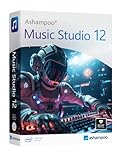
Music Studio 12
This editing and mixing suite lets you convert and blend audio files on Windows 11 and 10. It’s a versatile option when you want more than basic recording without a subscription.
Logitech Blue Yeti
The go-to USB condenser for creators, the Yeti offers Blue VO!CE effects, four pickup patterns, and true plug-and-play simplicity. It’s the fastest way to get broadcast-quality voice into your software.
M-AUDIO M-Track Solo
For anyone stepping up to XLR, this compact USB interface delivers clean preamp gain and low-latency monitoring. Paired with a mic like the FIFINE AmpliTank K688CT, it’s a serious yet affordable upgrade.
Related Guides
- Black Friday PC Deal (2026)
- Best Capture Cards for Streaming in 2026 (PS5, Switch 2, Xbox)
- Best Gaming Names (2026)
- Intel Ultra 270k Plus (2026)
- Best Linux For Gaming (2026)
Frequently Asked Questions
Is free recording software good enough?
For most creators, yes. Free multitrack tools like MixPad handle voice editing, mixing, and layering well; you can upgrade to paid features only if you hit a real limitation.
Do I need an audio interface?
Only if you use an XLR microphone. USB mics like the Blue Yeti plug straight into your computer, while XLR mics need an interface such as the M-Track Solo.
Can I record game audio and voice separately?
Yes, with multitrack software you can capture them on separate tracks, which makes balancing volume and editing your commentary much simpler later.
USB or XLR mic for beginners?
Start with a USB mic for simplicity. Move to XLR and an interface once you want more control and room to expand your setup.
Final Thoughts
MixPad Free Multitrack Studio is our top software pick for its powerful, no-cost feature set on both Windows and Mac. Pair it with a Logitech Blue Yeti for effortless USB quality, or step up to the M-Track Solo interface when you’re ready for XLR audio.
Top picks from this guide
 HyperXHyperX Alloy Origins 60 - Mechanical Gaming Keyboard, Ultra Compact…
 RedragonRedragon M916AK Wireless 42G Ultra-Light Mouse 26K DPI Remapping Keys…
 FIFINEFIFINE AmpliTank K688CT Podcast Microphone Kit, USB/XLR Dynamic Mic |…RazerRazer Wolverine Ultimate Officially Licensed Xbox One Controller: 6 Remappable…








