🛒 Best Price Today on Amazon
Prime members get fast, free shipping on everything above, plus member-only deals. New members get a 30-day free trial — cancel anytime.
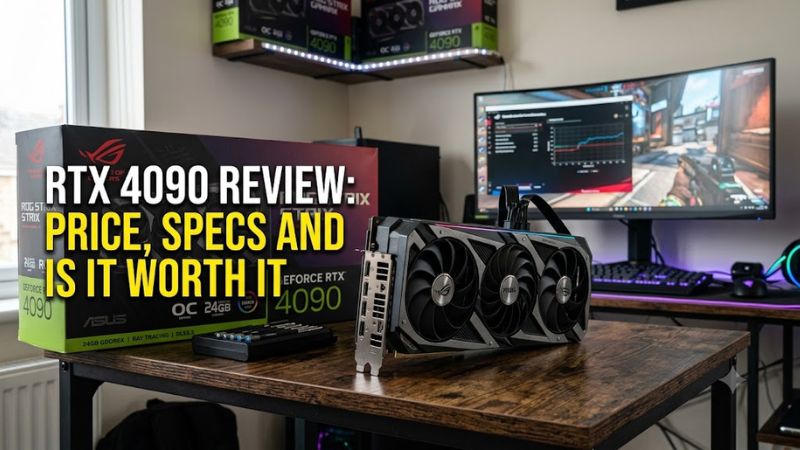
Rtx 4090 review: price, specs and is it worth it is a question of performance versus current cost. NVIDIA’s GeForce RTX 4090 remains a powerful 4K gaming and content-creation GPU, with 24GB of GDDR6X memory and demanding power requirements. However, its original price no longer reflects today’s market, and newer graphics cards change the value calculation for buyers.
What the RTX 4090 Offers for the Money
The RTX 4090 launched in October 2022 with a US starting price of $1,599. That figure is historical, not a reliable estimate of what a card costs in October 2026. Availability, condition, seller warranty and regional pricing all affect the actual purchase price, particularly when comparing used cards with remaining retail inventory.
Is the RTX 4090 Still Worth Buying in 2026?
The RTX 4090 can still make sense for enthusiasts who prioritize demanding 4K gaming, ray tracing, GPU rendering or workloads that benefit from 24GB of VRAM. Its value depends on the price of the specific card and the alternatives available. A used unit with a return window and verifiable condition is a different proposition from an expensive listing with no meaningful buyer protection.
For gaming alone, compare its asking price with the newer GeForce RTX 5090 and RTX 5080 before deciding. The RTX 5090 is the newer flagship generation, while the RTX 5080 may provide a more sensible balance of cost and gaming performance for many buyers. Neither alternative should be assumed faster or cheaper in every local listing without checking comparable benchmarks and current prices.
How Much Does the RTX 4090 Cost?
The launch MSRP was $1,599 in the United States, but that number does not establish a fair buying price in 2026. Current asking prices can vary substantially between used cards, remaining new stock and premium partner models. Before purchasing, compare several listings with similar condition, cooler design, warranty coverage and return terms rather than treating one seller’s price as the market average.
A sensible purchase limit should also account for alternatives. If a newer GPU costs less while meeting your target resolution and workload, the older flagship may not justify its premium. If you need its 24GB memory capacity for specific creative or compute tasks, paying more could be reasonable, but only after confirming that your software benefits from that capacity.
Who Benefits Most From the RTX 4090?
Enthusiasts targeting 4K with demanding graphics settings are the clearest gaming audience. The card’s large GPU resources and memory capacity also suit some rendering, video-production and local AI workflows. Its value is easier to justify when the computer serves several demanding purposes rather than gaming at a resolution where a less expensive GPU already delivers the desired experience.
Buyers focused on 1080p gaming or ordinary 1440p play should consider whether the extra GPU capacity will be used. At lower resolutions, CPU limitations can reduce the visible advantage of a flagship card. Budget-conscious builders should also include the cost of a suitable power supply, case clearance and any necessary cooling or support accessories when comparing complete system costs.
What Are the Main Drawbacks?
Power consumption is a major consideration: NVIDIA specifies 450W total graphics power for the RTX 4090. The card is also physically large, with dimensions that differ between Founders Edition and partner models. A case that accommodates one variant may not fit another, so check the exact product’s measurements and power-connector arrangement before ordering.
The other drawback is purchase risk. Used hardware may have limited warranty coverage, unknown operating history or previous repairs. The original launch price does not make a current listing good value by itself. Buyers should inspect the connector, confirm the card’s identity, check the seller’s return policy and compare the final cost with current-generation alternatives before committing.
RTX 4090 Specs and Top Alternatives
The RTX 4090 combines substantial rendering capability with high power demand and a large physical footprint. Its 24GB memory pool is a meaningful advantage for certain workloads, but buyers should compare the complete specification and compatibility requirements with newer cards. The following comparison separates the RTX 4090 from alternatives without assuming unverified current street prices.
| Product | Best For | Key Spec | Compatibility | Watch Out For |
| NVIDIA GeForce RTX 4090 | Best Overall for 4K and memory-heavy workloads | 24GB GDDR6X; 450W TGP | PCIe slot; 850W recommended PSU | High used-market cost |
| NVIDIA GeForce RTX 5080 | Best Value candidate for high-end gaming | 16GB GDDR7 | PCIe slot; verify PSU and card dimensions | Less VRAM than the 4090 |
| NVIDIA GeForce RTX 5090 | Best For maximum flagship performance | 32GB GDDR7 | PCIe slot; verify substantial power and clearance requirements | Higher system cost |
| AMD Radeon RX 9070 XT | Best For buyers prioritizing gaming value | 16GB GDDR6 | PCIe slot; check model-specific PSU and clearance | Different ray-tracing and software trade-offs |
Specifications are manufacturer-listed reference figures; partner models can differ. Prices are intentionally omitted because live US retail and used-market prices have not been consistently verified.
RTX 4090: Best Overall for Demanding 4K
The RTX 4090 is the most appropriate choice in this comparison when a buyer specifically needs its combination of high-end rendering performance and 24GB of VRAM. Its 16,384 CUDA cores and 384-bit memory interface support demanding graphics workloads, while DLSS 3 and ray-tracing hardware can improve the experience in compatible games. The original launch price was $1,599, not a current-value guarantee.
Buyers should choose it when their workload benefits from its capabilities and the asking price is competitive with newer options. Its weakness is the cost of ownership, including power requirements and potential used-card risks. Anyone building a more affordable gaming system, or playing primarily at 1080p, should compare less expensive GPUs before allocating such a large share of the budget to graphics.
RTX 5080: Best Value Candidate for Many Gamers
The RTX 5080 offers a newer-generation alternative for players who want high-end gaming without automatically paying for the RTX 4090’s larger memory capacity. Its 16GB of GDDR7 is less than the older flagship’s 24GB of GDDR6X, so buyers working with memory-intensive applications should compare actual workload requirements rather than judging the cards by generation alone.
Its weakness is that 16GB may be less suitable for certain large creative projects or local AI workloads. The right choice depends on real game benchmarks at the intended resolution, including ray tracing where relevant, and the actual price difference. Verify the specific card’s power recommendation, dimensions and connector requirements before upgrading an existing PC.
RTX 5090: Best for Buyers Seeking a Newer Flagship
The RTX 5090 succeeds the RTX 4090 as NVIDIA’s newer flagship generation and provides 32GB of GDDR7 memory. That additional capacity can be attractive for demanding production and compute work, while gaming buyers can compare the cards using the same games, resolution and graphics settings. Its greater memory capacity alone does not establish how much faster it will be in a particular game.
The major disadvantage is the potential cost of the card and supporting hardware. A buyer should check the live price, PSU requirements, case clearance and independent benchmarks before choosing it over a discounted RTX 4090. For someone who only needs conventional gaming performance, spending extra on a flagship may deliver less practical benefit than investing in a balanced system.
Radeon RX 9070 XT: Best for Price-Conscious Gaming Builds
The Radeon RX 9070 XT is a relevant alternative for buyers who care more about gaming performance per dollar than NVIDIA-specific features. It has 16GB of GDDR6 memory, and its position in the current GPU market makes it worth comparing against expensive older flagship cards. The decision should be based on independent game results rather than the assumption that the more expensive product is always better.
Its trade-offs include differences in ray tracing, upscaling support and application compatibility. Users relying on CUDA-based software or particular NVIDIA workflows should confirm that their applications support the AMD option before switching. Gamers should compare native rendering and upscaling results separately, using matching quality settings and resolution to avoid misleading performance comparisons.
How to Decide Whether the RTX 4090 Fits Your PC
A worthwhile GPU purchase depends on actual performance needs, system compatibility and the total cost of ownership. In this RTX 4090 review, the central question is not whether the card remains powerful; it is whether its capabilities justify the current asking price for your particular build. Confirm the exact board model and compare independent benchmarks before paying a premium.
What Do Independent Benchmarks Tell You?
Tom’s Hardware’s original RTX 4090 review compared graphics cards across multiple games and resolutions, reporting strong flagship performance alongside high cost and diminishing value at lower resolutions. Its results reflect the test platform, games and settings used during the 2022 review, not a universal frame rate for every current PC.
For a useful comparison, look for average FPS and 1% low FPS at 4K, with the same graphics preset and ray-tracing configuration. Check whether DLSS or frame generation is enabled, since generated frames are not equivalent to native rendered frames. Do not combine results from different test systems or game versions into a single performance claim.
What Power Supply and Case Do You Need?
NVIDIA lists 450W total graphics power and recommends an 850W power supply for the RTX 4090. That recommendation is a starting point, not proof that every 850W unit is suitable for every system. CPU power draw, PSU quality, available connectors and the exact board manufacturer’s requirements also matter when planning an upgrade.
NVIDIA
+1
The card uses a 16-pin power connection on reference designs, with an adapter supporting suitable existing PCIe 8-pin power connectors. Check the exact model’s manual, connect the cable fully and avoid sharp bends close to the plug. Confirm card length, thickness, slot clearance and airflow in your case; dimensions vary among partner designs, and a support bracket may help with a heavy card.
How Should You Inspect a Used RTX 4090?
Ask the seller for the exact model, serial information where appropriate, proof of purchase and details of remaining warranty coverage. Prefer a transaction with a clear return window. If possible, inspect the card in person and check for visible connector damage, corrosion, unusual fan noise and signs of repair. A seller’s assurance alone cannot establish the card’s internal condition.
Before accepting the card, run a sustained graphics workload and monitor temperatures, clock speeds, power draw and stability with a tool such as HWiNFO. Check for artifacts, crashes and unexpected throttling, and inspect Windows Event Viewer for relevant hardware errors if problems occur. No single successful run proves long-term reliability, so retain documentation and confirm the return policy before buying.
Is the RTX 4090 Better Than Buying a Newer GPU?
The RTX 4090 can be the stronger fit for a buyer who needs its 24GB memory capacity and finds a well-supported unit at an attractive price. However, a newer GPU may offer a better balance of features, warranty protection and purchase risk. Compare the actual checkout price rather than relying on historical MSRP or an isolated benchmark result.
For a gaming-only build, prioritize results in the titles you play and at your target resolution. For rendering or AI, check application support and memory requirements before deciding. If the RTX 4090 costs as much as or more than a suitable newer alternative, its age and secondhand risks can outweigh its remaining performance advantage for your needs.
Frequently Asked Questions
Is the RTX 4090 worth buying in 2026?
Yes, the RTX 4090 can be worth buying in 2026 if its price is competitive and you need its 24GB of VRAM or high-end 4K performance. Compare it with the RTX 5080 and RTX 5090, verify the seller’s warranty and condition, and avoid assuming the original $1,599 MSRP represents today’s fair price.
How much VRAM does the RTX 4090 have?
The RTX 4090 has 24GB of GDDR6X VRAM. That capacity benefits some demanding games, rendering projects and local AI workloads, but the practical advantage depends on software and memory usage. Buyers should compare the workload’s requirements with alternatives that offer different memory capacities and technologies.
What power supply does an RTX 4090 need?
NVIDIA recommends an 850W power supply for the RTX 4090, which has a 450W graphics power rating. The suitable PSU also depends on the rest of the computer and the specific card model. Confirm connector compatibility and the manufacturer’s instructions before installation.
Is the RTX 4090 good for 4K gaming?
Yes, the RTX 4090 is well suited to demanding 4K gaming, including supported ray-tracing workloads. Actual frame rates vary by game, CPU, settings and upscaling options, so consult independent benchmarks at 3840 × 2160 with clearly stated graphics settings before comparing it with newer cards.
Final Thoughts
Rtx 4090 review: price, specs and is it worth it comes down to what you pay and what you need. The RTX 4090 remains a capable 4K GPU with 24GB of VRAM, but high prices, power demands and used-card risks complicate the decision. Compare current alternatives, inspect the exact model and buy only when the performance suits your workload.