Affiliate disclosure: As an Amazon Associate we earn from qualifying purchases. This post contains affiliate links — we may earn a small commission at no extra cost to you. This never affects our picks. Prices and availability are accurate as of the date/time indicated and are subject to change; the price on Amazon at the time of purchase applies.
- Quick Comparison Table
- 1. Logitech G Pro X Superlight 2: Best for Light, Fast Play
- 2. Logitech G305 LIGHTSPEED: Best for Long Battery Life
- 3. Razer Viper V3 HyperSpeed: Best for Shooters
- 4. Razer Basilisk V3 X HyperSpeed: Best for Extra Buttons
- 5. SteelSeries Aerox 9 Wireless: Best for MMO Players
- How to Choose
- Frequently Asked Questions
- About the Author
- Related Articles
Quick answer: For the best wireless mouse for gaming and desktop use, the Logitech G Pro X Superlight 2 is our first pick for light, fast play. The Logitech G305 suits long battery life, the Razer Viper V3 HyperSpeed fits shooters, the Razer Basilisk V3 X adds buttons, and the SteelSeries Aerox 9 suits MMO players.
Wireless gaming mice have closed the gap with wired ones, so the decision now comes down to weight, shape, battery life and button layout. This guide compares five wireless models using the specifications printed in each listing: sensor, DPI, battery claims, connection type and programmable buttons. We did not run our own latency or accuracy tests, so the figures are the makers’ claims. Shape and grip fit matter a lot, so read the notes on hand size too.
Quick Comparison Table
| # | Model | Key specs (per listing) | Best for |
|---|---|---|---|
| 1 | Logitech G Pro X Superlight 2 | LIGHTSPEED wireless, HERO 2 sensor, 32,000 DPI, 5 programmable buttons | Light, fast competitive play |
| 2 | Logitech G305 LIGHTSPEED | Hero 12K sensor, 12,000 DPI, 6 programmable buttons, 250h battery | Long battery life |
| 3 | Razer Viper V3 HyperSpeed | 82g, 30K DPI optical sensor, up to 280 hr battery, 6 programmable buttons | Shooters, symmetrical shape |
| 4 | Razer Basilisk V3 X HyperSpeed | 5G 18K optical sensor, Chroma RGB, 9 programmable controls | Extra buttons and ergonomic grip |
| 5 | SteelSeries Aerox 9 Wireless | 18K DPI TrueMove Air sensor, Bluetooth and 2.4 GHz, water resistant | MMO and many-button players |
1. Logitech G Pro X Superlight 2: Best for Light, Fast Play
Specs per the listing: LIGHTSPEED wireless, LIGHTFORCE hybrid switches, HERO 2 sensor, 32,000 DPI, 5 programmable buttons, lightweight design.
The Superlight line is built around low weight and a simple, symmetrical body. With only five buttons it avoids clutter, which suits shooters and players who sweep the mouse across a large pad. The hybrid switches combine optical and mechanical qualities, and the sensor rating is far higher than most people will ever use.
The trade-off is fewer buttons and a flat, minimal shape that suits claw and fingertip grips better than a full palm grip. Check the maker page for exact weight and battery life, since the title does not list them.
- Pros: lightweight design; LIGHTSPEED wireless; high-end sensor; simple layout
- Cons: only five buttons; shape may not suit large palm grips

Logitech G Pro X Superlight 2 Lightspeed Wireless Gaming Mouse, Black | Lightweight, LIGHTFORCE hybrid switches, HERO 2 sensor, 32,000 DPI, 5 programmable buttons, USB-C charging, Mac & PC gaming
Included for 'Best Wireless Mouse for Gaming and Everyday Use' because the listing is a hybrid/pocket-spring build, which is the attribute this article compares.
View on Amazon2. Logitech G305 LIGHTSPEED: Best for Long Battery Life
Specs per the listing: Hero 12K sensor, 12,000 DPI, lightweight, 6 programmable buttons, 250 hour battery life, on-board memory.
The G305 is a long-running favourite for people who do not want to recharge. The listing claims 250 hours, so it is practical for work and play, and the maker page lists the battery type. The sensor is more than adequate for gaming, and six buttons give you a few extra binds.
It is less refined than newer flagships and has a smaller feature set, but it keeps the same wireless family as Logitech’s premium mice.
- Pros: 250 hour battery claim; Hero 12K sensor; six programmable buttons; on-board memory
- Cons: older design; battery type and weight are not in the title

Logitech G305 LIGHTSPEED Wireless Gaming Mouse, Hero 12K Sensor - Black | 12,000 DPI, lightweight, 6 programmable buttons, 250h battery life, on-board memory, PC/Mac, lightweight gaming mouse
Included for 'Best Wireless Mouse for Gaming and Everyday Use' as a representative home product in this roundup; selection reflects the product set returned for this topic.
View on Amazon3. Razer Viper V3 HyperSpeed: Best for Shooters
Specs per the listing: HyperSpeed wireless, 82g, 30K DPI optical sensor, up to 280 hr battery life, Mechanical Switches Gen-2, 6 programmable buttons.
The Viper shape is a symmetrical right-handed-friendly body aimed at esports. At 82 grams it is not the lightest wireless mouse, but it is light enough for quick flicks and long sessions. The battery claim of up to 280 hours is the longest in this guide.
Because the shape is low and symmetrical, large hands may prefer a fingertip or claw grip. Razer also sells Pro variants that weigh less, so make sure you compare the right model.
- Pros: 280 hr battery claim; 30K sensor; six programmable buttons; symmetrical esports shape
- Cons: heavier than the Pro versions; a poor match for large palm grips

Razer Viper V3 HyperSpeed Wireless PC Gaming Mouse, 82g, Black | 30K DPI Optical Sensor, Up to 280 Hr Battery Life, Mechanical Switches Gen-2, 6 Programmable Buttons, 1 x AA Battery included
Included for 'Best Wireless Mouse for Gaming and Everyday Use' as a representative home product in this roundup; selection reflects the product set returned for this topic.
View on Amazon4. Razer Basilisk V3 X HyperSpeed: Best for Extra Buttons
Specs per the listing: HyperSpeed wireless, Mechanical Switches Gen-2, 5G Advanced 18K optical sensor, Chroma RGB, 9 programmable controls, ergonomic design.
The Basilisk uses a taller ergonomic shape for palm and claw grips, and its extra buttons make it a flexible all-round choice for games and productivity. Nine programmable controls give you room for macros, dedicated application shortcuts and sniper-style buttons.
It weighs more than the lighter esports models, and the shape is aimed at right-handed users. If you play fast shooters on a low-sensitivity setup, a lighter mouse will feel easier to flick.
- Pros: nine programmable controls; ergonomic body; 18K sensor; Chroma RGB
- Cons: heavier than esports models; right-handed shape
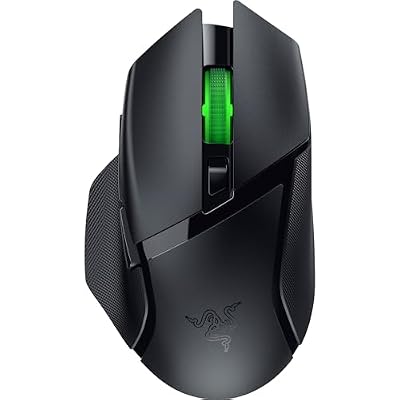
Razer Basilisk V3 X HyperSpeed Customizable Wireless Gaming Mouse, Black | Mechanical Switches Gen-2, 5G Advanced 18K Optical Sensor, Chroma RGB, 9 Programmable Controls, 285 Hr Battery
Included for 'Best Wireless Mouse for Gaming and Everyday Use' as a representative home product in this roundup; selection reflects the product set returned for this topic.
View on Amazon5. SteelSeries Aerox 9 Wireless: Best for MMO Players
Specs per the listing: Holey RGB, ultra-lightweight water resistant design, Bluetooth and 2.4 GHz connections, 18K DPI TrueMove Air optical sensor.
The Aerox 9 packs a many-button layout into a perforated lightweight shell, so it works for MMO and strategy players who want quick access to numbered actions. The dual connection means you can use the 2.4 GHz dongle for games and switch to Bluetooth for a laptop or tablet.
The honeycomb shell exposes the internals, so the water resistance rating matters, and the shape is not for everyone. Confirm the exact weight and button count on the maker page before ordering.
- Pros: Bluetooth and 2.4 GHz; lightweight water-resistant design; 18K sensor; many buttons
- Cons: holey shell is a matter of taste; specific weight not in the title
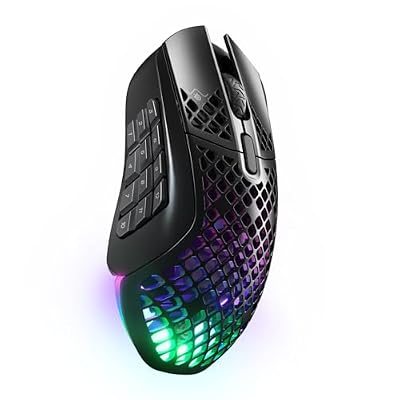
SteelSeries Aerox 9 Wireless Gaming Mouse - Black | Holey RGB Gaming Mouse - Ultra-lightweight Water Resistant Design - Bluetooth/2.4 GHz - 18K DPI TrueMove Air Optical Sensor
Included for 'Best Wireless Mouse for Gaming and Everyday Use' as a representative home product in this roundup; selection reflects the product set returned for this topic.
View on AmazonHow to Choose
Choose the connection that fits your use
A 2.4 GHz dongle connection is the standard for gaming because it gives low latency, while Bluetooth is better for laptops and tablets and saves a USB port. Mice with both give you flexibility. If you sit far from the computer, plug the dongle into a front port or an extension for a stable signal.
Match weight and shape to your grip
Light, symmetrical mice suit fingertip and claw grips and fast shooters. Taller, ergonomic bodies suit palm grips and long work sessions. Measure your hand from wrist to middle fingertip and compare it with the maker’s dimensions. A mouse that fits your hand matters more than a sensor number.
Check the battery system
Some mice use a replaceable AA battery while others charge over USB-C. Long advertised battery figures, such as 250 or 280 hours, usually assume a specific lighting setting and polling rate. Turn off lighting to extend life, and keep a charging cable or spare battery handy.
Don’t chase a sensor number
Most people use between 400 and 1,600 DPI in games, so a 12,000 DPI sensor and a 30,000 DPI sensor feel the same in practice. Spend your attention on weight, switches, shape and battery. Look for on-board memory if you use several computers so settings travel with the mouse.
Consider the surface and accessories
A mouse is only as consistent as the pad under it. Cloth pads give steady glide, and hard pads suit light, fast mice. Check that the sensor tracks reliably on your desk surface, and avoid glass or very glossy tops. Dongle extension cables, spare feet and grip tape are inexpensive extras that can improve comfort. If you share a computer, look for on-board profiles so your settings do not need to be reloaded each time you switch.
Frequently Asked Questions
Is a wireless gaming mouse as fast as a wired one?
Modern 2.4 GHz wireless mice use low-latency connections that most players cannot distinguish from wired ones. Poor placement of the dongle can still cause problems.
How long does the battery last?
Makers claim from 250 to 280 hours in some models, but real-world time depends on lighting and polling rate. Plan to charge or replace batteries regularly.
What DPI should I use?
Most players settle between 400 and 1,600 DPI. Higher DPI settings are available, but they are not a measure of quality.
Are these mice good for left-handed users?
Symmetrical designs like the Viper and Superlight can work, but side buttons may sit on one side. Check the maker page for ambidextrous support.
Do I need the software?
Not to use the mouse. Software unlocks button remapping, lighting and on-board profiles, which are useful but optional.