🛒 Best Price Today on Amazon
Prime members get fast, free shipping on everything above, plus member-only deals. New members get a 30-day free trial — cancel anytime.
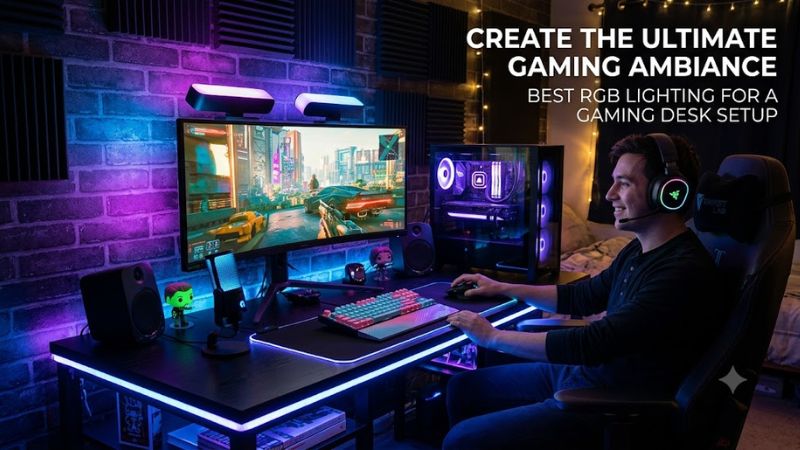
For best rgb lighting for a gaming desk setup, start with where the light will sit, how you want it controlled, and whether your PC or smart-home ecosystem matters. Light strips differ in addressable zones, white-light capability, cutting, connectivity, and software, so the right choice depends on the role you want the lighting to fill.
How to Choose RGB Lighting
The first criterion is placement: behind a monitor, beneath a desk, along a wall, or around a room needs different light distribution. The second is control, because app-based scenes, Matter, Wi-Fi, Bluetooth, and PC software do not offer identical features. For a desk-focused setup, Govee and Nanoleaf provide flexible smart-light options, while Elgato targets PC and streaming workflows.
Check the Lighting Type
The best rgb lighting for a gaming desk setup should match the surface rather than simply provide the highest brightness. A diffused strip works well when the LEDs should disappear into the glow, while individually addressable LEDs are useful when different sections need different colors. Govee’s Strip Light 2 Pro uses RGBWWIC lighting with independently controlled sections.
Match the Control Ecosystem
Control compatibility matters when your desk already contains smart lights, peripherals, or streaming equipment. Govee supports Wi-Fi, Bluetooth, voice control, and DreamView, while Nanoleaf’s Matter products can work across supported smart-home platforms. Matter features depend on the product, ecosystem, and required hub or Thread Border Router.
Check Cutting and Length
Physical fit is another important criterion because a desk strip may need to follow corners or stop before a monitor stand. Govee’s Strip Light 2 Pro can be cut and connected within supported configurations, while Elgato Light Strip Pro is cuttable but cannot be extended. Nanoleaf also allows cutting, but cut sections cannot be reconnected.
Verify PC Compatibility
PC compatibility should be checked before buying, especially when desktop control is important. Elgato officially supports Windows 10 64-bit or later through Control Center, while Nanoleaf’s desktop functionality requires a compatible Thread Border Router for its relevant Essentials setup. These requirements are different from simply controlling lights from a phone.
Top Picks
| Product | Best For | Key Spec | Compatibility | Watch Out For |
| Govee Strip Light 2 Pro | Best Overall | RGBWWIC; 10 segments/m | Wi-Fi, Bluetooth, Matter; Windows/mobile control | App complexity |
| Nanoleaf Essentials Matter Lightstrip | Best Value | 2 m starter; 2200 lm max | Bluetooth; Matter over Thread | One color across strip |
| Elgato Light Strip Pro | Best For Streaming | 2 m; individually addressable RGB | Windows 10+, macOS, Android, iOS | Cannot extend |
| Govee COB Strip Light Pro | Best For Diffused Glow | 1260 LEDs/m; RGBIC+W | Wi-Fi, Bluetooth, Matter | Very bright; cannot extend |
Govee Strip Light 2 Pro — Best Overall
The Govee Strip Light 2 Pro is a strong all-purpose choice for the best rgb lighting for a gaming desk setup because it combines RGBWWIC lighting, multiple controllable sections, sound response, and smart-home integration. Govee lists 6.56-, 16.4-, and 32.8-foot versions, with current US pricing varying by length.
The main weakness is software complexity rather than lighting capability. PC Gamer’s independent review found vivid colors, strong brightness, and sound responsiveness, but noted that the Govee app can be cumbersome and that detailed control is centered on the mobile app. Do not choose it if you want a simple strip with minimal software.
Nanoleaf Essentials Matter Lightstrip — Best Value
Nanoleaf’s Essentials Matter Lightstrip suits buyers who want the best rgb lighting for a gaming desk setup without building around a proprietary PC lighting ecosystem. The current 2-meter version supports 2700–6500K white adjustment, RGB colors, 16 million-plus colors, and brightness up to 2200 lumens.
Its main limitation is that it is not individually addressable, so the entire strip cannot display different colors simultaneously. Nanoleaf also requires a Thread Border Router for full Matter-over-Thread functionality, although Bluetooth control through the Nanoleaf app remains available without that setup.
Elgato Light Strip Pro — Best For Streaming
Elgato Light Strip Pro is designed around PC and creator workflows, making it a practical choice when the best rgb lighting for a gaming desk setup also needs to work around a webcam. It uses individually addressable RGB LEDs, supports 16 million colors, and connects over 2.4GHz or 5GHz Wi-Fi.
The real weakness is scope: the strip is 2 meters and cannot be extended, while its RGB-only design does not provide dedicated white channels. PC Gamer also noted that advanced custom scenes can require Elgato’s JavaScript-based tools, so it is less appealing if you want extensive effects without configuration.
Govee COB Strip Light Pro — Best For Diffused Glow
Govee’s COB Strip Light Pro is suited to the best rgb lighting for a gaming desk setup when smooth diffusion matters more than seeing individual LED points. The current product uses COB construction, RGBIC+W lighting, and a dense LED layout; Govee lists 1260 LEDs per meter and versions around 9.8 and 16.4 feet.
The weakness is brightness and flexibility after installation. PC Gamer found the strip very bright with attractive diffusion, but also noted that it could be too bright for cameras even at low settings. Once cut, it cannot be extended, so measure the desk or wall path carefully before installation.
FAQ
Which RGB light strip is best for a gaming desk?
The best rgb lighting for a gaming desk setup depends on the intended role, but Govee Strip Light 2 Pro covers a broad range of desk-focused needs with RGBWWIC lighting, multiple segments, Wi-Fi, Bluetooth, and Matter support. Its main trade-off is a more involved software experience than a basic strip.
For a simpler smart-home approach, Nanoleaf Essentials Matter Lightstrip provides adjustable white light and Matter support, while Elgato Light Strip Pro is more closely tied to Windows, Mac, and creator-oriented control. The choice should follow your existing ecosystem rather than brightness alone.
Does RGB lighting improve gaming performance?
RGB lighting does not increase GPU or CPU performance, so it should be treated as an aesthetic and workspace-lighting accessory rather than a frame-rate upgrade. Its practical role is to change the appearance of the desk, provide ambient illumination, or support a camera-friendly streaming background.
A strip behind the monitor can also change the perceived contrast between a bright display and a dark room, but lighting placement and brightness remain personal factors. Avoid aiming bright LEDs directly toward your eyes or camera; indirect placement behind the display or beneath the desk is usually easier to manage.
Can RGB light strips work with a gaming PC?
Yes, RGB light strips can work with a gaming PC, but the connection method varies by product. Elgato Light Strip Pro officially supports Windows 10 64-bit or later, while Govee provides PC-oriented control alongside Wi-Fi, Bluetooth, and Matter features. Nanoleaf’s desktop capabilities depend on the appropriate Thread setup.
This does not mean every strip connects directly to a motherboard RGB header. These products generally use their own controllers and external power supplies, so DDR4, DDR5, PCIe generation, CPU socket, and PSU GPU connectors are not relevant compatibility requirements for the lighting itself. The important checks are operating system, network, controller, and smart-home support.
How bright should RGB desk lighting be?
There is no single required brightness level because the appropriate setting depends on whether the strip is used as hidden accent lighting, monitor bias lighting, or a room-lighting source. Govee’s COB Strip Light Pro, for example, is substantially more focused on strong ambient output than a subtle decorative strip.
For a gaming desk, indirect placement generally gives more control than pointing LEDs directly at the player. A strip behind the monitor or under the desk can provide visible color while keeping the LED emitters out of the direct viewing path, which is particularly relevant for streaming cameras and dark-room gaming.
Final Thoughts
The best rgb lighting for a gaming desk setup comes down to placement, control, compatibility, and how much customization you actually need. Govee offers broad smart-light features, Nanoleaf emphasizes Matter, Elgato targets PC and streaming workflows, and Govee COB favors diffused output. Check the controller and installation limits before buying.