🛒 Best Price Today on Amazon
Prime members get fast, free shipping on everything above, plus member-only deals. New members get a 30-day free trial — cancel anytime.
A best gaming desk with cable management should give cables a defined route, enough depth for your monitors, and a frame suited to your setup. The right choice depends on whether you need sit-stand adjustment, a large fixed surface, monitor-arm support, or a compact footprint.
How to Choose a Gaming Desk With Cable Management
Cable management works best when the desk provides both an entry point on the desktop and storage underneath. Before buying a best gaming desk with cable management, compare the routing method, usable depth, load rating, and how easily cables can be reached after installation. These details matter more than lighting or gaming-themed styling.
Cable Routing Design
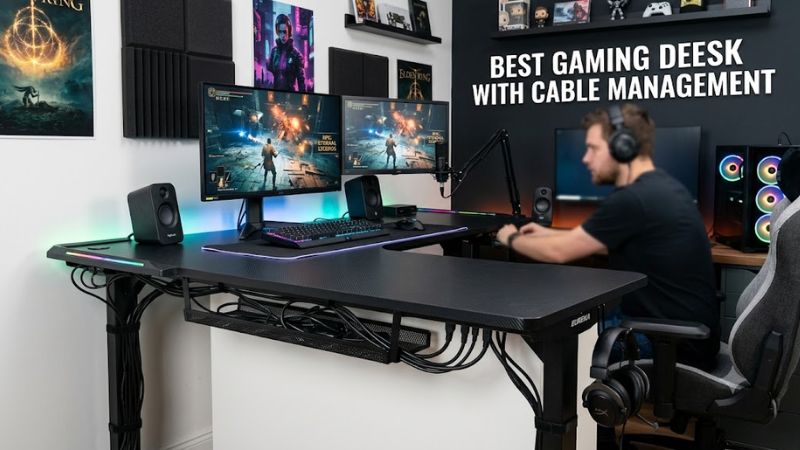
A full-length tray is useful when several displays, a powered USB hub, speakers, and a desktop PC share the same workspace. The Secretlab MAGNUS Pro uses a hinged rear cover and integrated cable tray, while the CORSAIR Platform:4 includes a large RapidRoute tray designed to hold power strips and routed cables.
A mesh basket can also work well, especially on a fixed-height desk. The IKEA UTESPELARE uses a cable-management net below the desktop, while the Arozzi Arena uses three desktop cutouts leading into an underneath mesh basket. These layouts keep display and peripheral cables close to their connection points.
Desktop Size and Monitor Space
Desk width should match the number and size of displays rather than the PC case alone. A 63-inch UTESPELARE provides substantially more horizontal room than the 47-inch CORSAIR Platform:4, while the 63-inch Arozzi Arena Large is designed around setups using up to three large screens.
Depth matters when a monitor arm, large keyboard, mousepad, and speakers share the same surface. The MAGNUS Pro measures 27.6 inches deep, while the Platform:4 is 30 inches deep and the Arena Large reaches 32.3 inches. A deeper desktop can leave more room between the display and keyboard.
Sit-Stand Compatibility
For a best gaming desk with cable management that moves between sitting and standing, the cable path must move with the desktop. The MAGNUS Pro and Platform:4 Elevate both use electric height adjustment, while the Arozzi Arena Moto combines electric adjustment with three cable cutouts and an under-desk cable net.
Compatibility also includes your monitor hardware. CORSAIR’s included Platform:4 monitor arm supports 75×75mm and 100×100mm VESA mounting and has a 27-pound weight limit. The Arozzi Arena provides cutouts that can be used for monitor attachments, while the UTESPELARE’s rear mesh can accept monitor-arm clamps.
Load Capacity and PC Setup
A desktop gaming PC does not require a special motherboard, CPU, GPU, RAM, or operating-system compatibility rating from the desk. Instead, check the desk’s physical load capacity and whether your monitor mount, speakers, power equipment, and other accessories fit within that limit.
The MAGNUS Pro supports a maximum distributed load of 265 pounds, and the Platform:4 carries the same stated maximum. UTESPELARE is rated for 110 pounds, while the Arena Large is rated for 176.4 pounds. These figures describe the desk’s stated load capacity, not a recommended PC weight.
Top Picks for the Best Gaming Desk With Cable Management
The table below separates four current options by the type of setup they suit. The best gaming desk with cable management for one buyer may be a premium electric desk, while another may need a cheaper fixed desk with a large surface. The key differences are cable routing, size, adjustment, and physical limits.
| Product | Best For | Key Spec | Compatibility | Watch Out For |
| Secretlab MAGNUS Pro | Best Overall | 59.1 × 27.6 in; 25.6–49.2 in height | Desktop or laptop; dual-monitor setups; VESA accessories | Premium pricing and metal desktop feel |
| IKEA UTESPELARE | Best Value | 63 × 31.5 in; 110-lb load | Desktop or laptop; clamp-style monitor arms | Manual height adjustment |
| CORSAIR Platform:4 Elevate | Best For Modular Setups | 47 × 30 in; 29–48 in height | VESA 75/100mm; included monitor arm | Smaller desktop footprint |
| Arozzi Arena Large | Best For Large Fixed Setups | 63 × 32.3 in; 176.4-lb load | Up to three large screens; monitor attachments | Fixed-style height adjustment |
Secretlab MAGNUS Pro: Best Overall
The Secretlab MAGNUS Pro combines a 59.1-inch-wide desktop, electric height adjustment from 25.6 to 49.2 inches, a 265-pound maximum distributed load, and an integrated cable-management tray. Its hinged rear cover provides access to the routing area without requiring a separate under-desk basket.
Buy it if you want a sit-stand desk where power and signal cables are routed around a purpose-built rear channel. Its main weakness is cost, and the metal desktop construction is less conventional than the particleboard or wood surfaces found on lower-priced desks. Buyers wanting a basic fixed desk should look elsewhere.
IKEA UTESPELARE: Best Value
UTESPELARE gives buyers a 63 × 31.5-inch surface, a manually adjustable height range of 26.75 to 30.75 inches, and a stated maximum load of 110 pounds. Its rear metal mesh provides another routing path and can accept monitor-arm clamps, while the cable net stores excess wiring below the top.
Buy it if your priority is surface area and straightforward cable storage without paying for motorized adjustment. The real limitation is the manual height system and lower load rating compared with the premium electric desks here. It is not the right choice for someone specifically needing frequent sit-stand transitions or a very heavy multi-device setup.
CORSAIR Platform:4 Elevate: Best For Modular Setups
The Platform:4 Elevate has a 47 × 30-inch desktop, dual electric motors, a 29-to-48-inch height range, and a 265-pound maximum load. It also includes a monitor arm supporting 75×75mm and 100×100mm VESA patterns, plus a RapidRoute cable tray and T-Channel accessory system.
Buy it if modular accessories and an integrated monitor arm matter as much as cable routing. The weakness is desktop area: 47 inches of width is considerably less than the 63-inch UTESPELARE or Arena Large. It should not be the first choice for a wide triple-monitor arrangement without additional planning.
Arozzi Arena Large: Best For Large Fixed Setups
The Arena Large provides a 63 × 32.3-inch surface, three cable cutouts, a fitted cable-management basket, and enough desktop area for up to three large screens according to Arozzi. Its full-surface microfiber mousepad is also designed around the desk’s curved shape.
Buy it if a broad fixed-height gaming surface matters more than electric adjustment. The stated load capacity is 176.4 pounds, and its height adjustment is limited to the legs rather than offering the powered range of an electric standing desk. That makes it less suitable for users who frequently alternate between sitting and standing.
FAQ About Gaming Desks With Cable Management
A best gaming desk with cable management is generally one that matches the buyer’s cable volume, desktop size, monitor arrangement, and preferred height system. The four questions below address the practical differences among the current picks rather than treating cable management as a single feature.
Which gaming desk has the most integrated cable management?
The Secretlab MAGNUS Pro has one of the most integrated cable-management designs because its rear channel and hinged cover are built into the desk rather than added as a separate basket. The Platform:4 also includes a large dedicated tray, while UTESPELARE and Arena use under-desk mesh solutions.
Is a 63-inch gaming desk better for multiple monitors?
A 63-inch desk provides more horizontal space than a 47-inch desk, so it can make multi-monitor placement easier when the room allows it. UTESPELARE and Arena Large both measure 63 inches wide, with Arena specifically stating support for up to three large screens.
Can these desks support a gaming PC and monitor arms?
Yes, these desks are designed for desktop gaming equipment, but the applicable load and mounting method differ. MAGNUS Pro and Platform:4 list 265-pound maximum loads, while UTESPELARE lists 110 pounds; monitor-arm compatibility also depends on the desk’s mounting area and the arm’s clamp or VESA requirements.
Do standing gaming desks need special PC hardware?
No, a standing desk does not require a special CPU, GPU, motherboard, RAM type, or Windows version. The important compatibility issue is physical: cables need enough slack for height movement, and the desk must support the combined weight of the PC, displays, monitor arms, and accessories within its stated capacity.
Final Thoughts
The best gaming desk with cable management depends on how much surface and adjustment your setup needs. MAGNUS Pro suits integrated routing and sit-stand use, UTESPELARE emphasizes value and space, Platform:4 favors modular accessories, and Arena Large targets broad multi-monitor layouts. Check dimensions and load limits before buying.