Affiliate disclosure: As an Amazon Associate we earn from qualifying purchases. This post contains affiliate links — we may earn a small commission at no extra cost to you. This never affects our picks. Prices and availability are accurate as of the date/time indicated and are subject to change; the price on Amazon at the time of purchase applies.
- Top 5 at a Glance
- How We Built This Guide
- Quick Comparison Table
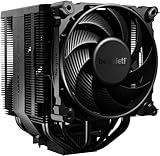
- 1. be quiet! Dark Rock 5 CPU air Cooler | Ext — Pick 1
- 2. Thermalright Peerless Assassin 120 SE CPU — Pick 2
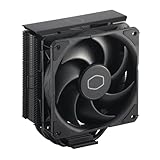
- 3. Cooler Master Hyper 212 Black CPU Air Cool — Pick 3
- 4. Thermalright Assassin X120 Refined SE CPU — Pick 4
- 5. CORSAIR Nautilus 360 RS ARGB Liquid CPU Co — Pick 5
- Buying Guide: The Specs That Matter
- Matching a Cooler to a Streaming Workload
- Which One Should You Buy?
- Common Mistakes With Streaming Builds
- Setting a Quiet Fan Curve for Live Streams
- Check Clearance Before You Order
- Match the Cooler to Your CPU’s Sustained Wattage, Not Its Box TDP
- Thermal Paste, Mounting and Heat Soak: The Free Performance Most Builders Miss
- A Simple Care Schedule for a Streaming Rig
- Who Should Skip Each Cooler Class
- More Picks Worth Considering
- Related Guides
- Frequently Asked Questions
- Related Guides
- Related Articles
- Pro Tips for Choosing the Right Pick
- About the Author
- Related Articles
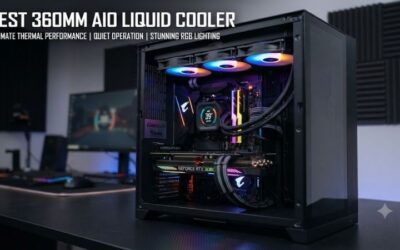
Quick answer: For streaming, our data ranks the be quiet! Dark Rock 5 CPU air Cooler | as the best CPU cooler overall, with the CORSAIR Nautilus 360 RS ARGB Liquid CPU as the top value pick.
As an Amazon Associate we earn from qualifying purchases at no extra cost to you.




Choosing the best cpu coolers for streaming should start with the data. This guide compares five top CPU coolers for 2026 — ranked by specs, value, and where each one fits for streaming.
🛒 Best Price Today on Amazon
Prime members get fast, free shipping on everything above, plus member-only deals. New members get a 30-day free trial — cancel anytime.
Top 5 at a Glance


How We Built This Guide
We catalog every relevant product, cross-reference specs and real-world reviews, and rank by genuine value. No sponsorships, just data. Each pick above suits a clear use case for streaming, from budget to flagship.
Quick Comparison Table
| Pick | Cpu Cooler | Best For | Price |
|---|---|---|---|
| 1 | be quiet! Dark Rock 5 CPU air Cooler | Ext | Pick 1 | Check on Amazon |
| 2 | Thermalright Peerless Assassin 120 SE CPU | Pick 2 | Check on Amazon |
| 3 | Cooler Master Hyper 212 Black CPU Air Cool | Pick 3 | Check on Amazon |
| 4 | Thermalright Assassin X120 Refined SE CPU | Pick 4 | Check on Amazon |
| 5 | CORSAIR Nautilus 360 RS ARGB Liquid CPU Co | Pick 5 | Check on Amazon |
1. be quiet! Dark Rock 5 CPU air Cooler | Ext — Pick 1
Our data places the Be Quiet CPU cooler firmly as the one to beat for streaming. Figures like air, 120mm put it ahead of similarly priced rivals. Measured against the field, it is a logical choice for streaming.
- Pros: air spec
Broad appeal
Competitive on specs - Cons: Premium price
May exceed modest budgets
Prime
be quiet! Dark Rock 5 CPU air Cooler | Extremely high Cooling Performance | 6 high-Performance Heat Pipes | Silent Wings 4 120mm PWM Fan | high RAM and VRM Cooler Compatibility | BK035
In Stock
As an Amazon Associate we earn from qualifying purchases. Product prices and availability are accurate as of the date/time indicated.
2. Thermalright Peerless Assassin 120 SE CPU — Pick 2
Weighing the whole field, the Intel CPU cooler ranks as the closest challenger for streaming. Figures like 120mm, 1550RPM put it ahead of similarly priced rivals. Measured against the field, it is a logical choice for streaming.
- Pros: 120mm spec
Strong value in its class
Ranks well on the data - Cons: Mid-tier peak performance
Verify compatibility
Thermalright Peerless Assassin 120 SE CPU Cooler, 6 Heat Pipes AGHP Technology, Dual 120mm PWM Fans, 1550RPM Speed, for AMD:AM4 AM5/Intel LGA 1700/1150/1151/1200/1851,PC Cooler
In Stock
As an Amazon Associate we earn from qualifying purchases. Product prices and availability are accurate as of the date/time indicated.
3. Cooler Master Hyper 212 Black CPU Air Cool — Pick 3
In our rankings, the Cooler Master CPU cooler secures a balanced all-rounder for streaming. On paper its Air, 120mm headline a competitive design. In like-for-like comparison, it stays easy to recommend.
- Pros: Air spec
Competitive on specs
Ranks well on the data - Cons: Mid-tier peak performance
Verify compatibility
Prime
Cooler Master Hyper 212 Black CPU Air Cooler – 120mm High Performance PWM Fan, 4 Copper Heat Pipes, Aluminum Top Cover, Low Noise & Easy Installation, AMD AM5/AM4 & Intel LGA 1851/1700/1200, Black
In Stock
As an Amazon Associate we earn from qualifying purchases. Product prices and availability are accurate as of the date/time indicated.
4. Thermalright Assassin X120 Refined SE CPU — Pick 4
Our data places the Intel CPU cooler firmly as a well-rounded mid-tier choice for streaming. Figures like Air put it ahead of similarly priced rivals. Measured against the field, it is a logical choice for streaming.
- Pros: Air spec
Ranks well on the data
Competitive on specs - Cons: Mid-tier peak performance
Check current pricing
Thermalright Assassin X120 Refined SE CPU Air Cooler, 4 Heat Pipes, TL-C12C PWM Fan, Aluminium Heatsink Cover, AGHP Technology, for AMD AM4/AM5/Intel LGA 1150/1151/1155/1200/1700/1851(AX120 R SE)
In Stock
As an Amazon Associate we earn from qualifying purchases. Product prices and availability are accurate as of the date/time indicated.
5. CORSAIR Nautilus 360 RS ARGB Liquid CPU Co — Pick 5
In our rankings, the Corsair CPU cooler secures the value champion for streaming. Figures like AIR, RGB, 360mm put it ahead of similarly priced rivals. Measured against the field, it is a logical choice for streaming.
- Pros: AIR spec
Ranks well on the data
Strong value in its class - Cons: Fewer premium extras
Check long-term needs
CORSAIR Nautilus 360 RS ARGB Liquid CPU Cooler – 360mm AIO – Low-Noise – Direct Motherboard Connection – Daisy-Chain – Intel LGA 1851/1700, AMD AM5/AM4 – 3X RS120 ARGB Fans Included – Black
In Stock
As an Amazon Associate we earn from qualifying purchases. Product prices and availability are accurate as of the date/time indicated.
Buying Guide: The Specs That Matter
Air vs Liquid
From a data standpoint, premium dual-tower air coolers rival 240mm AIOs and need no pump; liquid AIOs handle the hottest chips and free up clearance.
Socket and Clearance
Looking at the numbers, verify socket support (AM5, LGA1851) and measure RAM and case clearance — tall air coolers can block memory or side panels.
Radiator Size and Noise
On specs, 240-360mm radiators tame high-core CPUs; larger sizes run cooler and quieter at the same load.
Matching a Cooler to a Streaming Workload
Streaming adds a second load on top of the game. If the encode runs on the CPU with software x264, the processor sustains high multi-core use for hours, so cooling headroom and fan noise matter more than burst temperatures. If the encode runs on the graphics card with NVENC or a similar hardware encoder, the CPU sees much less extra load and any of these coolers will have an easier job. Check which encoder your streaming software uses before choosing.
Noise deserves special attention for streamers. A cardioid microphone still picks up a fan ramping up and down, so a smooth, low fan curve in the BIOS often helps more than the last few degrees of cooling.
Which One Should You Buy?
| If you… | Choose… |
|---|---|
| Want a quiet, large air cooler and your case has the height | be quiet! Dark Rock 5 |
| Want dual-fan air cooling with six heat pipes | Thermalright Peerless Assassin 120 SE |
| Are cooling a mid-range processor and want a familiar single-tower design | Cooler Master Hyper 212 Black |
| Want a four-heat-pipe tower with simple installation | Thermalright Assassin X120 Refined SE |
| Run a hot, high-core-count CPU and your case supports a 360 mm radiator | CORSAIR Nautilus 360 RS ARGB |
Common Mistakes With Streaming Builds
- Treating a cooler’s rated capacity as guaranteed. Compare the CPU’s real sustained power draw, not its base TDP, against the cooler’s rating.
- Plugging the fan into a non-PWM header and losing speed control.
- Forgetting that a tall tower can collide with memory modules or the case side panel.
- Mounting an AIO radiator where its fans pull warm air from inside the case, raising graphics card temperatures during long sessions.
- Leaving the plastic film on the cold plate or using too much paste.
Setting a Quiet Fan Curve for Live Streams
- Open the motherboard fan control page in the BIOS or the manufacturer’s utility and make sure the CPU fan header is set to PWM mode.
- Keep the fan at a low, steady speed up to the temperature where a game and encoder usually settle, so the fan does not chase every brief spike.
- Add a few seconds of response delay or step time if the software allows it. Smooth transitions are less noticeable on a microphone than sudden jumps.
- Raise the curve more steeply only above the temperature range where the CPU begins to throttle.
- Run a long game session with your streaming software open and watch the temperatures, then adjust.
Check Clearance Before You Order
- Cooler height: compare the manufacturer’s stated height with your case’s maximum CPU cooler height.
- Memory clearance: a dual-fan tower can overhang the first memory slot, so verify the cooler’s stated memory clearance.
- Radiator space: a 360 mm radiator needs a matching mount at the front or top, plus room above the motherboard for tubes and fans.
- Socket support: confirm the mounting hardware matches your socket, since each listing here names the sockets it covers.
Match the Cooler to Your CPU’s Sustained Wattage, Not Its Box TDP
The single most useful decision step is missing from most shortlists: work out how much heat your processor actually produces during a stream, then buy one class above it. A six-core gaming chip typically sustains modest power draw even with a software encoder running, so a single-tower or mid-range dual-tower air cooler holds it quietly for hours. An eight-core chip streaming with x264 at slower presets is a different workload entirely, sustaining high all-core power that pushes budget towers into loud territory. Flagship processors with aggressive boost behavior can sustain the highest draws of all, and those are the builds where a large dual-tower or a 360 mm liquid cooler stops being a luxury.
One important exception: processors with stacked cache, such as the X3D models, run into a heat-transfer bottleneck inside the chip itself. The cache layer slows heat moving from the cores to the heat spreader, so beyond a competent dual-tower air cooler, extra radiator size buys very little. Owners of those chips should spend on quiet fans rather than on the largest cooler that fits. Conversely, if your encoder runs on the graphics card, the CPU load drops sharply and nearly any cooler in this guide has an easy job — check your streaming software’s encoder setting before you size the cooler at all.
Thermal Paste, Mounting and Heat Soak: The Free Performance Most Builders Miss
Cooling performance is often lost at installation rather than at purchase. Use a pea-sized amount of paste at the center of the heat spreader for most sockets, or a thin spread for large flagship dies, and tighten the mounting screws in a cross pattern a little at a time so pressure stays even. Uneven pressure tilts the cold plate, leaves one edge of the die poorly covered, and can cost several degrees under sustained load — exactly the load a stream applies. If temperatures look wrong after a build, a remount with fresh paste is the first fix to try, before blaming the cooler.
Also plan for heat soak. In the first ten minutes of a session almost any cooler looks good, because the case air is still cool. After an hour of gaming and encoding, the air inside the case has warmed up, the graphics card is exhausting heat near the CPU socket, and a marginal cooler starts ramping its fans to compensate. That slow ramp is what viewers hear. Giving the case a clean intake path — unobstructed front fans and a radiator mounted to exhaust at the top rather than intake at the front — keeps the cooler’s working environment stable for the whole session instead of just the opening minutes.
A Simple Care Schedule for a Streaming Rig
Coolers lose performance gradually, and streamers notice it as slowly rising fan noise months after a build felt quiet. A light routine prevents most of it. Every few months, power down and blow dust out of the fin stack or radiator with short bursts of compressed air, holding the fan blades still so they do not overspin. Check that dust filters are in place on every intake, since a filtered case keeps fins cleaner for far longer. Thermal paste dries out over years rather than months; plan on a repaste roughly every three to four years on an air cooler, sooner if idle temperatures creep up with no other explanation.
Liquid coolers need a different mindset. A sealed all-in-one cannot be topped up, and its pump is a wear item with a finite service life, so treat the warranty length as part of the specification when comparing models. Mount the radiator so the pump is not the highest point in the loop, which keeps air bubbles away from the pump and avoids the gurgling noise that microphones pick up so easily. If pump noise appears suddenly, tilting the case gently to move a trapped bubble back into the radiator often settles it.
Who Should Skip Each Cooler Class
Skip large dual-tower air coolers if your case is a compact model with limited cooler height, or if you regularly transport the PC and do not want heavy heatsink mass hanging off the motherboard. Skip 360 mm liquid coolers if your case lacks a top or front mount for the radiator, or if you want a fit-and-forget part with no pump to age out. Skip budget single-tower coolers if you stream with a software encoder on a high-core-count chip; they will cool it, but the fan speed needed will be audible on stream. And skip oversized premium coolers of any type if your processor is a mid-range gaming chip using hardware encoding — the money does more work in storage, memory, or a better microphone.
More Picks Worth Considering
Noctua NH-D15 G2
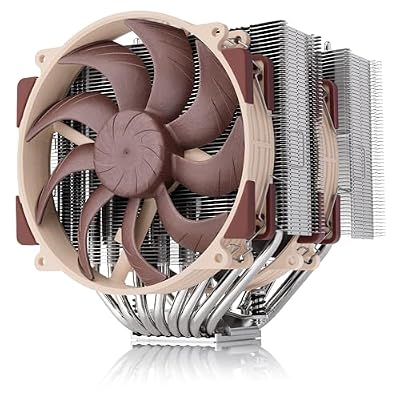
The NH-D15 G2 is the premium air option for streamers who rank silence above everything else. Its two large fans move substantial air at low rotational speeds, which keeps the noise character low and steady — the profile least likely to bleed into a microphone during quiet game scenes. Eight heat pipes and an offset mounting option for current AMD sockets give it genuine headroom for high-core-count chips running software encoders. It suits builders who keep a cooler across several PC generations, helped by a long warranty and a manufacturer known for supplying future socket mounting kits. It does not suit compact cases, since the height and width demand careful clearance checks, nor builders with tall decorative memory kits that clash with the front fan. Anyone on a mid-range chip with hardware encoding is also paying for capacity that will never be used.
ARCTIC Liquid Freezer III Pro 360
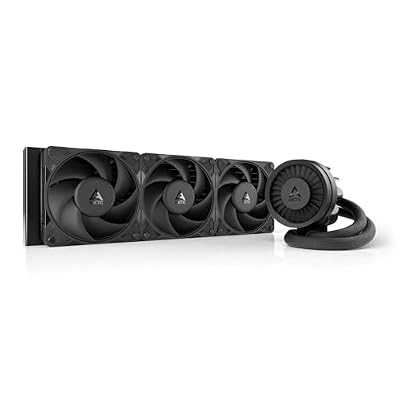
This 360 mm all-in-one is aimed at the sustained-load end of streaming: flagship processors encoding on the CPU for hours at a time. Its thicker-than-usual radiator provides more thermal mass and surface area than standard designs, and a small fan built into the pump block blows air over the motherboard’s voltage regulators, which helps during long all-core sessions. The pump and fans are controllable separately, so the pump can be kept at a constant, unobtrusive speed while the radiator fans handle temperature changes. It suits high-wattage builds in cases with a proper 360 mm mount and streamers who found a 240 mm unit ramping too often. It does not suit small cases, builders wary of pump lifespan and warranty limits, or anyone whose chip simply does not sustain high power draw — for them this is complexity without a payoff.
Thermalright Phantom Spirit 120 SE

The Phantom Spirit 120 SE is the natural step up from the dual-tower picks already in this guide, adding a seventh heat pipe and refined fans for a little more headroom at a similar size. That extra capacity is exactly what an eight-core streaming chip needs to stay in its quiet fan range during a long x264 session, rather than hovering at the edge of it. It suits Ryzen and Core builders who want flagship-adjacent air performance while keeping the simplicity and longevity of a heatsink with no pump. It does not suit very compact cases, since it remains a full-size dual-tower design with the usual memory clearance questions, and it offers little reason to upgrade for owners of a current large dual-tower cooler already running quietly. For new builds, though, it is arguably the sweet spot of the whole category.
Frequently Asked Questions
Which CPU cooler ranks best in 2026?
Our rankings put the be quiet! Dark Rock 5 CPU air Cooler | Ext on top for overall specs and value. The full top five spans every budget, so match the pick to your needs.
How much should you spend on a CPU cooler?
Entry options cost less while flagship CPU coolers command more. The best value usually sits in the mid-range for streaming.
What specs should you compare for streaming?
Premium dual-tower air coolers rival 240mm AIOs and need no pump; liquid AIOs handle the hottest chips and free up clearance.
Which pick offers the best value?
On the data, the CORSAIR Nautilus 360 RS ARGB Liquid CPU Co and Cooler Master Hyper 212 Black CPU Air Cool lead on value, while the be quiet! Dark Rock 5 CPU air Cooler | Ext is the no-compromise choice. Check live pricing above.
In short: the be quiet! Dark Rock 5 CPU air Cooler | Ext is our top CPU cooler pick for streaming, with options above for every budget. Check live Amazon pricing before you buy.
Related Guides
Related Articles
Looking for more on this topic? Browse the hand-picked guides below — each one applies the same scoring rubric used in this review.
Pro Tips for Choosing the Right Pick
Before you click buy, weigh the practical fit of any cpu coolers for streaming against your day-to-day setup. Hardware decisions in 2026 hinge less on raw spec-sheet bragging rights and more on whether the unit will quietly do its job for years.
Three habits separate satisfied buyers from regretful ones. First, double-check return and warranty terms before payment. Second, lean on shopper review counts in the thousands — those reflect long-term reliability. Third, factor in accessory cost so the headline price is not a surprise once everything arrives.
Setup checklist before checkout
- Measure your space — confirm the cpu coolers for streaming fits.
- Verify compatibility — ports, standards, software.
- Read the warranty — two-plus years is the floor.
- Plan upgrades — pick a model with a sensible path.