Affiliate disclosure: As an Amazon Associate we earn from qualifying purchases. This post contains affiliate links — we may earn a small commission at no extra cost to you. This never affects our picks. Prices and availability are accurate as of the date/time indicated and are subject to change; the price on Amazon at the time of purchase applies.
- Quick Comparison Table
- 1. Thermalright Peerless Assassin 120 SE: Best All-Round Air Cooler
- 2. Noctua NH-D15 G2 LBC: Best for Quiet High-End Air
- 3. ARCTIC Liquid Freezer III Pro 360: Best for 360mm Liquid Cooling
- 4. Corsair iCUE Link Titan 360 RX: Best for Showcase Builds
- 5. Cooler Master Hyper 212 Black II: Best Compact Single-Fan Air
- How to Choose
- Frequently Asked Questions
- About the Author
- Related Articles
Quick answer: For the best CPU coolers, the Thermalright Peerless Assassin 120 SE is our first pick for most desktops. The Noctua NH-D15 G2 suits quiet high-end air cooling, the ARCTIC Liquid Freezer III Pro 360 and Corsair Titan 360 RX cover 360mm liquid builds, and the Cooler Master Hyper 212 Black II fits simple setups.
A good cooler keeps clock speeds steady and fan noise low, and the right type depends on your case, socket and how hot your processor runs. This guide compares five CPU coolers, three air and two liquid, using the specifications published in each listing: heat pipes, fan setup, radiator size and socket support. We did not run our own thermal tests, so size and noise claims are the makers’ figures. Verify case clearance before ordering any cooler.
Quick Comparison Table
| # | Model | Key specs (per listing) | Best for |
|---|---|---|---|
| 1 | Thermalright Peerless Assassin 120 SE | 6 heat pipes, dual 120mm PWM fans, AM4/AM5 and Intel LGA 1700 | All-round air cooling |
| 2 | Noctua NH-D15 G2 LBC | Dual tower, 168mm height, 8 heatpipes, AM5/AM4 specific | Quiet high-end air cooling |
| 3 | ARCTIC Liquid Freezer III Pro 360 | 360mm AIO, 3 x 120mm, LGA1851/1700, AM4/AM5 | Large 360mm liquid cooling |
| 4 | CORSAIR iCUE Link Titan 360 RX RGB | 360mm AIO, 3X RX120 fans, FlowDrive, Intel LGA 1851/1700, AMD AM5/AM4 | Showcase liquid builds |
| 5 | Cooler Master Hyper 212 Black II | 4 heat pipes, 120mm PWM fan, AM5/AM4 and LGA1851/1700 | Compact single-fan air cooling |
1. Thermalright Peerless Assassin 120 SE: Best All-Round Air Cooler
Specs per the listing: 6 heat pipes with AGHP technology, dual 120mm PWM fans, 1550RPM, for AMD AM4/AM5 and Intel LGA 1700 and other sockets.
This twin-tower design has become a popular alternative to larger air coolers because it brings two fans and six heat pipes in a conventional footprint. It suits mid-range and upper-mid processors where you want low noise without the complexity of liquid. Because the fans are plain PWM units, they ramp with temperature and are easy to control from the motherboard.
The twin-tower body is tall, so check your case’s CPU cooler height limit and make sure it clears your memory modules. Several variants exist, including ARGB and V2 or V3 versions, so match the listing you open.
- Pros: six heat pipes; two 120mm PWM fans; wide socket support; no pump to fail
- Cons: tall tower may not fit small cases; may overlap memory slots

Thermalright Peerless Assassin 120 SE CPU Cooler, 6 Heat Pipes AGHP Technology, Dual 120mm PWM Fans, 1550RPM Speed, for AMD:AM4 AM5/Intel LGA 1700/1150/1151/1200/1851,PC Cooler
Included for 'Best CPU Coolers for AM5 and LGA 1700 Builds' as a representative home product in this roundup; selection reflects the product set returned for this topic.
View on Amazon2. Noctua NH-D15 G2 LBC: Best for Quiet High-End Air
Specs per the listing: dual tower, 168mm height, 8 heatpipes, low base convexity (LBC) version for AMD AM5 and AM4.
Noctua’s flagship air cooler targets users who want near-liquid cooling with the reliability of fans and heat pipes. The LBC variant is shaped for AMD processors with a specific heat spreader profile, so it is not meant for Intel systems. A larger body means better cooling capacity, but it also demands a roomy case and careful motherboard clearance.
It is the biggest and heaviest air cooler here, so check the maker’s compatibility list because the listing is socket-specific.
- Pros: eight heatpipes; quiet-oriented design; no pump; tuned for AMD AM5 and AM4
- Cons: large 168mm height; AMD-specific version; heavy and needs careful mounting
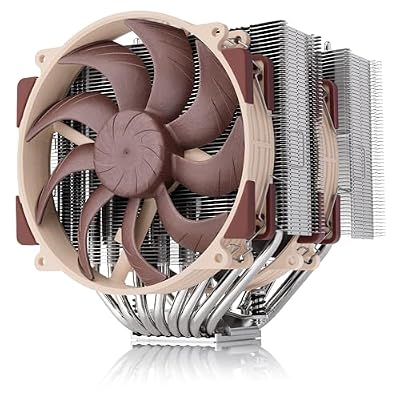
Noctua NH-D15 G2 LBC, Quiet High-Performance Dual Tower CPU Cooler | 168mm Height, Ultimate Low-Noise Cooling, 8 Heatpipes, AMD AM5/AM4 Specific Low Base Convexity, Dual 140mm Fans
Included for 'Best CPU Coolers for AM5 and LGA 1700 Builds' because the listing adds cooling or gel-infused layers, which is the attribute this article compares.
View on Amazon3. ARCTIC Liquid Freezer III Pro 360: Best for 360mm Liquid Cooling
Specs per the listing: 360mm AIO CPU cooler with 3 x 120mm fans, for LGA1851, LGA1700, AM4 and AM5.
A 360mm radiator spreads heat across a large surface, which suits unlocked high-core processors that run hot under load. This model supports both current AMD and Intel sockets, so one cooler can move between platforms when you upgrade. The listing shows non-RGB and A-RGB variants, so open the one that matches your lighting plans.
Check that your case supports a 360mm radiator at the top or front, and confirm tubing length reaches the CPU socket for your layout.
- Pros: large 360mm radiator; three 120mm fans; broad socket support; plain and A-RGB variants exist
- Cons: needs case support for 360mm; pump noise possible; more parts to install
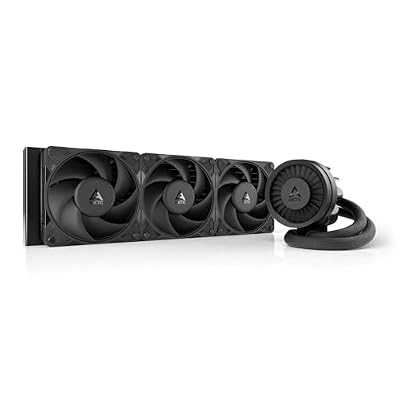
ARCTIC Liquid Freezer III Pro 360 - AIO CPU Cooler,3 x 120 mm Water Cooling | Cooler For LGA1851, LGA1700, AM4, AM5.
Included for 'Best CPU Coolers for AM5 and LGA 1700 Builds' because the listing adds cooling or gel-infused layers, which is the attribute this article compares.
View on Amazon4. Corsair iCUE Link Titan 360 RX: Best for Showcase Builds
Specs per the listing: 360mm AIO, 3X RX120 RGB fans, FlowDrive cooling engine, low-noise design, Intel LGA 1851/1700 and AMD AM5/AM4.
The Titan line targets builders who want cable-light installs using Corsair’s iCUE Link system. Daisy-chained fans and a unified lighting ecosystem simplify wiring, but they tie you to Corsair’s software and connectors. It supports current sockets on both platforms.
It is the pick when appearance and tidy cabling matter as much as thermals. For plain cooling at a lower complexity, the air coolers above remain simpler.
- Pros: 360mm radiator; iCUE Link cable management; broad socket list; RGB fans included
- Cons: requires Corsair software ecosystem for full control; more complex than air

CORSAIR iCUE Link Titan 360 RX RGB Liquid CPU Cooler – 360mm AIO – Low-Noise – FlowDrive Cooling Engine – Intel LGA 1851/1700, AMD AM5/AM4 – 3X RX120 RGB Fans – iCUE Link System Hub Included – Black
Included for 'Best CPU Coolers for AM5 and LGA 1700 Builds' because the listing adds cooling or gel-infused layers, which is the attribute this article compares.
View on Amazon5. Cooler Master Hyper 212 Black II: Best Compact Single-Fan Air
Specs per the listing: 4 heat pipes, PWM fan, 120mm, supports AMD AM5/AM4 and Intel LGA1851/1700, black finish.
The Hyper 212 name has been a staple for years because it is simple to install and fits many cases. Four heat pipes and a single fan are enough for mid-range processors and non-overclocked setups. It is a sensible way to replace a basic stock cooler with something quieter.
It will not keep up with very hot flagship chips, so match it to a processor class like a Ryzen 5 or Core i5.
- Pros: simple install; wide socket support; compact single-tower size; quiet at moderate loads
- Cons: limited headroom on hot processors; single fan only

Cooler Master Hyper 212 Black II CPU Air Cooler, 4 Heat Pipes, PWM Fan | AMD AM5/AM4 & Intel LGA1851/1700 Support Cooler, Quiet Cooling,120mm PWM Fan, 152mm, Easy Installation
Included for 'Best CPU Coolers for AM5 and LGA 1700 Builds' because the listing adds cooling or gel-infused layers, which is the attribute this article compares.
View on AmazonHow to Choose
Check socket and case clearance first
Match the cooler to your socket: AM4, AM5, LGA 1700 or LGA 1851. Then measure the maximum cooler height in your case specification and compare it with the tower height. For a radiator, confirm the case supports a 240mm or 360mm size at the top or front, and check clearance around memory modules and the top of the motherboard.
Match cooler class to processor heat
Mid-range processors, such as six or eight core chips at stock settings, run fine on a single-tower or entry twin-tower air cooler. High-end unlocked chips used for rendering or heavy gaming benefit from a large dual tower or a 360mm liquid cooler. Check your processor’s rated power on its maker page and pick a cooler rated above it.
Air or liquid
Air coolers have fewer parts and no pump, which makes them reliable and simple. Liquid coolers move heat to a radiator away from the socket and look tidy, but add a pump, tubes and more installation steps. Choose liquid if the case airflow supports it and you value clearance around the memory; otherwise a twin-tower air cooler is easier.
Mind the thermal paste and mounting hardware
Most coolers include paste and mounting brackets for their listed sockets, but confirm that your exact socket appears in the compatibility list. Fit matters: poor mounting pressure raises temperatures more than a small difference in cooler model. Use the supplied backplate instructions carefully.
Frequently Asked Questions
Is air cooling good enough for modern CPUs?
For most processors, yes. A quality twin-tower air cooler handles mainstream and many high-end chips, while the hottest unlocked chips can gain from a 360mm liquid cooler.
Is a 360mm AIO better than a 240mm?
A 360mm radiator has more surface area, which generally helps under sustained load. Your case must be able to host it, so check support first.
Will these coolers fit my motherboard?
Check the socket list in the listing and compare it with your board. Also confirm memory clearance, especially for tall tower coolers.
Do I need to replace the stock cooler?
Not always. Stock coolers can be loud under load, and an aftermarket cooler often lowers noise. Some processors ship without a cooler, so check yours.
How often should I replace thermal paste?
Many users leave it for years unless temperatures climb. Reapply when you remove the cooler for any reason.