Affiliate disclosure: As an Amazon Associate we earn from qualifying purchases. This post contains affiliate links — we may earn a small commission at no extra cost to you. This never affects our picks. Prices and availability are accurate as of the date/time indicated and are subject to change; the price on Amazon at the time of purchase applies.
- Quick Comparison Table
- 1. ARCTIC Liquid Freezer III Pro 360: Best for no-frills 360mm cooling
- 2. ID-COOLING FX360 PRO: Best for a simple AIO with clean styling
- 3. ASUS TUF Gaming LC III ARGB 360mm: Best for gaming builds with ARGB
- 4. Thermalright Frozen Warframe 360 SE ARGB V2: Best for display-equipped builds
- 5. CORSAIR iCUE Link Titan 360 RX RGB: Best for premium iCUE ecosystems
- How to Choose
- Frequently Asked Questions
- About the Author
- Related Articles
Quick answer: The best 360mm CPU coolers here are five AIO liquid units. ARCTIC Liquid Freezer III Pro 360 is our top pick for straightforward cooling, ID-COOLING FX360 PRO suits tighter plans, ASUS TUF LC III fits gaming builds, Thermalright Frozen Warframe adds an LCD, and Corsair Titan 360 RX targets premium iCUE setups.
A 360mm all-in-one cooler uses a three-fan radiator to move heat away from hot, high-core-count processors. This guide compares five models from the store using only what each listing says: socket support, fan count, pump details and extras. We did not run our own benchmarks, so we do not quote temperatures. Use the table to narrow by style, then the checklist for fit and compatibility, which matters more than small differences between brands.
Quick Comparison Table
| # | Model | Key specs (per listing) | Best for |
|---|---|---|---|
| 1 | ARCTIC Liquid Freezer III Pro 360 | 3x120mm fans, LGA1851/1700, AM4/AM5 | No-frills 360mm cooling |
| 2 | ID-COOLING FX360 PRO | 360mm AIO, triple 120mm fans, LGA1851/1700, AM5/AM4 | Straightforward AIO with simple styling |
| 3 | ASUS TUF Gaming LC III ARGB 360mm | TUF MF-12 fans, 3-phase 6-slot 4-pole pump, reinforced tubing, LGA1851/1700/1200, AM5/AM4 | Gaming builds with ARGB |
| 4 | Thermalright Frozen Warframe 360 SE ARGB V2 | 2-inch LCD screen, 3000RPM pump, 3x TL-M12Q fans, AM5/AM4, LGA1851/1700 | Display-equipped builds |
| 5 | CORSAIR iCUE Link Titan 360 RX RGB | 3x RX120 RGB fans, iCUE Link System Hub included, LGA 1851/1700, AM5/AM4 | Premium iCUE ecosystems |
1. ARCTIC Liquid Freezer III Pro 360: Best for no-frills 360mm cooling
Specs per the listing: 360mm AIO with 3 x 120mm fans, listed sockets LGA1851, LGA1700, AM4 and AM5. This version is not the A-RGB variant.
The Liquid Freezer III Pro is a plain, performance-first AIO. The listing shows broad socket coverage, from AM4 and AM5 to LGA1700 and LGA1851, which makes it flexible if you upgrade platforms later. Without RGB, it also keeps the build simple and avoids lighting controllers and extra cables.
The limitation is that the listing gives little detail beyond sockets and fan count, so check the maker page for radiator thickness, tubing length and fan specs. If you want lighting, ARCTIC also lists an A-RGB version, but for a quiet, cleaner look, the plain model is the sensible one.
- Pros: Broad socket coverage including AM4 and LGA1851; No lighting, so fewer cables and controllers; Three 120mm fans on a 360mm radiator
- Cons: Few details in the title beyond sockets; No RGB for those who want lighting
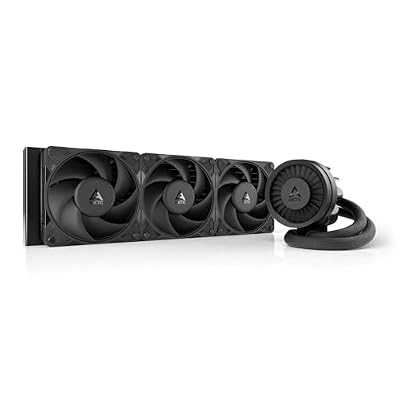
ARCTIC Liquid Freezer III Pro 360 - AIO CPU Cooler,3 x 120 mm Water Cooling | Cooler For LGA1851, LGA1700, AM4, AM5.
Included for 'Best 360mm CPU Coolers: AIO Liquid Picks for AM5 and LGA 1700' because the listing adds cooling or gel-infused layers, which is the attribute this article compares.
View on Amazon2. ID-COOLING FX360 PRO: Best for a simple AIO with clean styling
Specs per the listing: 360mm AIO, high-efficiency fans, CD-pattern pump cover, triple 120mm fans, supports Intel LGA1851/1700 and AMD AM5/AM4.
The FX360 PRO is a good fit for builders who want a standard 360mm layout and a decorated pump cap without a complicated ecosystem. The listing covers the same four sockets as the ARCTIC and describes triple 120mm fans.
ID-COOLING is less of a household name than Corsair or ASUS, so check the warranty and support on the maker page. Software control is not mentioned in the title, so expect straightforward motherboard fan headers rather than app-based control.
- Pros: Supports Intel LGA1851/1700 and AMD AM5/AM4; Triple 120mm fans; Decorative pump cover
- Cons: Warranty details not in the title; No software ecosystem mentioned

ID-COOLING FX360 PRO 360mm AIO CPU Cooler, High-Efficiency Fans | CD-pattern pump cover, triple 120mm high-efficiency fans, supports Intel LGA1851/1700 and AMD AM5/AM4.
Included for 'Best 360mm CPU Coolers: AIO Liquid Picks for AM5 and LGA 1700' because the listing adds cooling or gel-infused layers, which is the attribute this article compares.
View on Amazon3. ASUS TUF Gaming LC III ARGB 360mm: Best for gaming builds with ARGB
Specs per the listing: 360mm AIO, TUF Gaming MF-12 fans, 3-phase 6-slot 4-pole pump, reinforced tubing, ARGB lighting, Intel LGA1851/1700/1200 and AMD AM5/AM4.
The TUF LC III pairs ARGB lighting with a pump design the listing describes as 3-phase, 6-slot and 4-pole, and it highlights reinforced tubing. It is also the only model here that lists LGA1200, so it works for owners of an older Intel board.
The ARGB lighting is a plus if your motherboard supports it and a minor annoyance if it does not, so check header compatibility. If your build is mostly aesthetic and you already use ASUS components, this is a natural match.
- Pros: Also lists LGA1200 support; Reinforced tubing and ARGB; TUF MF-12 fans
- Cons: Needs an ARGB header to use lighting; Fan RPM not listed

ASUS TUF Gaming LC III ARGB 360mm AMD/Intel Gaming Liquid CPU Cooler | 360mm AIO, TUF Gaming MF-12 fans, 3-phase 6-slot 4-pole pump, reinforced tubing, Intel LGA1851/1700/1200 & AMD AM5/AM4
Included for 'Best 360mm CPU Coolers: AIO Liquid Picks for AM5 and LGA 1700' as a representative home product in this roundup; selection reflects the product set returned for this topic.
View on Amazon4. Thermalright Frozen Warframe 360 SE ARGB V2: Best for display-equipped builds
Specs per the listing: 360mm AIO with 2-inch LCD screen, 3000RPM pump, 3x TL-M12Q 120mm PWM daisy-chain fans, AM5/AM4 and Intel LGA1851/1700, black.
The LCD pump cap is the headline feature: you can show a clock, animation or sensor readout. Daisy-chain fan cabling keeps the build tidier with fewer separate plugs.
The 2-inch screen needs software and a USB connection on the board, and the title does not describe how that works, so confirm with the maker page. If you do not care about a display, the more basic models here are simpler.
- Pros: LCD screen on the pump cap; Daisy-chain fans for tidy cabling; PWM fans
- Cons: Display needs software and a header; LGA1200 is not listed

Thermalright Frozen Warframe 360 SE ARGB V2 360mm AIO Cooler, 2" LCD Screen | 3000RPM Pump, 3×TL-M12Q 120mm PWM Daisy-Chain Fans, for AMD AM5/AM4 and Intel LGA1851/1700, Black
Included for 'Best 360mm CPU Coolers: AIO Liquid Picks for AM5 and LGA 1700' as a representative home product in this roundup; selection reflects the product set returned for this topic.
View on Amazon5. CORSAIR iCUE Link Titan 360 RX RGB: Best for premium iCUE ecosystems
Specs per the listing: 360mm AIO, 3x RX120 RGB fans, iCUE Link System Hub included, FlowDrive cooling engine, low-noise, Intel LGA 1851/1700 and AMD AM5/AM4, black.
The Titan 360 RX is the choice for a Corsair ecosystem. The iCUE Link System Hub reduces cable clutter and lets the fans, pump and other iCUE Link parts connect in a chain, so it makes the most sense if you already use iCUE devices.
The cost is complexity: it relies on Corsair software and a system hub, and the title does not give radiator thickness or fan speeds. If you do not use iCUE, the extra ecosystem is a feature you may not need.
- Pros: iCUE Link System Hub included; Three RX120 RGB fans; Low-noise design per listing
- Cons: Best value only inside the iCUE ecosystem; Relies on Corsair software

CORSAIR iCUE Link Titan 360 RX RGB Liquid CPU Cooler – 360mm AIO – Low-Noise – FlowDrive Cooling Engine – Intel LGA 1851/1700, AMD AM5/AM4 – 3X RX120 RGB Fans – iCUE Link System Hub Included – Black
Included for 'Best 360mm CPU Coolers: AIO Liquid Picks for AM5 and LGA 1700' because the listing adds cooling or gel-infused layers, which is the attribute this article compares.
View on AmazonHow to Choose
Check socket and case first
Confirm that the cooler lists your socket: AM5 and AM4 for AMD, LGA1700 and LGA1851 for Intel (and LGA1200 for the ASUS). Then check that your case supports a 360mm radiator at the front or top and that the tubing reaches the CPU block. Many compact cases only take 240mm.
Radiator placement and clearance
A 360mm radiator is 360mm long, plus fan thickness. Check the case manual for maximum radiator thickness and RAM clearance when mounted at the top. Front mounting is easier for memory clearance but may limit space for a graphics card in some cases.
Choose features for your use
Lighting, LCD screens and software hubs are cosmetic. If you do not want them, a plain model like the ARCTIC is the simplest option. If you want a showpiece, the LCD or iCUE options add visual interest but also cables and software.
What to skip
Skip air coolers when you specifically want a 360mm AIO. Skip any cooler that does not state your socket in the title. Also skip a 360mm unit if your case cannot take it; a smaller AIO or a large air cooler is a better fit than forcing one in.
Frequently Asked Questions
Is a 360mm AIO better than a 240mm?
A larger radiator generally has more surface area, which helps with high-power processors and quieter fan curves. It also needs more case space. Choose 360mm if your case supports it and your CPU runs hot.
Do I need an ARGB header?
Only for the models with lighting that you want to control. The ARCTIC plain model has none. Check your motherboard for a 5V ARGB header, and use the maker page to confirm wiring.
Will these fit AM5?
All five listings state AM5 support. Mounting hardware varies, so check that the kit includes the right brackets and read the manual to avoid pressure problems.
How long does an AIO last?
Lifespan varies by maker and use, and we do not state a figure. Check the warranty length on each maker page, and listen for pump noise over time.
Does the LCD affect cooling?
No. The screen is a cosmetic feature on the pump cap. Cooling is set by the cold plate, pump, radiator and fans, so judge the LCD model by features you want rather than temperature claims.