An RGB keyboard and mouse combo buys you a matched look and a single setup step, but the lighting is only part of the decision. The keyboard half decides how typing and key presses feel, the mouse half decides how aiming and clicking feel, and the two halves have to suit the same desk, the same games, and the same hands. A set that glows beautifully but pairs a cramped board with a mouse that is too large or too small is a poor buy, however good it looks in photos.
The five sets below are all keyboard and mouse kits with RGB or backlit wording stated in the listing title, chosen from what each listing title states about lighting, mouse sensitivity, anti-ghosting, and size. They span full-size boards, a compact 65 percent board, wired sets, and one wireless set, so the choice comes down to desk space, layout preference, and how much weight you put on the mouse half versus the keyboard half.
Quick Picks
As an Amazon Associate we earn from qualifying purchases.
| Product | Best for | Key spec from title |
|---|---|---|
| Redragon Updated S107 Gaming Keyboard and Mouse | A full setup with software control | RGB keyboard, 10000 DPI mouse, 25-key anti-ghosting |
| Redragon S101-3 PRO Gaming Keyboard and Mouse | Recording macros without extra steps | RGB backlit, independent macro record keys |
| RedThunder K10 Wired Gaming Keyboard and Mouse | A desk set with a wrist rest included | RGB backlit, 7D 7200 DPI mouse, 3-in-1 set |
| MSI Forge GK110 Combo | The highest mouse sensitivity wording here | RGB keyboard and mouse set, 12800 DPI optical sensor |
| GEODMAER 65 Percent Gaming Keyboard and Mouse Combo | A small desk and a compact layout | 65 Percent board, RGB backlit, 7200 DPI mouse |
How to Choose
Read the lighting wording as a feature, not a promise
RGB wording tells you the keyboard lights up, but it does not tell you how much control you get over the lighting. Some titles state programmable lighting with software, which means effects and brightness can be changed from the computer, while others state only that the keyboard is backlit, which usually means fixed colours changed from the keyboard itself. Decide before buying whether you want per-key control and software profiles, or whether a steady backlight that helps you see keys in a dark room is enough. If lighting sync with other gear matters, check the full listing for software wording, because the title alone rarely states which programs the set works with.
Match the mouse half to your grip and your games
Combo mice are often described with a single sensitivity figure, and that figure is the easiest way to compare them here, but it is not the whole story. A high DPI figure suits fast turns in shooters and quick movement across large monitors, while a lower figure can feel steadier for precise aiming. Just as important is the mouse shape and button count stated in the title: a 7D mouse carries extra side buttons for skills and shortcuts, while a simpler mouse keeps the shape clean for players who only need the standard buttons. Think about how you hold a mouse and which games you play most, then weigh the mouse half as heavily as the keyboard half.
Check anti-ghosting and layout before you buy
Anti-ghosting wording states how many keys the board registers when several are pressed at once, which matters in games where movement, sprinting, and ability keys are held together. A 25-key or 26-key anti-ghosting claim covers the keys most players press in combination, while a title that says nothing about anti-ghosting leaves the question open for the full listing. Layout matters just as much: a full-size board keeps the number pad for work and hotkeys, while a 65 percent board drops keys to save desk space and shortens the reach to the mouse. Measure your desk and be honest about whether you use the number pad daily before choosing between the two.
Decide wired or wireless on the whole set, not one half
A combo shares one buying decision across two devices, so the connection type has to work for both. Wired sets avoid charging and pairing entirely and keep both halves ready whenever the computer is on, which suits a fixed desk that never moves. Wireless sets free the desk from cables but add batteries or charging to both the keyboard and the mouse, and a title that states three modes, wired plus two wireless options, gives a fallback if the wireless link ever drops. Check whether the set runs over a single receiver for both halves, and whether the keyboard and mouse can keep working while charging, because a dead half mid-game is the main drawback of going wireless.
The 5 Best Options
1. Redragon Updated S107 Gaming Keyboard and Mouse
The Redragon S107 is the most completely described set in this group, with the title stating the lighting, the mouse sensitivity, the anti-ghosting, the polling rate, and the software in one line. That breadth of stated wording makes it the easiest set to judge before buying: the keyboard is an RGB gaming keyboard, the mouse reaches 10000 DPI, and the set is built around plug-and-play use on a PC or laptop with programmable software behind it. It suits a buyer who wants a full-size matched set and wants the listing itself to answer most questions.
Specs
- RGB gaming keyboard with 10000 DPI mouse combo
- 25-key anti-ghosting
- 1K Hz programmable mouse with software
- Plug and play for PC and laptop
Best for: A buyer who wants software control and the fullest stated specification in one kit.
Watch out for: The title states no layout size or switch wording, so confirm the board size and key feel on the full listing before buying.
- ASIN: ⚠ B0DWMQRK3M
2. Redragon S101-3 PRO Gaming Keyboard and Mouse
The Redragon S101-3 PRO leads with its macro keys rather than its sensitivity figure, which sets it apart from the other Redragon set here. The title states an RGB backlit programmable keyboard and mouse with software and independent macro record keys, aimed at players who want to record key sequences without extra programs. It is framed as a value combo set in a new update version, so it suits a buyer who values one-touch macros and a straightforward backlit look over headline sensitivity numbers.
Specs
- RGB backlit programmable keyboard and mouse with software
- Independent macro record keys
- Value combo set, new update version
Best for: A player who records macros and wants that control built into the keyboard itself.
Watch out for: The title states no DPI figure, no anti-ghosting wording, and no layout size, so those details need confirming on the full listing.
- ASIN: ⚠ B00NLZUM36
3. RedThunder K10 Wired Gaming Keyboard and Mouse
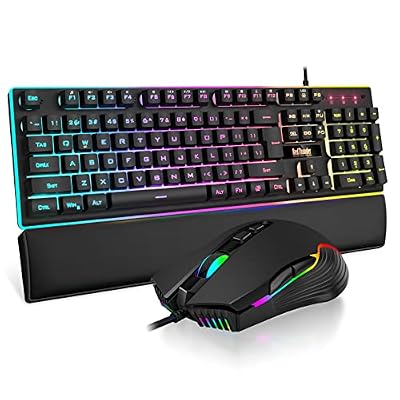
The RedThunder K10 is the only set here that adds a wrist rest, and the title presents it as a three-in-one set for a PC gamer: a wired RGB backlit keyboard, a 7D mouse, and a soft leather wrist rest in black. The keyboard is described as mechanical-feel with anti-ghosting, and the mouse states 7200 DPI with seven directions of control, so both halves carry concrete stated wording. It suits a buyer setting up a fixed desk who wants the rest included rather than bought separately.
Specs
- Wired RGB backlit keyboard and mouse and wrist rest combo
- Mechanical-feel anti-ghosting keyboard
- 7D 7200 DPI mouse
- Soft leather wrist rest, 3-in-1 set, black
Best for: A fixed desk setup where a wrist rest and a mechanical-feel board are both wanted.
Watch out for: The title states no software or polling-rate wording, so lighting control and reporting speed need confirming on the full listing.
- ASIN: ⚠ B09N9FR2FH
4. MSI Forge GK110 Combo
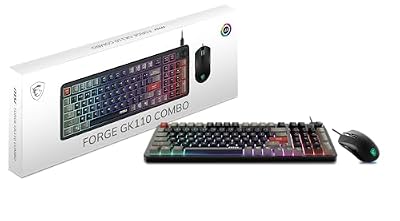
The MSI Forge GK110 carries the highest mouse sensitivity wording in this group, with the title stating a 12800 DPI optical sensor alongside a gaming RGB keyboard and mouse set. The keyboard half states 26-key anti-ghosting, which covers the key combinations most players hold during play. The title is short on other detail, stating neither the connection type nor the layout size, so it suits a buyer who puts the mouse sensor first and is willing to confirm the remaining details on the full listing.
Specs
- Gaming RGB keyboard and mouse set
- 26-key anti-ghosting
- 12800 DPI optical sensor
Best for: A player who prioritises the highest stated mouse sensitivity in this group.
Watch out for: The title states no wired or wireless wording and no layout size, so confirm the connection type and board size on the full listing.
- ASIN: ⚠ B0FP7CL37H
5. GEODMAER 65 Percent Gaming Keyboard and Mouse Combo
The GEODMAER set is the compact choice, built around a 65 percent board for desks where a full-size keyboard crowds the mouse. The title states an RGB backlit keyboard paired with a 7200 DPI gaming mouse, in an ultra-compact anti-ghosting wired set for PC and laptop gamers. It suits a buyer who wants the smallest footprint here and is happy to give up the number pad and function row spacing in exchange for more mouse room.
Specs
- 65 Percent gaming keyboard and mouse combo
- RGB backlit keyboard with 7200 DPI gaming mouse
- Ultra-compact anti-ghosting wired keyboard and mouse
- For PC and laptop gamers
Best for: A small desk where a compact board frees real room for the mouse.
Watch out for: A 65 percent layout drops keys a full-size board keeps, so confirm which keys are missing on the full listing before buying.
- ASIN: ⚠ B0FBWP81MW
Which One Fits Your Situation
You want the most detail stated before you buy
Choose the Redragon S107. Its title states the lighting, the sensitivity, the anti-ghosting, the polling rate, and the software, so fewer questions are left for the full listing than with any other set here. It is the safest pick when you want to judge a combo from its stated wording alone and move on.
You play with macros and want them on the keyboard
Choose the Redragon S101-3 PRO. Its independent macro record keys are the headline feature, and the programmable RGB backlighting with software supports a setup built around recorded sequences. It suits players who repeat the same openings, crafting steps, or chat commands and want them on a single key press. If you rarely record sequences, the macro keys add little, and the S107 gives you more stated detail.
You are setting up a fixed desk from scratch
Choose the RedThunder K10. The included soft leather wrist rest means one less separate purchase, and the wired RGB set with a mechanical-feel board suits a desk that stays put. It is the most complete desk package of the five. The 7D mouse adds side buttons for skills and shortcuts, so the set covers both comfort and control without extra accessories. Confirm the lighting software wording on the full listing, since the title states backlighting without naming a program.
Your desk is small and the mouse needs room
Choose the GEODMAER 65 Percent set. The ultra-compact board gives the mouse the most space of any pick here, and the wired connection keeps both halves ready without charging. It suits players who rarely touch the number pad and want the keyboard to disappear under their hands. Check the missing keys against your daily use before committing, because a key you press every session is a poor trade for desk space.
Common Mistakes
- Buying for the lighting alone without checking the mouse half: a bright keyboard cannot rescue a mouse shape or button layout that does not suit your grip.
- Assuming every RGB title means software control: some sets state only backlighting, with effects changed on the keyboard rather than through a program.
- Ignoring the layout: a full-size board on a small desk crowds the mouse, while a 65 percent board drops keys some players press every session.
- Treating the DPI figure as the only mouse spec: button count, shape, and weight shape how a mouse feels far more than the top sensitivity number.
- Skipping the full listing: titles here state only part of each set, and connection type, switch feel, and cable details live on the listing page.
Frequently Asked Questions
Is an RGB keyboard and mouse combo good for gaming?
Yes, when both halves suit your games. The keyboard half needs anti-ghosting for keys pressed together, and the mouse half needs a sensitivity range and shape that fit your grip. A combo is a good buy when the two halves are each good enough for your actual play, and a poor buy when either half falls short of what you need.
Does an RGB combo need software to change the lighting?
It depends on the set. Titles that state programmable lighting with software usually allow effects and brightness to be changed from the computer, while titles that state only backlighting usually mean fixed colours or built-in effects changed from the keyboard. Check the full listing for software wording before buying if lighting control matters to you.
Is a higher DPI mouse better for gaming?
Not always. A higher DPI figure allows faster movement and suits large monitors and quick turns, but many players aim better at moderate settings and change sensitivity in game. Treat the DPI figure as a range to choose from, not a score, and weigh the mouse shape and buttons just as heavily.
Should I buy a combo or a separate keyboard and mouse?
Buy a combo when both halves suit your use and you value one matched look and one setup step, especially for a first setup or a second desk. Buy separately when either half has a specific job, such as a particular switch type or a mouse shape you already know, that the combo version cannot match.
Top picks from this guide
 RedragonRedragon S101-3 PRO Gaming Keyboard and Mouse, RGB Backlit Programmable…
 RedThunderRedThunder K10 Wired Gaming Keyboard and Mouse and Wrist Rest…
 RedragonRedragon Updated S107 Gaming Keyboard and Mouse, RGB Gaming Keyboard…
 GEODMAERGEODMAER 65% Gaming Keyboard and Mouse Combo, RGB Backlit Keyboard…