Free cloud gaming tiers promise the full library without a console or a gaming PC, and the promise holds up better than many players expect. GeForce NOW lets anyone queue into a free session, Xbox Cloud Gaming opens its free-to-play titles without a subscription, and smaller services hand out trial sessions that cost nothing. The catch sits in the fine print: sessions end after a set length, queues grow at peak hours, and the stream caps out at a modest resolution.
What you play on, and how your home network is set up, decides whether those limits feel like a minor pause or a ruined evening. This guide walks through the limits that matter, the network numbers that keep play smooth, and four pieces of gear that make the biggest difference on a free tier: two controllers, a WiFi 6E router, and a wired headset. Every pick comes from its Amazon product page, with a real ASIN you can look up.
Quick Picks
As an Amazon Associate we earn from qualifying purchases.
| Product | Best for | Key spec from title |
|---|---|---|
| Xbox Wireless Controller Carbon Black | Console-style play on any screen | Hybrid D-pad, Share button |
| 8BitDo Ultimate Bluetooth Controller | Long sessions without drift worry | Hall Effect joysticks, charging dock |
| TP-Link Archer AXE75 WiFi 6E Router | Cutting WiFi lag at home | AXE5400 tri-band WiFi 6E, 6 GHz band |
| HyperX Cloud II Gaming Headset | Clear audio without Bluetooth lag | 7.1 surround sound, detachable microphone |
How to Choose
Free-Tier Session Limits and Queues
Every free tier rations time. GeForce NOW free sessions run about an hour before you rejoin the queue, Xbox free-to-play cloud titles need no subscription yet still depend on server load, and trial sessions from smaller services end quickly and may not save progress the same way a paid plan does. Before you commit to a service, check four things: the session length, how the queue behaves at peak hours, the resolution cap, and whether your saves carry over between sessions. A tier that drops you mid-match is worse than a tier with a shorter session that warns you first. Pick the service whose limits fit the way you actually play, then build your setup around it.
Latency and Network Numbers That Matter
Cloud gaming streams video to you and sends your inputs back, so delay stacks up from the controller, the network, and the display. A wired Ethernet link beats WiFi for stability, a 5 GHz or 6 GHz band beats the crowded 2.4 GHz band, and a nearby server region beats a distant one every time. For smooth 1080p play you want a steady download lane with headroom above the minimum, low ping to the service, and minimal jitter. Raw download speed matters less than most people assume once you clear the minimum. Packet loss and jitter cause the stutter and rubber-banding that ruin a match, so measure your connection at the time of day you actually play.
Controllers: Bluetooth, Wired, and Compatibility
A controller is the single biggest feel upgrade on a free tier, because touch controls add delay and imprecision to a stream that already has some. Check how the controller connects to your device: Bluetooth works nearly everywhere, a USB-C wired link cuts input delay further, and a phone clip turns a handset into a handheld console. Hall Effect sticks resist the drift that wears out older potentiometer sticks, while a built-in battery or a charging dock keeps long sessions going. Confirm the controller pairs with your exact device, whether that is Windows, Android, iOS, or a smart TV app, since support varies more than the marketing suggests.
Router and Audio: The Quiet Latency Killers
Your router and your headset decide how much of the stream survives the trip through your house. A WiFi 6 or WiFi 6E router opens the 6 GHz band, which stays clear of the neighbors crowding 2.4 GHz and 5 GHz, and quality-of-service settings can put your game traffic ahead of a video download in another room. Wired Ethernet ports matter too, since a cable to your laptop or TV removes WiFi from the chain entirely. On audio, a wired headset avoids the extra delay Bluetooth adds between the game and your ears, and a closed-back design with a detachable microphone keeps voice chat clear without letting room noise leak in.
The 4 Best Options
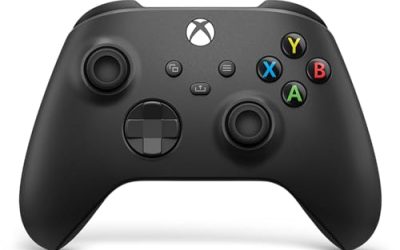
Xbox Wireless Controller Carbon Black

The Xbox Wireless Controller is the default pad for cloud gaming: it pairs with almost everything a free tier runs on, from Windows PCs to Android phones, iOS devices, and smart TVs. The hybrid D-pad feels precise in platformers and fighting games, the textured grip keeps the pad steady during long sessions, and the Share button captures clips without digging through menus. Bluetooth handles wireless play, while a USB-C cable gives you a wired link when you want the lowest delay. It runs on two AA batteries for up to 40 hours, so a rechargeable pair or a battery pack covers a full week of evening sessions.
Specs
- Hybrid D-pad and textured grip on triggers, bumpers, and back case
- Share button for capturing screenshots and recordings
- Xbox Wireless and Bluetooth for Xbox Series X|S, Xbox One, Windows PC, Android, and iOS
- USB-C port for wired play and 3.5mm headset jack
- Up to 40 hours of battery life with 2 AA batteries
- Custom button mapping with the Xbox Accessories app
Best for: Players who want one controller that works across console, PC, phone, and TV cloud apps.
Watch out for: The sticks use potentiometer sensors rather than Hall Effect, so drift can appear after heavy long-term use; confirm the listing is live before ordering, since the QAT-00007 model has a parallel listing under a different code.
8BitDo Ultimate Bluetooth Controller Black

The 8BitDo Ultimate Bluetooth Controller answers the drift problem directly with Hall Effect joysticks, which use magnets instead of physical contact and hold their center far longer than standard sticks. It connects over Bluetooth, 2.4GHz wireless, or USB-C, so it covers Switch, Windows, Steam Deck, and mobile play from one pad, and the included charging dock powers it on and off automatically when you set it down. Two pro back paddles add extra inputs for games that reward them, and the 22-hour rechargeable battery outlasts most free-tier session blocks. Motion controls and rumble round out a pad built for long sessions.
Specs
- Hall Effect sensing joysticks
- Charging dock with auto ON/OFF
- Bluetooth, 2.4GHz, and USB-C connectivity
- 2 pro back paddle buttons
- 22-hour rechargeable battery
- Compatible with Switch, Windows, and Steam Deck
Best for: Players who play long sessions and want drift-resistant sticks plus a dock that keeps the pad charged.
Watch out for: The dock needs a clear spot near your play area, and some phone cloud apps map the extra paddles differently, so check your app’s button layout before a long session.
TP-Link Archer AXE75 WiFi 6E Router

The Archer AXE75 attacks cloud gaming lag where it lives: your home network. Its tri-band WiFi 6E design opens the 6 GHz band, which stays clear of the congestion that slows 2.4 GHz and 5 GHz in apartment buildings, and the 160 MHz channels give the stream room to breathe. Six high-performance antennas spread coverage through the house, while a 1.7 GHz quad-core CPU keeps the router responsive when several devices stream at once. The Gigabit WAN port, four Gigabit LAN ports, and USB 3.0 port cover wired play and storage, and OneMesh lets you extend coverage without a second network name.
Specs
- AXE5400 tri-band WiFi 6E with 6 GHz band
- 160 MHz channels
- 1.7 GHz quad-core CPU
- 6 high-performance antennas
- Gigabit WAN port, 4 Gigabit LAN ports, USB 3.0 port
- OneMesh whole-home coverage, WPA3 security, HomeShield
Best for: Households where WiFi congestion, distance from the router, or shared bandwidth makes cloud streams stutter.
Watch out for: The 6 GHz band needs a WiFi 6E device to use it, and its range through walls is shorter than 5 GHz, so place the router where your play area gets a clear signal.
HyperX Cloud II Gaming Headset Red

The HyperX Cloud II is a wired headset, and that wire is the point: it carries game audio and voice chat with no Bluetooth delay between the stream and your ears. The USB sound card audio control box delivers 7.1 surround sound on PC, while 53 mm drivers and memory foam ear pads keep long sessions comfortable and directional cues clear. The aluminum frame survives daily use, the detachable microphone comes off for solo play, and passive noise cancellation muffles room noise without any battery or charging. It works across PC, PlayStation, and Xbox, so one headset covers every screen a free tier reaches.
Specs
- 7.1 surround sound via USB sound card audio control box
- 53 mm drivers
- Memory foam ear pads
- Durable aluminum frame
- Detachable microphone
- Passive noise cancellation
Best for: Players who want lag-free audio and clear voice chat on any cloud gaming screen.
Watch out for: The 7.1 surround works on PC and Mac while consoles and mobile get stereo, and the red colorway is the one tied to this listing, so match the model KHX-HSCP-RD when ordering.
Which One Fits Your Situation
You Play on a Phone or Tablet
A phone or tablet is the most common free-tier screen, and a controller turns it into a handheld. Pair the Xbox Wireless Controller over Bluetooth for app support, or grab the 8BitDo Ultimate if you play daily and want Hall Effect sticks that hold up over time. Add a phone clip so the screen sits at eye level, use a 5 GHz or 6 GHz WiFi band, and keep the charger nearby, since streaming drains a handset battery fast.
You Play on a TV or Laptop Over WiFi
TV and laptop play puts your stream through the whole house, so the router matters most. The Archer AXE75 clears the 6 GHz band for your game traffic, and a wired Ethernet cable to the TV or laptop removes WiFi from the chain entirely. Pair it with the Xbox controller for broad compatibility and the HyperX Cloud II so audio arrives without Bluetooth delay. If the TV sits far away, OneMesh coverage or moving the router beats any settings change.
You Play Competitive Shooters on a Free Tier
Fast games punish every millisecond, and free tiers add queue time on top of stream delay. Wire everything you can: a USB-C cable for the controller, Ethernet for the device, and the wired HyperX Cloud II for audio with no wireless lag. The 8BitDo Ultimate earns its place here with Hall Effect sticks that stay accurate under flicks, while the AXE75 keeps your traffic on the clearest band. Accept the session cap and avoid peak hours, when queues stretch longest.
You Share the Connection With a Household
Shared bandwidth is the silent killer of free-tier sessions, since a download or video call in another room can spike your jitter mid-match. The Archer AXE75 is the pick here, with quality-of-service settings that put game traffic ahead of background downloads and a 6 GHz band that sidesteps crowded airwaves. Schedule heavy downloads outside your play window, wire the gaming device when possible, and use the HyperX Cloud II so household noise stays out of voice chat.
Common Mistakes
- Playing over the 2.4 GHz band in a crowded building, where neighboring networks add jitter that no controller can fix.
- Using Bluetooth headphones for cloud gaming, which adds audio delay on top of stream delay and makes footsteps arrive late.
- Ignoring the session timer until the free tier drops you mid-match, instead of planning breaks around the cap.
- Buying a controller without checking it pairs with your exact device, since support varies between Windows, Android, iOS, and TV apps.
- Expecting a free tier to stream at the top resolution, when most free plans cap the picture below what a paid plan offers.
Frequently Asked Questions
Can you play cloud games for free without a subscription?
Yes, several services run without a subscription. GeForce NOW offers free sessions with a time cap and a queue, Xbox Cloud Gaming opens free-to-play titles without a paid plan, and smaller services hand out trial sessions. You still need an account, a compatible device, and a steady connection. Free tiers suit casual play, while long daily sessions push players toward a paid plan with longer sessions and no queue.
How fast does my connection need to be for smooth cloud gaming?
For smooth 1080p play you want a download lane above the service minimum, low ping to the nearest server region, and minimal jitter. A wired Ethernet link gives the most stable result, while a 5 GHz or 6 GHz WiFi band is the next best option. Raw download speed matters less than stability once you clear the minimum, since packet loss and jitter cause the stutter that ruins a match.
Do I need a controller, or is a keyboard and mouse enough?
A keyboard and mouse work well in a PC browser session, yet a controller suits far more devices. Touch controls add delay and imprecision to a stream that already carries some, so a controller is the bigger upgrade on a free tier. Pick a pad that pairs with your device over Bluetooth or USB-C, and confirm the cloud app maps its buttons the way you expect.
Why does my game lag even though my internet is fast?
Fast downloads do not guarantee low latency. The stream travels to a distant server and back, so distance, jitter, and packet loss matter more than raw speed. WiFi congestion on the 2.4 GHz band, a distant router, and Bluetooth audio all add delay in your own home. Move closer to the router, switch to the 5 GHz or 6 GHz band, wire the device, and pick a nearby server region.