Streaming changes what a gaming desktop has to do. The machine is not only rendering a game, it is also encoding video, mixing audio, running chat and overlays, and holding a browser full of dashboards steady for hours. A desktop that plays smoothly offline can still drop frames on stream when its processor is crowded or its memory is thin, and that is the gap this guide is built around.
This guide is for streamers, creators and variety broadcasters who want an Intel-powered prebuilt for live play on Twitch, YouTube or Kick. Every system below was chosen from the processor, graphics card, memory, storage and connectivity stated in its Amazon listing, so you can compare what each tower actually ships with.
Quick Picks
As an Amazon Associate we earn from qualifying purchases
| Product | Best for | Key spec from title |
|---|---|---|
| CyberPowerPC Gamer Xtreme Ultra 5 225F | A first streaming rig with a large fast drive | Core Ultra 5 225F, RTX 5060 Ti 8GB, 16GB DDR5, 2TB SSD |
| iBUYPOWER Slate MESH i7-14700F | A mid-range stream with room for chat and overlays | Core i7-14700F, RTX 5070 12GB, 32GB DDR5, 1TB SSD |
| STORMCRAFT Sirius i7-14700F | Long streams with a big library on one drive | Core i7-14700F, RTX 5060 Ti 16GB, 32GB DDR5, 2TB SSD |
| Skytech Shadow i7-14700F | A liquid-cooled stream that stays quiet on mic | Core i7-14700F, RTX 5060 Ti 16GB, 16GB DDR5, 1TB SSD |
| Alienware Aurora ACT1250 Ultra 7 265F | A compact stream with a strong power supply | Core Ultra 7 265F, RTX 5060 Ti, 16GB DDR5, 1TB SSD |
How to Choose
Give the encoder and the game separate headroom
A stream is two workloads at once: the game and the broadcast. Modern RTX cards carry a dedicated encoder that takes the video work off the processor, which is why the graphics card matters as much as the CPU here. Even so, the processor still runs the game logic, audio, chat tools and overlays, so a twenty-core Intel chip keeps those jobs from crowding each other. When you compare systems, look for an RTX card with a hardware encoder and a CPU with enough threads to leave the game smooth while the stream runs.
Treat 32GB of memory as the streaming baseline
Sixteen gigabytes can run a game and a stream, but the margin disappears quickly once you add a browser with chat, alerts, a music app and a dashboard. Thirty-two gigabytes of DDR5 gives you room for all of that without the system paging to disk mid-broadcast, and it also helps when you record a local copy of the stream at the same time. If a system ships with 16GB, check whether it has free memory slots so you can add a second kit later without replacing what you already own.
Size storage for games, recordings and clips
A 1TB SSD holds the operating system, a handful of games and your streaming software, but local recordings and highlight clips fill it fast. A 2TB drive is the safer choice if you record every session or keep several large games installed at once. Also check whether the tower has a spare M.2 slot or drive bay, because adding a second drive for recordings keeps your game drive clear and makes it easier to find and archive clips later.
Check connectivity for cameras, mics and capture gear
A streaming desk collects devices quickly: a webcam or camera, a USB microphone or audio interface, a headset, a controller and sometimes a capture card for a console. Count the USB ports on the front and rear of the tower, and confirm the Wi-Fi standard and Ethernet speed, because a wired connection is steadier for a live broadcast than wireless. A strong power supply also matters when the graphics card and processor both work hard for hours, so note the wattage and rating stated in the listing.
The 5 Best Options
CyberPowerPC Gamer Xtreme Ultra 5 225F

The Gamer Xtreme with a Core Ultra 5 225F is a sensible first streaming rig. Its RTX 5060 Ti handles the game and the hardware encoder, while the 2TB PCIe 4.0 SSD holds a large game library and plenty of local recordings without constant uninstalling. Sixteen gigabytes of DDR5 is enough to start with, and the B860 motherboard platform leaves room to grow. Wi-Fi is built in, so the tower works in a room where running a cable is awkward.
Specs
- Intel Core Ultra 5 225F, 3.3GHz
- NVIDIA GeForce RTX 5060 Ti, 8GB
- 16GB DDR5 RAM
- 2TB PCIe 4.0 SSD
- Intel B860 chipset motherboard
- Wi-Fi ready
- Windows 11 Home
Best for: A first streaming setup with a big game library and room to add memory later.
Watch out for: The 16GB of memory is a starting point for streaming, so check the free memory slots if you plan to run many browser tools at once.
iBUYPOWER Slate MESH i7-14700F

The Slate MESH is built for the middle of the streaming range, where a strong CPU and a capable GPU share the work. Its twenty-core Core i7-14700F keeps game logic, audio and overlay tools responsive, while the RTX 5070 with 12GB of video memory and a dedicated encoder carries the broadcast. Thirty-two gigabytes of DDR5 RGB memory leaves room for chat, alerts and a dashboard, and the mesh case helps airflow during long sessions.
Specs
- Intel Core i7-14700F CPU
- NVIDIA GeForce RTX 5070, 12GB GPU
- 32GB DDR5 RGB 5200MHz RAM
- 1TB NVMe SSD
- Wi-Fi ready
- Windows 11 Home
- Keyboard and mouse included
Best for: A mid-range live stream with chat, overlays and a dashboard running beside the game.
Watch out for: The 1TB drive fills quickly if you record every session, so plan a second drive for recordings.
STORMCRAFT Sirius i7-14700F

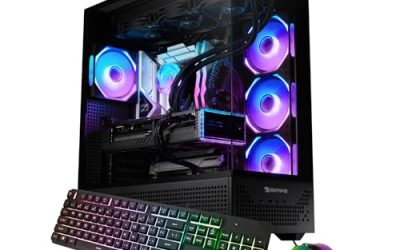
The Sirius suits streamers who broadcast for hours and keep a large library installed. Its Core i7-14700F and RTX 5060 Ti with 16GB of video memory handle demanding games and encoding together, while 32GB of DDR5 at 6000MHz and a 2TB NVMe Gen4 SSD give you room for games, recordings and clips on one fast drive. The B760 platform, Wi-Fi 6E and 2.5GbE networking cover both wireless and wired streaming setups.
Specs
- Intel Core i7-14700F, up to 5.4GHz
- NVIDIA GeForce RTX 5060 Ti, 16GB GDDR7
- 32GB DDR5 RGB 6000MHz RAM
- 2TB NVMe Gen4 SSD
- B760 chipset
- Wi-Fi 6E and 2.5GB Ethernet
- 5 RGB fans
Best for: Long streams with a large installed library and local recordings on one drive.
Watch out for: Confirm the exact fan and lighting setup in the listing, because the Sirius is sold in several configurations.
Skytech Shadow i7-14700F

The Shadow is the pick for streamers who care about microphone noise. Its Core i7-14700F and RTX 5060 Ti with 16GB of video memory cover modern games and encoding, while the 360mm ARGB liquid cooler keeps the processor cool without a loud air cooler spinning up on mic. Sixteen gigabytes of DDR5 and a 1TB Gen4 NVMe SSD cover the game and the broadcast software, and the 650W Gold power supply suits long sessions under load.
Specs
- Intel Core i7-14700F, 2.1GHz, up to 5.3GHz
- NVIDIA GeForce RTX 5060 Ti, 16GB
- 16GB DDR5 RAM, 5200MHz
- 1TB Gen4 NVMe SSD
- 650W Gold PSU
- 360mm ARGB AIO liquid cooling
- Wi-Fi
- Windows 11
Best for: A quiet stream where the microphone picks up the room, not the cooler.
Watch out for: The 16GB of memory is workable for streaming, but check the free slots if you run a browser full of stream tools.
Alienware Aurora ACT1250 Ultra 7 265F

The Aurora ACT1250 fits a streamer who wants a tidy, well-built tower with a strong power supply. Its twenty-core Core Ultra 7 265F and RTX 5060 Ti handle the game and the encoder together, while 16GB of DDR5 and a 1TB SSD cover the essentials. The 500W Platinum-rated power supply and clear-panel chassis suit a desk where the tower is visible, and the compact footprint leaves more room for a camera, a mic arm and a second monitor.
Specs
- Intel Core Ultra 7 265F processor
- NVIDIA GeForce RTX 5060 Ti
- 16GB DDR5 RAM
- 1TB SSD
- 500W Platinum rated PSU
- Air cooled
- Windows 11 Home
- Clear panel chassis
Best for: A compact, tidy streaming desk where the tower itself is part of the setup.
Watch out for: Check the exact graphics and memory configuration in the listing, because the Aurora ACT1250 is sold in many variants.
Which One Fits Your Situation
You are starting your first channel
Choose the CyberPowerPC Gamer Xtreme Ultra 5 225F. Its RTX 5060 Ti encoder and 2TB SSD give you a solid foundation for regular broadcasts, and you can add memory later when your toolset grows. The 2TB drive also holds your game library and local recordings together, so you will not need to uninstall games to make room for clips.
You stream several nights a week with overlays and chat
Choose the iBUYPOWER Slate MESH i7-14700F. The twenty-core CPU and 32GB of DDR5 keep the game, the encoder, chat and alerts responsive together, and the mesh case helps during long sessions. The 32GB of memory also leaves room for a browser full of dashboards and a music player, so your stream setup can grow without the game stuttering.
You record everything and keep many games installed
Choose the STORMCRAFT Sirius i7-14700F. Its 2TB SSD and 32GB of memory hold a large library and local recordings on one fast drive, and the 16GB graphics card leaves headroom for demanding titles. The 16GB graphics card also handles demanding titles at higher settings, so recordings look sharp even when the game gets busy.
Your microphone hears everything in the room
Choose the Skytech Shadow i7-14700F. The liquid cooler keeps the processor quiet under load, which matters when your mic is close to the tower and your audience hears every fan ramp. The 360mm liquid cooler also keeps temperatures steady during long broadcasts, so the fans stay quiet even when the game and the encoder both work hard.
Common Mistakes
- Buying a gaming desktop for streaming without checking whether the graphics card has a hardware encoder.
- Running a stream on 16GB of memory while a browser full of chat, alerts and dashboards eats the margin.
- Filling a 1TB drive with games and then recording every session to the same drive.
- Streaming over Wi-Fi in a crowded household instead of using a wired connection when one is available.
- Placing the tower where its fans blow straight into a sensitive microphone.
Frequently Asked Questions
What matters most in a streaming desktop, the CPU or the GPU?
Both, for different jobs. The GPU and its hardware encoder carry the video broadcast, while the CPU runs the game logic, audio, chat and overlays. A balanced system with a twenty-core Intel chip and a modern RTX card keeps both sides smooth. A strong GPU alone will not fix a crowded processor, and a strong CPU alone will not fix a weak encoder.
Is 16GB of RAM enough for game streaming?
It is enough to start, but 32GB is the safer baseline for regular streaming. Chat, alerts, a browser, a music app and a local recording all consume memory beside the game. If you buy a 16GB system, check that it has free memory slots so you can add a second kit later.
Do I need a capture card to stream PC games?
No, not for games running on the same PC. The streaming software captures the game directly, and the RTX encoder handles the broadcast. A capture card only becomes necessary when you want to stream a console or a second PC through the same setup.
Should I stream over Wi-Fi or Ethernet?
Ethernet is steadier for a live broadcast, because it avoids the interference and congestion that can affect wireless in a busy household. If you must use Wi-Fi, place the tower close to the router, use a modern Wi-Fi standard, and keep other heavy downloads off the network while you are live.