Cloud gaming moves the heavy work to servers far away, so the gear in your hands and on your desk decides whether a session feels instant or sluggish. A controller that pairs cleanly, a router that keeps the connection steady, and a monitor that draws each frame without smearing matter more than a powerful local machine. The wrong combination turns a smooth stream into delayed inputs and smeared motion, while the right one makes a modest laptop or TV feel like a full gaming rig.
This guide is for players who stream games on a TV, a laptop, a phone, or a tablet and want the setup to disappear into the background. It covers casual players who dip in for an evening, households where several people share one connection, and competitive players who notice every millisecond of delay. Each pick below comes from names and specifications listed on its Amazon page, with the focus on the traits that shape streamed play rather than raw local horsepower.
Quick Picks
As an Amazon Associate we earn from qualifying purchases
| Product | Best for | Key spec from title |
|---|---|---|
| Xbox Wireless Controller | Everyday cloud play on console, PC, and mobile | Wireless and Bluetooth connectivity |
| 8BitDo Ultimate Bluetooth Controller | Hall Effect sticks and a charging dock | Hall Effect sensing joystick |
| TP-Link Archer AXE75 Router | Steady Wi-Fi 6E for busy households | AXE5400 tri-band Wi-Fi 6E |
| ASUS TUF Gaming VG27AQ Monitor | Smooth high-refresh visuals | QHD 165Hz IPS display |
How to Choose
Latency and Connection Stability
Latency is the gap between pressing a button and seeing the result, and it decides whether cloud gaming feels natural or frustrating. A wired Ethernet link from your router to your TV or laptop removes one source of wobble, while a strong 5 GHz or 6 GHz wireless signal keeps the stream steady when a cable is not practical. Look for a router that can hold a clean signal through walls and handle several devices at once, and place it close to where you play. Run a quick connection check at the same hour you usually play, since evening congestion can change the result.
Controller Comfort and Compatibility
A controller is the part you hold for hours, so grip shape, stick feel, and button layout deserve real attention. Bluetooth pairing lets one controller move between a phone, a tablet, a laptop, and a TV, while a USB-C cable gives a wired option when wireless interference creeps in. Check that the controller works with the service and device you plan to use, since some services accept only certain models. Hall Effect sticks resist drift over time, and a charging dock keeps the controller ready without hunting for cables before every session.
Router Bands and Wired Options
A router shapes every streamed frame, because the game video travels from a distant server through your home network to your screen. Tri-band models add a 6 GHz band that stays clear of the crowded 2.4 GHz and 5 GHz traffic from neighbours and smart home gadgets. Gigabit Ethernet ports matter too, since a wired link to a TV or laptop is the most reliable path for cloud play. Quality of service settings can give gaming traffic priority over downloads and video calls, and a modern quad-core processor keeps the router responsive when many devices connect at once.
Monitor Refresh and Response
A monitor decides how clean streamed motion looks once the video reaches your desk. A 1440p panel with a 165Hz refresh and a 1ms response draws fast movement without the blur that makes tracking targets hard. Adaptive sync support keeps the picture free of tearing when the stream frame rate wobbles, which happens often on shared connections. A 27-inch screen hits a comfortable middle ground for a desk, large enough to read distant detail and small enough to keep the whole scene in view. HDMI and DisplayPort inputs let you switch between a laptop, a console, and a streaming stick without replugging cables.
The 4 Best Options
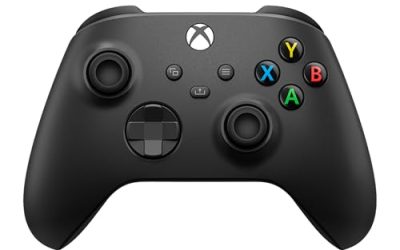
Xbox Wireless Controller — Carbon Black

The Xbox Wireless Controller is the safest default for cloud gaming, because nearly every service and device already knows how to talk to it. It pairs over Xbox Wireless and Bluetooth, so it moves from a console to a laptop, a tablet, or a phone without extra adapters. The hybrid D-pad gives clean diagonal input for fighting games and platformers, while textured grips keep the controller steady during long sessions. A USB-C port allows wired play when wireless interference appears, and the familiar layout means no learning curve for players who already game on Xbox or PC.
Specs
- Wireless and Bluetooth connectivity for Xbox Series X|S, Xbox One, Windows PC, Android, and iOS
- Hybrid D-pad and dedicated Share button
- Textured grip on triggers, bumpers, and back case
- USB-C port for wired play and charging
- Up to 40 hours of battery life on AA batteries
- Works with Xbox Wireless and Bluetooth devices
Best for: Players who want one controller that works across console, PC, and mobile cloud services.
Watch out for: Confirm the listing matches model QAT-00001 for Carbon Black before ordering, since several color variants share similar titles.
ASIN: B08DF248LD
8BitDo Ultimate Bluetooth Controller — Black

The 8BitDo Ultimate Bluetooth Controller suits players who want drift-resistant sticks and a tidy charging setup. Its Hall Effect sensing joysticks use magnets instead of sliding contacts, which helps them hold accuracy after months of daily play. The multifunction charging dock powers the controller and wakes it when lifted off, so it is ready whenever a session begins. Bluetooth, 2.4G, and USB-C connections cover Switch, Windows, and Steam Deck, while two Pro back paddles and a custom profile switch give extra control without opening menus.
Specs
- Hall Effect sensing joysticks
- Multifunction charging dock included
- Bluetooth, 2.4G adapter, and USB-C connectivity
- Compatible with Switch, Windows, and Steam Deck
- Two Pro back paddle buttons and custom profile switch button
- Rumble vibration, motion controls, and 22 hours rechargeable battery
Best for: Players who want Hall Effect sticks, a charging dock, and Switch plus PC support in one controller.
Watch out for: The Bluetooth model and the 2.4G-only model share similar names, so confirm the listing names Bluetooth and the charging dock before ordering.
ASIN: B0B9BGJVLL
TP-Link Archer AXE75 Router

The Archer AXE75 gives cloud gaming a clean wireless path without flagship complexity. Its tri-band AXE5400 design adds a 6 GHz band that stays clear of crowded 2.4 GHz and 5 GHz traffic, which keeps streamed frames arriving on time during busy evenings. Six high-performance antennas spread coverage through a home, while gigabit ports offer a wired link for a TV or laptop. A 1.7 GHz quad-core processor handles many connected devices at once, and OneMesh support lets the router join a wider mesh network when one box cannot cover the whole home.
Specs
- AXE5400 tri-band Wi-Fi 6E with 2.4 GHz, 5 GHz, and 6 GHz bands
- Speeds up to 5400 Mbps across three bands
- Six high-performance antennas
- 1.7 GHz quad-core CPU
- Gigabit WAN and LAN ports plus USB 3.0 port
- OneMesh whole-home coverage, WPA3 security, and HomeShield
Best for: Households that stream games over Wi-Fi while other devices stay online.
Watch out for: Older devices cannot use the 6 GHz band, so confirm your TV, laptop, or streaming stick supports Wi-Fi 6E before counting on it.
ASIN: B0B3SQK74L
ASUS TUF Gaming VG27AQ Monitor

The TUF Gaming VG27AQ makes streamed motion look sharp on a desk setup. Its 27-inch WQHD panel shows 2560 x 1440 detail, and the 165Hz refresh with a 1ms response keeps fast scenes free of the smear that hides movement. G-SYNC compatibility and Extreme Low Motion Blur Sync smooth out the wobble that appears when a stream frame rate shifts. Built-in speakers cover casual sessions without extra gear, and DisplayPort plus HDMI inputs switch between a laptop and a console. VESA mounting frees desk space for a keyboard and controller.
Specs
- 27-inch WQHD 2560 x 1440 IPS display
- 165Hz refresh rate (supports 144Hz) and 1ms response time
- Extreme Low Motion Blur and G-SYNC Compatible
- Built-in speakers
- DisplayPort and HDMI inputs
- VESA mountable
Best for: Desk players who want high-refresh 1440p visuals for streamed and local games alike.
Watch out for: The VG27AQ, VG27AQ1A, and VG27AQ3A share similar names with different refresh rates, so confirm the listing shows 165Hz and model VG27AQ before ordering.
ASIN: B07WQ4FXY9
Which One Fits Your Situation
Playing on a TV in the living room
Pick the Xbox controller and a wired link if your TV sits near the router. The controller pairs quickly with a TV or streaming stick, and an Ethernet cable removes wireless wobble during evening sessions. Keep the router in the open rather than inside a cabinet, and sit within a clear line of sight for the strongest signal.
Playing on a laptop or tablet around the house
Choose the 8BitDo controller and the Archer AXE75 when you roam between rooms. Bluetooth pairing moves the controller from a tablet to a laptop in seconds, and the tri-band router holds a clean signal through walls. The charging dock keeps the controller ready on a desk, so a session can begin without hunting for cables.
Sharing Wi-Fi with a busy household
Go for the Archer AXE75 first when several people stream, call, and download at once. Its 6 GHz band gives gaming traffic a clear lane away from crowded bands, and gigabit ports let you wire the main screen directly. Give gaming traffic priority in the router settings, and schedule large downloads for hours when nobody plays.
Chasing the smoothest competitive feel
Pair the VG27AQ monitor with a wired connection when every frame counts. The 165Hz refresh and 1ms response show movement cleanly, while adaptive sync removes tearing when the stream wobbles. Add the Xbox controller for its familiar layout and low-latency wireless link, and keep background downloads off during competitive matches.
Common Mistakes
- Judging cloud gaming by download speed alone while ignoring latency, which decides how quickly inputs reach the game.
- Playing on a crowded 2.4 GHz band when a 5 GHz or 6 GHz band sits free on the same router.
- Buying a controller without checking it works with your cloud service and device.
- Placing the router inside a cabinet or behind a TV, where the signal weakens before it reaches your screen.
- Skipping a wired Ethernet link for the main screen when the router sits close enough for a cable.
Frequently Asked Questions
Do I need a powerful PC for cloud gaming?
No. The game runs on a remote server, so a modest laptop, tablet, TV, or phone can play demanding titles through a stream. What matters is a stable connection, a comfortable controller, and a screen that shows motion cleanly. A weak local machine can still deliver a good session when the network holds steady and the gear around it fits the job.
How much internet speed do I need for cloud gaming?
Most services play well on a steady 25 to 50 Mbps connection for 1080p, while 4K streams ask for more headroom and a stable line. Consistency matters more than the headline number, since a connection that dips under load causes stutter even when its top speed looks high. A wired link or a clear 5 GHz or 6 GHz signal keeps the stream steadier than a distant 2.4 GHz signal.
Can I use any Bluetooth controller for cloud gaming?
Most modern Bluetooth controllers work, but support varies by service and device. Xbox controllers pair with nearly every cloud service, while some controllers need a specific app or firmware update before they connect. Check the service help pages for a compatibility list, and favor controllers with a USB-C wired mode as a backup when Bluetooth pairing fails or interference appears.
Does a 165Hz monitor help when the stream runs at 60 frames per second?
Yes, within limits. A 165Hz panel still draws each streamed frame cleanly and cuts motion blur, so fast scenes look sharper than on a slow 60Hz screen. It cannot add frames the stream never sent, so the benefit shows in clarity rather than extra smoothness. Adaptive sync also helps, since it keeps the picture free of tearing when the stream frame rate shifts.