The best gaming laptops for law students are light 14-inch machines with strong battery life, quiet cooling, a comfortable keyboard, and enough RTX graphics power for gaming after the reading is done. Law school days run long, moving between lectures, the library, and study groups, so carry weight and unplugged endurance matter as much as frame rates.
The five picks below all stay under four pounds, pair modern RTX graphics with fast SSD storage, and use screens that suit both long documents and fast games. They range from a premium OLED flagship down to a budget-tier model with upgradeable memory.
As an Amazon Associate, we earn from qualifying purchases.
Table of Contents
- Quick Answer
- ASUS ROG Zephyrus G14 (2025)
- HP OMEN Transcend 14
- ASUS TUF Gaming A14
- Acer Predator Triton 14
- MSI Stealth 14 Studio A13VF
- How to Choose
- Who Should Skip
- FAQ
- Conclusion
Quick Answer
For most law students, the ASUS TUF Gaming A14 is the balanced pick: it weighs about 3.22 pounds, carries a 73Wh battery, and its RTX 4060 handles modern games at its 2.5K screen. The ASUS ROG Zephyrus G14 (2025) is the premium step-up with an OLED display and RTX 5070 Ti, while the MSI Stealth 14 Studio A13VF is the budget-tier choice with upgradeable memory and storage.
ASUS ROG Zephyrus G14 (2025)
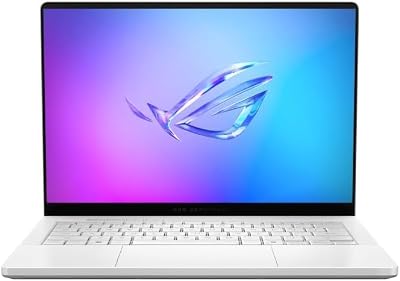
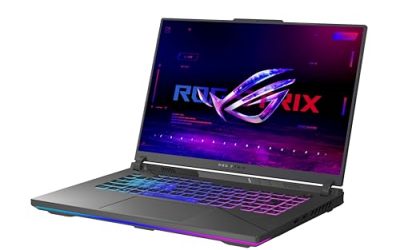
The Zephyrus G14 is the premium pick for a law student who wants one machine for everything. In this configuration it pairs a 12-core Ryzen AI 9 HX 370 with an RTX 5070 Ti carrying 12GB of GDDR7 memory, the strongest graphics in this group, so it stays capable through a full degree and beyond.
The 14-inch OLED display runs at 2880 x 1800 with a 120Hz refresh rate and full DCI-P3 color coverage. Text stays crisp during long reading sessions, and the panel doubles as a strong screen for games and video. At 3.31 pounds and 0.63 inches thin, it slips into a bag next to casebooks without dominating the load, and the 73Wh battery is sized for long library days. Memory is soldered, so this 32GB configuration is the one to choose for longevity.
Specs
- Processor: AMD Ryzen AI 9 HX 370 (12 cores)
- Graphics: NVIDIA GeForce RTX 5070 Ti, 12GB GDDR7
- Display: 14-inch OLED, 2880 x 1800, 120Hz
- Memory: 32GB LPDDR5X-8000 (soldered)
- Storage: 1TB PCIe 4.0 NVMe SSD
- Battery: 73Wh
- Weight: 3.31 lb, 0.63 in thin
- Connectivity: Wi-Fi 7, USB4, HDMI 2.1, microSD reader
HP OMEN Transcend 14

The OMEN Transcend 14 is the Intel-based alternative, and its configuration suits students who split time between study, gaming, and some content creation. A Core Ultra 7 255H pairs with an RTX 5060 and a generous 32GB of memory, so research, writing, and everyday multitasking feel effortless, while the graphics card still runs modern games well at the native resolution with sensible settings.
The 14-inch 3K OLED panel runs at 120Hz with HDR 500 brightness and full DCI-P3 coverage, which keeps documents sharp and games vivid. A practical advantage for campus life is USB-C fast charging: the 71Wh battery can be topped up with the same kind of charger used for phones and tablets, which cuts the weight of a separate power brick on shorter days. The FHD IR camera supports Windows Hello sign-in. At 3.6 pounds it is not the lightest pick here, but the black aluminum design looks understated enough for internships and clerkships.
Specs
- Processor: Intel Core Ultra 7 255H (16 cores)
- Graphics: NVIDIA GeForce RTX 5060, 8GB GDDR7
- Display: 14-inch OLED, 2880 x 1800, 120Hz, HDR 500
- Memory: 32GB LPDDR5X (onboard)
- Storage: 1TB PCIe Gen4 NVMe SSD
- Battery: 71Wh, USB-C fast charge
- Weight: 3.6 lb
- Connectivity: Wi-Fi 6E, Thunderbolt 4, HDMI 2.1, FHD IR camera
ASUS TUF Gaming A14

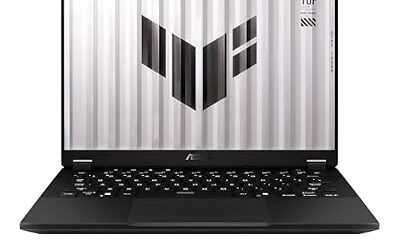
The TUF Gaming A14 is the mid-range sweet spot, and the pick most law students should start with. It uses the same Ryzen AI 9 HX 370 flagship processor as the Zephyrus G14, so CPU performance is not the compromise; the step down is the RTX 4060, which runs at 100W with Dynamic Boost and a MUX switch, healthy output for a 14-inch chassis and plenty for popular multiplayer and single-player games.
Instead of OLED, the A14 uses a 2.5K IPS-level panel at 165Hz with G-SYNC. That is a sensible trade for a study machine: the fast refresh suits competitive games, and there are no OLED burn-in worries during long static document sessions. It weighs about 3.22 pounds, the lightest here, carries a 73Wh battery with fast charging, and the TUF line is built to a military-grade durability standard that suits daily life in a backpack. Memory is 16GB and soldered, which is the main long-term limitation to accept at this tier.
Specs
- Processor: AMD Ryzen AI 9 HX 370 (12 cores)
- Graphics: NVIDIA GeForce RTX 4060, 8GB GDDR6, 100W with Dynamic Boost, MUX switch
- Display: 14-inch IPS-level, 2560 x 1600, 165Hz, G-SYNC
- Memory: 16GB LPDDR5X (soldered)
- Storage: 1TB PCIe Gen4 NVMe SSD
- Battery: 73Wh, fast charging
- Weight: about 3.22 lb, 0.67 in thin
- Connectivity: Wi-Fi 6E, USB4, HDMI 2.1
Acer Predator Triton 14

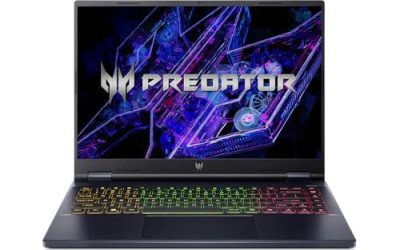
The Predator Triton 14 earns its place on battery capacity and plugged-in power. Its 76Wh battery is the largest in this group, a real buffer for back-to-back lectures and long library sessions, and the RTX 4070 inside runs at up to 140W, the highest graphics power here, so performance at a desk or in a dorm room is a genuine strength.
The 14-inch Mini LED panel reaches 250Hz at 2560 x 1600 with G-Sync, a specification none of the newer picks match, and it makes fast-paced games look exceptionally smooth. The trade-offs are the previous-generation Core i7-13700H, soldered 16GB of memory, and a weight of about 1.7 kg, the heaviest carry in this roundup.
Specs
- Processor: Intel Core i7-13700H (14 cores, up to 5.0 GHz)
- Graphics: NVIDIA GeForce RTX 4070, 8GB GDDR6, up to 140W
- Display: 14-inch Mini LED, 2560 x 1600, 250Hz, G-Sync
- Memory: 16GB LPDDR5 (soldered)
- Storage: 1TB PCIe Gen 4 SSD
- Battery: 76Wh
- Weight: about 1.7 kg
- Connectivity: Wi-Fi 6E, Thunderbolt 4
MSI Stealth 14 Studio A13VF

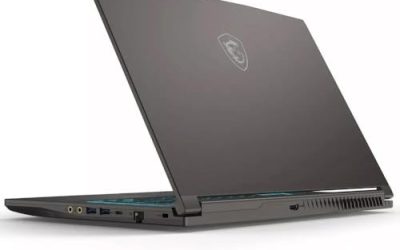
The Stealth 14 Studio is the budget-tier entry, built around a previous-generation pairing that still plays well. Its Core i7-13620H and RTX 4060 remain a capable combination for 1080p and 1440p gaming, and the 14-inch 1920 x 1200 IPS-level display runs at 165Hz. A vapor chamber cooling system is unusual at this tier and helps the slim magnesium-aluminum chassis sustain performance during longer sessions.
The standout feature for a student on a budget is flexibility: the Stealth 14 Studio uses two standard DDR5 memory slots and an accessible M.2 slot, so RAM and storage can be upgraded later instead of being fixed at purchase, something none of the soldered designs above can offer. At about 3.75 pounds and 19mm thin it is the bulkiest machine here, and the screen resolution trails the OLED models, but as a value pick with upgrade headroom, it makes a strong case.
Specs
- Processor: Intel Core i7-13620H (10 cores)
- Graphics: NVIDIA GeForce RTX 4060, 8GB GDDR6
- Display: 14-inch IPS-level, 1920 x 1200, 165Hz
- Memory: 16GB DDR5, two SO-DIMM slots (upgradeable)
- Storage: 1TB NVMe PCIe SSD
- Cooling: Vapor chamber with dual fans
- Weight: about 3.75 lb, 19mm thin
- Connectivity: Wi-Fi 6E, Thunderbolt 4, HDMI 2.1
How to Choose
Start with weight and battery, because a law student carries a laptop all day. Every pick here is a 14-inch machine under four pounds, and battery capacity runs from 71Wh to 76Wh. Larger batteries and efficient processors stretch unplugged time through lectures and library sessions, while fast charging or USB-C charging reduces how often you need to carry the full power brick.
Next, match the graphics card to your gaming habits. An RTX 4060 is enough for popular multiplayer titles and most single-player games at these screen resolutions, while the RTX 4070 and RTX 5070 Ti add headroom for newer, heavier games and for keeping the machine capable later into a degree. If gaming is an occasional break rather than a hobby, the mid-range and budget tiers are the sensible spend.
Memory and storage deserve a long view. Law school work itself is light, mostly documents, PDFs, and browser research, but 16GB is the sensible minimum for comfortable multitasking, and 32GB removes any worry for the life of the degree. Most thin laptops solder their memory, so choose the capacity you need at purchase; the MSI Stealth 14 Studio is the exception, with slots you can upgrade later.
Finally, consider the screen and the details. OLED panels on the Zephyrus G14 and OMEN Transcend 14 give the sharpest text and best contrast for reading, while IPS-level panels avoid burn-in concerns during long static document work. A good webcam matters for remote classes and interviews, and a professional-looking chassis helps when the same laptop goes to internships and clerkships.
Who Should Skip
Skip this whole category if you do not game at all. A thin ultrabook without a dedicated graphics card is lighter, usually lasts longer on battery, and costs less in the budget tier, and it handles documents, research, and video calls just as well. The RTX hardware here only earns its place if you actually play games.
Also skip these 14-inch picks if you want a big screen every day. A 16-inch gaming laptop gives more room for side-by-side documents and a more immersive game view, at the cost of a heavier daily carry. And if your priority is maximum gaming performance rather than portability, a thicker 15.6-inch or 16-inch model in the same tier usually runs its graphics card at higher power.
FAQ
How much RAM does a law student need in a gaming laptop?
Sixteen gigabytes is the practical minimum and covers legal research, writing, and gaming comfortably. Thirty-two gigabytes, as on the Zephyrus G14 and OMEN Transcend 14, adds multitasking headroom for the whole degree. Because most thin laptops cannot be upgraded later, choose the larger capacity at purchase if your tier allows it.
Is a 14-inch screen big enough for law school work?
Yes, for most students. A 14-inch screen at 2.5K or 3K resolution keeps text sharp, and documents can be read comfortably at full width. If you often compare two documents side by side, an external monitor at your desk solves that without adding daily carry weight to the laptop itself.
Can these laptops last a full day of classes on battery?
For lectures, note-taking, and reading, the 71Wh to 76Wh batteries in this group are sized for long days away from an outlet, especially with the brightness kept moderate. Gaming drains any battery quickly, so treat these as study machines unplugged and plug in when it is time to play.
Will a gaming laptop look out of place at an internship?
The picks here are deliberately restrained. The Zephyrus G14, OMEN Transcend 14, and Stealth 14 Studio use clean metal designs without aggressive styling, and their RGB lighting can be turned off or set to plain white. They read as ordinary professional laptops in an office or courtroom setting.
Conclusion
For most law students, the ASUS TUF Gaming A14 is the right balance of low weight, a 73Wh battery, and RTX 4060 gaming power in the mid-range tier. Step up to the ASUS ROG Zephyrus G14 (2025) for the premium OLED screen and the strongest graphics here, or choose the MSI Stealth 14 Studio A13VF if the budget tier and future upgrades matter most.
Product and ASIN Reference
| Product | ASIN |
|---|---|
| ASUS ROG Zephyrus G14 (2025), RTX 5070 Ti, 32GB, 1TB | B0FC4T1R3K |
| HP OMEN Transcend 14, RTX 5060, 32GB, 1TB | B0G4RBV6MF |
| ASUS TUF Gaming A14 FA401WV, RTX 4060, 16GB, 1TB | B0DNJJPF6Q |
| Acer Predator Triton 14 (PT14-51), RTX 4070, 16GB, 1TB | B0C24HV9HQ |
| MSI Stealth 14 Studio A13VF, RTX 4060, 16GB, 1TB | B0CCLPSMFW |