🛒 Best Price Today on Amazon
Prime members get fast, free shipping on everything above, plus member-only deals. New members get a 30-day free trial — cancel anytime.
A cap of 1200 dollars is an unusual ceiling for a mini PC. Most boxes in this category sit far below it, so the cap does not tell you what to buy; it tells you that money is not the main filter. The real question is how much of that headroom a given job needs. A spreadsheet-and-browser desk does not need what a multi-monitor trading setup or a light gaming rig does, and spending toward the cap on the wrong spec leaves you with a faster chip you never push and a shortage of the ports you actually use every day.
This guide is for buyers who want a small desktop under 1200 dollars and need to decide between older quad-core Ryzen parts, newer Ryzen 7 silicon, and entry-level Celeron designs. The eight systems below are compared strictly on what their listings state: processor, memory, storage, display outputs, networking, and expansion. Where a listing is silent, the article says so rather than guessing. Treat 2026 as the year to favor DDR5, Wi-Fi 6, and 2.5 gigabit Ethernet if the budget allows, and to accept older parts only when the use case is light.
Quick Picks

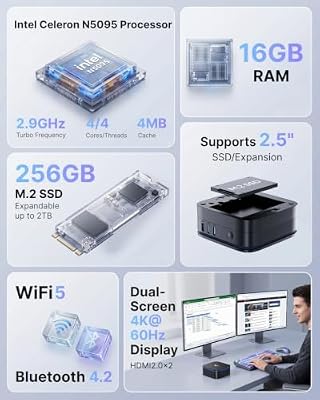
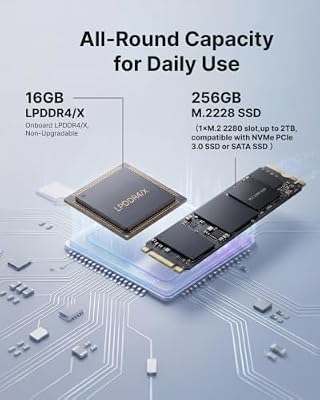
KAMRUI AK1PLUS Mini PC Computer, Intel Celeron N5095 (Up to 2.9GHz), 16GB RAM 256GB SSD, Dual 4K Mini Desktop Computer, Support 2.5'' SSD Expansion, WiFi, Bluetooth, Ethernet, Business Home Office PC



As an Amazon Associate we earn from qualifying purchases. Product prices and availability are accurate as of the date/time indicated.

C4 SE Mini PC, Ryzen 5 3500U (up to 3.7GHz), 8GB DDR4 256GB NVMe SSD | Mini Computer, Desktop Computer 4K Triple Display (HDMI/DP/USB-C), WiFi 5, BT 5.0, Dual Gigabit LAN, SFF Business Office PC


As an Amazon Associate we earn from qualifying purchases. Product prices and availability are accurate as of the date/time indicated.

GMKtec M5 Ultra Gaming Mini PC Computer Ryzen 7 7730U 16GB RAM 256GB SSD | Office Personal Desktop (Beats 7430U/ 7525U), Dual NIC LAN 2.5GbE, Triple 4K Display, WiFi 6E, USB-C, BT 5.2, DP, HDMI 2.0


As an Amazon Associate we earn from qualifying purchases. Product prices and availability are accurate as of the date/time indicated.
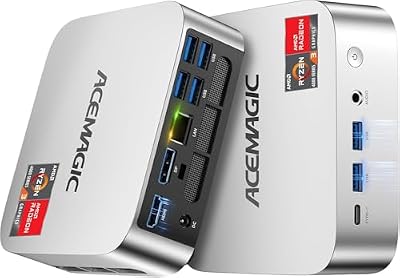
ACEMAGIC K1 Mini PC AMD Ryzen Pro 7330U 16GB 256 SSD 4 Cores 8 Threads 28W | 4.3GHz Multitasking, Cooling Mini Computers Win 11 Pro, Beat 3500U/3200U Triple 4K Display, HDMI, LAN, Home Office & Business


As an Amazon Associate we earn from qualifying purchases. Product prices and availability are accurate as of the date/time indicated.

BOSGAME E5 11 Pro Mini PC, AMD Ryzen 5300U 4C/ 8T, Business Home Office PC | 8GB DDR4 256GB M.2 2280 SSD, 2.5 GbE Dual Lan Desktop Computers, Triple Displays 4K 60Hz, Wi-Fi 5, BT 5.0, Support Linux SSH


As an Amazon Associate we earn from qualifying purchases. Product prices and availability are accurate as of the date/time indicated.

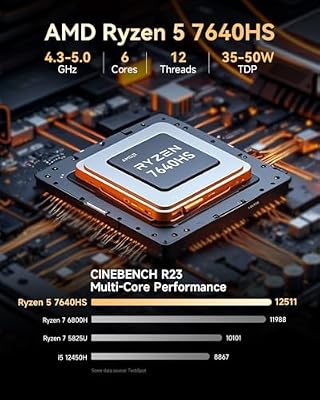
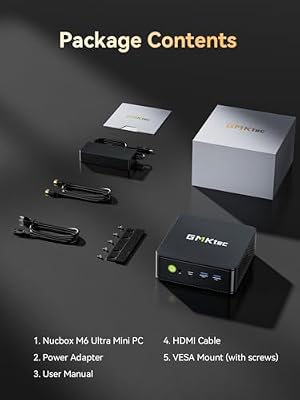
GMKtec M6 Ultra Gaming Mini PC Ryzen 7640HS 32GB RAM DDR5 1TB SSD | Desktop Mini Computers Office Home, Dual NIC LAN 2.5GbE, Triple 4K Display, WiFi 6, USB4, BT5.2, DP, HDMI 2.0



As an Amazon Associate we earn from qualifying purchases. Product prices and availability are accurate as of the date/time indicated.
| Product | Best for | Key spec from the title |
|---|---|---|
| KAMRUI AK1PLUS | Basic office and storage upgrades | Celeron N5095, 16GB RAM, 256GB SSD, 2.5-inch SSD expansion |
| C4 SE | Three-screen desks on a tight plan | Ryzen 5 3500U, 8GB DDR4, 256GB NVMe, HDMI/DP/USB-C outputs |
| GMKtec M5 Ultra | Wired network and multi-display work | Ryzen 7 7730U, 16GB RAM, dual 2.5GbE |
| ACEMAGIC K1 | Business use with Windows 11 Pro | Ryzen Pro 7330U, 16GB RAM, 4 cores 8 threads |
| Beelink SER3 | Home, office, and school desks | Ryzen 3 3200U, 8GB DDR4, 4 USB 3.2 ports |
| BOSGAME E5 | Small business with dual LAN | Ryzen 5300U 4C/8T, 8GB DDR4, 2.5GbE dual LAN |
| GMKtec M6 Ultra | Headroom-first buyers | Ryzen 7640HS, 32GB DDR5, 1TB SSD, WiFi 6 |
| GMKtec G10 | Mid-range triple-display desk | Ryzen 5 3500U, 16GB DDR4, HDMI 2.1 |
How to Choose
Memory and storage come before processor bragging rights
Eight gigabytes of RAM is workable for a browser, email, and a document editor, but it runs out quickly once you keep many tabs, a video call, and a chat client open together. Sixteen gigabytes is the practical floor for a machine you want to keep for years. Thirty-two gigabytes only pays off for virtual machines, large spreadsheets, or creative software. Check also whether the RAM is DDR4 or DDR5; the newer standard is faster but only matters if the processor can use it. For storage, 256GB fills up fast on Windows with a few applications installed, so look for a spare M.2 slot or a 2.5-inch bay. Several listings below mention SSD expansion or an M.2 2280 drive, which is the detail to confirm.
Match the processor generation to the workload
The titles here span three tiers. Celeron N5095 is an entry-level chip suited to web browsing, streaming, and light office work. Ryzen 3 3200U, Ryzen 5 3500U, and Ryzen 5300U are older mobile parts with four cores and eight threads in the better cases; they handle everyday multitasking but are not what you buy for heavy editing. Ryzen 7 7730U, Ryzen Pro 7330U, and Ryzen 7640HS are newer and give more headroom. Ignore peak clock numbers such as up to 3.7GHz or 4.3GHz as the sole decision factor, because boost speeds depend on cooling and power limits that a listing does not describe.
Count your displays and ports honestly
Many mini PCs advertise dual or triple 4K output, but you need to know which physical ports carry it. A listing that names HDMI, DisplayPort, and USB-C is telling you that three screens are possible. One that says only dual 4K at 60Hz HDMI supports two. If you plan to use a USB-C monitor, confirm that the USB-C port carries video. Beyond screens, count USB ports for a keyboard, mouse, webcam, and external drive.
Networking and what budget models cut
Wi-Fi 5 and Bluetooth 5.0 are fine for a desk with a router nearby, while Wi-Fi 6 is more future-proof. Dual 2.5 gigabit Ethernet matters for small offices, home labs, or anyone moving large backups over a wired link; gigabit-only jacks are a common place where cheaper boxes save money. Watch for what is missing: some listings do not name the Windows edition or the cooling design, and budget models may use a single memory stick or soldered memory, which limits later upgrades. When the title is silent on an item, assume it is absent until the product page confirms it.
The 8 Best Options
KAMRUI AK1PLUS
The AK1PLUS is the entry-level choice in this group, built around an Intel Celeron N5095 rated up to 2.9GHz. The listing pairs it with 16GB of RAM and a 256GB SSD, and it advertises dual 4K output. It suits a household desk for email, video streaming, and paperwork.
- Strength: the title states 16GB of memory, a generous amount for a chip in this tier.
- Strength: support for a 2.5-inch SSD is listed, so storage can grow without replacing the main drive.
- Trade-off: a Celeron-class processor is the weakest in this lineup for demanding work.
Skip it if you plan on video editing, virtual machines, or any workload that keeps the processor busy for long stretches. Buyers who expect to keep the machine five years should look higher in this table.
C4 SE
The C4 SE pairs a Ryzen 5 3500U, up to 3.7GHz, with 8GB of DDR4 and a 256GB NVMe SSD. Its standout is the display plan: the listing names HDMI, DisplayPort, and USB-C for triple 4K output, along with Wi-Fi 5 and Bluetooth 5.
- Strength: three named video outputs let a multi-monitor desk work without adapters.
- Strength: the NVMe drive is listed, which is a faster storage type than a basic SATA unit.
- Trade-off: only 8GB of RAM limits heavy multitasking unless the memory can be upgraded.
Skip it if you want a Ryzen generation newer than the 3500U or need more than 8GB of memory out of the box. Anyone sensitive to aging silicon will prefer the newer chips below.
GMKtec M5 Ultra
The M5 Ultra steps up to a Ryzen 7 7730U with 16GB of RAM and a 256GB SSD. The listing highlights dual NIC 2.5GbE LAN and triple 4K display support, and it is marketed as a gaming mini PC that is also suited to office use.
- Strength: Ryzen 7 silicon is the newer class in this group, giving more processing room.
- Strength: two 2.5GbE network ports suit small offices and file-heavy home networks.
- Trade-off: the 256GB drive is modest for the processor class and may need a later upgrade.
Skip it if your network is gigabit-only and you do not need the second wired port. In that case the extra cost buys networking you cannot use, and a simpler model serves better.
ACEMAGIC K1
The K1 uses an AMD Ryzen Pro 7330U with 4 cores and 8 threads at 28W, rated at 4.3GHz, and ships with 16GB of RAM, a 256GB SSD, and Windows 11 Pro. The Pro designation and the Pro edition of Windows make it the most office-oriented of the group.
- Strength: Windows 11 Pro is named, which supports business features like domain join and drive encryption.
- Strength: 16GB of RAM is listed alongside the Pro-grade processor.
- Trade-off: the title does not name the port layout or display outputs, so confirm them before buying.
Skip it if you need a clearly documented triple-display or dual-LAN arrangement. Read the full product page for ports first, since the title leaves that open, and compare it against the GMKtec models.
Beelink SER3
The SER3 is built on a Ryzen 3 3200U, up to 3.5GHz, with 8GB DDR4 and a 256GB NVMe SSD. It lists dual 4K at 60Hz over HDMI, four USB 3.2 ports, Wi-Fi 5, and Bluetooth 5.0, and is aimed at home, office, and school use.
- Strength: four USB 3.2 ports give room for peripherals without a hub.
- Strength: the 4K at 60Hz output is stated, which keeps desktop text smooth.
- Trade-off: Ryzen 3 is the lowest AMD tier here, which matters if your workload grows.
Skip it if you want multitasking headroom or a Ryzen 5 class processor. A shared family computer with many users and browser profiles will feel the limits of 8GB sooner than a single-user desk would.
BOSGAME E5
The E5 uses a Ryzen 5300U with 4 cores and 8 threads, 8GB of DDR4, and a 256GB M.2 2280 SSD. It is pitched at business and home office use and lists 2.5GbE dual LAN with triple display output.
- Strength: dual 2.5GbE LAN is useful for small business routing and wired backups.
- Strength: an M.2 2280 SSD uses a standard size, which makes later replacement simpler.
- Trade-off: 8GB of RAM is on the light side for many open applications at once.
Skip it if wired networking is irrelevant to you and you would rather have more memory. A buyer on Wi-Fi alone is paying attention to a feature that never gets used, so weigh the 16GB alternatives instead.
GMKtec M6 Ultra
The M6 Ultra is the premium pick: a Ryzen 7640HS with 32GB of DDR5 and a 1TB SSD. It lists dual NIC 2.5GbE LAN, triple 4K display support, and Wi-Fi 6, so it is the best-equipped system in the table.
- Strength: 32GB of DDR5 and a 1TB drive remove the usual memory and storage compromises.
- Strength: Wi-Fi 6 plus two 2.5GbE ports cover wireless and wired setups.
- Trade-off: it sits at the top of the lineup, so it is more than a basic desk needs.
Skip it if your work is email and documents; a lower tier will do the same job. Its value shows up in long-term use and heavy multitasking, not in a light browsing desk that would leave most of the memory idle.
GMKtec G10
The G10 combines a Ryzen 5 3500U, up to 3.7GHz with 4 cores and 8 threads, 16GB of DDR4, and a 256GB SSD. It lists triple 4K display output through HDMI 2.1, DisplayPort, and USB-C, plus Wi-Fi 5.
- Strength: 16GB of RAM is a better match for the 3500U than the 8GB used in sibling designs.
- Strength: HDMI 2.1 and three display paths are named in the listing.
- Trade-off: the processor is an older generation than the Ryzen 7 options.
Skip it if you want Wi-Fi 6 or DDR5, which the title does not list. Buyers who want the newest platform for a long ownership span should consider the M5 Ultra or M6 Ultra over this older design.
Which One Fits Your Situation
A kitchen-table desk for a family
The Beelink SER3 fits shared use, since four USB 3.2 ports handle a printer, a mouse, a keyboard, and a flash drive. If the household needs more memory, the KAMRUI AK1PLUS brings 16GB and expandable storage for lighter workloads.
A small office with a network switch
The BOSGAME E5 and GMKtec M5 Ultra both list dual 2.5GbE. Choose the M5 Ultra for more processor room and the E5 if the work is light and you want to stay in the mid-range.
A three-monitor workstation for spreadsheets
The GMKtec G10 lists HDMI 2.1, DisplayPort, and USB-C for triple display, with 16GB of RAM to keep large files responsive. The C4 SE is a cheaper way to the same output count if 8GB is enough.
A system to keep for several years
The GMKtec M6 Ultra is the only one with 32GB of DDR5, a 1TB drive, and Wi-Fi 6. If a business license matters, the ACEMAGIC K1 with Windows 11 Pro is the alternative.
Common Mistakes
- Buying toward the cap instead of toward the workload; most desks never use what the top tier offers.
- Assuming every port on the case carries video; only the outputs named in the listing are guaranteed.
- Ignoring the RAM type and count, then discovering that a single 8GB module limits upgrades.
- Choosing by peak clock speed alone while skipping core count, generation, and cooling.
- Forgetting the operating system edition; Windows 11 Pro matters for business tools, and some listings do not state it.
Related guides
- Gaming Chairs For Back Pain With Lumbar Support
- Gaming Keyboards For Fps With Rapid Trigger
- Travel Backpack With Laptop Compartment
Frequently Asked Questions
Is 8GB of RAM enough for a mini PC?
For web browsing, documents, and streaming it works, but it leaves little room for more. If the memory is upgradable, plan to move to 16GB. If it is not, buy the 16GB model from the start.
Do I need dual 2.5GbE Ethernet?
Only if you move large files over a wired network, run a small server, or need two separate network connections. A home desk using Wi-Fi gains little from it.
Can these systems drive multiple 4K monitors?
The listings state dual or triple 4K output, but the number you can use depends on the ports in use and the cable types. Confirm that each monitor connects to a port the title names.
Is a Ryzen 7 mini PC worth the step up?
It is worth it when you run heavy multitasking, creative tools, or virtual machines. For email and browsing, a Ryzen 5 or Ryzen 3 system with 16GB is enough and leaves most of the cap unspent.