🛒 Best Price Today on Amazon
Prime members get fast, free shipping on everything above, plus member-only deals. New members get a 30-day free trial — cancel anytime.
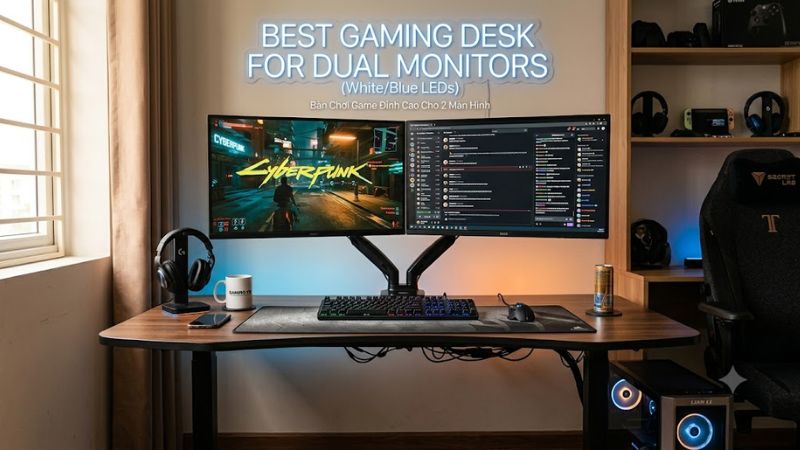
A best gaming desk for dual monitors needs enough width and depth for two displays without sacrificing mouse space, speakers, or a desktop PC. Current options range from fixed 63-inch desks to motorized 70-inch models, so the right choice depends on monitor arms, room size, cable routing, and whether standing adjustment matters.
How to Choose a Gaming Desk for Dual Monitors
For a best gaming desk for dual monitors, start with four practical checks: surface dimensions, load capacity, monitor-arm compatibility, and cable management. A pair of 27-inch screens benefits from a wide surface, while deep desktops leave more room between your eyes and the displays. The desk also needs enough structural capacity for monitors, arms, PC hardware, and peripherals.
Surface Width and Depth
Width determines whether two displays can sit naturally beside each other without pushing the keyboard and mouse toward the front edge. A 60-inch-plus desktop gives dual 27-inch monitors considerably more working room, while roughly 30 inches of depth leaves useful space for a keyboard, mouse pad, and monitor stands.
The Secretlab MAGNUS Pro XL provides a 70-inch by 26-inch desktop, while the IKEA UTESPELARE measures 63 by 31.5 inches. The difference matters because width favors side-by-side screens, whereas greater depth gives more flexibility for viewing distance and peripheral placement.
Load Capacity
Load capacity matters when two monitors share the desk with a desktop tower, speakers, microphone, and accessories. It should be treated as a total rated limit rather than a promise about any particular setup, and monitor-arm limits can be separate from the desk’s overall rating.
The Arozzi Arena is rated for 176 pounds distributed across its desktop, while the Corsair Platform:6 is rated for 330 pounds. The IKEA UTESPELARE is rated for 110 pounds, which can still accommodate a conventional dual-monitor arrangement when the complete load remains within its specification.
Monitor-Arm Compatibility
A monitor arm can free valuable desktop space, but compatibility depends on the desk design and the arm rather than simply the number of monitors. The IKEA UTESPELARE specifically allows a pair of monitor arms to clamp to its rear metal section, while Arozzi provides three desktop cutouts intended for cable routing and monitor attachment.
The Secretlab MAGNUS ecosystem includes a dual monitor arm designed for two screens up to 34 inches each, while Corsair’s included Platform:6 monitor arms support up to 18 pounds per arm and use 75x75mm or 100x100mm VESA mounting. Check your monitor weight and VESA pattern before buying.
Cable Management and Room Fit
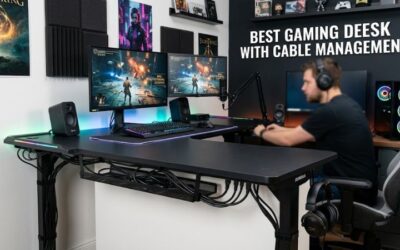
Cable routing becomes more important with two displays because each monitor adds power and video connections. The Arozzi Arena uses three cutouts and an under-desk basket, IKEA provides a cable-management net, and Secretlab builds a rear cable-management system into the desk. These layouts differ substantially in how much desktop space remains usable.
Room dimensions are just as important as desktop dimensions. A 70-inch desk can be excellent for a wide setup but awkward in a small room, while a 63-inch desk may leave more practical clearance around the chair. Measure wall-to-wall space and allow room for chair movement before choosing a large surface.
Top Picks
| Product | Best For | Key Spec | Compatibility | Watch Out For |
| Secretlab MAGNUS Pro XL | Best Overall | 70 x 26 in; 265 lb | Dual arm option; two 34-inch screens | Premium price and heavy construction |
| IKEA UTESPELARE | Best Value | 63 x 31.5 in; 110 lb | Pair of monitor arms; deep desktop | Manual height adjustment |
| Arozzi Arena | Best For Large Mouse Space | 160 x 82 cm; 176 lb | Three monitor attachment/cable cutouts | Fixed-height design and large footprint |
| Corsair Platform:6 | Best For Sit-Stand Setups | 72 x 30 in; 330 lb | Included dual arms; 18 lb per arm | High cost and large footprint |
Secretlab MAGNUS Pro XL
The Secretlab MAGNUS Pro XL suits buyers who want a large dual-monitor surface combined with electric height adjustment and integrated cable routing. Its 70-inch width and 26-inch depth provide substantial room, while the current technical documentation lists a 265-pound maximum desktop load and dual motors.
Its main weakness is practical rather than technical: the desk is heavy and accessories can increase the total purchase cost. PC Gamer also noted its high price and weight in its review. The platform is most appropriate when a premium sit-stand desk and integrated cable system matter more than keeping furniture costs low.
IKEA UTESPELARE
The IKEA UTESPELARE is the value-focused choice for buyers who primarily need a wide, deep surface for two displays. Its 63-by-31.5-inch desktop, 110-pound load rating, rear metal mesh, and cable-management net provide the core features needed for a conventional dual-monitor gaming station without motorized height adjustment.
Its real limitation is the manual height system, which provides six positions rather than electric adjustment. PC Gamer also identified height adjustment as a drawback. The desk should suit buyers who want generous surface area and cable routing but should not be the first choice if frequent sit-stand changes are central to the setup.
Arozzi Arena
The Arozzi Arena is aimed at gamers who want a broad surface with a full-desk mouse pad. Its 160-by-82cm desktop is large enough for up to three large monitors according to Arozzi, while three cutouts provide both cable-routing and monitor-attachment points. Its distributed desktop load rating is 176 pounds.
The weakness is its fixed-height approach and substantial footprint. Independent PC Gamer coverage also noted that the surface coating requires gentle cleaning and that assembly can involve variable machining fit. Buyers who prefer a conventional desktop and full mouse coverage can accept those trade-offs more easily than users wanting electric height adjustment.
Corsair Platform:6
The Corsair Platform:6 is designed for large PC setups that combine dual monitors with accessories, power management, and sit-stand functionality. Its 72-by-30-inch desktop carries a 330-pound maximum load, while the current configuration supports dual monitor arms rated at 18 pounds per arm and VESA 75x75mm or 100x100mm displays.
Its main drawback is cost and physical size. Independent reviews have also pointed to the expensive configuration and some stiffness in the included monitor arms. The desk makes more sense for a large room and a complex gaming or creator setup than for someone who simply needs two screens on a modest budget.
FAQ
What size desk is needed for two monitors?
A desk around 60 inches wide is a practical starting point for two 27-inch monitors, although the required size changes with monitor stands, arms, speakers, and PC placement. Depth also matters because a wider surface does not automatically provide enough room behind the keyboard.
For example, the IKEA UTESPELARE offers 63 inches of width and 31.5 inches of depth, while the Secretlab MAGNUS Pro XL reaches 70 inches in width. Those dimensions leave substantially more room for side-by-side displays than compact gaming desks.
Can a gaming desk hold two monitor arms?
Yes, a gaming desk can hold two monitor arms when the desk design, clamp location, arm capacity, and monitor mounting pattern are compatible. IKEA specifically states that a pair of monitor arms can clamp to the UTESPELARE’s rear metal section, while Arozzi provides three monitor attachment cutouts.
Corsair’s Platform:6 includes dual monitor arms rated at 18 pounds per arm, and Secretlab offers a dual arm designed for two 34-inch screens. Always compare the monitor’s actual weight and VESA pattern with the arm’s specification rather than relying only on screen size.
Is a 63-inch desk enough for dual 27-inch monitors?
A 63-inch desk is generally large enough for two 27-inch monitors, with the exact amount of remaining space depending on stand width, arm placement, speakers, and the PC tower. The IKEA UTESPELARE and Arozzi Arena both provide enough surface area for multi-monitor arrangements.
A deeper 63-inch desk can be particularly useful when monitors use individual stands because it preserves front-to-back workspace. With monitor arms, the same width can leave more room for the keyboard, mouse pad, speakers, and other gaming accessories.
Is a standing desk useful for dual-monitor gaming?
A standing desk is useful for dual-monitor gaming when you specifically want adjustable sitting and standing positions, but two monitors alone do not require an electric desk. Fixed desks can provide equal desktop width and depth without adding motors or height controls.
The MAGNUS Pro XL offers a 25.6-to-49.2-inch height range, while the Platform:6 adjustable versions cover 29 to 48 inches. By contrast, the UTESPELARE uses manual height adjustment and the Arena uses manually adjustable legs, making the choice primarily about whether powered height changes are part of your setup.
Final Thoughts
The best gaming desk for dual monitors depends on the surface, arm setup, load, room, and height-adjustment requirements rather than gaming features alone. MAGNUS Pro XL emphasizes cable management and sit-stand use, UTESPELARE emphasizes space and value, Arena emphasizes surface area, and Platform:6 targets expansive modular setups.