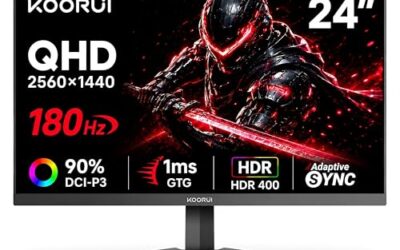
- Top Pick: Samsung 27” Odyssey G5 (G50F) Series QHD Gaming Monitor
- Best Value: Capshi 8K 4K DisplayPort Cable 1.4, VESA Certified DP Cord 6.6ft
- Premium Choice: Ubluker 10K 8K DisplayPort 2.1 Cable 54Gbps 3.3 FT, Certified DP to DP Cord 4K 240Hz 165Hz 144Hz 120Hz 10K 8K 120Hz Nylon Braided UHBR HDCP2.3 FreeSync G-Sync RTX5090 Gaming Monitor PC Projector
Variable refresh rate technology transformed PC gaming by eliminating screen tearing without the input lag of traditional V-Sync, but it comes in two flavors: AMD’s FreeSync and NVIDIA’s G-Sync. Both solve the same core problem by syncing your monitor to your GPU’s frame output, yet they differ in cost, certification, hardware requirements, and cross-compatibility in ways worth understanding before you buy a monitor.
This comparison lays out FreeSync versus G-Sync in 2026, explaining how each works, where they overlap, and which one makes sense for your GPU and budget. With most modern displays and a good DisplayPort cable supporting variable refresh out of the box, the decision is easier than it used to be, but the details still matter.
As an Amazon Associate we earn from qualifying purchases at no extra cost to you.






⚡ Save on Your Next PC — Amazon Prime
Prime members get fast free shipping on the systems above, plus early access to Prime Day & Black Friday PC deals. New members get a 30-day free trial.
Watch: FreeSync vs G-Sync: Which Is Better? — Video Review
Quick Verdict
For the vast majority of gamers, FreeSync and G-Sync Compatible deliver an equally smooth, tear-free experience, so you should choose the monitor with the best panel, refresh rate, and price rather than the sync badge. FreeSync is open, royalty-free, and found on affordable displays, while true hardware G-Sync monitors carry a dedicated module, a premium price, and the tightest certification. Because most FreeSync monitors now also work as G-Sync Compatible with NVIDIA cards, the two are more interchangeable than ever.
Key Differences
- Origin: FreeSync is AMD’s open standard built on VESA Adaptive-Sync; G-Sync is NVIDIA’s proprietary technology.
- Cost: FreeSync monitors are generally cheaper; hardware G-Sync displays command a premium for the dedicated module.
- Hardware: true G-Sync uses a proprietary module in the monitor, while FreeSync relies on standard scaler hardware.
- Compatibility: many FreeSync monitors are certified G-Sync Compatible, working with NVIDIA GPUs over DisplayPort.
- Tiers: FreeSync has Premium and Premium Pro levels; G-Sync has Compatible, standard, and Ultimate.
- GPU pairing: FreeSync pairs naturally with AMD cards, G-Sync with NVIDIA, though cross-brand support has broadened.
AMD FreeSync
FreeSync is AMD’s open, royalty-free take on variable refresh, built on the VESA Adaptive-Sync standard. Because manufacturers pay no licensing fee, FreeSync appears on a huge range of monitors at every price point, from budget 1080p panels to premium displays like the Samsung Odyssey G5. Higher tiers, FreeSync Premium and Premium Pro, add low-framerate compensation and HDR support for smoother motion even when frame rates dip.
Its openness is the killer feature. FreeSync works with AMD GPUs natively and, crucially, many FreeSync monitors are also validated to run G-Sync Compatible mode with NVIDIA cards over DisplayPort. That flexibility means a FreeSync display rarely locks you into one GPU brand, making it the pragmatic, value-oriented choice for most builds. Pairing it with a certified DisplayPort 1.4 cable ensures the full refresh range is available.
NVIDIA G-Sync
G-Sync is NVIDIA’s variable refresh technology, and in its full hardware form it uses a proprietary module built into the monitor. That module enables the strictest quality validation, a wide refresh range, and features like variable overdrive, which is why hardware G-Sync and G-Sync Ultimate displays sit at the premium end of the market. For gamers chasing the most rigorously tested, top-tier motion quality with an NVIDIA card, it represents the gold standard.
The trade-off is cost and lock-in. Hardware G-Sync monitors are more expensive and historically pair best with NVIDIA GPUs. NVIDIA also created the G-Sync Compatible tier, which certifies select FreeSync monitors to run G-Sync over standard hardware, blurring the line between the two camps. Unless you specifically want the dedicated-module benefits, a G-Sync Compatible FreeSync panel often delivers nearly the same experience for far less money.
Which Should You Buy?
- Choose FreeSync if you want the best value and flexibility, especially with an AMD GPU.
- Choose G-Sync Compatible for an NVIDIA card without paying the full hardware-module premium.
- Choose hardware G-Sync if you want NVIDIA’s strictest certification and top-tier motion quality and will pay for it.
- Prioritize the panel, its resolution, refresh rate, and response time, over the sync badge for most builds.
- Confirm cross-compatibility on the monitor’s spec sheet if you plan to pair it with the other brand’s GPU.
Frequently Asked Questions
Can I use a FreeSync monitor with an NVIDIA GPU?
In most cases yes. Many FreeSync monitors are certified G-Sync Compatible, and NVIDIA GPUs can enable G-Sync on them over DisplayPort. Even some uncertified FreeSync displays work when you enable G-Sync manually, though results vary, so a certified panel is the safest bet.
Is G-Sync worth the extra money over FreeSync?
For most gamers, no. A good FreeSync or G-Sync Compatible monitor delivers a nearly identical tear-free experience for less. Hardware G-Sync is worth it only if you specifically want the dedicated module’s strict validation and features and are pairing it with an NVIDIA card.
Does FreeSync or G-Sync affect frame rate?
Neither changes your raw frame rate. They synchronize the monitor’s refresh to the frames your GPU produces, eliminating tearing and smoothing motion within their supported range. The benefit is visual smoothness and consistency, not higher FPS numbers.
Do I need a special cable for variable refresh?
Use a quality DisplayPort cable for the widest and most reliable variable refresh range on desktop GPUs; a VESA-certified DP 1.4 cable ensures enough bandwidth for high refresh rates. HDMI can support VRR too, but DisplayPort remains the recommended connection for gaming monitors.
Final Verdict
The FreeSync versus G-Sync battle has largely dissolved into a shared, smooth experience for gamers. FreeSync wins on value and flexibility, hardware G-Sync wins on premium certification, and G-Sync Compatible bridges the two for NVIDIA owners. The practical advice: pick the monitor with the best panel and refresh rate at your price, confirm it supports your GPU’s variable refresh mode, and pair it with a certified DisplayPort cable. Do that and screen tearing becomes a thing of the past regardless of the badge.