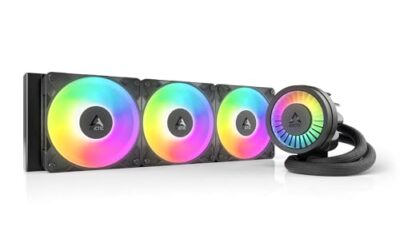
- Top Pick: ARCTIC Liquid Freezer III Pro 360 A-RGB – AIO CPU Cooler, Water Cooling
- Best Value: CORSAIR Nautilus 360 RS Liquid CPU Cooler – 360mm AIO – Low-Noise – Direct Motherboard Connection – Daisy-Chain – Intel LGA 1851/1700, AMD AM5/AM4 – 3X RS120 Fans Included – Black
- Premium Choice: ARCTIC Liquid Freezer III Pro 360 – AIO CPU Cooler,3 x 120 mm Water Cooling
All-in-one liquid coolers have become the default choice for serious builders in 2026, and it is easy to see why. A sealed AIO moves heat from a hot processor to a radiator with minimal fuss, keeps clocks high under sustained load, and gives a build that clean, modern look that big air towers cannot match. The best units now add smart features like LCD screens and quiet, high-static-pressure fans.
But not every AIO is created equal. Radiator thickness, pump quality, fan noise, and warranty length separate the standouts from the also-rans. Whether you want raw thermal muscle or a customizable centerpiece, this roundup covers the best AIO coolers of the year, followed by a clear guide to choosing the right one for your rig.
As an Amazon Associate we earn from qualifying purchases at no extra cost to you. Product prices and availability are accurate as of the date shown and are subject to change.


⚡ Save on Your Next PC — Amazon Prime
Prime members get fast free shipping on the systems above, plus early access to Prime Day & Black Friday PC deals. New members get a 30-day free trial.
Watch: Best AIO Cooler 2026 — Video Review
How to Choose an AIO Cooler in 2026
- Radiator size: A 360mm radiator is the sweet spot for high-end CPUs, offering strong cooling with quiet fan speeds. Make sure your case supports the length before buying.
- Pump and thermal capacity: Look for a robust pump rated for high TDP, especially if you run a flagship chip or plan to overclock. Higher capacity means more headroom under load.
- Fan quality: Good static-pressure PWM fans keep noise low while pushing air through the radiator. Magnetic or daisy-chain fans also simplify cable management.
- Screen and lighting: Some AIOs add an LCD or ARGB for style and system monitoring. Decide whether these extras justify the higher price for your build.
- Warranty and support: A longer warranty, such as five or six years, signals confidence in the pump and offers peace of mind for a sealed liquid system.
The Best AIO Coolers Reviewed
ARCTIC Liquid Freezer III Pro 360 A-RGB
The Liquid Freezer III Pro 360 remains the benchmark for value. Its extra-thick radiator and integrated VRM fan deliver class-leading thermals that embarrass pricier rivals, while the A-RGB accents keep it looking sharp. For enthusiasts chasing the best cooling per dollar, this is the obvious first pick.
CORSAIR Nautilus 360 RS
The Nautilus 360 RS focuses on simplicity and silence, using a direct motherboard connection and daisy-chained RS120 fans to cut cable clutter. It supports Intel LGA 1851/1700 and AMD AM5/AM4, making it a fuss-free, low-noise option for builders who value a clean install.
ARCTIC Liquid Freezer III Pro 360
The non-RGB version of the Liquid Freezer III Pro 360 offers the same outstanding cooling performance with three 120mm fans and a stealthy look. It is ideal for builders who want maximum thermals and quiet operation without lighting, at a slightly friendlier price.
ASUS ROG RYUJIN III 360 ARGB Extreme
The ROG RYUJIN III 360 ARGB Extreme is the premium showpiece, built for AMD Ryzen 9000 and Intel Core Ultra chips. Its Asetek Gen8 V2 pump, high-airflow magnetic fans, customizable 3.5-inch LCD, and six-year warranty make it a flagship cooler for enthusiasts who want it all.
NZXT Kraken Plus 360
The Kraken Plus 360 blends strong cooling with a sleek LCD display that shows stats, GIFs, or custom art. Its refined pump and quiet fans handle high-end processors with ease, and NZXT’s polished software makes it a favorite for clean, personalized builds.
Frequently Asked Questions
Is a 360mm AIO overkill for my CPU?
For mid-range chips a 240mm AIO or good air cooler is plenty, but a 360mm unit gives valuable headroom for flagship or overclocked processors. The larger radiator also lets fans spin slower and quieter at the same temperatures.
Do AIO coolers need maintenance?
Sealed AIOs like these require no refilling and are essentially maintenance-free for their lifespan. Just keep the radiator and fans dust-free, and the closed loop handles the rest without user intervention.
Are LCD screens on AIOs worth it?
An LCD adds a striking visual centerpiece and can display useful stats like temperatures, but it raises the price. If aesthetics and monitoring matter to you, models like the RYUJIN III or Kraken Plus are worth the premium; otherwise a screenless unit cools just as well.
How long do AIO coolers last?
Quality AIOs typically last five to seven years or more, and many now ship with warranties to match. Choosing a unit with a robust pump and a long warranty, like the six-year ROG RYUJIN III, helps protect your investment.
Final Thoughts
The best AIO cooler comes down to your budget and how much flash you want. The ARCTIC Liquid Freezer III Pro delivers unbeatable value and thermals, while the ASUS ROG RYUJIN III and NZXT Kraken Plus bring premium screens and style for showcase builds. Match the radiator size to your case and the pump capacity to your CPU, and you will enjoy cool, quiet performance for years.