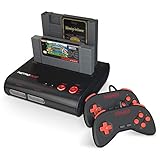
- Top Pick: Retro-Bit Retro Duo 2 in 1 Console System – for Original NES/SNES, & Super Nintendo Games – Black/Red
- Best Value: Atari 2600+ PAC-MAN Edition Console, Game & Wireless Joystick
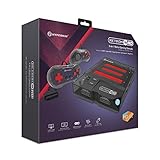
- Premium Choice: Hyperkin RetroN 3 HD 3-in-1 Retro Gaming Console for NES, Super Famicom, and Genesis/Mega Drive (Space Black), M03888-SB – Sega Genesis
For a certain kind of gamer, emulation will never fully scratch the itch. There is something irreplaceable about sliding an original cartridge into a slot, hearing the click, and watching a game boot from the actual medium it shipped on decades ago. In 2026, a healthy market of modern cartridge-compatible consoles lets you play your genuine NES, SNES, Genesis, and Atari collections on today’s HDTVs without hunting down aging original hardware.
- Watch: Best Retro Cartridge Console 2026 — Video Review
- How to Choose a Retro Cartridge Console
- The Best Retro Cartridge Consoles for 2026
- What to Look For When Playing Real Cartridges
- Which One Should You Buy?
- Cartridge Care That Prevents Problems
- Common Mistakes When Buying a Cartridge Console
- Setting Up for the Cleanest Picture
- Troubleshooting Common Problems
- Should You Buy Original Cartridges or Reproductions?
- Frequently Asked Questions
- Final Thoughts
- Related Articles
- Related Guides
This roundup gathers the best retro cartridge consoles you can buy right now, from faithful multi-system clones to officially licensed revivals. We cover what separates a great cartridge console from a disappointing one, then highlight specific models worth your shelf space. If you have a box of old carts in the attic, one of these machines is your ticket back to them.
As an Amazon Associate we earn from qualifying purchases at no extra cost to you.



⚡ Save on Your Next PC — Amazon Prime
Prime members get fast free shipping on the systems above, plus early access to Prime Day & Black Friday PC deals. New members get a 30-day free trial.
Watch: Best Retro Cartridge Console 2026 — Video Review
How to Choose a Retro Cartridge Console
- Cartridge compatibility: Confirm exactly which systems and regions a console supports, since some play NES and SNES while others add Genesis or Famicom.
- Video output: Prefer models with HDMI and upscaling for a clean picture on modern TVs rather than fuzzy composite-only output.
- Build quality: A sturdy cartridge slot and reliable contacts matter, as cheap mechanisms cause connection issues and flicker.
- Controllers: Check whether it includes quality gamepads and supports original controllers for authentic feel.
- Extras: Some consoles bundle preloaded games or accept multi-game cartridges, adding value beyond your existing collection.
The Best Retro Cartridge Consoles for 2026
Hyperkin RetroN 3 HD
A do-it-all favorite, the RetroN 3 HD plays NES, Super Famicom, and Genesis/Mega Drive cartridges with 720p HDMI output. Three systems in one attractive shell make it a superb centerpiece for a mixed collection.
Retro-Bit Retro Duo 2-in-1
The Retro Duo handles both original NES and SNES/Super Nintendo cartridges in a single compact unit. It is an affordable, reliable pick for players focused on Nintendo’s 8- and 16-bit libraries.
Atari 2600+ PAC-MAN Edition
This officially licensed revival plays original 2600 and 7800 cartridges over modern HDMI, and the PAC-MAN Edition adds a themed design plus a wireless joystick for a proper nostalgia trip.
Old Skool Classiq 3 HD
The Classiq 3 is a slick 3-in-1 that runs NES, SNES, and Genesis carts at 720p. Its clean black design and solid HDMI output make it a strong all-rounder for the living room.
852-in-1 NES Multi-Game Cartridge
If your library is thin, this 852-in-1 NES cartridge instantly expands any compatible console with a huge collection of classics, a great companion to the cartridge consoles above.
What to Look For When Playing Real Cartridges
Know Which Cartridge Formats Fit Which Slot
Cartridges from different systems are physically incompatible, and the connectors are a quick way to tell them apart. The NES uses a 72-pin connector, the Famicom a 60-pin one, the SNES a 62-pin one, and the Sega Genesis a 64-pin one. Atari 2600 cartridges are a different shape altogether. A console that takes more than one format normally has separate slots or an adapter, so check exactly which systems the listing names.
That matters for the products in this roundup. The Retro Duo 2-in-1 is built around two cartridge types, while a multi-cart such as the 852-in-1 NES cartridge is designed for an NES-style slot and depends on the console reading it correctly.
Region Differences and Refresh Rates
North American and Japanese systems output 60 Hz video, while European consoles use 50 Hz. Some hardware also locks games by region through the cartridge shape or an internal chip, so a European game may not run in a North American console unless the console is region-free. Owners commonly report that this is the number one cause of “my game will not boot” problems with imported cartridges.
Video Output and Input Lag
Original consoles output very low resolution, usually 240 lines. An HD console upscales that signal to a 720p or 1080p HDMI picture, and the quality of that upscaler decides how sharp or smeary the image looks. Cheap scalers can add a frame or two of delay, which is noticeable in tight platformers.
- Look for a display mode setting that lets you choose between the stretched 16:9 image and the original 4:3 box.
- Check whether the console supports integer scaling or pixel-perfect modes, which keep lines crisp.
- Pair it with a TV that has a game mode, which turns off extra processing.
Controllers and Hardware Quality
Ports on modern consoles are either original-style connectors, which let you use your existing pads, or USB, which means you rely on the controllers in the box. Original-connector ports are the better long-term choice if you own old hardware. Also look at the cartridge slot itself: a stiff, snug connector usually protects your games better than a loose one that wobbles under pressure.
Which One Should You Buy?
| If you… | Choose… |
|---|---|
| Own a mix of cartridges and want one box for several systems | Hyperkin RetroN 3 HD |
| Mainly play NES and SNES cartridges and want a simple two-slot unit | Retro-Bit Retro Duo 2-in-1 |
| Want an officially styled console for Atari-era cartridges | Atari 2600+ PAC-MAN Edition |
| Want an HD console focused on a straightforward plug-and-play setup | Old Skool Classiq 3 HD |
| Want a large game library on a single NES-style cartridge | 852-in-1 NES Multi-Game Cartridge |
Supported systems and controller options differ between listings and revisions, so confirm them on the listing before ordering.
Cartridge Care That Prevents Problems
Many “broken” cartridges only have dirty contacts. A cotton swab and isopropyl alcohol of 90 percent or higher usually clears oxidation from the gold fingers, and the cartridge should dry completely before you insert it. Avoid blowing into the slot; moisture from your breath contributes to corrosion over time.
Store cartridges upright, away from heat and direct sun, and avoid forcing a game into a slot at an angle. If the console has a spring-loaded or tight connector, push straight in and out so the pins wear evenly.
Common Mistakes When Buying a Cartridge Console
- Assuming every clone matches the original perfectly. Hardware reimplementations can differ in sound, timing, or support for certain cartridge chips, so a handful of games may misbehave.
- Buying a multi-cart without checking compatibility. Multi-game cartridges depend on the console handling their memory mapping; confirm your console supports the format.
- Skipping region checks. Import cartridges can be incompatible with a console of a different region unless it states region-free support.
- Forgetting the cables and power. Some units need a specific HDMI cable or power adapter that is not always included in the box.
- Expecting a perfect 4K picture. These consoles upscale a 240-line source, so the image remains retro even on a high-resolution TV.
Setting Up for the Cleanest Picture
A few settings make the difference between a soft, laggy image and a sharp, responsive one. Work through them in order.
- Connect the console to an HDMI port on your TV and switch that input to game mode, which turns off extra processing.
- Choose the output resolution in the console menu; 720p is often the most compatible, while 1080p may look sharper if the TV handles it well.
- Pick the aspect ratio. The original 4:3 image avoids stretching, and many consoles offer a wider mode that distorts characters.
- Turn on scanline or pixel filters only if you like the look; they are cosmetic and can dim the image.
- Check controller input by loading a familiar game and trying fast actions before settling into a long session.
Troubleshooting Common Problems
| Symptom | Likely cause | What to try |
|---|---|---|
| Blank screen or flashing logo | Dirty cartridge contacts or loose seating | Clean the contacts and reinsert straight in |
| Garbled graphics | Incompatible cartridge type or mapper | Try another game and check supported formats |
| No signal on the TV | Wrong HDMI input or unsupported resolution | Switch inputs and lower the output resolution |
| Controller drops inputs | Worn pad or loose connector | Try another controller or port |
| Game boots but crashes later | Region mismatch or memory chip issue | Confirm the cartridge region and format |
Should You Buy Original Cartridges or Reproductions?
Original cartridges tend to keep working for decades, but they vary in condition, and rare titles can be scarce. Newer reproductions are widely available, though quality differs, and some use different memory chips that can affect save data. If a game relies on a battery to keep save files, plan for the day that battery fails, because replacement is a small soldering job on many older cartridges. Whatever you choose, store games out of heat and humidity, and keep a list of which ones you own so you can match each against your console’s supported formats.
Frequently Asked Questions
Do modern cartridge consoles play original games?
Yes, that is their main appeal. Models like the RetroN 3 HD and Retro Duo accept genuine cartridges, letting you play the physical games you already own on a current TV.
Are clone consoles as good as original hardware?
Quality varies, but reputable brands like Hyperkin and Retro-Bit offer strong compatibility and HDMI output that often looks better than original systems on modern displays.
Will these work on a 4K TV?
Consoles with HDMI output connect easily to 4K TVs and upscale the picture, though the source games remain low resolution. The result is a crisp, clean image without adapters.
Can one console play multiple systems’ cartridges?
Several can. Multi-system units such as the RetroN 3 HD and Old Skool Classiq 3 accept NES, SNES, and Genesis cartridges, consolidating several consoles into one device.
Final Thoughts
Playing on original cartridges keeps a tactile piece of gaming history alive, and the 2026 lineup makes it easier than ever. Whether you want the three-system flexibility of the Hyperkin RetroN 3 HD or the officially licensed charm of the Atari 2600+, there is a cartridge console to match your collection. Check compatibility against the carts you own, favor clean HDMI output, and rediscover your favorites exactly as they were meant to be played.