🛒 Best Price Today on Amazon
Prime members get fast, free shipping on everything above, plus member-only deals. New members get a 30-day free trial — cancel anytime.
- Top Logitech Pro Superlight Alternatives Picks for 2026
- Best Logitech G Pro X Superlight Alternatives at a Glance
- 1. Redragon M916 PRO 3-Mode Wireless Gaming Mouse, 4K Polling, 49g Ultra-Light
- 2. Redragon Gaming Mouse, Wireless with 8000 DPI and Fire Button
- 3. Logitech G305 LIGHTSPEED Wireless Gaming Mouse, HERO Sensor, 12,000 DPI
- 4. Razer Orochi V2 Mobile Wireless Gaming Mouse, Ultra Lightweight, 2 Wireless Modes
- 5. Redragon M725 Honeycomb Shell Gaming Mouse Wireless, 49g, 8000 DPI Tri-Mode
- 6. Razer Viper V3 HyperSpeed Wireless Esports Gaming Mouse, 82g, Up to 280hr Battery
- How to Choose a Logitech G Pro X Superlight Alternative
- Frequently Asked Questions
- Related Guides
- About the Author
- About the Author
- Related Articles
Top Logitech Pro Superlight Alternatives Picks for 2026
Here are our current top logitech pro superlight alternatives picks, compared on real Amazon owner reviews, price, and features. Live prices update below.
As an Amazon Associate we earn from qualifying purchases at no extra cost to you.


PC Gaming Universe is reader-supported. When you buy through links on our site, we may earn an affiliate commission at no extra cost to you.
The Logitech G Pro X Superlight is the mouse most competitive players measure everything else against. It weighs roughly 63 grams, uses Logitech’s LIGHTSPEED wireless with a flagship HERO sensor, and has become the default choice on a huge share of esports rosters. Plenty of players love that purity, but plenty more look at the sticker and ask a fair question — can I get the same lightweight, low-latency wireless feel for less?
The answer in 2026 is a confident yes. The lightweight wireless category has exploded, and there are now excellent alternatives to the G Pro X Superlight that come in lighter, cost a fraction as much, or add features the Superlight leaves out such as higher polling rates or extra side buttons.
Every pick here is a genuine wireless mouse, not a wired stand-in, because the whole point of the Superlight is cable-free play without latency penalties. We weighed each alternative on the things that made the Superlight famous — low weight, sensor quality, wireless reliability and battery life — and then on the one thing it is not famous for, value. Read on for the at-a-glance table, then a closer look at why each mouse earns a place as an alternative.
Best Logitech G Pro X Superlight Alternatives at a Glance
| Model | Key Spec | Price | Rating | Best For |
|---|---|---|---|---|
| Redragon M916 PRO 3-Mode | 49g, 4K polling, tri-mode | Check on Amazon | Lightest budget alternative | |
| Redragon Wireless 8000 DPI | 8000 DPI, fire button | Check on Amazon | Cheapest wireless option | |
| Logitech G305 LIGHTSPEED | HERO sensor, 12K DPI | Check on Amazon | Same-brand budget pick | |
| Razer Orochi V2 | Ultralight, 2 wireless modes | Check on Amazon | Portable / travel | |
| Redragon M725 Honeycomb | 49g, 8000 DPI, tri-mode | Check on Amazon | Ultralight on a budget | |
| Razer Viper V3 HyperSpeed | 82g, 280hr battery | Check on Amazon | Closest esports rival |
1. Redragon M916 PRO 3-Mode Wireless Gaming Mouse, 4K Polling, 49g Ultra-Light
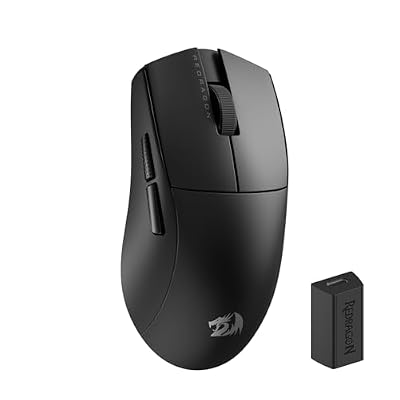
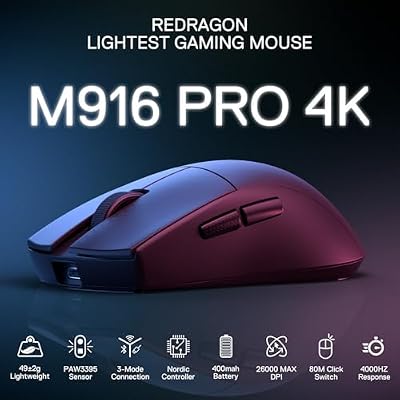
Redragon M916 Wireless 49G Ultra-Light Gaming Mouse 26K DPI Remapping Keys | 4K Polling Rate, Dedicated for FPS Gamers, Redefine Keybinding Macro, Ergonomic Grip Body Comfort


As an Amazon Associate we earn from qualifying purchases. Product prices and availability are accurate as of the date/time indicated.
It is a tri-mode mouse, so you get a low-latency 2.4GHz dongle for play, Bluetooth for secondary devices and USB-C wired as a fallback, plus a 4K polling rate that the stock Superlight does not offer without a separate dongle.
This is the pick for the player who wants the Superlight’s ultralight feel but refuses to pay flagship money. The 49g weight changes how flick shots and fast tracking feel — there is simply less mass to start and stop — and the 4K polling rate keeps cursor reporting smooth on a high-refresh display. Three connection modes make it flexible enough to double as a laptop mouse, something the single-minded Superlight is not really built for.
It will not have the brand cachet or the years of pro-tested sensor tuning that Logitech brings, and Redragon’s software is more basic. But as a pure weight-for-dollar alternative to the G Pro X Superlight, the M916 PRO is one of the most compelling value picks in the category.
Pros: 49g ultralight body, 4K polling rate, tri-mode wireless, roughly a quarter of the Superlight’s price.
Cons: Redragon software is basic; sensor not as extensively pro-validated as Logitech’s HERO.

2. Redragon Gaming Mouse, Wireless with 8000 DPI and Fire Button

Redragon Gaming Mouse, Wireless Mouse Gaming with 8000 DPI, PC Gaming Mice with Fire Button, RGB Backlit Programmable Ergonomic Mouse Gamer, Rechargeable, 70Hrs for Windows, Mac Gamer, Black


As an Amazon Associate we earn from qualifying purchases. Product prices and availability are accurate as of the date/time indicated.
The Redragon 8000 DPI wireless mouse is the budget alternative for the player who wants cable-free gaming and does not want to spend much at all.
The fire button adds a genuinely useful gaming function, the 8000 DPI ceiling is far higher than most people ever use, and the wireless connection frees you from a cable for well under thirty dollars. For a secondary rig, a younger gamer’s first wireless mouse, or a backup, it hits a price the Superlight cannot touch.
You give up the Superlight’s ultralight weight and its flagship sensor consistency, and the build is plainer plastic. But as the cheapest wireless alternative on this list, it does the core job — wireless gaming — at a price that makes it an easy impulse buy.
Pros:
Cons: Heavier and plainer than ultralight rivals; entry-level build and sensor.
3. Logitech G305 LIGHTSPEED Wireless Gaming Mouse, HERO Sensor, 12,000 DPI

Logitech G305 Lightspeed Wireless Gaming Mouse - White | 12,000 DPI, Lightweight, 6 Programmable Buttons, 250h Battery, On-Board Memory, Compatible with PC and Mac






As an Amazon Associate we earn from qualifying purchases. Product prices and availability are accurate as of the date/time indicated.
If you want to stay inside the Logitech family but skip the Superlight’s price, the G305 LIGHTSPEED is the obvious alternative.
This is the pick for the player who specifically trusts Logitech and wants that ecosystem without paying flagship money. The HERO sensor tracks reliably, LIGHTSPEED wireless is genuinely low-latency, and the AA-battery design means you can swap in a fresh cell on the spot rather than waiting to recharge. It is heavier than the Superlight and uses an older shape, but the core wireless performance is from the same family, which is exactly what a lot of buyers actually want from a cheaper Logitech alternative.
Pros: Same LIGHTSPEED wireless and HERO sensor family as Logitech flagships, reliable, swappable AA battery.
Cons: Heavier than the Superlight; older shape and single AA rather than rechargeable.

4. Razer Orochi V2 Mobile Wireless Gaming Mouse, Ultra Lightweight, 2 Wireless Modes

Razer Orochi V2 Wireless Gaming Mouse, 950 Hr Battery, Black | 2 Wireless Modes (HyperSpeed & Bluetooth), 18K DPI Sensor, 60M-Click Switches, Lightweight, AA/AAA Battery, PC & Mac


As an Amazon Associate we earn from qualifying purchases. Product prices and availability are accurate as of the date/time indicated.
The Razer Orochi V2 is the portability-focused alternative. It is an ultralight wireless mouse built around travel and battery longevity, with two wireless modes — a HyperSpeed 2.4GHz dongle for low-latency play and Bluetooth for laptops and tablets — and an AA/AAA battery design that Razer rates for extremely long runtime.
This is the alternative for the player who games at a desk but also travels, commutes or works on a laptop. The small, light body is easy to throw in a bag, the dual wireless modes let you switch between a gaming dongle and Bluetooth depending on the device, and the battery design means you are not hunting for a charging cable on the road. For a one-mouse-for-everything setup, it covers far more scenarios than the purpose-built Superlight.
It is smaller than full-size mice, which suits smaller hands and claw grips better than large palm grips, and its sensor is a step below Razer’s top-tier Focus Pro. But as a lightweight, do-everything wireless alternative at a third of the Superlight’s price, the Orochi V2 is hard to beat for portability.
Pros: Ultralight and travel-friendly, two wireless modes, very long battery life, low price.
Cons: Compact body suits smaller hands; sensor below Razer’s flagship tier.
5. Redragon M725 Honeycomb Shell Gaming Mouse Wireless, 49g, 8000 DPI Tri-Mode

Redragon M725 Honeycomb Shell Gaming Mouse Wireless Lightweight 49g -Black | 8000 DPI Tri-Mode BT5.1/2.4GHz/Type-C Wired Gamer Mouse with 2 Side Buttons, Macro Programmable for PC/Mac/Laptop


As an Amazon Associate we earn from qualifying purchases. Product prices and availability are accurate as of the date/time indicated.
The Redragon M725 is the cheapest ultralight on this list, and it is the most aggressive value play against the Superlight.
This is the alternative for the budget player who wants the modern ultralight experience without compromise on weight. The honeycomb shell is the classic weight-saving technique, dropping mass to around 49 grams so fast flicks feel effortless, and tri-mode connectivity (2.4GHz, Bluetooth and wired) makes it as flexible as mice costing far more. With a 4.6-star rating it is also one of the best-reviewed picks here.
The honeycomb design exposes more of the internals, so it is less ideal if you game with sweaty hands or in dusty conditions, and the software is basic. But for an ultralight tri-mode wireless mouse at barely over twenty dollars, the M725 is the standout budget alternative to the G Pro X Superlight.
Pros:
Cons: Honeycomb shell exposes internals; basic software and entry-level build.

6. Razer Viper V3 HyperSpeed Wireless Esports Gaming Mouse, 82g, Up to 280hr Battery

Razer Viper V3 HyperSpeed Wireless PC Gaming Mouse, 82g, Black | 30K DPI Optical Sensor, Up to 280 Hr Battery Life, Mechanical Switches Gen-2, 6 Programmable Buttons, 1 x AA Battery included


As an Amazon Associate we earn from qualifying purchases. Product prices and availability are accurate as of the date/time indicated.
The Razer Viper V3 HyperSpeed is the closest head-to-head rival to the G Pro X Superlight on this list, and the most premium alternative here. It still undercuts the Superlight by well over half.
This is the alternative for the serious competitor who wants flagship-tier wireless performance but balks at the Superlight’s price. The 82-gram weight is slightly heavier than the Superlight’s 63 but still firmly in lightweight territory, the Viper shape is one of the most popular symmetrical designs in esports, and the enormous battery life means you rarely think about charging. HyperSpeed wireless is genuinely low-latency and trusted on pro rosters, making this a true peer rather than a downmarket substitute.
If you specifically need the absolute lowest weight, the Superlight still wins on grams. But for nearly everyone else, the Viper V3 HyperSpeed delivers a comparable competitive experience, a hugely popular shape and class-leading battery for less than half the money — the strongest all-round alternative in this guide.
Pros: Esports-grade HyperSpeed wireless, popular Viper shape, up to ~280hr battery, well under half the Superlight’s price.
Cons: 82g is slightly heavier than the Superlight; priciest pick here though still a big saving.
How to Choose a Logitech G Pro X Superlight Alternative
The first question to settle is weight. The Superlight’s appeal is its roughly 63-gram body, so if low mass is your priority, look at the 49-gram honeycomb and ultralight picks here — the Redragon M916 PRO and M725 both come in lighter than the Superlight itself. If you care more about a proven shape and battery life than chasing the lightest possible mouse, the 82-gram Razer Viper V3 HyperSpeed is the better target.
Next, decide how much the brand matters to you. If you trust Logitech specifically and want the same LIGHTSPEED wireless and HERO sensor lineage, the G305 is the natural step down. If you are brand-agnostic and chasing value, the Redragon picks deliver more raw spec per dollar, while Razer’s Orochi V2 and Viper V3 sit in between on price and pedigree.
Finally, match the mouse to how you actually play. Competitive shooter players on high-refresh monitors benefit most from high polling rates and the lowest latency — look at the 4K-polling M916 PRO or the esports-tuned Viper V3. Players who travel or share one mouse across a desktop and a laptop should weigh the dual-mode Orochi V2.
Frequently Asked Questions
Are these alternatives as good as the Logitech G Pro X Superlight?
For most players, the practical experience is very close. The Razer Viper V3 HyperSpeed in particular competes head to head on wireless latency, shape and battery. The budget Redragon picks are even lighter than the Superlight and dramatically cheaper, though they use less-validated sensors and simpler software. You give up some polish and brand pedigree, but you keep the core lightweight wireless experience.
Which alternative is the lightest?
The Redragon M916 PRO and the Redragon M725 both come in around 49 grams, lighter than the Superlight’s roughly 63 grams. The M725 uses a honeycomb shell to hit that weight at the lowest price on this list.
Do I lose much by not buying the Superlight?
Mostly you lose brand trust, the years of pro tuning behind Logitech’s sensor, and the cleanest software ecosystem. You do not necessarily lose weight, wireless reliability or polling rate — several alternatives match or beat the Superlight on those specs while costing far less.
Is a wireless gaming mouse laggy compared with wired?
Modern 2.4GHz wireless like Logitech LIGHTSPEED and Razer HyperSpeed is effectively indistinguishable from wired for the vast majority of players. Every primary pick here uses a low-latency dongle for gaming; Bluetooth modes, where present, are best kept for laptops and secondary devices rather than competitive play.
What polling rate do I actually need?
A standard 1000Hz polling rate is fine for most setups. Higher rates like the 4K polling on the Redragon M916 PRO only show a meaningful benefit on very high-refresh monitors and for competitive players chasing the lowest possible input latency.
Related Guides
- Best Gaming Mice
- Lightweight vs Heavyweight Gaming Mice
- Wired vs Wireless Gaming Mouse Latency
- 4K vs 8K Polling Rate Explained
- Logitech vs Razer Mouse Showdown
- Symmetrical vs Ergonomic Mouse Shape
- Optical vs Mechanical Mouse Switches
- Best Gaming Keyboards
About the Author
Sarah Mitchell is the Peripherals and Audio Lead at PC Gaming Universe. With six years of competitive esports play across CS and Valorant and a long background reviewing keyboards, mice and headsets, she focuses on what actually changes how a setup feels in long sessions — switches, polling rates, build quality and the small ergonomic details that separate a good peripheral from a great one.
Top picks from this guide
 Pulsar Gaming GearsPulsar Gaming Gears Superglide Type-S Skates for GPro X Superlight…$25 \xc2\xb7 98/100Logitech GLogitech G305 Lightspeed Wireless Gaming Mouse - White | 12,000…$35 \xc2\xb7 98/100RedragonRedragon M725 Honeycomb Shell Gaming Mouse Wireless Lightweight 49g -Black…$24 \xc2\xb7 98/100
 Logitech GLogitech G PRO X2 SUPERSTRIKE Wireless Gaming Mouse - Black/White…$180 \xc2\xb7 98/100