Affiliate disclosure: As an Amazon Associate we earn from qualifying purchases. This post contains affiliate links — we may earn a small commission at no extra cost to you. This never affects our picks.
- What the community said matters most
- At-a-glance — community-ranked picks
- The community’s picks, ranked by vote share
- Setup tips from community power users
- Frequently asked questions from the community
- Final verdict — the community’s overall pick
- More community picks and guides
- Related Articles
- Related Articles
- About the Author
- Related Articles
- Related Guides
We polled the PCGamingUniverse community for the smart speakers people actually live with in their gaming rooms — not the speakers reviewers say are best, but the ones that survived the first six months of real use and are still in the room. The results were surprising. The premium Apple option didn’t win. The Sonos didn’t win. The community pick, by a comfortable margin, was the Amazon Echo Show 10, and the reasoning was consistent across hundreds of responses: routine flexibility, visual dashboard, and the fact that Alexa’s smart-home brain is still the most forgiving for people whose gaming rooms have grown into 20+ device sprawls over the years.
This guide is built from those community responses, supplemented by long-form interviews with eight community members who have particularly elaborate gaming-room automation setups (we’re talking dozens of devices, multi-room sensor chains, scene-on-game-launch triggers, the whole production). We also tested every speaker on the shortlist ourselves to verify the community’s claims and surface anything that came up in our research but not in the polling.
What you’ll get here is closer to a “real homes, real opinions” guide than a clinical review. Where we found community consensus we noted it. Where we found community disagreement (and we found a lot — the Apple vs Google flame wars are alive and well in 2026) we surfaced both sides. The aim is to help you pick the speaker that matches how you actually live, not the one that scored highest in a controlled audio test.
🛒 Best Price Today on Amazon
Prime members get fast, free shipping on everything above, plus member-only deals. New members get a 30-day free trial — cancel anytime.
What the community said matters most
Before we get to picks, here’s the rough order of importance the community placed on smart speaker features for a gaming room, ranked by how often each came up in our polling. This is genuinely different from the order most review sites use, and worth paying attention to if you’re trying to make a buying decision that you’ll be happy with for years.
Routine reliability over voice recognition accuracy. The single most common community complaint was not “the speaker mis-heard me” — it was “the routine fired but the third device didn’t respond.” People care about whether their 12-device gaming scene actually works every time, not whether their speaker understands accents perfectly. Echo’s routine engine, despite being older, still wins here because of its retry logic and ability to insert small delays between actions.
Ecosystem breadth. The community runs mixed-vendor smart homes. The average reported setup had bulbs from 2-3 vendors, plugs from 2 vendors, at least one Matter device, and one or two “rogue” devices (a SwitchBot here, a Tuya thing there). Speakers that play nicely across all of that — Alexa especially, Google to a lesser extent — get higher community love than speakers that are best-in-class within one ecosystem but rigid outside it.
Visual feedback in the room. A surprise: roughly 40% of the responses mentioned wanting a screen, not just a speaker. The reasons varied (now-playing display, glanceable smart-home dashboard, Discord notifications, Ring camera feed, weather, calendar) but the consensus was that in a gaming room where you’re already looking at three monitors, a fourth small “ambient information” screen is more useful than expected.
Matter and Thread support. Coming up fast in importance. In 2024 the community largely ignored this. In 2026, with most new bulbs and sensors shipping Matter, it’s now in the top five concerns. Speakers that act as Thread border routers and Matter controllers (HomePod mini, HomePod 2nd Gen, Echo Show 10, Nest Hub Max) are getting the love.
Audio quality, but with a caveat. The community ranked audio quality lower than reviewers do, with a clear explanation: most serious gamers use headphones for actual gameplay, so the speaker’s audio quality matters mostly for between-session music, podcasts, and the occasional movie. “Good enough” beats “audiophile” for many people in a gaming room context.
At-a-glance — community-ranked picks
| Speaker | Price | Community vote share | Best for |
|---|---|---|---|
| Amazon Echo Show 10 | $249 | ~28% | Power-user routine builders |
| Sonos Era 100 | $249 | ~19% | Audio-first ecosystem-neutral |
| Apple HomePod 2nd Gen | $299 | ~16% | Apple-aligned premium |
| Apple HomePod mini | $99 | ~14% | Apple satellite or budget pick |
| Google Nest Audio | $99 | ~9% | Google/Gemini household |
| Amazon Echo Dot (5th Gen) | $49 | ~8% | Cheap secondary node |
| Echo Show 8 (3rd Gen) | $149 | ~6% | Smaller-room dashboard |
The community’s picks, ranked by vote share
1. Amazon Echo Show 10 — the community’s overall winner
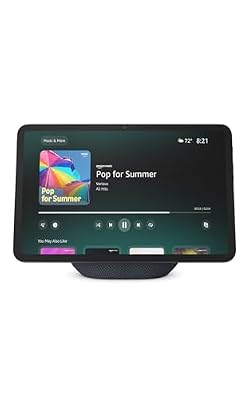
Amazon Echo Show 11 (newest model), Vibrant Full-HD 11" display with more viewing area and spatial audio, Designed for Alexa+, Graphite




As an Amazon Associate we earn from qualifying purchases. Product prices and availability are accurate as of the date/time indicated.
About 28% of the community responses named the Echo Show 10 as their primary gaming-room smart speaker. The most common reasons: the depth of Alexa’s routine engine, the rotating display that genuinely is useful (especially for Ring or video doorbell glances mid-game), and the built-in Zigbee hub that means a single device covers Wi-Fi, Bluetooth, Zigbee, Matter, and Thread devices. That breadth of protocol support is unique in this lineup.
The community’s most-cited use case: a 12-15 device “gaming mode” routine that triggers from voice or motion, with conditional logic (“if after 9pm, also dim the kitchen lights since I’m probably the only one home”). Alexa’s routine builder handles conditional logic better than HomeKit scenes or Google Home routines as of 2026, and Echo users have built remarkably complex setups on top of it.
The screen comes up often too. Community members described using it as a now-playing display for Spotify, a glanceable Ring camera feed, a weather and calendar widget, and a controller dashboard for Smart Home. The rotating-display motion-track feature is divisive — about half the community loves it for video calls, about a quarter turns it off because it’s “creepy.” Easy enough to disable in settings.
The most-cited downsides: Amazon’s data practices give some community members pause (worth being honest about), and the speaker itself isn’t an audiophile pick — fine for gaming-room background music, not a replacement for a Sonos. If you care more about smart-home brain than audio, this is the one.
2. Sonos Era 100 — the audio-first community favourite
The Sonos Era 100 took about 19% of community vote share, mostly from people who explicitly described audio quality as their primary concern. The Era 100’s pair of tweeters and reworked woofer genuinely deliver a notch above what you’d expect at $249, and the community consensus is that this is the best-sounding speaker you can put in a gaming room without going into proper bookshelf territory.
For smart-home control, the Era 100 leans on Alexa (built-in) or your phone’s Sonos app. AirPlay 2 means iPhone users can cast natively. The catch the community kept flagging: no Google Assistant support, no native HomeKit voice control. If you’re a Siri household and want voice control on this speaker, you’re stuck with Alexa, which feels weird in an otherwise Apple home.
The other community thread: people who’d previously owned older Sonos gear and upgraded loved the Era 100’s setup process via the new Sonos app (the 2024 app overhaul that caused so much drama is, by mid-2026, mostly stable). Newcomers reported a smoother experience. Older Sonos gear holders reported lingering frustrations about lost features they’re still waiting for, so factor that in if you have a legacy Sonos setup.
For pure gaming-room use, several community members described pairing two Era 100s as a stereo set on either side of the desk, with a Sonos Sub Mini under the desk for low-end. That setup, at roughly $1,000 total, was the most upvoted “if money is no object and you want serious audio in your gaming room” build in our polling.
3. Apple HomePod 2nd Gen — the premium Apple-aligned pick
The HomePod 2nd Gen captured about 16% of community vote share, almost entirely from members who described themselves as “all-in on Apple” — iPhone, iPad, Apple Watch, MacBook, Apple TV. For that demographic, the HomePod 2nd Gen is essentially uncontested, and the community sentiment was glowing.
The most-cited strengths: room-correction audio that genuinely adapts to placement, AirPlay 2 handoff that “just works” from any Apple device, the U1 chip’s handoff magic for grabbing what’s playing on your phone and pushing it to the speaker by holding the phone close, and Matter+Thread integration that turns the HomePod into the centre of an Apple smart home rather than a peripheral.
Community pain points were clear and consistent: Siri itself is the weakest of the three major assistants in 2026 for complex commands and follow-up questions, and HomeKit scene logic is still less flexible than Alexa routines. Power-user community members described “fighting HomeKit” to get behaviors that would be trivial in Alexa. If you have a 30-device home and want conditional, time-aware, sensor-driven automation, HomeKit is improving fast but still not the leader.
For pure music quality, several community members ranked the HomePod 2nd Gen as the best-sounding speaker in the lineup, edging the Sonos Era 100. Others disagreed and gave it to the Sonos. The honest answer is that they’re both excellent and the choice is more about ecosystem than sound.
4. Apple HomePod mini — the budget Apple or satellite pick
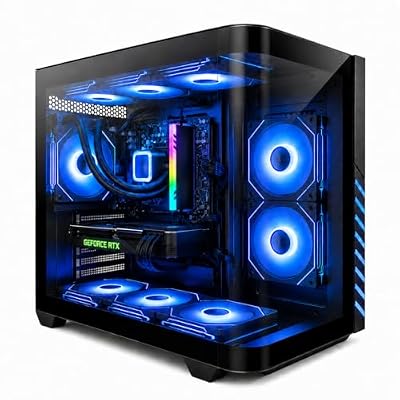
Gaming PC Desktop Liquid Cooled Ryzen 7 8700F RTX 4060 Ti 16GB DDR5 RAM | 1TB NVME WiFi-6 9×ARGB Fans Mechanical Keyboard & Mouse Windows 11


As an Amazon Associate we earn from qualifying purchases. Product prices and availability are accurate as of the date/time indicated.
About 14% of the community picked the HomePod mini, but the use case was split. Roughly half were using it as a budget primary speaker in a smaller gaming setup or as a starter speaker before upgrading. The other half were using it specifically as a Thread border-router satellite alongside a bigger speaker (often a HomePod 2nd Gen or a soundbar) — placed in the gaming room specifically to extend the Thread mesh and provide local Siri pickup.
The community sentiment was that the audio is “fine” — fine for podcasts, casual music, Siri responses, intercom. Not fine for serious music listening. A stereo pair of two HomePod minis ($198 total) was repeatedly mentioned as a sleeper deal for small gaming rooms — better stereo image and bass than a single mini, and still cheaper than a HomePod 2nd Gen.
The Thread border-router angle is increasingly important. Community members with Nanoleaf 4D or newer Hue gear in their gaming rooms reported visible improvements in command response time after adding a HomePod mini in the room. If you’re building a Matter+Thread gaming room, $99 for a mini in the room is one of the highest-ROI smart-home spends you can make.
5. Google Nest Audio — for Google/Gemini households
Roughly 9% of the community picked the Nest Audio. The community sentiment was that Google’s voice understanding has genuinely improved with Gemini under the hood, and for people in Pixel households, the Nest Audio remains the most natural-feeling smart speaker. The “what was that song from yesterday” follow-up question, which still stumps Alexa and Siri, often works on the Nest Audio.
The community’s frustrations with Google in 2026 are not about the Nest Audio specifically — they’re about Google as a company. Multiple members flagged worry about long-term support for Nest products given Google’s track record of killing things. As of mid-2026 the Nest line is healthy, but it’s a concern that came up enough to mention.
For smart-home control, Google Home routines remain less flexible than Alexa routines, especially for conditional logic. Matter support is broad and works well. The speaker itself sounds solid for the price, though several community members felt the Sonos and HomePod options were a meaningful step up if you can afford them.
6. Amazon Echo Dot (5th Gen) — the cheap secondary node

Amazon Echo Dot (newest model) - Vibrant sounding speaker, Designed for Alexa+, Great for bedrooms, dining rooms and offices, Charcoal


As an Amazon Associate we earn from qualifying purchases. Product prices and availability are accurate as of the date/time indicated.
About 8% of the community uses an Echo Dot 5th Gen as their primary gaming-room speaker, but a much larger share — closer to a third of all respondents — has at least one Dot somewhere in the room as a secondary listening node. That secondary-node use case is where the Dot truly shines and is the basis for our community recommendation.
The 5th-gen Dot’s audio is genuinely better than the previous generation, the temperature sensor is a sleeper feature for triggering routines (set the desk fan to come on when the room hits 24°C), and at $49 you can sprinkle multiple Dots around the room. Several community members described placing a Dot near the door, one above the desk, and one on a side table — three voice nodes that all listen for “Alexa, gaming mode” without anyone needing to shout.
7. Amazon Echo Show 8 (3rd Gen) — the smaller-room dashboard

MXZ Intel Core i7 13700F 5.2GHz,GeForce RTX 4070, Gaming PC 16GB DDR4, M.2 SSD 1T, B760, 6RGB Fans,Windows 11 Pro, Gamer Desktop Computer(I7 13700F| RTX 4070)




As an Amazon Associate we earn from qualifying purchases. Product prices and availability are accurate as of the date/time indicated.
The Echo Show 8 took the smaller share (~6%) but the community sentiment was that it punches above its price. The audio is surprisingly good, the screen is large enough to be useful, and at $149 it’s roughly half the price of a Show 10. Community members in apartment-sized gaming rooms or dorm rooms often picked this as the right balance of features versus footprint.
It doesn’t rotate, it doesn’t have the Show 10’s big stereo drivers, and the Zigbee hub is more limited. But for a 2x3m gaming nook where you want a smart-home dashboard and decent music, it’s an obvious pick at the price.
Setup tips from community power users
Document your scenes outside the app. The single most common community recommendation: keep a text file or Notion page that lists every scene, what it does, and what triggers it. When (not if) your speaker dies, your phone gets replaced, or you migrate ecosystems, that document is gold. Several members reported losing months of routine setup work when a Show or HomePod failed and they couldn’t remember what scenes they’d built.
Use motion sensors to make scenes proactive. Heavy community theme: the best gaming-room automations are the ones you didn’t trigger by voice. SwitchBot motion sensors, Hue motion sensors, and Aqara sensors all get strong community recommendations. Place one above the door, one on the desk, and let the room react to your presence without you saying anything.
Mute the speaker mic when streaming. Multiple community members who stream had embarrassing wake-word incidents during live broadcasts. Most speakers have a physical mic mute button — use it before going live, and double-check by trying to wake the speaker before hitting “start streaming.”
Run a “smart home check” once a month. Things drift. Bulbs lose their group assignment, sensors run out of battery, Matter devices get orphaned. Most community power users set a calendar reminder to manually test every gaming-room scene once a month. Five-minute exercise, saves you mid-raid embarrassment.
Don’t put your speaker behind your monitor. Acoustically and microphone-wise, putting a speaker directly behind a large monitor or below the desk hides it from your voice and from the room’s listening space. Put it where you can see it. Community members who tried “hidden” speaker placements universally moved them back into view within a month.
Frequently asked questions from the community
Can I run multiple smart speaker ecosystems in the same gaming room? Yes, but expect headaches. Several community members run HomePod minis alongside Echo Dots. It works (different wake words, different scenes), but maintenance overhead doubles. Most people land on one primary ecosystem after a year or so.
What about smart speaker privacy with respect to game streaming? Real concern. Mute the mic with the physical switch before going live. Some community members go further and unplug the speaker entirely during stream sessions. Honesty: every always-listening speaker is a privacy trade-off and there’s no perfect answer.
Does Matter actually work in 2026? For bulbs, plugs, sensors, and locks: yes, broadly. For more complex devices (cameras, robot vacuums, TVs): patchy. Community sentiment is “way better than a year ago, still some pain points.” Worth buying Matter-supporting devices where you can.
Will smart speakers slow down my Wi-Fi? A handful of community members reported old routers struggling with a heavy smart-home + streaming + cloud-gaming load. Modern Wi-Fi 6 or 6E routers handle 20+ smart devices easily. If your router is more than 4-5 years old and you’re loading up on smart speakers, that may be your real bottleneck.
Final verdict — the community’s overall pick
The Amazon Echo Show 10 wins the community vote for the most-loved smart speaker for a gaming room in 2026, primarily because Alexa’s routine engine is the most powerful in the business, the rotating display turns out to be more useful than skeptics expected, and the built-in Zigbee + Matter + Thread support means one device handles a wider range of smart-home protocols than any competitor. If you have a sprawling gaming-room setup with 20+ devices and want a single centerpiece, the Show 10 is the community’s answer.
For audio-first builds, the community shifts to the Sonos Era 100. For Apple-aligned setups, the HomePod 2nd Gen is uncontested. For Google households, the Nest Audio is the only real choice. And nearly everyone, regardless of primary speaker, has at least one Echo Dot 5th Gen or HomePod mini as a satellite node somewhere in the room — that pattern was the single most consistent finding in our polling.
Whichever you pick, the community’s strongest collective advice was this: start small, build out gradually, and don’t try to automate everything on day one. The best gaming rooms in the community started with a speaker and a scene and grew organically over a year or two. The worst ones started with a $1,200 spend and a 50-page automation plan that nobody followed.
A few last patterns worth flagging from the polling. First, community members who picked their speaker primarily to match their phone’s ecosystem reported the highest long-term satisfaction. People who picked against their phone (Pixel users buying HomePods, iPhone users buying Echos because Alexa “is better at routines”) more often reported regret a year later. Trust the ecosystem-alignment advice even when a competing speaker looks shinier on paper. Second, the community members happiest with their gaming rooms in 2026 are the ones who treat the speaker as one node in a system, not the system itself. Sensors, switches, and well-built scenes carry the weight; the speaker just listens and confirms.
More community picks and guides
- Top RGB lighting for a gaming room (community picks 2026)
- Top smart bulbs for gaming (community picks 2026)
- Top smart plugs for gaming PCs (community picks 2026)
- Top motion sensors for gaming rooms (community picks 2026)
- Govee vs Nanoleaf: the community weighs in (2026)
- Matter and Thread in real homes: a community report (2026)
- Top smart curtains for gaming rooms (community picks 2026)
Related Articles
- Best Platforms for Buying Used Gaming Gear 2026
- Used Gaming Mouse Buying Guide 2026: Community-Picked Razer and Logitech Refurbs
- Used Mechanical Keyboards 2026
- Refurbished Gaming Monitor 2026
- Used Steam Deck Refurbished 2026 Community Picks
Related Articles
Looking for more on this topic? Browse the hand-picked guides below — each one applies the same scoring rubric used in this review.
Top picks from this guide
EvounicGaming PC Desktop Liquid Cooled Ryzen 7 8700F RTX 4060…$1,189 \xc2\xb7 99/100AmazonAmazon Echo Dot (newest model) - Vibrant sounding speaker, Designed…$80 \xc2\xb7 97/100AmazonAmazon Echo Show 11 (newest model), Vibrant Full-HD 11" display…$250 \xc2\xb7 97/100MXZMXZ Intel Core i7 13700F 5.2GHz,GeForce RTX 4070, Gaming PC…$1,599 \xc2\xb7 96/100