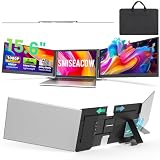
- Top Pick: SMISEACOW Laptop Screen Extender Triple 15.6", 1080P FHD IPS 0.18" Ultra-Slim & 3.9 lbs, Plug-Play Portable Monitor for Laptops Fits 12-17.3" Laptops, Compatible with Win/Mac/Android
- Best Value: 15.6" Laptop Screen Extender, 1080P FHD Triple Portable Monitor for Laptops, Ultra-Slim Travel Dual Monitor Fit for 12"-17.3" Laptops, USB-C Plug&Play Extended Screen Compatible with Win/Mac/Android
- Premium Choice: MNN 15.6" FHD 60Hz Portable Monitor USB-C HDMI IPS HDR Gaming Laptop
Adding a second monitor to a laptop is the single most effective productivity upgrade most people can make, and portable dual-screen extenders make it possible anywhere. Whether you clip a folding panel onto your lid or stack a foldable display beside it, doubling your screen space transforms how efficiently you work on the move.
This review examines the best dual-monitor solutions for laptops on Amazon, from triple-capable extenders run in dual mode to purpose-built stacked displays. We weigh image quality, connectivity, and portability so you can choose the setup that fits your laptop and your commute.
As an Amazon Associate we earn from qualifying purchases at no extra cost to you.



🎮 Get More From Your Setup — Free
Prime Gaming gives you free PC games every month, in-game loot, and a free Twitch channel sub — plus fast free shipping on all the gear above. New members get a 30-day free trial.
Watch: 2 Monitor Laptop — Video Review
Design & Build
There are two main approaches. Clip-on extenders like the SMISEACOW 15.6-inch and KEFEYA 14-inch attach side panels to your lid, while the InnoView portable dual monitor stacks two 15.6-inch screens vertically with a 315-degree adjustment for flexible positioning. Standalone portable monitors such as the MNN 15.6-inch sit on a kickstand beside the laptop. The extenders win on integration and travel compactness; the standalone and stacked designs offer larger, more stable viewing without loading the laptop hinge.
Performance
Panels are predominantly 1080p FHD IPS, providing sharp text and wide viewing angles ideal for documents, email, and coding. The VueForge and SMISEACOW extenders use ultra-slim, lightweight panels that keep the lid balanced, while the InnoView stacked monitor delivers two full displays on a single stand for a desk-like experience. USB-C plug-and-play connectivity is the norm, carrying power and video over one cable, though some models offer HDMI as a fallback for older laptops. For everyday multitasking, all deliver a noticeable efficiency boost.
Pros & Cons
- Doubled workspace: A second screen dramatically improves multitasking.
- Portable: Foldable and clip-on designs travel easily.
- Simple setup: USB-C plug-and-play on most models.
- Flexible positioning: Stacked and rotating options suit varied desks.
- Resolution ceiling: Most panels are 1080p, not ideal for detailed design work.
- Power draw: Extra screens can shorten laptop battery life.
Alternatives to Consider
If you always work at the same desk, a full-size external monitor offers more screen area and higher resolution for less money. A single large portable monitor is a lighter alternative to a clip-on extender. But for genuine grab-and-go dual screens, the SMISEACOW extender and InnoView stacked display are standout choices.
Related Guides
- Dell Snapdragon Laptop (2026)
- Best Deals On Gaming Laptop (2026)
- Best Laptop For Gaming And Work (2026)
- OLED Surface Laptop (2026)
Frequently Asked Questions
Do I need USB-C to use these?
USB-C with video output is the easiest connection, powering and driving the screen over one cable. Models like the KEFEYA also include HDMI for laptops without a compatible USB-C port.
Will a second screen drain my battery?
Yes, powering an extra display draws from the laptop battery. For all-day mobile use, keep a charger handy or choose a monitor with its own power input.
Clip-on or standalone, which is better?
Clip-on extenders are the most portable and integrated. Standalone or stacked monitors like the InnoView give larger, more stable screens but take up more desk space.
Can I use these with a tablet or phone?
Many support Android devices and consoles over USB-C or HDMI, though functionality varies. Check the listing for compatibility with your specific device.
Verdict
Adding a second monitor to your laptop pays immediate dividends in productivity, and the right solution depends on how you work. The SMISEACOW and KEFEYA clip-on extenders are ideal for travel, while the InnoView stacked display suits a semi-permanent desk setup. Match the connection to your laptop’s ports, keep power in mind, and you will wonder how you managed with one screen.