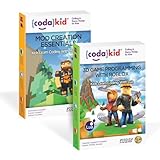
- Top Pick: CodaKid Coding Box for Kids – Minecraft Modding & Java Game Design Activity, Ages 9+ – Includes 12 Months Access & Online Mentor Support
- Best Value: Malwarebytes Standard, Premium Software | Amazon Exclusive | 2 Devices, 18 Months (Windows, Mac OS, Android, Apple iOS, Chrome) [software_key_card]
- Premium Choice: CodaKid Coding Bundle for Kids – Learn Lua with Roblox + Java with Minecraft Mods – 190+ Hours of Award-Winning Online Coding Courses – Ages 9+ – PC & Mac
To download Minecraft on a Mac, go to minecraft.net, buy or sign in to a Microsoft account that already owns Minecraft: Java Edition, download the macOS launcher as a .dmg file, and drag the Minecraft Launcher into your Applications folder. Java Edition is the version that runs on macOS; Bedrock Edition, the version found on consoles, Windows, and phones, has never been released for Mac. That single fact answers most of the confusion around installing Minecraft on Apple hardware, and the rest of this guide covers versions, Apple Silicon performance, and what to do when the launcher refuses to open.
As an Amazon Associate I earn from qualifying purchases.
Mac gaming has improved dramatically, and Minecraft is only one of many sandbox and indie titles that run beautifully on Apple hardware. Here is a quick comparison of the standouts.
| Game | Platform | Genre | Why It’s Great | Rating |
|---|---|---|---|---|
| Minecraft: Java Edition | macOS, Windows, Linux | Sandbox Survival | The moddable original, and the only Minecraft built for Mac | 9.5/10 |
| Stardew Valley | macOS, PC, Switch, mobile | Farming Sim | Runs on nearly any Mac and supports full multiplayer | 9.4/10 |
| Terraria | macOS, PC, consoles, mobile | 2D Sandbox | Enormous content depth with tiny hardware demands | 9.3/10 |
| Baldur’s Gate 3 | macOS, PC, PS5, Xbox | CRPG | A native Mac build of one of the deepest RPGs ever made | 9.7/10 |
| Hollow Knight | macOS, PC, Switch, consoles | Metroidvania | Flawless art direction and a native Apple Silicon-friendly build | 9.4/10 |
| Civilization VI | macOS, PC, Switch, consoles | 4X Strategy | Turn-based pacing that suits laptops and integrated GPUs | 9.0/10 |
| Disco Elysium | macOS, PC, consoles | RPG | Writing-driven design with modest system requirements | 9.5/10 |
| Factorio | macOS, PC, Linux, Switch | Automation | Endlessly optimisable factories that scale to any CPU | 9.6/10 |
🛒 Best Price Today on Amazon
Prime members get fast, free shipping on everything above, plus member-only deals. New members get a 30-day free trial — cancel anytime.
How to Download Minecraft on Mac Step by Step
Step 1: Buy the Right Edition
Head to the official Minecraft website and look for Minecraft: Java Edition. Purchases are tied to a Microsoft account, and if you owned Minecraft years ago under a Mojang account, that account has since been migrated to Microsoft, so sign in with the migrated credentials rather than creating a new one. Java Edition is currently sold in a bundle with Bedrock Edition on Windows, but the Bedrock half of that bundle will not install on macOS, so do not expect it to appear in your launcher on a Mac. Never buy Minecraft from a third-party key reseller; account-bound licences cannot be legitimately transferred and those keys are a common source of revoked purchases.
Step 2: Download and Install the Mac Launcher
On the download page choose the macOS option, which delivers a .dmg disk image. Open it, then drag the Minecraft icon into the Applications shortcut that appears in the window. Eject the disk image and launch the game from Applications or Launchpad. The first time you run it, macOS Gatekeeper may warn that the app was downloaded from the internet; approve it, and if it is blocked outright, open System Settings, go to Privacy and Security, and click Open Anyway next to the Minecraft entry. The launcher then downloads the game files themselves, which can take several minutes on a slow connection. A comfortable input setup makes those first hours far better, so it is worth reviewing a gaming mouse buying guide if you are still using the bundled Apple mouse.
Step 3: Sign In and Pick a Version
After signing in with your Microsoft account, the launcher’s Installations tab lets you choose which version of Minecraft to run. Keeping the latest release is best for playing with friends on current servers, but older versions remain available, which matters if you are joining a modded server locked to a specific build. Each installation gets its own game directory option, so you can keep a vanilla profile and a modded profile side by side without them interfering with each other. Snapshots, which are Mojang’s pre-release test builds, are also selectable here and are a good way to preview upcoming features without touching your main world. If you plan to run multiple modded profiles, storage fills quickly, and a gaming SSD buying guide explains which drives handle constant world saves best.
Does Minecraft Run Well on Apple Silicon Macs?
Yes. Minecraft: Java Edition ships with a native Apple Silicon build of Java, so M-series Macs run the game without Rosetta translation, which was a serious performance drag in the early Apple Silicon days. In practice, an M-series MacBook Air handles vanilla Minecraft at high frame rates with a moderate render distance, and higher-tier chips comfortably handle shader packs. Intel Macs still work, but integrated graphics from that era struggle once you push render distance past about twelve chunks or install a demanding shader. Regardless of chip, watch your RAM allocation and your thermals, since sustained load on a fanless Mac will throttle. If you play docked, a guide to the best monitors for MacBooks covers panels that handle Retina scaling without blurry text.
Why You Cannot Download Bedrock Edition on Mac
Bedrock Edition is the C++ codebase that powers Minecraft on Windows, Xbox, PlayStation, Switch, iOS, and Android, and it is what enables cross-play and the Marketplace. Mojang has never shipped a macOS build of it, which means Mac players cannot join Bedrock realms, use Marketplace content, or play cross-platform with console friends through Minecraft itself. The workarounds are limited: play Java Edition with friends who also own Java, run Bedrock inside a Windows virtual machine or Boot Camp on older Intel Macs, or use game streaming from a Windows PC. Minecraft Education is a separate product that does run natively on macOS and iPad, but it is aimed at classrooms rather than general play. For streaming from a PC to a Mac, network stability matters far more than raw bandwidth, so check a gaming router and mesh Wi-Fi buying guide before blaming your Mac for input lag.
Adding Mods, Shaders, and Resource Packs
The reason many players specifically want Java Edition on Mac is modding. Fabric and Forge are the two dominant mod loaders, both offering macOS installers that add a new profile to the launcher. Once a loader is installed, mods go into the mods folder inside your Minecraft directory, reachable through Finder by pressing Command+Shift+G and entering the Application Support path for minecraft. Shader packs such as those that run through Iris or OptiFine transform lighting and water but demand far more GPU headroom, so start conservative and raise settings gradually. Always match mod versions to your game version exactly, since a mismatched mod is the single most common cause of a crash on startup. Long modding and building sessions benefit from proper audio separation, and a wireless gaming headset buying guide is a good starting point for anything better than laptop speakers.
Fixing the Most Common Mac Installation Problems
If the launcher opens and immediately closes, the usual culprits are a corrupted download, an outdated macOS version below the game’s minimum requirement, or leftover files from a previous installation. Delete the launcher from Applications, remove the minecraft folder from Application Support if you do not mind losing local worlds (back it up first), and reinstall from a fresh download. If the game launches but worlds fail to load, allocate more memory to the Java runtime in the installation’s More Options panel, keeping the value well under your total system RAM. Network errors during sign-in are often caused by VPNs or restrictive DNS settings rather than by Minecraft. Finally, if worlds are slow to save, an ageing external drive is often to blame, and a portable SSD buying guide explains which interfaces actually deliver their advertised speeds on modern Macs.
Frequently Asked Questions
Is Minecraft free to download on Mac?
The launcher itself downloads for free, but playing requires a purchased Minecraft: Java Edition licence attached to your Microsoft account. There is a limited free trial available through the launcher on some platforms, and Minecraft Education has its own separate licensing model aimed at schools rather than personal use.
Which Minecraft edition can Mac users actually play?
Only Java Edition runs natively on macOS. Bedrock Edition, the version used on consoles, Windows, and mobile devices, has no Mac build, so Mac players cannot use the Marketplace, join Bedrock realms, or cross-play with console friends without streaming from a Windows machine.
Do I need to install Java separately before downloading Minecraft?
No. The modern Minecraft launcher bundles and manages its own Java runtime, including a native build for Apple Silicon, so a separate system-wide Java installation is unnecessary. Installing your own Java version is only relevant for advanced modding or for running a dedicated Minecraft server on the same Mac.
Can I play with my Windows friends after downloading Minecraft on Mac?
Yes, provided they are also on Java Edition. Java servers and realms are fully cross-compatible between macOS, Windows, and Linux. You cannot join friends who are playing Bedrock Edition on consoles, phones, or the Windows Store version, because the two editions run entirely separate networking code.
As an Amazon Associate we earn from qualifying purchases at no extra cost to you.

![Malwarebytes Standard, Premium Software | Amazon Exclusive | 2 Devices, 18 Months (Windows, Mac OS, Android, Apple iOS, Chrome) [software_key_card]](https://m.media-amazon.com/images/I/41npXhY+3vL._SL160_.jpg)