Affiliate disclosure: As an Amazon Associate we earn from qualifying purchases. This post contains affiliate links — we may earn a small commission at no extra cost to you. This never affects our picks. Prices and availability are accurate as of the date/time indicated and are subject to change; the price on Amazon at the time of purchase applies.
- Quick Comparison Table
- 1. Logitech G305 LIGHTSPEED: Best for a lightweight wireless first mouse
- 2. Logitech G502 HERO: Best for a wired mouse with many buttons
- 3. Razer Basilisk V3: Best for ergonomic comfort and customisation
- 4. Razer Viper V3 HyperSpeed: Best for esports and light weight
- 5. ATK VXE Dragonfly R1 SE+: Best for ultralight tri-mode connectivity
- How to Choose
- Frequently Asked Questions
- About the Author
- Related Articles
Quick answer: The Logitech G305 LIGHTSPEED is our top pick among the best gaming mouse options under 50 for its wireless freedom. The G502 HERO suits button-heavy games, the Basilisk V3 suits comfort, the Viper V3 suits esports and the ATK Dragonfly suits ultralight fans.
This guide compares five of the best gaming mouse options under 50, from Logitech and Razer favourites to a 55g ATK ultralight. We picked a mix of wired and wireless models with clearly stated sensors and button counts. Every comparison uses each listing’s published specs; we did not run our own benchmarks.
Quick Comparison Table
| # | Model | Key specs (per listing) | Best for |
|---|---|---|---|
| 1 | Logitech G305 LIGHTSPEED | Wireless, HERO 12K sensor, 12,000 DPI, 6 buttons, 250h battery | a lightweight wireless first mouse |
| 2 | Logitech G502 HERO | Wired, HERO 25K, 25,600 DPI, 11 buttons, adjustable weights, RGB | a wired mouse with many buttons |
| 3 | Razer Basilisk V3 | Wired, ergonomic, 26K DPI optical, 11 buttons, HyperScroll tilt wheel | ergonomic comfort and customisation |
| 4 | Razer Viper V3 HyperSpeed | Wireless, 82g, 30K DPI, 280h battery, Gen-2 mechanical switches, 6 buttons | esports and light weight |
| 5 | ATK VXE Dragonfly R1 SE+ | 55g, PAW3395 SE sensor, 18,000 DPI, 70h battery, 2.4G/Bluetooth/wired | ultralight tri-mode connectivity |
1. Logitech G305 LIGHTSPEED: Best for a lightweight wireless first mouse
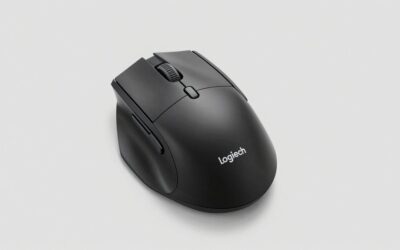
Specs per the listing: LIGHTSPEED wireless, HERO 12K sensor, 12,000 DPI, 6 programmable buttons, up to 250 hours of battery life, on-board memory, PC and Mac.
The G305 is the easiest recommendation for someone moving from a wired office mouse to a proper gaming one. It is wireless through Logitech’s LIGHTSPEED link, uses the HERO 12K sensor, and the listing claims a 250-hour battery life, so you rarely think about charging. On-board memory keeps your settings if you move the mouse to another computer.
It has only six programmable buttons and a compact body, so it will feel small in a large hand. If you play MMOs or games with many binds, a mouse with more buttons will suit you better. For general play and shooters, it is a safe choice.
- Pros: Wireless with a long stated battery life; HERO 12K sensor; lightweight; on-board memory
- Cons: Only 6 buttons; compact size; weight not given in the title

Logitech G305 LIGHTSPEED Wireless Gaming Mouse, Hero 12K Sensor - Black | 12,000 DPI, lightweight, 6 programmable buttons, 250h battery life, on-board memory, PC/Mac, lightweight gaming mouse
Included for 'Best Gaming Mouse Under 50: Wireless and Wired Picks' as a representative home product in this roundup; selection reflects the product set returned for this topic.
View on Amazon2. Logitech G502 HERO: Best for a wired mouse with many buttons
Specs per the listing: Wired, HERO 25K sensor, 25,600 DPI, RGB lighting, adjustable weights, 11 programmable buttons, on-board memory, PC and Mac.
The G502 HERO is a classic shape with a lot of controls. Eleven programmable buttons suit strategy and RPG players who want skills bound to the mouse, and adjustable weights let you tune the heft. The HERO 25K sensor offers a very high DPI ceiling, though few players use anything close to it.
It is wired and heavier than modern lightweight designs, so quick flick shots can feel slower to some players. If you want the lightest possible mouse for esports, look at the Razer Viper V3 or ATK mouse below. For control and customisation, the G502 stays strong.
- Pros: 11 programmable buttons; adjustable weights; HERO 25K sensor; on-board memory
- Cons: Wired only; heavier than the newest lightweight mice; button layout takes getting used to

Logitech G502 HERO Wired Gaming Mouse, HERO 25K Sensor for PC/Mac | High performance, 25,600 DPI, RGB, adjustable weights, 11 programmable buttons, on-board memory, programmable mouse
Included for 'Best Gaming Mouse Under 50: Wireless and Wired Picks' as a representative home product in this roundup; selection reflects the product set returned for this topic.
View on Amazon3. Razer Basilisk V3: Best for ergonomic comfort and customisation
Specs per the listing: Wired, ergonomic shape, Razer Chroma RGB, 26K DPI optical sensor, 11 programmable buttons, HyperScroll tilt wheel, fast gaming mouse switch.
The Basilisk V3 is built around comfort for palm and claw grips. The ergonomic shape includes a thumb rest, and the HyperScroll tilt wheel gives you either free-spin or notched scrolling, handy for browsing as well as games. Eleven programmable buttons cover a wide range of games.
It is a wired mouse with RGB lighting. If you dislike a cable or want a very light mouse, this is not it. Razer’s software is needed for full customisation, which some players find heavy. For long play sessions with a comfortable shape, it is a strong fit.
- Pros: Ergonomic shape with thumb rest; HyperScroll tilt wheel; 11 programmable buttons; 26K DPI optical sensor
- Cons: Wired; Razer software needed for full customisation; weight not in the title

Razer Basilisk V3 Customizable RGB Wired Ergonomic Gaming Mouse, Black | Fastest Gaming Mouse Switch, Chroma RGB Lighting, 26K DPI Optical Sensor, 11 Programmable Buttons, HyperScroll Tilt Wheel
Included for 'Best Gaming Mouse Under 50: Wireless and Wired Picks' as a representative home product in this roundup; selection reflects the product set returned for this topic.
View on Amazon4. Razer Viper V3 HyperSpeed: Best for esports and light weight
Specs per the listing: Wireless HyperSpeed, 82g, 30K DPI optical sensor, up to 280 hours of battery life, mechanical switches Gen-2, 6 programmable buttons, 1 AA battery included.
At 82g with a 30K DPI optical sensor and a stated 280 hours of battery life, the Viper V3 HyperSpeed is the esports-minded pick. It uses a single AA battery, which is included, so you can swap in a fresh one instead of waiting to charge. Gen-2 mechanical switches aim for consistent clicks.
The shape is a symmetrical esports design, so it may feel flat for palm-grip players who prefer a hump. It has six programmable buttons and no thumb rest, so it focuses on speed rather than extras. If you like a very light mouse for fast flicks, this is it.
- Pros: 82g weight; 30K DPI optical sensor; 280-hour battery per listing; AA battery included
- Cons: Only 6 buttons; flat shape may not suit palm grip; AA battery adds weight versus built-in cells

Razer Viper V3 HyperSpeed Wireless PC Gaming Mouse, 82g, Black | 30K DPI Optical Sensor, Up to 280 Hr Battery Life, Mechanical Switches Gen-2, 6 Programmable Buttons, 1 x AA Battery included
Included for 'Best Gaming Mouse Under 50: Wireless and Wired Picks' as a representative home product in this roundup; selection reflects the product set returned for this topic.
View on Amazon5. ATK VXE Dragonfly R1 SE+: Best for ultralight tri-mode connectivity
Specs per the listing: 55g lightweight, PAW3395 SE sensor, up to 18,000 DPI, 1K polling rate, up to 70 hours of battery life, tri-mode 2.4G, Bluetooth and wired.
The Dragonfly R1 SE+ is the lightest mouse here at 55g, and it offers three connection options: 2.4G wireless, Bluetooth and wired. That flexibility lets you use it with a gaming PC, a laptop and, in wired mode, as a backup when the battery is low. The PAW3395 SE sensor is a well-known choice in lightweight mice.
ATK is a smaller brand than Logitech or Razer, so software, support and long-term durability are less established. A 1K polling rate is standard but lower than the top-end mice. If you are curious about ultralight mice, this is the low-risk way to try one.
- Pros: 55g ultralight body; tri-mode 2.4G, Bluetooth and wired; PAW3395 SE sensor; 70-hour battery per listing
- Cons: Less established brand; 1K polling rate only; limited software details in the title

ATK VXE Dragonfly R1 SE+ Wireless Gaming Mouse - White | 55g Lightweight, PAW3395 SE Sensor, Up to 18000 DPI, 1K Polling Rate, 70 Hr Battery Life, Tri-Mode 2.4G/Bluetooth/Wired
Included for 'Best Gaming Mouse Under 50: Wireless and Wired Picks' as a representative home product in this roundup; selection reflects the product set returned for this topic.
View on AmazonHow to Choose
Weight and shape come first
A mouse that feels wrong will hurt your aim no matter what the sensor is. Under 60g suits fast, fingertip or claw players. Between 80g and 100g suits most palm grip users. Heavier, shaped mice such as the G502 favour control over speed. Look at the listing for grip hints: ergonomic designs support the palm, symmetrical ones suit claw and fingertip grips. If you can try a friend’s mouse first, do.
Wired or wireless
Modern wireless gaming mice are fast enough for competitive play. The G305 and Viper V3 use dedicated 2.4G links, not just Bluetooth. Wired mice never need charging and are consistent, but the cable can drag. If you use Bluetooth only, expect more latency than a dedicated receiver. For a desktop, a good 2.4G wireless mouse is worth it.
Sensor, DPI and buttons
Every mouse here has a sensor far better than you need. Do not pick by the biggest DPI number; most players use 400 to 1600 DPI. More important is how many buttons you will actually bind. Shooter players rarely need more than six. MMO and strategy players benefit from eleven. Check that the mouse has on-board memory if you want settings to follow it between computers.
Reliability and what to skip
Stick with brands that have established software and support. Skip no-name wired mice that list huge DPI values but no sensor model; the number tells you little. Check battery type: built-in rechargeable cells need a charger, an AA mouse can be swapped in seconds. Always confirm the grip size against your hand length if the listing offers measurements.
Frequently Asked Questions
Is wireless good enough for competitive games?
Yes, with a dedicated 2.4G receiver. Mice such as the G305 and Viper V3 use low-latency wireless links built for gaming. Bluetooth alone has more latency and is better for casual use.
What DPI should I use?
Most players use between 400 and 1600 DPI, adjusted with in-game sensitivity. A high maximum DPI is a spec, not a target. Choose a mouse that tracks cleanly at your usual DPI.
Do I need a lightweight mouse?
Not necessarily. Lightweight mice help fast flick aiming and reduce fatigue, but heavier mice give stability. Pick what feels natural to your grip and games.
How many buttons do I need?
For shooters, two side buttons are enough. For MMOs, MOBAs and strategy games, 6 to 11 programmable buttons let you bind abilities and macros.
Will these mice work on Mac?
The Logitech listings state PC and Mac support. For Razer and ATK mice, check the maker page for Mac software support.