Our Short List of 3
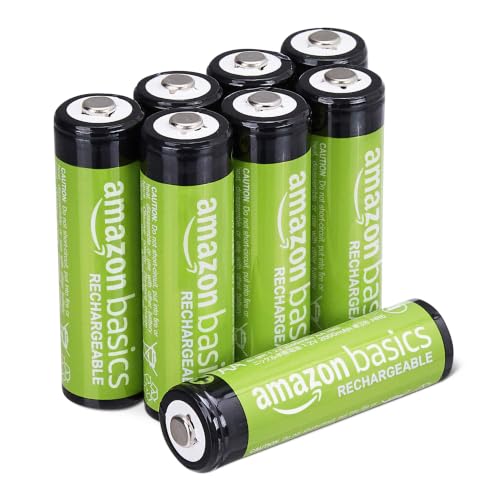
- Size: AA, 8 cells
- Chemistry: NiMH, 1.2 volts
- Capacity: 2000 mAh
- Recharge cycles: Up to 1000 times

- Size: AA, 4 cells
- Chemistry: NiMH, 1.2 volts
- Capacity: 2400 mAh
- Recharge cycles: Up to 400 times

- Size: AAA, 8 cells
- Chemistry: NiMH, 1.2 volts
- Capacity: 800 mAh minimum, 850 mAh typical
- Recharge cycles: Up to 2100 times
All 3 Picks at a Glance
| Product | Specs | Action |
|---|---|---|
| Amazon Basics 8-Pack Rechargeable AA NiMH Batteries, 2000 mAh |
| Check price on Amazon |
| Amazon Basics 4-Pack Rechargeable AA NiMH High-Capacity Batteries, 2400 mAh |
| Check price on Amazon |
| Panasonic eneloop AAA 8-Pack, BK-4MCCA8BA |
| Check price on Amazon |
Best Batteries For Keyboard And Mouse at a Glance
A wireless keyboard and a wireless mouse are two of the lowest-drain devices on a desk. A keyboard sips power for months at a time, and a mouse uses a little more, mostly when its sensor and radio are active. Neither device needs the high current that a camera flash or a game controller demands. What matters instead is low self-discharge, so a cell still holds a useful charge after weeks in a drawer or inside a keyboard that sleeps between keystrokes, and a long cycle life, so one set of cells can be recharged again and again for years.
- Best Batteries For Keyboard And Mouse at a Glance
- How to Choose Batteries for a Keyboard and Mouse
- Amazon Basics 8-Pack Rechargeable AA NiMH Batteries, 2000 mAh
- Amazon Basics 4-Pack Rechargeable AA NiMH High-Capacity Batteries, 2400 mAh
- Panasonic eneloop AAA 8-Pack, BK-4MCCA8BA
- The Three Picks Compared
- Setting Up a Battery Rotation
- Mistakes to Avoid
- Frequently Asked Questions
- Final Choice
That is why this guide covers rechargeable nickel-metal hydride cells, known as NiMH, in AA and AAA sizes only. A rechargeable set replaces hundreds of single-use cells over its life, and a charged spare set in the drawer means a dead mouse never ends a work session. The three picks below are all NiMH rechargeable batteries sold on Amazon US, and every one arrives pre-charged and ready to use. Two are AA packs for full-size keyboards and most wireless mice, and one is an AAA pack for compact mice and slim keyboards.
| Product | Size | Capacity | Recharge cycles | Charge retention |
|---|---|---|---|---|
| Amazon Basics Rechargeable AA, 8-Pack | AA | 2000 mAh | Up to 1000 times | 80 percent for 2 years |
| Amazon Basics Rechargeable AA High-Capacity, 4-Pack | AA | 2400 mAh | Up to 400 times | 70 percent for 6 months |
| Panasonic eneloop AAA, 8-Pack | AAA | 800 mAh minimum | Up to 2100 times | 70 percent after 10 years |
How to Choose Batteries for a Keyboard and Mouse
Start with the size the device takes
Open the battery compartment before buying anything. Most full-size wireless keyboards take two AA cells, and most wireless mice take one or two AA cells. Compact travel mice, slim keyboards and some presentation remotes take AAA cells instead. AA and AAA cells are not interchangeable, and no adapter fixes a wrong size, so the compartment decides the purchase. A household with both sizes needs one pack of each.
Capacity matters, but less than on high-drain gear
Capacity, measured in milliamp-hours, decides how long a cell runs before it needs charging. On a keyboard, the difference between a 2000 mAh cell and a 2400 mAh cell is measured in extra weeks of typing, because the drain is so low. On a mouse, the gap is more noticeable, because the sensor draws power whenever the mouse moves. A high-capacity AA cell is the right call for a gaming mouse at a high polling rate, while a standard-capacity cell is plenty for a keyboard and an office mouse.
Recharge cycles decide the long-term value
A recharge cycle is one full charge and discharge. A cell rated for 1000 cycles can be recharged roughly a thousand times before its capacity fades noticeably, which at a keyboard pace of a few charges per year is many years of use. The eneloop AAA cells here are rated for up to 2100 cycles, the standard Amazon Basics AA cells for up to 1000 cycles, and the high-capacity Amazon Basics AA cells for up to 400 cycles. That last number reflects a real trade-off in NiMH chemistry: higher capacity cells usually survive fewer cycles.
Low self-discharge matters most here
Self-discharge is the charge a battery loses while sitting unused. Modern low self-discharge NiMH cells hold most of their charge for months or years, which is what makes them a good fit for keyboards. The standard Amazon Basics AA cells maintain 80 percent of capacity for 2 years, the eneloop AAA cells maintain 70 percent of charge after 10 years, and the high-capacity Amazon Basics AA cells maintain 70 percent for 6 months and 50 percent for 12 months. For a keyboard that may sit untouched over a holiday, or a spare set kept in a drawer, the longer retention figures are worth more than a small capacity advantage.
Remember the 1.2 volt difference
Rechargeable NiMH cells run at 1.2 volts, while single-use alkaline cells run at 1.5 volts. Almost every wireless keyboard and mouse is designed to work with both, but a small number of devices show a low-battery warning earlier with NiMH cells, or report a shorter remaining runtime than the cells actually deliver. The listing for the Amazon Basics cells carries this exact warning.
Budget for a charger
None of the three packs in this guide includes a charger, so a household without a NiMH charger needs one. A basic four-bay charger that takes AA and AAA cells covers a keyboard and mouse pair, and a charger that charges each cell individually is better than one that charges in pairs, because it stops each cell when that cell is full. Do not charge NiMH cells in a charger made for another chemistry, and do not mix old and new cells, different brands, or different capacities in the same device, because the weakest cell decides the runtime of the set.
Amazon Basics 8-Pack Rechargeable AA NiMH Batteries, 2000 mAh
- Size: AA, 8 cells
- Chemistry: NiMH, 1.2 volts
- Capacity: 2000 mAh
- Recharge cycles: Up to 1000 times
The standard Amazon Basics AA pack is the default choice for a keyboard and mouse, and the pack size is the reason. Eight cells cover a two-cell keyboard and a two-cell mouse with four cells left over, which is exactly one full spare set. When the mouse dies mid-session, the swap takes seconds, and the dead cells go on the charger while the spares take over. That rotation is the whole system, and it only works when the pack holds at least twice as many cells as the devices use.
The cells are NiMH, rated at 2000 mAh and 1.2 volts, pre-charged and ready to use. The listing states they can be recharged up to 1000 times with minimal power loss, maintain 80 percent of capacity for 2 years, and have a shelf life of up to 5 years. Those figures fit keyboard and mouse use: a keyboard cell might be recharged only a few times a year, so 1000 cycles is far beyond the life of the keyboard itself.
The listing describes these cells as suited to remote controls, flashlights, clocks and similar everyday devices, which is the same low-drain class as a keyboard and mouse. Buy this pack first when both devices take AA cells.
Amazon Basics 8-Pack Rechargeable AA NiMH Batteries, 2000 mAh
Link: https://www.amazon.com/dp/B00CWNMV4G
Amazon Basics 4-Pack Rechargeable AA NiMH High-Capacity Batteries, 2400 mAh
- Size: AA, 4 cells
- Chemistry: NiMH, 1.2 volts
- Capacity: 2400 mAh
- Recharge cycles: Up to 400 times
The high-capacity Amazon Basics AA pack is the specialist in this guide, and its job is the mouse. A wireless gaming mouse at a high polling rate, a mouse with a sensor that never sleeps, or a mouse used for long daily sessions drains cells far faster than a keyboard does. In that pairing, the keyboard runs happily on standard cells for months while the mouse needs fresh cells every few weeks, and the extra 400 mAh in these high-capacity cells stretches each mouse charge noticeably longer.
The cells are NiMH, rated at 2400 mAh and 1.2 volts, pre-charged and ready to use. The listing states they can be recharged up to 400 times, maintain 70 percent of capacity for 6 months and 50 percent for 12 months, and have a shelf life of up to 5 years. The listing describes them as intended for devices with high power or continuous drain, naming game controllers and wireless devices directly. A gaming mouse is exactly that kind of device, and it is the use case where these cells earn their place over the standard pack.
The trade-offs are real. Four hundred cycles is fewer than the 1000 cycles of the standard pack, and the charge retention figures are shorter, so a spare set of these cells should not sit in a drawer for a year. That is a fair exchange for a mouse that gets charged often. The 4-pack size is also a limit: four cells cover a two-cell mouse plus one spare pair, but they do not cover a keyboard as well, so this pack works best as a companion to the 8-pack, not as the only pack on the desk.
Amazon Basics 4-Pack Rechargeable AA NiMH High-Capacity Batteries, 2400 mAh
Link: https://www.amazon.com/dp/B081FF82RK
Panasonic eneloop AAA 8-Pack, BK-4MCCA8BA
- Size: AAA, 8 cells
- Chemistry: NiMH, 1.2 volts
- Capacity: 800 mAh minimum, 850 mAh typical
- Recharge cycles: Up to 2100 times
The eneloop AAA pack is the only AAA pick in this guide, and it exists because a meaningful share of compact wireless mice and slim keyboards take AAA cells. A travel mouse, a compact keyboard built for a laptop bag, and many low-profile office keyboards all use two AAA cells, and owners of those devices need the same rechargeable rotation as AA owners, just in the smaller size. The eneloop name is the long-standing reference point for low self-discharge NiMH cells, and the specifications on this pack explain why.
The cells are NiMH, rated at 800 mAh minimum and 850 mAh typical, at 1.2 volts, pre-charged at the factory using solar power and ready to use out of the pack. The listing states they can be recharged up to 2100 times and maintain up to 70 percent of their charge after 10 years when not in use. That retention figure is the strongest in this guide, and it matters most for a travel mouse that may sit in a bag for weeks between trips.
The pack holds eight cells, which covers a two-cell mouse and a two-cell keyboard with a full spare set left over, the same rotation the AA 8-pack gives. No charger is included, so a NiMH charger that accepts AAA cells is required. Buy this pack when any device on the desk takes AAA cells.
Panasonic eneloop AAA 8-Pack, BK-4MCCA8BA
Link: https://www.amazon.com/dp/B00JHKSMIG
The Three Picks Compared
The three packs solve three different desk setups. The standard Amazon Basics AA 8-pack is the general pick for a keyboard and mouse that both take AA cells, with the best balance of capacity, cycles and retention for low-drain gear. The high-capacity Amazon Basics AA 4-pack is the mouse specialist, with more runtime per charge and fewer cycles, suited to a gaming mouse that drains cells quickly. The eneloop AAA 8-pack is the AAA pick, with the longest cycle life and the longest charge retention in the guide, suited to compact mice and slim keyboards.
| Amazon Basics AA 8-Pack | Amazon Basics AA High-Capacity 4-Pack | eneloop AAA 8-Pack | |
|---|---|---|---|
| Size | AA | AA | AAA |
| Pack count | 8 | 4 | 8 |
| Capacity | 2000 mAh | 2400 mAh | 800 mAh minimum |
| Recharge cycles | Up to 1000 | Up to 400 | Up to 2100 |
| Charge retention | 80 percent for 2 years | 70 percent for 6 months | 70 percent after 10 years |
| Best for | Keyboard and mouse pair | High-drain gaming mouse | Compact mouse, slim keyboard |
A household with a standard keyboard and mouse needs only the first pack plus a charger; a gaming mouse adds the second pack, and any AAA device adds the third. Check the compartments first and buy for the devices on the desk.
Setting Up a Battery Rotation
A rotation is a small habit that removes the main annoyance of rechargeable cells, which is a dead device with nothing charged to replace it. Keep two sets per device size: one set in the devices, one set charged in a drawer. When the mouse shows a low-battery warning, swap in the charged set and put the dead set on the charger the same day. Do not wait until both sets are flat, because the system fails exactly when the spare set is empty too.
Keep each pair of cells together as a set, and do not mix the 2000 mAh and 2400 mAh AA cells in one device, or eneloop cells with another brand in the same mouse.
A slow overnight charge is gentler on NiMH cells than a fast charge. Take cells off the charger when it signals they are full, and store charged spares in a cool, dry place rather than beside a heater, because heat speeds up self-discharge and shortens cell life.
Mistakes to Avoid
The most common mistake is buying the wrong size, and it is also the easiest to avoid by opening the compartment first. The second mistake is owning only one set per device, with no charged spares, which turns every low-battery warning into a wait for the charger. The third mistake is mixing chemistries: alkaline single-use cells and NiMH rechargeable cells must never be charged together, and a NiMH cell must never go into a charger built for lithium cells. The fourth mistake is judging a rechargeable cell by its first week. A new NiMH cell sometimes needs two or three charge cycles to reach its full capacity, so a short first run does not mean the cells are faulty.
A further mistake is expecting rechargeable cells to behave exactly like alkaline cells. The 1.2 volt output means some devices show a low-battery indicator sooner, even while the cells still have useful charge left, and the device usually keeps working for a long while after it first appears.
Frequently Asked Questions
How long do rechargeable AA batteries last in a wireless keyboard?
A keyboard is a very low-drain device, so a charged pair of AA cells typically runs for months of normal typing. The exact time depends on the keyboard, because a backlit keyboard drains cells far faster than a keyboard without lighting, and a keyboard left switched on around the clock drains faster than one that sleeps between sessions. Turning off backlighting when it is not needed extends each charge more than any choice of cell.
How long do rechargeable AA batteries last in a wireless mouse?
A mouse uses more power than a keyboard, because its sensor and radio work whenever the mouse moves. An office mouse on a standard AA pair typically runs for weeks to a few months, while a gaming mouse at a high polling rate can need fresh cells much sooner. The high-capacity AA pack in this guide exists for that second case.
Can I use AAA batteries in a mouse that takes AA batteries?
No. AAA cells are smaller in both diameter and length than AA cells, so they do not fit the compartment and do not make reliable contact. The reverse is also true: AA cells do not fit a AAA compartment. Buy the size the device takes, and check both the keyboard and the mouse, because a pair of devices can take different sizes.
How many rechargeable batteries do I need for a keyboard and mouse?
Count the cells in both devices, then double it. A keyboard with two AA cells and a mouse with two AA cells needs eight AA cells in total: four in the devices and four charged spares. That is exactly why the two 8-packs in this guide are sized the way they are. A pair of devices taking different sizes needs one pack of each size.
Final Choice
For most desks, the Amazon Basics 8-pack of standard AA cells is the right starting point, because it covers a keyboard and mouse pair plus a full spare set. Add the high-capacity 4-pack when a gaming mouse drains cells fast, and add the eneloop AAA 8-pack when a compact mouse or slim keyboard takes the smaller size. Whichever pack fits, the system is the same: two sets in rotation, a NiMH charger, and charged spares in the drawer, so a low-battery warning is a thirty-second swap instead of a stopped session.
Disclosure: As an Amazon Associate, we earn from qualifying purchases.