Our Short List of 3

- Sensor: 16,000 DPI optical sensor
- Weight: 61 grams
- Connectivity: 2.4 GHz wireless
- Battery: Up to 100 hours
- Sensor: PixArt PMW3335 optical sensor, up to 16,000 DPI
- Shape: Ergonomic right-handed shell
- Connectivity: 2.4 GHz wireless and wired USB
- Battery: Up to 45 hours

- Sensor: HERO 12K optical sensor, up to 12,000 DPI
- Weight: 99 grams
- Connectivity: LIGHTSPEED Wireless with USB receiver
- Battery: Up to 250 hours on one AA battery
All 3 Picks at a Glance
| Product | Specs | Action |
|---|---|---|
| 2. HyperX Pulsefire Haste Wireless |
| Check price on Amazon |
| 3. Redragon M686 Vampire Elite |
| Check price on Amazon |
| 5. Logitech G305 LIGHTSPEED |
| Check price on Amazon |
Introduction
A cheap wireless gaming mouse does not have to feel cheap. The lowest-cost wireless mice on the market now carry real gaming sensors, low-latency wireless links, and battery life measured in weeks or months, and the best of them are genuinely good mice rather than compromises. The trick is knowing which ones deliver where it counts and which ones cut corners in the places that matter.
This guide focuses on the lowest-cost wireless gaming mice: models that keep the essentials strong while staying affordable. Every pick below is wireless, with a modern optical sensor, a dependable wireless link, and a battery that lasts for weeks. Wired mice are excluded on purpose, because a wireless-only list keeps the comparison honest and the choices clear.
All five mice are real wireless gaming mice sold on Amazon US, with their own Amazon product links. We cover ergonomic all-rounders, ultralight options, and a macro-button mouse for players who want extra controls. Use the guide to find the cheap wireless mouse that fits your hand and your games.
What to Look For in a Cheap Wireless Gaming Mouse
Sensor quality first. The sensor is the one thing you should never compromise on, even at the lowest cost. A modern optical sensor with at least 12,000 DPI gives you clean tracking and plenty of headroom for sensitivity settings. Avoid mice with old or unnamed sensors, and check that the sensor model is stated clearly in the product listing.
Wireless link reliability. A 2.4 GHz wireless link with a 1 ms report rate is the standard for gaming, and every mouse in this guide provides one. Some models also include Bluetooth, which is handy for laptop use and saves a USB port. A stable link matters more than a headline DPI number, so prioritise mice with a proven wireless connection.
Battery life. A cheap wireless mouse that needs charging every few days will become a chore. Look for at least 45 hours of battery life, and more is better: some mice in this guide last for 250 hours or more on a single battery. Rechargeable models should last for weeks between charges, and replaceable-battery models can run for months.
Weight and shape. Lighter mice reduce wrist fatigue and make fast movements easier, while a comfortable shape matters even more during long sessions. Compact shells suit claw and fingertip grips, while mid-size ergonomic shells suit palm grips. Match the shell to your grip style and hand size before anything else.
Buttons and build. Six or more programmable buttons cover most games, and a solid shell with no flex is a sign of a mouse built to last. A cheap mouse should still feel solid in the hand, with crisp clicks and a scroll wheel that is easy to use. Check the switch rating as a rough guide to durability.
What to skip. At the lowest cost, skip mice with extra features you will not use, such as heavy RGB lighting systems or complex software, and put the value into the sensor, the wireless link, and the shape instead. A simple mouse that does the basics well is a better buy than a complicated one that does them poorly.
Our Top Picks
1. Razer DeathAdder V2 X HyperSpeed
The Razer DeathAdder V2 X HyperSpeed is the best cheap wireless gaming mouse for players who want a large, comfortable ergonomic shell without paying for a flagship model. It weighs 62 grams, uses a 5G 14K DPI optical sensor, and connects over both HyperSpeed Wireless and Bluetooth, so you can pair it directly with a laptop or use the faster wireless link for games. Battery life reaches up to 235 hours in Bluetooth mode and 130 hours over HyperSpeed.
The DeathAdder shape is one of the most comfortable in gaming, with a long body, a tall hump, and a thumb rest that supports a large palm. Seven programmable buttons and Gen-2 mechanical switches give you plenty of control for most games, and the mouse runs on a single AA battery, which is easy to replace anywhere. The V2 X HyperSpeed is a natural fit for palm and claw grips.
If you want an ergonomic wireless mouse with dual wireless modes and a proven shape, the DeathAdder V2 X HyperSpeed is the pick. It delivers the comfort of a much more expensive mouse in a low-cost package.
- Sensor: 5G 14K DPI optical sensor
- Weight: 62 grams
- Connectivity: HyperSpeed Wireless and Bluetooth
- Battery: Up to 235 hours in Bluetooth mode, 130 hours over HyperSpeed
- Buttons: 7 programmable buttons
- Battery type: AA
2. HyperX Pulsefire Haste Wireless
- Sensor: 16,000 DPI optical sensor
- Weight: 61 grams
- Connectivity: 2.4 GHz wireless
- Battery: Up to 100 hours
The HyperX Pulsefire Haste Wireless is the lightest mouse in this guide and a strong choice for players who want fast, ultralight performance at a low cost. It weighs 61 grams, uses a 16,000 DPI optical sensor, and connects over 2.4 GHz wireless with a 1 ms report rate. Battery life reaches up to 100 hours, and the mouse charges over USB-C.
The shell is a symmetrical honeycomb design that keeps the weight down while staying rigid, and it suits claw and fingertip grips best. The sensor tracks cleanly at high speeds, and the switches feel crisp and consistent. The Haste Wireless is built for fast play, with a light shell that makes quick flicks and long sweeping movements easier on the wrist.
For players who want the lightest cheap wireless mouse in this guide, the Haste Wireless is the pick. It is easy to carry, quick in the hand, and solid enough for everyday gaming.
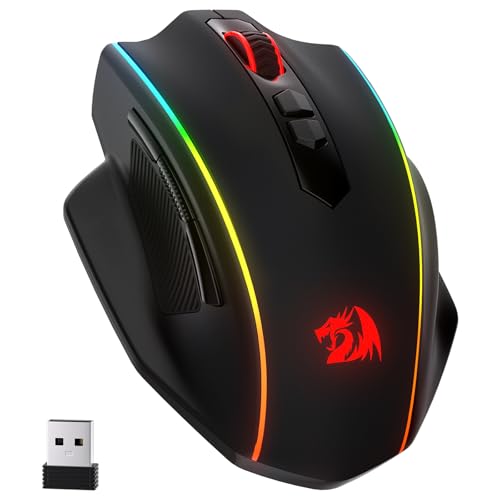
3. Redragon M686 Vampire Elite
- Sensor: PixArt PMW3335 optical sensor, up to 16,000 DPI
- Shape: Ergonomic right-handed shell
- Connectivity: 2.4 GHz wireless and wired USB
- Battery: Up to 45 hours
The Redragon M686 Vampire Elite is the macro-button pick in this guide, built for players who want extra controls without a high cost. It uses a PixArt PMW3335 sensor with up to 16,000 DPI, connects over 2.4 GHz wireless and wired USB, and runs for up to 45 hours on a charge. Eight programmable macro buttons and RGB lighting give you plenty of room for shortcuts and custom commands.
The ergonomic right-handed shell suits palm and claw grips, with a thumb rest and side buttons that sit where your thumb naturally rests. The M686 is a good fit for MMOs and complex games where extra buttons make a real difference, and the wireless link keeps the desk clear of cables. The 45-hour battery life is the shortest in this guide, so keep the charging cable handy.
If you play games with many commands and you want a low-cost wireless mouse with plenty of buttons, the M686 Vampire Elite is the pick. It is the most button-rich mouse in this guide.
4. SteelSeries Rival 3 Wireless
The SteelSeries Rival 3 Wireless is the battery-life champion of this guide, and it is built for players who hate thinking about charging. SteelSeries rates it at more than 400 hours of battery life, and it connects over both 2.4 GHz wireless and Bluetooth 5.0, so you can pair it directly with a laptop over Bluetooth and keep your USB ports free, then switch to the 2.4 GHz link for the fastest response in a game.
The TrueMove Air optical sensor reaches 18,000 CPI and tracks accurately on most surfaces, while the switches are rated for 60 million clicks. The right-handed ergonomic shell suits palm and claw grips, and the mouse works on PC and Mac alike. Two AAA batteries power the mouse, and the long battery life means you may go months between swaps.
At 106 grams, the Rival 3 Wireless is the heaviest mouse in this guide, but the weight brings a solid, planted feel that many players prefer for steady aim. If your priority is a cheap wireless mouse you can pair once and then forget about for months, this is the one to choose.
- Sensor: TrueMove Air optical sensor, up to 18,000 CPI
- Weight: 106 grams
- Connectivity: 2.4 GHz wireless and Bluetooth 5.0
- Battery: More than 400 hours
- Buttons: 6 programmable buttons
- Extras: 60 million click switch rating
5. Logitech G305 LIGHTSPEED
- Sensor: HERO 12K optical sensor, up to 12,000 DPI
- Weight: 99 grams
- Connectivity: LIGHTSPEED Wireless with USB receiver
- Battery: Up to 250 hours on one AA battery
The Logitech G305 LIGHTSPEED is the most dependable cheap wireless mouse in this guide, and it has earned that position through years of consistent performance. It weighs 99 grams, uses the HERO 12K sensor with up to 12,000 DPI, and runs for up to 250 hours on a single AA battery. The LIGHTSPEED wireless link delivers a 1 ms report rate, so the connection feels as responsive as a wired mouse in fast games.
The USB receiver stores inside the mouse body, so you never have to worry about losing it, and the compact symmetrical shell works for left and right-handed players alike. Six programmable buttons and on-board memory let you store your DPI settings and button assignments on the mouse itself, so it behaves the same way on any computer you use it with.
The G305 connects over LIGHTSPEED wireless only, with no Bluetooth mode, so it always uses one USB port for its receiver. That is a fair trade for the connection quality and battery life on display here. If you want a proven wireless mouse that simply works every time, the G305 is the safest pick in this guide.
Comparison Table
| Product | Key Feature | Best For |
|---|---|---|
| Razer DeathAdder V2 X HyperSpeed | 62 g, dual wireless, 235 hr Bluetooth battery | Ergonomic comfort at a low cost |
| HyperX Pulsefire Haste Wireless | 61 g, 16,000 DPI sensor, 100 hr battery | Lightweight fast play |
| Redragon M686 Vampire Elite | 8 macro buttons, 16,000 DPI sensor | Extra buttons for complex games |
| SteelSeries Rival 3 Wireless | More than 400 hr battery, Bluetooth 5.0 | Long battery life and Bluetooth pairing |
| Logitech G305 LIGHTSPEED | 250 hr battery, built-in receiver storage | Dependable everyday wireless gaming |
Buying Guide: Things to Consider
Sensor first, everything else second. At the lowest cost, the sensor is the one thing you should never compromise on. A modern optical sensor with at least 12,000 DPI gives you clean tracking and plenty of headroom. If a product listing does not name the sensor, treat that as a warning sign and choose a mouse that does.
Check the wireless link. A 2.4 GHz receiver link is the fastest option and the right choice for competitive games, while Bluetooth is more convenient for laptop use and saves a USB port. A dual-mode mouse gives you both, and that flexibility is worth prioritising if you play on more than one machine.
Battery life is a daily concern. A cheap wireless mouse that needs charging every few days will become a chore. Look for at least 45 hours of battery life, and remember that the headline figure is often measured in the most efficient mode. Mice with replaceable batteries can run for months, while rechargeable models should last for weeks between charges.
Shape beats specs. A sensor number will not help you if the mouse does not fit your hand. Palm grips need a longer shell, claw grips suit mid-size shells with a defined hump, and fingertip grips work best with compact mice. If you can, compare the shell dimensions with a mouse you already own before you decide.
Buttons should match your games. Six buttons cover most games, but MMOs and complex strategy games benefit from extra side buttons. The M686 in this guide has eight macro buttons for that reason, while the other picks keep a simpler layout for fast games. Choose the layout that matches what you actually play.
Do not overbuy on features. At the lowest cost, skip mice with heavy lighting systems or complex software you will not use, and put the value into the sensor, the wireless link, and the shape instead. A simple mouse that does the basics well is a better buy than a complicated one that does them poorly.
Frequently Asked Questions
Is a cheap wireless mouse good enough for gaming?
Yes, if you choose one with a modern optical sensor and a low-latency 2.4 GHz wireless link. The mice in this guide carry sensors rated at 12,000 DPI and beyond, with a 1 ms report rate over their wireless links, which feels the same as a wired connection in practice. Use the 2.4 GHz receiver mode rather than Bluetooth for ranked matches.
How long should the battery last on a cheap wireless mouse?
Aim for at least 45 hours of battery life in the mode you use most, and more is better. Mice with replaceable batteries can run for hundreds of hours, while rechargeable models usually last for weeks between charges. The longest-lasting mouse in this guide runs for more than 400 hours.
What is the lightest cheap wireless gaming mouse?
The lightest pick in this guide is the HyperX Pulsefire Haste Wireless at 61 grams, followed closely by the Razer DeathAdder V2 X HyperSpeed at 62 grams. Both are genuine ultralight mice with modern sensors, and both suit claw and fingertip grips best.
Should I choose Bluetooth or a 2.4 GHz receiver for gaming?
Use Bluetooth when you want to save a USB port and play casually, and use the 2.4 GHz receiver when you want the lowest latency for competitive games. A dual-mode mouse lets you switch between the two in seconds, which is the most flexible setup, especially on a laptop.
Conclusion
The best cheap wireless gaming mouse is the one that gets the essentials right: a modern sensor, a dependable wireless link, a battery that lasts for weeks, and a shape that fits your hand. The Razer DeathAdder V2 X HyperSpeed leads this guide for its ergonomic comfort and dual wireless modes, while the HyperX Pulsefire Haste Wireless is the lightest option here. The Redragon M686 Vampire Elite suits players who want extra buttons, the SteelSeries Rival 3 Wireless is the pick for players who want to forget about charging, and the Logitech G305 LIGHTSPEED remains the most dependable all-rounder.
Whichever mouse you choose, prioritise the sensor, the wireless link, and the shape over extra features. A cheap wireless mouse that does the basics well will serve you far better than a complicated one that does them poorly. Pick your grip, pick your connection, and enjoy wireless gaming at a low cost.
Disclosure: As an Amazon Associate, we earn from qualifying purchases.