🛒 Best Price Today on Amazon
Prime members get fast, free shipping on everything above, plus member-only deals. New members get a 30-day free trial — cancel anytime.
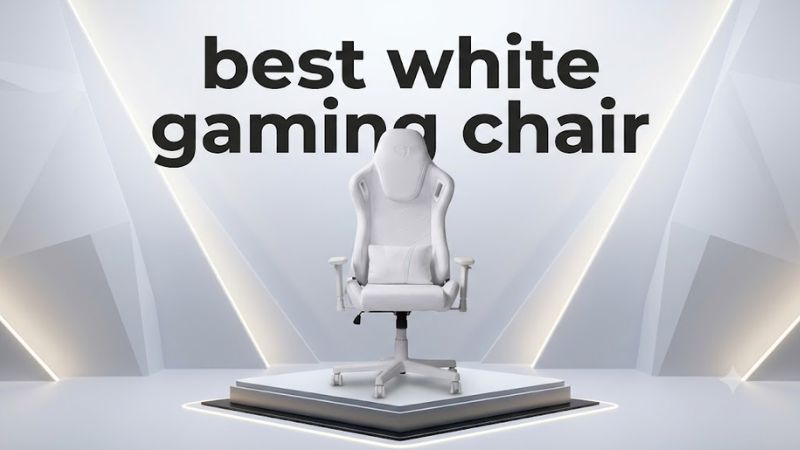
A best white gaming chair should complement your setup without sacrificing support, adjustability, or durability. Whether you’re building a clean white PC battlestation or upgrading your daily gaming seat, this guide compares leading options by upholstery, lumbar support, sizing, and value so you can choose a chair that fits your body and budget.
How to Choose a White Gaming Chair
The right chair depends on more than its color. Before buying, consider your height, weight, desk dimensions, preferred upholstery, and how many hours you spend gaming or working. White finishes also require practical care, so weigh the appearance against cleaning needs and the manufacturer’s warranty.
1. Choose a Size That Fits Your Body
A chair should support your back while allowing your feet to rest flat on the floor or on a suitable footrest. Check the manufacturer’s recommended height range, maximum supported weight, seat width, seat depth, and minimum and maximum seat height rather than relying on labels such as regular or XL.
For a white gaming chair, sizing matters just as much as appearance. A seat that’s too deep can press against the backs of your knees, while a narrow base can restrict movement. If possible, compare the chair’s measurements with a seat you already find comfortable.
2. Compare Lumbar Support and Adjustability
Look for lumbar support that fits the curve of your lower back without forcing you into an uncomfortable position. Integrated adjustable support gives you more control than a fixed lumbar contour, while a separate cushion can be repositioned but may shift during use.
Armrests matter, too. Height adjustment helps align your arms with your desk, while additional movement can make it easier to keep your shoulders relaxed. Reclining backrests and adjustable seat height are useful features, but extra mechanisms are worthwhile only when you can position them correctly.
3. Decide Between Leatherette and Fabric
White leatherette has a smooth, modern appearance and is generally straightforward to wipe clean. However, it can feel warmer against your skin during extended sessions, and its surface may show wear, discoloration, or damage over time. Follow the manufacturer’s cleaning instructions instead of using harsh household chemicals.
Fabric can feel less slick and may suit people who prefer a softer texture. Its disadvantage is that spills, dust, and stains can be harder to remove. For a white chair, check whether the upholstery can be cleaned with a damp cloth and whether replacement parts or upholstery options are available.
4. Set a Realistic Budget
A budget chair may provide the essential adjustments without sophisticated lumbar mechanisms or premium upholstery. More expensive models can add multiple size options, better armrest adjustment, integrated back support, and longer warranty coverage, but those features don’t automatically make a chair more comfortable for every person.
Compare the complete package rather than the advertised discount. Shipping, return costs, replacement armrests, and warranty exclusions can affect the total value. Because retailer prices and color availability change, confirm the current white configuration and final US price before purchasing.
Top White Gaming Chairs Worth Considering
These recommendations prioritize models with identifiable light-colored configurations and meaningful ergonomic features. Product lines can offer several finishes, but a white chair may not be available in every size or upholstery type. Check the exact configuration before ordering, and treat comfort as a personal fit decision rather than something specifications alone can establish.
1. Secretlab TITAN Evo — Best Overall Premium Option
The Secretlab TITAN Evo is a strong premium candidate for a white gaming setup because the range combines multiple size options with integrated lumbar adjustment and adjustable armrests. Its Pure White finish is worth considering if you want a coordinated desk, monitor, and PC aesthetic without giving up the adjustability expected from a higher-end gaming chair.
Its key features include four-way adjustable lumbar support, 4D armrests, a magnetic head pillow, and a reclining backrest. The range offers Small, Regular, and XL sizing, although fit recommendations and weight limits differ by size. Check the exact white edition’s specifications rather than assuming every finish shares identical upholstery or availability.
The main drawback is the premium price, and light upholstery needs regular care to preserve its appearance. Buyers who prefer a softer fabric texture or want to spend less should compare fabric-covered alternatives before committing. Choose this chair if size selection, lumbar adjustment, and a polished white aesthetic are your main priorities.
2. AndaSeat Kaiser 3 Cloudy White — Best for Adjustable Support
The AndaSeat Kaiser 3 in Cloudy White is another worthwhile option for shoppers who want a pale finish and a feature-rich gaming chair. Its two size options make it easier to compare body fit, while the integrated lumbar mechanism provides more adjustment than a simple fixed lumbar cushion.
The Kaiser 3 range includes four-way adjustable lumbar support, 4D armrests, a magnetic memory-foam head pillow, and a reclining backrest with an advertised range of 90 to 155 degrees. AndaSeat lists size L for users approximately 150–190 cm tall and under 120 kg, and XL for users approximately 181–210 cm tall with a stated upper weight limit of 180 kg. Check the individual size’s full specifications before buying.
The trade-offs are its substantial footprint and the need to maintain the light-colored upholstery. Its size and adjustment features may also be unnecessary if you prefer a simpler chair for occasional gaming. Consider it if you want a white gaming chair with adjustable lower-back support and a choice of larger seating configurations.
Comparison Table: Which Chair Fits Your Setup?
| Product | Best For | Key Spec | Compatibility | Watch Out For |
| Secretlab TITAN Evo, Pure White | Premium all-round setup | Four-way lumbar adjustment, 4D armrests | Choose Small, Regular, or XL based on fit | Premium cost; confirm white finish availability |
| AndaSeat Kaiser 3, Cloudy White | Adjustable support and size choice | Four-way lumbar adjustment, 4D armrests | Size L or XL, according to the manufacturer’s fit guidance | Large footprint; light upholstery needs care |
These are two qualified options rather than an artificially expanded ranking. Other gaming chairs may be sold in white or light gray, but their current color availability and exact configurations should be verified before they are treated as direct alternatives.
Getting the Most From Your White Gaming Chair
A well-chosen chair should work with your body and gaming desk, not just the colors in your room. Once you have narrowed the options, check the dimensions, arrange the armrests and lumbar support, and establish a simple cleaning routine. These practical steps can help you make a better purchase and maintain its appearance.
Match the Chair to Your Desk
Measure the underside of your desk and compare it with the chair’s armrest height range. The armrests should fit beneath the desk when needed, without forcing you to raise your shoulders while typing or using a controller. Also check the seat’s height range against your desk and leg length.
Remember to account for the chair’s wheelbase and recline clearance. A large chair can fit beside a desk but still interfere with drawers, nearby cabinets, or a wall when reclined. Leave enough room to move naturally, especially if your setup occupies a compact bedroom or shared workspace.
Keep White Upholstery Looking Clean
Dust, skin oils, and dye transfer from dark clothing can gradually affect light upholstery. Wipe down surfaces using only the cleaning method recommended by the manufacturer, and address spills promptly. Avoid abrasive pads, bleach, or unapproved solvents, which can damage the finish or change its color.
Fabric and leatherette need different care routines, so identify the material before cleaning. If you frequently eat at your desk, consider keeping food and drinks away from the chair or using a separate table. These habits are especially useful for preserving a bright white finish over time.
Adjust Your Seating Position
Start with your feet supported, your knees comfortably bent, and your back resting against the backrest. Adjust the seat height first, then position the lumbar support to follow your lower-back curve. Set the armrests so your shoulders remain relaxed and your elbows sit comfortably near your sides.
No adjustment can compensate for a chair that is the wrong size. If the seat presses into the backs of your knees, your shoulders feel constrained, or the lumbar support creates pressure, reassess the fit. Take regular movement breaks during long gaming sessions rather than remaining in one position for hours.
Check Warranty and Replacement Parts
Before ordering, review the warranty terms for the exact model and the country where you are buying it. Pay attention to coverage for the frame, reclining mechanism, gas lift, armrests, and upholstery, because coverage can differ by component. Also check whether cosmetic damage and normal wear are excluded.
Ask about replacement parts if you expect to keep the chair for years. A replaceable armrest pad or wheel can be more practical than replacing an entire chair when a small component wears out. Confirm return shipping arrangements as well, since a large chair can be inconvenient and expensive to return.
FAQ
Is a white gaming chair difficult to maintain?
A white gaming chair generally needs more attention to visible marks than a darker chair, although the difficulty depends on the upholstery material. Leatherette can usually be wiped according to its care instructions, while fabric may require more careful stain treatment. Clean spills promptly and avoid unapproved chemicals.
Is the Secretlab TITAN Evo worth buying?
The Secretlab TITAN Evo is worth considering if you value size options, integrated adjustable lumbar support, and multi-directional armrests. Its premium cost may not make sense if you need only basic seating. Compare the white configuration’s current price, warranty, and dimensions with alternatives before deciding.
Which white gaming chair is better for a tall person?
The AndaSeat Kaiser 3 XL is a candidate for taller users because its manufacturer lists a recommended height range of approximately 181–210 cm. Check seat depth, seat height, and the weight limit for the exact size. A taller user should not choose a chair based on maximum supported weight alone.
Does a white gaming chair improve gaming performance?
A white gaming chair does not directly improve frame rates, input latency, or in-game skill. Its benefits are visual and ergonomic: an appropriate fit and useful adjustments can make your desk setup more comfortable. Choose based on support, fit, and materials rather than expecting a competitive advantage.
Final Thoughts
The best white gaming chair is the one that balances body fit, adjustable support, upholstery care, and price. The Secretlab TITAN Evo suits premium setups, while the AndaSeat Kaiser 3 Cloudy White offers another adjustable option with two sizes. Compare the exact configurations and measurements before making your final choice.