🛒 Best Price Today on Amazon
Prime members get fast, free shipping on everything above, plus member-only deals. New members get a 30-day free trial — cancel anytime.
The Elgato Key Light review comes down to one question: is a premium desk-mounted LED panel worth buying for streaming, gaming videos, and webcam calls? With up to 2,800 lumens, adjustable color temperature, and app-based controls, it offers substantial lighting capability, but its price, Wi-Fi setup, and fixed desk installation deserve consideration.
How to Choose a Streaming Key Light
A good streaming light should illuminate your face evenly without consuming valuable desk space or making your setup difficult to manage. Brightness matters, but so do color adjustment, mounting flexibility, and control options. The right choice depends on your room, camera position, and whether you stream regularly or only join occasional video calls.
Brightness and light quality
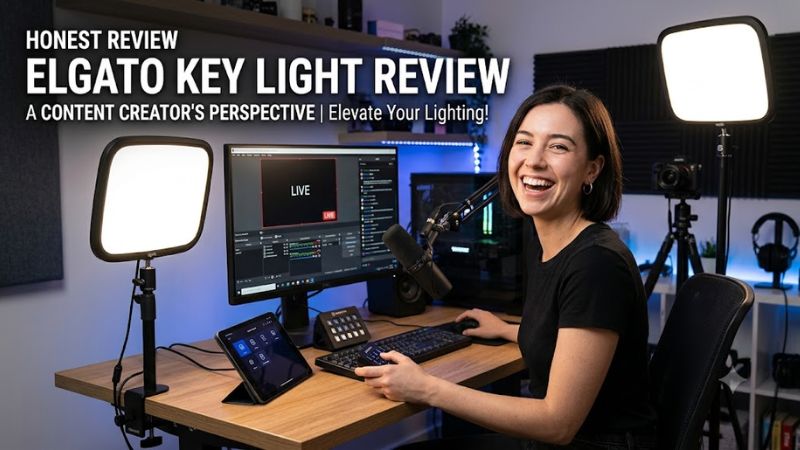
The original Elgato Key Light is rated for up to 2,800 lumens, giving it considerably more maximum output than compact USB-powered lights. That reserve can help when the panel sits farther from your face or when you need to illuminate a wider area. Actual results depend on distance, positioning, room conditions, and brightness settings.
Brightness alone does not determine how flattering your camera image looks. Position the panel slightly above eye level and angle it toward your face to reduce harsh shadows. The Key Light’s adjustable output also lets you lower brightness when sitting close to the panel, rather than using maximum power unnecessarily.
Adjustable color temperature
The Key Light supports a color-temperature range of 2,900K to 7,000K. Warmer settings create a softer, more amber appearance, while cooler settings produce a more neutral or bluish-white look. Adjusting the light helps you match your room’s existing illumination and avoid an obvious mismatch between your face and background.
Elgato specifies a color rendering index (CRI) above 92. This indicates its ability to reproduce colors under illumination, although CRI alone cannot establish how accurate every skin tone will look on a particular webcam. For streaming, consistent lighting and sensible camera exposure remain important alongside the panel’s specifications.
Mounting and desk space
The included Master Mount L attaches to a compatible desk edge and provides an adjustable mounting height of approximately 22–49 inches. Keeping the light elevated frees up space that a traditional floor stand or tabletop lamp might occupy. The panel measures approximately 13.78 × 9.84 × 1.38 inches, so check the available clearance around your monitors.
Desk construction matters before purchasing. Elgato specifies a maximum clamp opening of approximately 2.35 inches, and the desk must support the mounted equipment securely. Measure the desk edge and inspect any bevels, cable trays, or shelves that could obstruct the clamp. A small desk or an unsuitable edge may make a monitor-mounted alternative more practical.
Software and network compatibility
The Key Light uses Wi-Fi for setup and wireless control through Elgato Control Center. It supports Windows and macOS, with mobile devices available for initial setup. Unlike a basic USB lamp, it is designed to be adjusted through software and can fit into a streaming workflow that uses Elgato’s Stream Deck.
Network compatibility deserves attention before buying. The original model’s documented networking requirements include 2.4 GHz Wi-Fi and supported WPA/WPA2 security configurations. Certain router settings, enterprise authentication, or network isolation features can prevent discovery. If your PC is connected by Ethernet, a compatible mobile device can help with initial pairing.
Elgato Key Light Review: Specifications, Value, and Alternatives
The original Elgato Key Light is a full-size LED panel intended for creators who want adjustable, remotely controlled lighting at a dedicated desk. Its strongest advantages are high rated output, a broad color-temperature range, and an included mounting system. The main trade-offs are its purchase cost, reliance on network-based controls, and limited portability.
Key specifications and design
The original Key Light, model 10GAK9901, has a flat LED panel measuring 350 × 250 × 35 mm and weighs approximately 1.3 kg without its mount. It supports adjustable brightness, 2,900–7,000K color temperature, and up to 45W power consumption. The box includes the light, Master Mount L, power supply, and cable clips.
| Specification | Elgato Key Light |
| Maximum brightness | 2,800 lumens |
| Color temperature | 2,900–7,000K |
| Color rendering | CRI above 92 |
| Maximum power consumption | 45W |
| Wireless connection | Wi-Fi |
| Panel dimensions | 350 × 250 × 35 mm |
| Panel weight | 1.3 kg |
| Mounting | Included Master Mount L |
| Manufacturer model | 10GAK9901 |
These are manufacturer-published specifications, not independent measurements of real-world illumination. Retailer descriptions sometimes show different brightness figures, so buyers should use the manufacturer’s specification for the exact model rather than transferring numbers from another Elgato light.
Lighting performance for gaming streams
The Key Light’s principal benefit is its ability to provide controlled illumination for a facecam. Better lighting can help a webcam capture a more usable image in a dim room, although the resulting picture also depends on the camera sensor, exposure settings, background, and distance from the light.
For a typical gaming setup, start with the panel slightly above your eyes and off to one side of the camera. Adjust its angle and brightness until shadows are softer without washing out your face. If the background is too dark, a separate fill light or room light may help more than increasing the key light’s brightness.
Smart controls and daily usability
Elgato Control Center lets users adjust brightness and color temperature from compatible devices. Once paired, the light can be controlled through the local network, and supported Stream Deck workflows can provide convenient lighting adjustments without opening a separate app. This is useful when switching between gameplay, recording, and video calls.
The limitation is that the original model does not offer the same direct onboard adjustment experience as newer alternatives with physical controls. Its setup also depends on network discovery working correctly. A router configuration that isolates wireless clients or blocks discovery traffic may require troubleshooting before the light appears in the control app.
Price and overall value
As of October 23, 2026, US retailer listings place the original Elgato Key Light around 155–180, depending on the retailer and available discount. These are listing prices rather than a guaranteed checkout price, and availability can change. Check that the listing is for model 10GAK9901 and includes the mount before comparing offers.
At that price, the Key Light makes the most sense for frequent streamers, video creators, and users with a permanent desk setup. Casual gamers who only need better lighting for occasional calls may get sufficient results from a less expensive USB-powered panel. The original model’s extra brightness is useful only if the setup benefits from it.
FAQ
Is the Elgato Key Light worth buying for streaming?
Yes, the Elgato Key Light is worth considering for regular streamers who need high-output, adjustable lighting and a dedicated desk mount. Its 2,800-lumen rating and broad color-temperature range provide useful flexibility. For occasional calls or a compact laptop setup, a less expensive light may offer better value.
Does the Elgato Key Light work with a gaming PC?
Yes, the original Key Light supports compatible Windows PCs and macOS computers through Elgato Control Center. Initial pairing requires a suitable Wi-Fi-capable device, and the original model has specific network compatibility requirements. A wired Ethernet connection on the PC can still work for subsequent control when the network is configured appropriately.
What is the difference between Elgato Key Light and Key Light Neo?
The original Key Light is a larger, higher-output panel rated at 2,800 lumens, while Key Light Neo is a compact USB-powered option rated for up to 1,000 lumens with a sufficiently powerful supply. Neo suits close-range webcam lighting and smaller desks; the original is better suited to a permanent streaming station that needs greater light output.
Does the Elgato Key Light improve webcam quality?
Yes, better lighting can improve the appearance of webcam footage by illuminating your face more evenly and helping the camera manage exposure. It does not increase the camera’s native resolution or guarantee a sharper image. Camera quality, placement, ambient light, and exposure settings still affect the final result.
Final Thoughts
This Elgato Key Light review finds a compelling option for creators who need substantial adjustable lighting, a tall desk mount, and software-based control. Its premium price is harder to justify for casual calls or compact setups. Before buying, measure your desk, confirm network compatibility, and compare the cost with the smaller Key Light Neo and Key Light Air MK.2.