🛒 Best Price Today on Amazon
Prime members get fast, free shipping on everything above, plus member-only deals. New members get a 30-day free trial — cancel anytime.
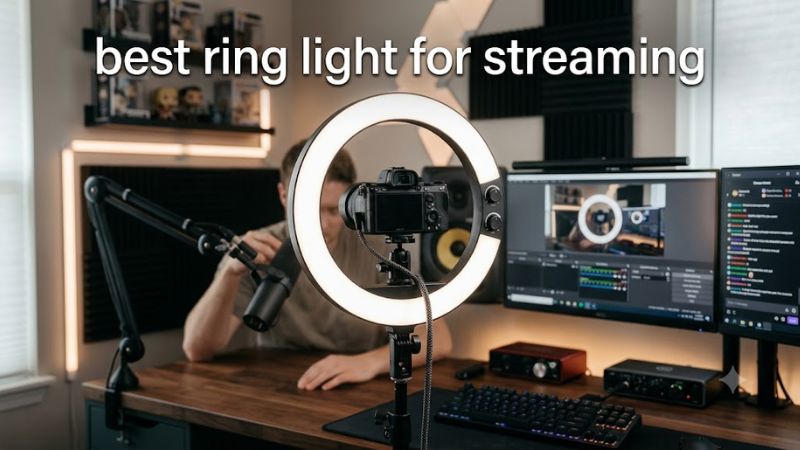
Choosing the best ring light for streaming depends on your camera, desk space, room lighting, and budget. A ring light can brighten your face for Twitch, YouTube, and video calls, but compact LED panels may offer better placement and fewer reflections. This guide compares practical options and explains which setup suits each creator.
How to Choose a Streaming Light
The right lighting setup makes your face easier to see without forcing your webcam to compensate for a dark room. Ring lights provide a circular source around the camera, while rectangular panels and light bars offer different mounting options and light direction. Choose according to your workspace and the look you want, not shape alone.
1. Brightness and light quality
Brightness matters when your room is dim, but maximum output is not always necessary. A light with adjustable intensity lets you balance your face against the background without washing out skin tones. Look for a published brightness rating, preferably in lumens, and avoid comparing products using wattage alone.
Color rendering also matters for face-camera streams. A high color rendering index (CRI) generally helps colors appear more natural under the light. Diffusion can soften harsh shadows, while positioning the light slightly above eye level and near the camera can create an even, flattering result without shining directly into your eyes.
2. Color temperature and adjustment
Color temperature, measured in kelvins (K), describes whether a light looks warmer or cooler. Warm settings can suit a cozy room, while cooler settings may match daylight or a bright office. Adjustable color temperature is useful when your room lighting changes throughout the day or when you need consistent appearances across multiple sessions.
Manual controls are sufficient for many streamers, but app control can be convenient if you frequently switch between gaming, recording, and video calls. RGB lighting is a separate consideration: it adds colored accents to the room, but it does not replace a good, neutral front light for clear facial visibility.
3. Mounting, desk space, and camera position
A traditional ring light usually sits on a stand or tripod, with the camera placed inside or near its center. This can work well for face-focused content, but a larger stand may compete with your keyboard, microphone arm, or monitor. Check the actual stand footprint and height before choosing a model.
Compact monitor-mounted lights and slim desk bars can be easier to fit into gaming setups. A monitor-mounted option should suit your screen bezel and mounting arrangement; a desk bar needs enough room for its base or clamp. Keep the light stable, route cables away from moving arms, and avoid blocking the webcam or monitor.
4. Power, controls, and overall value
A USB-powered light can simplify a desk setup, but USB ports do not all supply the same amount of power. Output may depend on the port or external power supply, so check the manufacturer’s stated brightness for each power mode. A light that appears adequate on a powered adapter may be less bright on a low-power port.
Set a budget that includes any stand, clamp, adapter, or other required accessories. For streaming, consistent lighting and convenient controls are usually more useful than decorative features you rarely use. If your room is already bright, a small adjustable light may be enough; a larger panel is more suitable when you need stronger illumination across a wider area.
Best Ring Lights and Streaming Lights
The following shortlist includes dedicated ring lights for face-camera streaming and compact alternatives designed for gaming desks. The best choice depends on whether you prioritize a traditional circular light, portability, stronger illumination, or software-controlled accent lighting. Specifications below come from manufacturer information; they are not claims of comparative performance testing.
1. Razer Ring Light — Best for Compact Gaming Setups
The Razer Ring Light is a sensible choice for streamers who want a dedicated circular light without moving to a full studio setup. Its 12-inch design, USB power, and physical controls make it straightforward to position around a webcam or phone camera. It is particularly suited to a desk where space matters.
Its published specifications include 500 lumens of brightness, three color-temperature settings at 3000K, 4500K, and 6500K, and brightness adjustment from 10% to 100%. The included tripod extends from approximately 15.8 to 53.2 inches. Maximum output requires a USB power source capable of 5V at 2A.
Main limitation: The light has a CRI rating above 80, and its three color settings provide less flexibility than continuously adjustable models. Consider a larger ring light if you need broad illumination or a more adjustable studio arrangement.
2. NEEWER RL-18 Ring Light Kit — Best for a Larger Streaming Area
The NEEWER RL-18 is designed for creators who want a large circular light and a dedicated stand. Its 18-inch ring can illuminate a broader area than a compact 12-inch model, making it worth considering for face-camera streams, tutorials, and recording sessions in a home studio.
The manufacturer lists 240 LEDs, 55W power consumption, 0–100% dimming, and a 5500K specification for the version sold without a stand. A separate RL-18 kit is listed with 3200K and 5600K color options using included filters, so buyers should confirm which package and version they are considering.
Main limitation: The RL-18 listings differ in their included accessories and color-adjustment methods. Some packages also require more floor space for a tripod. Check the exact kit contents rather than assuming every RL-18 includes the same stand and controls.
3. Lume Cube Ring Light Pro — Best for Portable Creator Setups
The Lume Cube Ring Light Pro is a premium option for creators who move between a gaming room, recording space, and other locations. Its large circular design and built-in diffusion are intended to provide softer illumination, while the adjustable output supports different room conditions.
Published specifications include a 17.5-inch ring, 1500 lumens, a CRI rating of 96 or higher, and adjustable color temperature. The included stand in the standard kit extends from 18 to 70 inches. The rechargeable battery provides approximately 70 minutes at full brightness, with longer runtime at reduced output.
Main limitation: This is a substantial investment compared with basic USB ring lights, and battery runtime depends on brightness. It makes more sense for creators who value portability and flexible positioning than for someone who streams exclusively at one desk.
4. Elgato Key Light Neo — Best for Small Desks and Webcam Streaming
The Elgato Key Light Neo is not a traditional ring light, but it is a relevant alternative for gaming streamers who want a compact, monitor-mounted light. Its small, square panel sits near the webcam, keeping a separate tripod off the desk and making it easier to maintain a tidy setup.
Elgato specifies brightness of up to 1000 lumens with a suitable external USB power supply, a color range of 2900K–7000K, and a CRI above 94%. Its output varies with power: the manufacturer lists 400 lumens over USB-A at 4.5W, 700 lumens over USB-C at 7.5W, and 1000 lumens with a suitable 3A power supply.
Main limitation: It does not provide the circular illumination pattern of a ring light, and its highest brightness depends on the power source. If you specifically want a camera centered inside a ring, choose a dedicated ring-light model instead.
Quick Comparison Table
| Product | Best For | Key Spec | Compatibility | Watch Out For |
| Razer Ring Light | Compact gaming desks | 12-inch ring, 500 lumens | USB power; PC or mobile-oriented setup | Three fixed color temperatures |
| NEEWER RL-18 | Larger streaming area | 18-inch ring, 55W | AC power; stand depends on kit | Check exact version and accessories |
| Lume Cube Ring Light Pro | Portable creator setups | 17.5-inch ring, 1500 lumens | Mains power or built-in battery | Premium cost and limited full-power runtime |
| Elgato Key Light Neo | Monitor-mounted webcam lighting | Up to 1000 lumens | USB power; optional Wi-Fi control | Output varies by power supply |
How to Get Better Lighting for Streaming
Even the best ring light for streaming can produce poor results if it is too close, too bright, or positioned at the wrong angle. Camera exposure, room lighting, skin tone, glasses, and background brightness all influence the final image. Start with placement and moderate brightness before spending money on more equipment.
1. Position the light near eye level
Place the light close to the webcam and slightly above your eye line, angling it down toward your face. This arrangement helps keep your face visible without creating dramatic shadows beneath your eyes or nose. Avoid placing the light far to one side unless you intentionally want a more directional look.
Start at a comfortable distance, then adjust the light and camera exposure together. A ring light positioned too close can create harsh highlights, while one placed too far away may not provide enough illumination. The right distance depends on the model’s output and your camera’s field of view.
2. Match brightness and color temperature
Set a neutral color temperature first, then adjust brightness until your face is visible without losing detail in brighter areas. If your room uses warm lamps, either match their color or reduce their influence on the scene. Mixed warm and cool lighting can make different parts of your face appear inconsistent.
Avoid increasing brightness automatically whenever the image looks dark. Webcam exposure, gain, and automatic white balance may also contribute to a noisy or washed-out image. Make small changes, review the camera preview, and keep the lighting consistent between sessions.
3. Check glasses, skin highlights, and reflections
Ring lights can create visible circular reflections in glasses because the light source surrounds the camera. If that distracts from your stream, raise the light slightly, move it farther away, or angle it off-axis. Check the preview while wearing the glasses you normally use during gaming.
Diffusion and lower brightness can also help with reflective skin and bright forehead highlights. If a ring light still produces unwanted reflections, a rectangular panel placed slightly to one side may work better. The goal is clear facial detail, not maximum brightness.
4. Balance your face against the background
A brightly lit face against a completely dark room can look disconnected from the rest of the scene. A small background lamp or subtle accent light can create separation, but keep it dim enough that it does not compete with your face. RGB lighting is optional and should complement the main light.
For a first setup, prioritize one front light and reasonable room lighting before adding a second key light or multiple RGB fixtures. Review your camera preview at the resolution and frame rate you normally stream with, because the final image may look different from the room itself.
FAQ
Is a ring light better than a softbox for streaming?
A ring light is often more convenient for compact, face-focused streaming, while a softbox offers more directional lighting and can create a more natural-looking falloff. Neither is universally better. Choose based on available space, the look you prefer, and whether reflections in your glasses are a concern.
What size ring light is best for Twitch streaming?
A 12-inch ring light can suit a close-up webcam view, while an 18-inch model may be more appropriate for a wider framing or a larger recording space. Size alone does not determine brightness or image quality, so also compare output, diffusion, placement, and available adjustment.
Do I need RGB lighting to stream?
No, RGB lighting is optional and does not replace effective front lighting. A neutral white light generally makes it easier to keep facial colors consistent, while RGB fixtures can add background color. Start with clear facial illumination before buying decorative lighting.
Can I use a ring light with any webcam?
Most ring lights can illuminate a scene viewed by a separate webcam, but mounting arrangements differ. Check whether the model includes a stand, camera mount, or phone holder and whether it can fit your desk. You generally do not need a special webcam, although camera exposure and white balance may need adjustment.
Final Thoughts
The best ring light for streaming is the one that suits your camera framing, available space, and lighting needs. Choose the Razer for a compact circular setup, the NEEWER for a larger studio arrangement, or the Lume Cube for portability. If desk space is limited, consider the Elgato Key Light Neo as a practical alternative.