🛒 Best Price Today on Amazon
Prime members get fast, free shipping on everything above, plus member-only deals. New members get a 30-day free trial — cancel anytime.
Choosing the best teleprompter for streaming depends on your camera setup, viewing distance, budget, and how often you read scripts live. An integrated desktop model offers convenience, while a tablet-based rig can cost less. This guide compares practical options for gaming streams, tutorials, reviews, and live presentations.
How to Choose a Teleprompter for Streaming
A teleprompter helps you read talking points while looking toward the camera instead of repeatedly glancing at a separate monitor. For PC streamers, the right choice depends on eye-line alignment, screen readability, camera mounting, and software compatibility—not simply display size or the number of accessories included.
1. Eye-line alignment and viewing distance
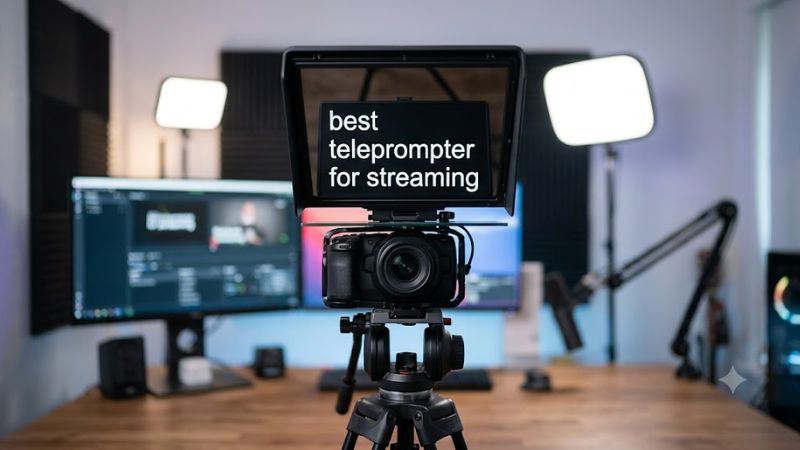
The main benefit of a teleprompter is placing text close to the camera lens. A beam-splitter glass design reflects text from a screen toward the presenter while allowing the camera to record through the glass. This makes it easier to maintain eye contact during introductions, sponsored segments, tutorials, and scripted commentary.
For a typical desk setup, prioritize a unit that positions your webcam or camera near the center of the reflected text. A tablet placed beside your monitor can display notes, but your eyes will visibly move away from the lens. Larger screens become more useful when you sit farther away or need larger text.
2. Built-in display versus a phone or tablet
A built-in display reduces setup friction because you do not need to supply a separate screen. Elgato’s Prompter, for example, includes a 9-inch display with 1024 × 600 resolution. Its screen can also serve as a secondary computer display, making it useful for streamers who want scripts and selected windows near the camera.
Tablet-based models make more sense when you already own a compatible device. You can avoid paying for another display, but you must account for tablet dimensions, mounting, power, and software. Check whether your chosen setup supports the scrolling controls you need before assuming a tablet or phone will work with every teleprompter.
3. Camera, lens, and mounting compatibility
Before buying, identify whether you use a USB webcam, a mirrorless camera, a DSLR, or a smartphone. Each has different mounting requirements. Check the teleprompter’s supported camera dimensions, lens clearance, adapter sizes, mounting threads, and weight limits, especially if the camera sits on a desk arm rather than a dedicated tripod.
Wide-angle lenses can also affect framing. A teleprompter’s hood, glass, and mounting hardware may obstruct the edges of the image with certain camera and lens combinations. Review the manufacturer’s compatibility information and allow enough room for your microphone, lighting, and monitor without creating an unstable or crowded desk arrangement.
4. Script control and streaming software
A good teleprompter should fit the way you broadcast. If you read prepared commentary, look for adjustable text size, scrolling speed, and straightforward script management. If you frequently respond to chat, you may prefer a display that can show other windows instead of restricting you to a dedicated prompting application.
Check the operating system, connection type, and software requirements before purchasing. A USB-connected display may need a compatible USB port and dedicated software. Features such as voice-following, remote control, and Stream Deck integration vary by product and may require specific hardware or additional configuration.
Top Picks: Best Teleprompters for Streaming
The strongest choice depends on whether you want an integrated computer display, a portable tablet-based system, or a larger studio setup. The following recommendations are based on manufacturer specifications, intended use, and practical trade-offs for PC streaming. They are not rankings from PC Gaming Universe’s own product testing.
| Product | Best For | Key Spec | Compatibility | Watch Out For |
| Elgato Prompter | Best overall desktop setup | 9-inch, 1024 × 600 display | Windows, macOS, compatible cameras | Requires Camera Hub |
| NEEWER BASICS X12B | Best value tablet setup | 12-inch glass, included remote | Compatible tablets up to 9.84 × 8.68 inches | Not compatible with wide-angle lenses |
| Elgato Prompter XL | Best for studio streaming | 15.6-inch, 1920 × 1080 display | Windows, macOS, compatible camera rigs | Larger footprint and higher power requirements |
| Glide Gear TMP 100 | Best portable tablet rig | Supports devices up to 10.5 × 8 inches | Compatible smartphones, tablets, and cameras | No prompting app included |
1. Elgato Prompter — Best Overall for PC Streamers
Ideal for gaming commentary, live tutorials, and scripted YouTube streams.
The Elgato Prompter is a strong fit for a streamer who wants scripts near the camera without balancing a separate tablet over the lens. Its integrated 9-inch display runs at 1024 × 600 and connects to a compatible computer through USB 3.0. The included camera mounting accessories accommodate several types of cameras, subject to the specific setup.
Camera Hub supports script management, displaying windows on the prompter, and integration with Stream Deck. This makes it useful beyond reading prepared paragraphs: you can place selected content near the lens while keeping your main gaming monitor available for the game and streaming controls.
The main trade-off is its relatively modest display resolution and the need to check camera clearance. Voice Sync also has hardware requirements, including an NVIDIA RTX 2060 or newer GPU for the documented Windows configuration. You do not need that feature simply to display and read scripts.
Buy if: You stream regularly from a desk and value integrated software, a built-in screen, and minimal extra equipment.
Consider an alternative if: You already own a suitable tablet and want to spend less on the prompting hardware itself.
2. NEEWER BASICS X12B — Best Value for Tablet Owners
Ideal for budget-conscious streamers using an existing iPad or compatible tablet.
The NEEWER BASICS X12B uses a 12-inch beam-splitter arrangement with a tablet to display reflected script text. Its aluminum-alloy construction, folding design, and included RT113 remote make it a practical option for creators who want physical prompting hardware without buying a separate built-in display.
The manufacturer specifies compatibility with tablets up to 9.84 × 8.68 inches and a reading distance of up to 10 feet. Its companion app supports script playback, scrolling speed, font-size adjustments, and page changes. The remote communicates with the compatible phone or tablet through Bluetooth.
Compatibility deserves particular attention. NEEWER states that the X12B does not support the 12.9-inch iPad Pro and is not suitable for wide-angle camera lenses; the camera lens focal length must exceed 28 mm. Phones mounted in the prompting assembly display text rather than record the video, so plan to use a separate camera for filming.
Buy if: You already have a compatible tablet and want a folding teleprompter with remote-controlled scrolling.
Consider an alternative if: You use a wide-angle webcam, need a built-in computer display, or want a system with fewer tablet-specific constraints.
3. Elgato Prompter XL — Best for Studio Streaming
Ideal for longer viewing distances, large camera rigs, and multi-person presentations.
The Elgato Prompter XL expands the integrated-display concept with a 15.6-inch Full HD screen running at 1920 × 1080. Elgato specifies brightness of 600 nits and a recommended reading range of up to 15 feet. Those characteristics make it more appropriate than a compact desktop unit when presenters sit farther from the camera.
Its mounting hardware accommodates compatible camera and lens configurations up to 22 cm in camera-and-lens length. The system includes multiple mounting threads and an accessory rail, while Camera Hub supports scripts, display windows, and Stream Deck integration. These features are relevant for studio presentations, interviews, and production setups with several accessories.
The XL is physically larger and heavier than the standard model. It also requires a USB-C 3.2 connection capable of supplying 15 watts for its single-cable setup. That makes port capability and mounting stability important checks before purchase. For a solo gamer sitting close to a webcam, the extra display area may not justify the additional space and cost.
Buy if: Your camera is positioned several feet away, you need larger text, or your streaming setup resembles a dedicated studio.
Consider an alternative if: You stream at a small desk and can comfortably read from a compact display.
4. Glide Gear TMP 100 — Best Portable Tablet-Based Rig
Ideal for creators who move between streaming, recording, and other filming locations.
The Glide Gear TMP 100 is a collapsible teleprompter designed for smartphones, tablets, and compatible cameras. It uses a separate device to display the script, with beam-splitter glass reflecting the text toward the presenter. Its aluminum construction, protective hood, carry bag, and adjustable glass make it suitable for a setup that needs to be packed away between sessions.
The manufacturer specifies support for devices up to 10.5 × 8 inches and a reading distance of up to 10 feet. It works with prompting applications that support mirrored text, so you can choose software that suits your preferred script workflow rather than relying on a proprietary application supplied with the hardware.
The limitation is that the TMP 100 does not include its own display or prompting app. Device dimensions matter, and the manufacturer excludes the iPad Pro from its stated compatibility. Check the precise tablet dimensions and camera arrangement before buying. If you want a ready-to-use desktop peripheral, the Elgato Prompter requires less separate equipment.
Buy if: You already own a compatible tablet and want a portable rig for both livestream preparation and recorded videos.
Consider an alternative if: You prefer integrated display hardware or want to avoid managing a separate tablet and application.
FAQ
Is a teleprompter worth it for gaming streams?
Yes, a teleprompter can help when your streams include prepared introductions, reviews, tutorials, sponsorship messages, or structured commentary. It is less essential for spontaneous gameplay where you mainly react to events and interact with chat. Start by identifying which parts of your broadcast actually need a script.
Can I use a teleprompter with OBS Studio?
Yes, you can use a compatible teleprompter alongside OBS Studio, provided your camera, display, and prompting software work with your computer. The teleprompter does not replace OBS or automatically control your broadcast. Integrated displays can show supported windows, while tablet-based models use their own compatible prompting apps.
Do I need a dedicated GPU for a teleprompter?
No, ordinary script display does not inherently require a dedicated gaming GPU. However, certain advanced features have additional hardware requirements. For example, Elgato specifies an NVIDIA RTX 2060 or newer GPU for Voice Sync on its documented Windows setup. Check the requirements for the particular feature you intend to use.
Is a tablet teleprompter better than a built-in display?
A tablet-based teleprompter is often better value if you already own a compatible device, while a built-in display is convenient for regular desktop streaming. Compare the total cost, mounting requirements, screen readability, and software workflow. Neither design is automatically superior for every camera or desk arrangement.
Final Thoughts
The best teleprompter for streaming is the one that keeps your script close to the lens without complicating your broadcast. Choose the Elgato Prompter for an integrated desktop workflow, the NEEWER X12B for tablet-based value, or the Prompter XL for studio distances. Check camera compatibility before committing to a setup.