🛒 Best Price Today on Amazon
Prime members get fast, free shipping on everything above, plus member-only deals. New members get a 30-day free trial — cancel anytime.
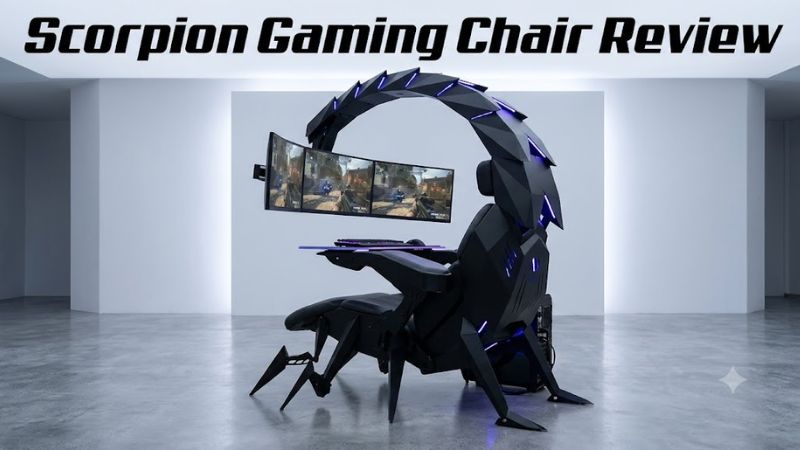
The scorpion gaming chair review most buyers need is really a look at the Cluvens Scorpion, an elaborate gaming cockpit with an integrated seat and multi-monitor support. Its appeal is immersion rather than affordability. This review examines its price, features, space requirements, practical drawbacks, and whether a conventional gaming chair makes more sense.
How to Choose a Scorpion Gaming Chair
A Scorpion-style gaming cockpit is a major workstation purchase, not a simple replacement for an office chair. Before spending thousands of dollars, consider the games you play, your monitor configuration, your available floor space, and whether the seating position supports your everyday PC activities.
1. Match the cockpit to your gaming style
The Cluvens Scorpion is designed for an immersive, reclined setup that brings the display close to the player. This arrangement can appeal to racing and flight simulation enthusiasts, as well as gamers who want a dedicated entertainment station rather than a conventional desk.
For competitive mouse-and-keyboard games, productivity, and frequent typing, the design requires more consideration. A traditional desk and adjustable chair offer a more familiar upright working position and make it easier to change posture throughout the day.
2. Check monitor support before buying
The monitor arrangement is one of the main reasons to consider this cockpit. Cluvens advertises the Scorpion as a multi-monitor workstation, but buyers should verify the precise model’s mounting configuration, supported screen sizes, VESA patterns, and weight limits before ordering.
Also account for the dimensions of your displays, cables, and graphics card outputs. A mounting arm does not create additional video outputs on your PC. Your GPU must independently support the resolution, refresh rate, and number of displays you intend to use.
3. Measure your room and access route
A cockpit can occupy substantially more room than an ordinary gaming chair, particularly when the seat reclines and the monitor arms extend. Measure the intended installation area and check the clearance needed to enter the seat, move the display assembly, and access nearby equipment.
Measure doorways, hallways, stairs, and elevator access as well. A large, heavy workstation can be difficult to move after assembly, so confirm the shipping dimensions, delivery arrangements, and whether assistance is needed before placing an order.
4. Set a realistic total budget
The advertised price is only one part of the purchase. Depending on the configuration, you may also need monitors, a compatible PC, a keyboard-and-mouse tray, cable management, and suitable power access. Those extras can make the final setup considerably more expensive than the chair itself.
Consider warranty coverage, replacement parts, shipping terms, and return costs before deciding. For someone who mainly wants comfortable PC gaming, an ergonomic office chair and a quality desk may deliver more practical value at a fraction of the cockpit’s cost.
Cluvens Scorpion Gaming Cockpit Review
The Cluvens Scorpion is best understood as a powered gaming workstation with a reclining seat and monitor-support structure. The manufacturer’s current website lists it at $3,099, reduced from $3,499, in US dollars; that is an advertised price checked on October 22, 2026, not a guarantee of checkout availability or future pricing.
Design, construction, and adjustability
The cockpit’s defining feature is its scorpion-inspired frame, which places the seat and display assembly within one coordinated structure. The product listing specifies a powder-coated steel frame and upholstery options including PU leather, microfiber leather, and cowhide. The exact materials depend on the selected configuration.
Electric reclining and monitor-height adjustment make the setup more elaborate than a conventional gaming chair. However, more adjustment mechanisms also mean more components that may need maintenance. Buyers should confirm which motors, accessories, and upholstery options are included in their chosen configuration.
Monitor support and PC compatibility
The listed configuration supports one ultrawide display up to 49 inches, one 21:9 display up to 38 inches, one standard 16:9 display up to 32 inches, or three 16:9 displays up to 29 inches each. The listing also specifies VESA mounting patterns of 75 × 75 mm and 100 × 100 mm.
These are mount specifications, not a guarantee that every monitor will fit. Check the display’s weight, mounting location, cable connections, and physical dimensions. A compatible graphics card and adequate display outputs are still necessary, and the optional equipment or custom brackets available for other configurations should not be assumed to come standard.
Comfort and everyday usability
The reclining seat and adjustable display position are intended to create a relaxed, immersive gaming position. This could suit controller-based gaming, cinematic single-player titles, and simulation setups where the user prefers a dedicated seat over a traditional desk chair.
There is no reliable independent measurement in the available evidence establishing that the Scorpion is more comfortable over a full workday than an ergonomic office chair. Comfort depends on body proportions, seat support, viewing distance, and posture. If possible, arrange a demonstration or clarify the return policy before committing to a purchase this expensive.
Price, warranty, and overall value
At the advertised $3,099 price, the Scorpion belongs in a very different category from ordinary gaming chairs. Its value comes from the integrated workstation design, powered adjustments, and display mounting rather than simply providing a place to sit. The included configuration matters because monitors and other peripherals may add considerably to the total.
The reviewed reseller listing states a one-year warranty for electronic components and a two-year warranty for the structure. Confirm these terms directly for your purchase, including coverage for motors, shipping damage, replacement parts, and international orders.
Scorpion Gaming Chair Review: Specifications and Alternatives
The key buying question is whether the Scorpion’s integrated cockpit features justify its price and physical footprint. The specifications below summarize the listed configuration, while the alternatives help distinguish a full workstation from a chair designed primarily for everyday gaming.
Key specifications at a glance
| Specification | Cluvens Scorpion |
| Advertised price | $3,099 USD |
| Frame | Powder-coated steel |
| Upholstery options | PU leather, microfiber leather, cowhide |
| Maximum seat load | 280 lb (125 kg) |
| Maximum monitor-mount load | 53 lb (24 kg) |
| Monitor configuration | Single ultrawide or up to three standard displays, subject to listed limits |
| VESA mounting | 75 × 75 mm and 100 × 100 mm |
| Recline | Electric adjustment, listed up to 160 degrees |
| Net weight | 352 lb (160 kg) |
| Listed warranty | 1 year for electronics; 2 years for structure |
Specifications are from the reviewed reseller listing and may vary by configuration. Confirm the exact model and included accessories before ordering.
Who should buy the Cluvens Scorpion?
The Scorpion makes the most sense for enthusiasts who want a dedicated cockpit and can accommodate its large frame. Its integrated monitor support and electric adjustments are useful differentiators for someone building a permanent, immersive gaming station.
It is less compelling for people who split their time between gaming, office work, and other activities. If you need to move your chair frequently, share a desk, or keep costs under control, the additional structure and powered mechanisms may be unnecessary.
What are the main drawbacks?
The biggest drawbacks are cost, size, weight, and complexity. At 352 lb before accounting for other equipment, the listed cockpit is not an ordinary chair that you can easily roll into another room. Delivery, assembly, floor clearance, and future relocation deserve attention.
There is also a substantial difference between advertised functionality and independently documented long-term reliability. Available product information describes the design and specifications, but does not establish long-term failure rates, maintenance costs, or objectively superior comfort. Treat those as unresolved buying questions rather than established strengths.
Which alternatives make more sense?
Consider these three approaches before deciding:
| Alternative | Best for | Main trade-off |
| Ergonomic office chair and gaming desk | Gaming, work, and daily computer use | No integrated monitor cockpit |
| Conventional reclining gaming chair | Players who prioritize a reclined seating position | Usually requires separate monitor mounting |
| Dedicated racing or flight simulator cockpit | Wheel, pedal, and flight-control setups | May specialize in simulation rather than general PC use |
| Cluvens Scorpion | Premium, integrated multi-monitor gaming workstation | High purchase cost and substantial space requirements |
A conventional ergonomic chair is the practical starting point for most PC gamers. A simulator cockpit may be a better investment if racing wheels, pedals, or flight controls are central to your setup. Choose the Scorpion when its distinctive integrated structure is a priority in its own right.
FAQ
Is the Cluvens Scorpion gaming chair worth the money?
The Cluvens Scorpion is worth considering if you specifically want a powered, integrated gaming cockpit with multi-monitor support. For ordinary gaming or office work, a conventional chair and desk will generally be the more economical approach.
How many monitors can the Scorpion support?
The listed configuration supports up to three standard displays of 29 inches each or a single ultrawide display up to 49 inches, subject to the specified mounting limits. Verify the exact configuration before purchasing, especially if you use unusually heavy or large monitors.
Does the Scorpion gaming chair come with monitors?
Do not assume that monitors are included. The reviewed listing explicitly states that monitors must be purchased separately, so check the package contents and any optional accessories when requesting a quote.
Is the Scorpion suitable for everyday office work?
It may accommodate some desk work, but suitability depends on your posture, adjustment needs, and work habits. Anyone spending long hours typing should compare it with an ergonomic office chair and a conventional desk before choosing a fixed cockpit-style workstation.
Final Thoughts
This scorpion gaming chair review finds the Cluvens Scorpion most appealing to enthusiasts building a dedicated, premium gaming cockpit. Its monitor support and powered adjustments distinguish it from ordinary chairs, but its price, weight, and space requirements limit its practicality. Measure your room, confirm the warranty, and compare alternatives before committing.