🛒 Best Price Today on Amazon
Prime members get fast, free shipping on everything above, plus member-only deals. New members get a 30-day free trial — cancel anytime.
The Elgato Facecam review comes down to whether sharp 1080p video and detailed camera controls matter more to your streaming setup than 4K resolution or autofocus. The original Facecam remains relevant on the used market, but its discontinued status makes model identification, condition, and price essential parts of the buying decision.
How to Choose the Right Elgato Facecam
The original Facecam targets streamers, gaming creators, and people who want more control over their webcam image than basic office cameras provide. Before buying, consider its resolution, lighting requirements, USB connection, and software controls. These factors determine whether it suits your desk setup better than a newer webcam.
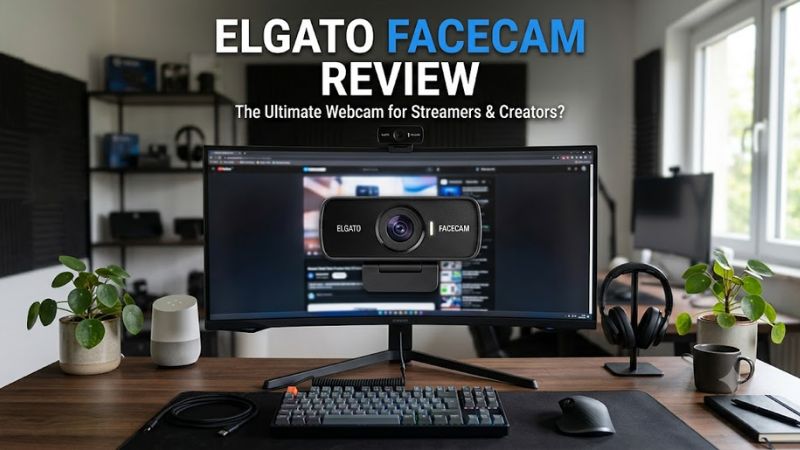
1. Video Quality and Frame Rate
The original Elgato Facecam captures video at up to 1920 × 1080 resolution and 60 frames per second. That combination works well for face-cam overlays in Twitch streams, YouTube videos, Discord calls, and other applications that benefit from smooth motion.
Its 1080p ceiling is also an important limitation. You cannot record native 1440p or 4K footage with this model. However, 1080p60 remains a practical format for gaming streams, where the webcam usually occupies a relatively small portion of the screen.
2. Lens, Focus, and Lighting
Elgato equips the original Facecam with an eight-element, all-glass Prime Lens, an f/2.4 aperture, and a Sony STARVIS CMOS sensor. The lens has a 24mm full-frame-equivalent focal length and an 82-degree diagonal field of view.
The camera uses fixed focus rather than autofocus. Its specified focus range is approximately 30–120 cm, making it suitable for someone sitting at a desk. You should position the camera within that range and avoid expecting it to refocus when you move closer to or farther from the lens.
Lighting still matters. A decent front-facing light can improve facial detail and reduce the need for aggressive exposure adjustments. The sensor does not make poor room lighting irrelevant, so creators recording in dark rooms should budget for lighting improvements before paying extra for a premium webcam.
3. Software Controls and Streaming Compatibility
Elgato Camera Hub provides controls for exposure, shutter speed, color temperature, saturation, sharpness, contrast, and field of view. These adjustments help you create a consistent image instead of relying entirely on automatic webcam processing.
The original Facecam supports USB 3.0 or later and works with compatible UVC applications, including OBS Studio and common video-conferencing software. Its settings can be stored in onboard flash memory, helping preserve adjustments when switching between compatible computers.
For streamers, that combination is more useful than a long list of decorative software effects. However, advanced controls take time to configure, and the camera does not replace a dedicated microphone or proper lighting.
4. Price, Condition, and Long-Term Value
The original Facecam is listed as discontinued on Elgato’s official product page. Its previously listed US price was $129.99, but that figure should not be treated as a current retail offer or a reliable used-market valuation.
When shopping for a secondhand unit, compare the asking price with the current Facecam MK.2 and Facecam Neo. Check that the seller identifies the exact model, includes the necessary cable and mount, and accepts returns if the camera has connection or image-quality problems.
A used original Facecam makes the most sense when its price reflects its age and 1080p limitation. If the difference between a used unit and a new alternative is small, warranty coverage and newer hardware may offer better overall value.
Elgato Facecam Review: Features, Performance, and Value
The original Facecam’s main appeal is its emphasis on image capture rather than built-in audio or automatic focusing. For gaming creators, its 1080p60 output and manual controls can provide a useful camera foundation. The trade-offs are its fixed focus, discontinued status, and lack of higher-resolution recording.
Key Specifications
| Specification | Original Elgato Facecam |
| Maximum resolution | 1920 × 1080 |
| Maximum frame rate | 60 FPS |
| Image sensor | Sony STARVIS CMOS |
| Lens | Eight-element, all-glass Prime Lens |
| Aperture | f/2.4 |
| Focus system | Fixed focus |
| Focus range | 30–120 cm |
| Field of view | 82° diagonal |
| Connection | USB-C, USB 3.0 or later recommended |
| Built-in microphone | No |
| Mounting | Monitor mount with 1/4-inch thread |
| Product status | Discontinued |
Image Quality: Good for a Dedicated Gaming Camera
The original Facecam is designed to deliver detailed Full HD video with manual control over the image. Its 60 FPS capability is useful for creators who move frequently on camera, use animated overlays, or want their face-cam footage to look smooth alongside fast-paced gameplay.
Actual image quality depends on exposure, lighting, camera placement, and the software settings used to capture the feed. A well-lit Facecam setup can be more useful than a higher-resolution camera with poor lighting, but specifications alone do not establish how it compares with every competing webcam.
Fixed Focus: A Practical Limitation
Fixed focus keeps the camera configured for a particular working distance, which is convenient when you sit in a consistent position. You do not need to manage autofocus hunting or refocusing during ordinary desk use.
The trade-off becomes noticeable if you regularly lean toward the camera, demonstrate small objects close to the lens, or move around while recording. Buyers who need to change subject distances frequently should consider an autofocus webcam instead.
Camera Hub: More Control Over the Image
Camera Hub is one of the original Facecam’s strongest features. Manual exposure and color adjustments let you tune the image to match your room lighting, background, and streaming layout. This is particularly useful when you want your webcam image to remain consistent across different sessions.
The learning curve is worth considering. Beginners may prefer automatic adjustments, while creators who enjoy refining their camera setup can benefit from manual controls. The software improves configuration flexibility, but it cannot compensate fully for inadequate lighting or an unsuitable camera position.
Strengths, Weaknesses, and Buying Verdict
The original Facecam’s main strengths are its 1080p60 capture, glass optics, adjustable image settings, onboard setting storage, and standard tripod mounting point. These features make it a capable option for a dedicated streaming station or gaming desk.
Its weaknesses are equally important: no native 4K recording, fixed focus, no built-in microphone, and discontinued retail status. Availability of accessories, replacement units, and warranty support may also differ depending on the seller and region.
Buy it if: you find a reasonably priced unit in good condition, mainly stream or record at 1080p, and prefer manual image adjustments.
Skip it if: you want autofocus, 4K capture, a new-product warranty, or a camera that handles frequent changes in subject distance.
How It Compares With Newer Elgato Webcams
Elgato’s current webcam lineup includes the Facecam MK.2, Facecam Neo, and Facecam 4K. These are different products, so their specifications and prices should not be attributed to the original Facecam.
| Product | Best For | Key Spec | Compatibility | Watch Out For |
| Original Facecam | Budget-conscious streamers buying used | 1080p60, fixed focus | Compatible Windows and macOS systems with USB 3.0 | Discontinued; condition varies |
| Facecam MK.2 | Full HD streaming with HDR support | 1080p60, HDR up to 1080p30 | Windows 11 or newer; macOS 13.3 or newer | Still limited to 1080p |
| Facecam Neo | Entry-level streaming and video calls | 1080p60 | Compatible computers and supported UVC apps | Fewer premium camera features |
| Facecam 4K | Creators who need higher resolution | Up to 4K60 | Windows 11 or newer; macOS 13 or newer | Higher cost and greater capture demands |
The Facecam MK.2 is the more direct modern alternative if you want a new Full HD webcam with a built-in privacy shutter, adjustable image controls, and HDR support at compatible resolutions. Its fixed-focus design means it is not automatically the right choice for people who need autofocus.
The Facecam Neo is worth considering if you want a simpler entry-level camera. The Facecam 4K is more appropriate for creators who need additional resolution for cropping or detailed footage, although 4K capability alone does not guarantee a better image in every environment.
FAQ
Is the original Elgato Facecam still worth buying?
Yes, the original Elgato Facecam can be worth buying if you find a well-maintained unit at a substantial discount. Its 1080p60 capture and manual controls remain useful for streaming, but compare the price against newer models and account for the lack of normal new-product availability.
Does the Elgato Facecam have a built-in microphone?
No, the original Elgato Facecam does not have a built-in microphone. You will need a separate microphone or another audio input for streaming and calls. A USB microphone, headset microphone, or compatible audio interface can provide that input independently of the webcam.
Does the original Elgato Facecam support 4K?
No, the original Facecam is limited to 1080p video at up to 60 FPS. If native 4K recording is important, consider the Facecam 4K instead. The original model’s 1080p output can still be suitable for conventional streaming layouts and video calls.
Does the Elgato Facecam work with OBS Studio?
Yes, the original Facecam can work with OBS Studio through its compatible webcam capture support. Connect it to a suitable USB 3.0 port, install Camera Hub if you need its image controls, and select the camera as a video-capture source in OBS. Actual resolution and frame-rate options depend on the connection and software configuration.
Final Thoughts
The Elgato Facecam review verdict is straightforward: the original model remains a sensible 1080p60 streaming camera when the price and condition justify buying used. Its manual controls are valuable, but its fixed focus and discontinued status limit its appeal. Compare it with the Facecam MK.2 before committing to a purchase.