🛒 Best Price Today on Amazon
Prime members get fast, free shipping on everything above, plus member-only deals. New members get a 30-day free trial — cancel anytime.
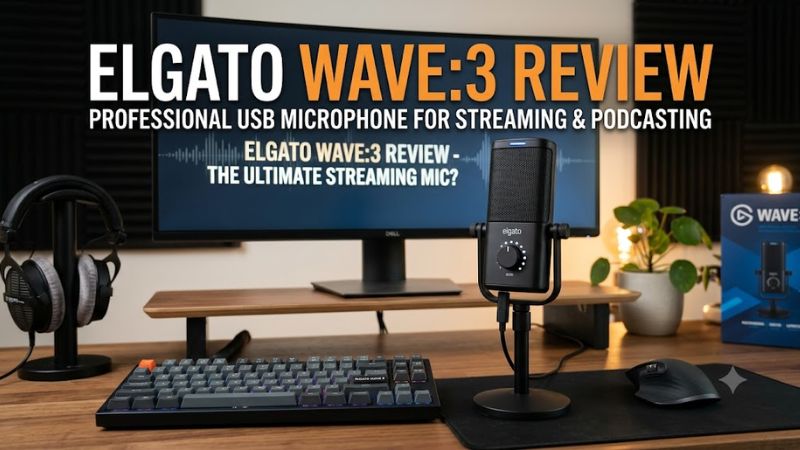
The elgato wave 3 review question comes down to whether this USB microphone offers enough audio quality and streaming control to justify its premium price. With 24-bit recording, Clipguard technology, and Wave Link mixing software, it targets gamers, streamers, and creators who want cleaner voice capture without a separate audio interface.
How to Choose a USB Microphone for Gaming and Streaming
A good gaming microphone needs more than a high sample rate. Voice clarity, background-noise management, software controls, and compatibility with your streaming setup all affect the result. The Elgato Wave:3 combines a condenser microphone with digital audio tools, making it particularly relevant to creators who manage game audio, voice chat, and microphone input simultaneously.
1. Sound Quality and Pickup Pattern
The Wave:3 uses a 17 mm electret condenser capsule with a cardioid pickup pattern. Cardioid microphones primarily capture sound from the front, making them suitable for commentary, Discord calls, streaming, and solo recordings. Positioning the microphone correctly remains important because the capsule can also pick up nearby keyboard clicks, fans, and room reflections.
Elgato specifies a frequency response of 70 Hz–20 kHz and recording at 24-bit with sample rates of 48 kHz or 96 kHz. These specifications provide flexibility for voice recording, but they do not automatically make a microphone sound better than every competitor. Room acoustics, microphone distance, gain, and speaking technique also influence the final recording.
2. Audio Controls and Clipping Protection
The Wave:3 features a multifunction control dial and a capacitive mute button. The dial provides access to microphone gain, headphone volume, and the balance between microphone input and computer audio. This arrangement keeps frequently used adjustments accessible without requiring a separate hardware mixer.
Clipguard is another important feature. It helps manage sudden loud input levels to reduce clipping distortion, which can occur when someone shouts or raises their voice unexpectedly. It is useful for energetic gaming commentary, although it should complement sensible gain settings rather than replace them.
3. Streaming Software and Audio Routing
Wave Link is central to the microphone’s appeal. The software allows creators to organize supported audio sources into separate channels and create different mixes for themselves and their audience. For example, you can adjust game sound, microphone volume, music, and voice chat without treating every source as one combined signal.
This is particularly useful when streaming through OBS or managing multiple applications during a gaming session. However, the software adds complexity for users who only need a microphone for occasional calls. If you rarely adjust audio sources independently, a less expensive USB microphone may be sufficient.
4. Connectivity, Mounting, and Desk Space
The microphone connects through USB-C and includes a USB-A-to-USB-C cable, a desktop stand, and a boom-arm adapter. The supplied stand makes initial setup straightforward, while the adapter provides another mounting option for a compatible microphone arm.
Elgato lists Windows 11 64-bit or newer and macOS Sonoma 14.2 or newer in its current product specifications, alongside a USB connection and free Wave Link software. Check the current requirements before buying if you use an older operating system. Also consider desk vibrations and keyboard noise: a boom arm, suitable positioning, and a stable mounting surface can make a meaningful difference.
Elgato Wave 3 Review: Features, Performance, and Value
The Elgato Wave:3 is best understood as a streaming microphone and audio-control solution rather than simply a device for recording voice. Its specifications are competitive for a USB condenser microphone, while its software and clipping protection distinguish it from simpler models. The main question is whether those additional capabilities justify paying more than a basic microphone costs.
Key Specifications at a Glance
| Specification | Elgato Wave:3 |
| Microphone type | Electret condenser |
| Capsule size | 17 mm |
| Pickup pattern | Cardioid |
| Bit depth | 24-bit |
| Sample rates | 48 kHz and 96 kHz |
| Frequency response | 70 Hz–20 kHz |
| Maximum SPL | 120 dB; 140 dB with Clipguard engaged |
| Connection | USB-C |
| Audio software | Wave Link |
| Included accessories | Desktop stand, USB-A-to-USB-C cable, boom-arm adapter |
| Official US price checked | $149.99 |
Specifications are from Elgato’s product information. The listed price is the manufacturer’s US price, not a guarantee of the current price at every retailer.
Sound Quality for Gaming, Discord, and Streaming
Independent reviews from SoundGuys and Popular Science describe the Wave:3 as capable of clear, detailed vocal capture. Its condenser design can reproduce subtle speech details, which is useful for commentary, podcasts, voiceovers, and live broadcasts. The cardioid pattern also suits a single person speaking toward the microphone.
The trade-off is sensitivity. A condenser microphone can pick up keyboard noise, computer fans, and room reflections when those sounds are close enough or the gain is too high. The Wave:3 is therefore better suited to a reasonably controlled desk environment than a noisy room where the microphone must reject sound from every direction.
Wave Link and the Overall Streaming Experience
Wave Link adds practical value for people who want separate control over their microphone and PC audio. Rather than relying entirely on individual application volume sliders, creators can manage supported sources within a dedicated mixing environment. This can simplify balancing game sound against commentary and monitoring the resulting mix.
The benefit depends on your workflow. A streamer juggling multiple audio sources has more reason to pay for these controls than a gamer who only joins Discord and occasionally records a clip. Software features also require initial configuration, so first-time users should allow time to set up their preferred inputs, outputs, and application routing.
Build, Controls, and Everyday Usability
The Wave:3 has a compact design, a front-facing multifunction dial, and a touch-sensitive mute control. The physical interface makes common adjustments accessible without adding a separate mixer to the desk. Its included stand is convenient for starting out, and the supplied boom-arm adapter offers flexibility as the setup develops.
There are limitations to consider. The microphone has only one pickup pattern, so it is not designed to switch between cardioid, omnidirectional, and bidirectional recording. Its desktop stand may also transmit some surface vibration, and the microphone’s sensitivity means that placement still matters. An optional pop filter can help reduce plosive sounds from words containing strong P and B sounds.
Price, Value, and Who Should Buy It
Elgato lists the Wave:3 at $149.99 in the US. At that price, it is a premium USB microphone rather than a basic entry-level purchase. The value proposition rests on the combination of vocal capture, Clipguard, convenient controls, and Wave Link software, not just the recording resolution.
The microphone makes the most sense for streamers, gaming creators, and people who regularly record spoken audio on a PC. It is harder to justify for someone who rarely records, needs multiple pickup patterns, or has a strict budget. In those cases, a simpler USB microphone or an alternative with a different pickup design may deliver better value.
Elgato Wave 3 vs. Alternatives: Which Should You Choose?
The Wave:3 competes with several established USB microphones, including the Blue Yeti family and the HyperX QuadCast range. These alternatives approach recording differently, so the right choice depends on whether you prioritize software-based audio routing, pickup flexibility, or a more gaming-oriented design. The comparison below focuses on practical differences rather than unsupported performance rankings.
| Microphone | Best For | Key Advantage | Compatibility Consideration | Watch Out For |
| Elgato Wave:3 | PC streamers | Wave Link and Clipguard | Check current OS and software requirements | Single pickup pattern |
| Blue Yeti | General recording | Multiple pickup patterns on applicable models | Confirm the exact model and connection requirements | More options may require additional setup |
| HyperX QuadCast | Gaming and streaming | Multiple pickup patterns on applicable models and integrated pop-filter features | Confirm the selected model’s supported connections and software | Features vary across the QuadCast family |
| Razer Seiren Mini | Budget-conscious solo users | Compact, straightforward microphone design | Confirm the exact model’s connection and mounting needs | Fewer built-in controls than the Wave:3 |
These are broad product-family comparisons. Features vary by generation, and this table does not imply that every model has been compared under identical recording conditions.
Elgato Wave:3 vs. Blue Yeti
The Blue Yeti family is worth considering if you need more than one pickup pattern. Depending on the model, multiple patterns can accommodate solo commentary, group conversations, interviews, or recording more than one person around a table. That flexibility can be more valuable than a higher maximum sample rate for certain workflows.
The Wave:3 has a stronger case for creators who want Elgato’s audio-routing software and Clipguard. If your recording setup centers on one speaker and a gaming PC, those features may matter more than multiple patterns. If you frequently record interviews or shared-room discussions, compare the exact Yeti model before deciding.
Elgato Wave:3 vs. HyperX QuadCast
The HyperX QuadCast family targets gaming and streaming users who want a microphone designed around a gaming desk. Depending on the model, features include multiple pickup patterns and an integrated pop filter, which can be helpful for different recording situations.
The Wave:3 is attractive when software-based mixing is a priority. Neither product is automatically the better choice for every voice or room. Compare the exact model, physical controls, connection type, mounting options, and software support, then choose the setup that matches your recording habits.
Elgato Wave:3 vs. Razer Seiren Mini
The Razer Seiren Mini is a reasonable alternative for buyers who want a compact microphone for voice chat and basic commentary without paying for an advanced audio-mixing workflow. Its simpler design can be an advantage if you prefer minimal setup and have little interest in routing several applications independently.
The Wave:3 costs more, but its additional controls, Clipguard, and Wave Link support give it a broader role in a creator’s setup. If you only need clearer communication in multiplayer games, the extra spending may not be worthwhile. If you stream regularly and manage several sound sources, the Wave:3 is the more relevant option to investigate.
FAQ
Is the Elgato Wave:3 good for gaming?
Yes, the Elgato Wave:3 is well suited to gaming voice chat, streaming commentary, and recording spoken content. Its cardioid pickup pattern is designed primarily for a person speaking toward the microphone, while Clipguard helps manage loud input peaks. Positioning and gain still matter if you want to limit keyboard and fan noise.
Does the Elgato Wave:3 work with OBS and Discord?
The Wave:3 can be used as a USB microphone with compatible PC applications, including OBS and Discord. Wave Link can provide additional control over supported audio sources and mixes, but the precise configuration depends on your operating system, application settings, and installed software version.
Is the Elgato Wave:3 worth $149.99?
It can be worth $149.99 for streamers who will use its audio routing, clipping protection, and physical controls regularly. For basic voice chat, occasional recordings, or buyers who need multiple pickup patterns, a less expensive microphone or a different model may offer better value.
Does the Elgato Wave:3 need an audio interface?
No, the Elgato Wave:3 does not require a separate audio interface because it connects to a computer over USB-C. It includes a USB-A-to-USB-C cable, although buyers should confirm that their computer meets the current operating-system and connectivity requirements.
Final Thoughts
The elgato wave 3 review verdict is positive for PC streamers who value clear voice capture, Clipguard, and flexible audio routing in one USB microphone. Its single pickup pattern and premium price limit its appeal for casual users. Compare current alternatives, check software compatibility, and buy it if you will use its mixing features regularly.