🛒 Best Price Today on Amazon
Prime members get fast, free shipping on everything above, plus member-only deals. New members get a 30-day free trial — cancel anytime.
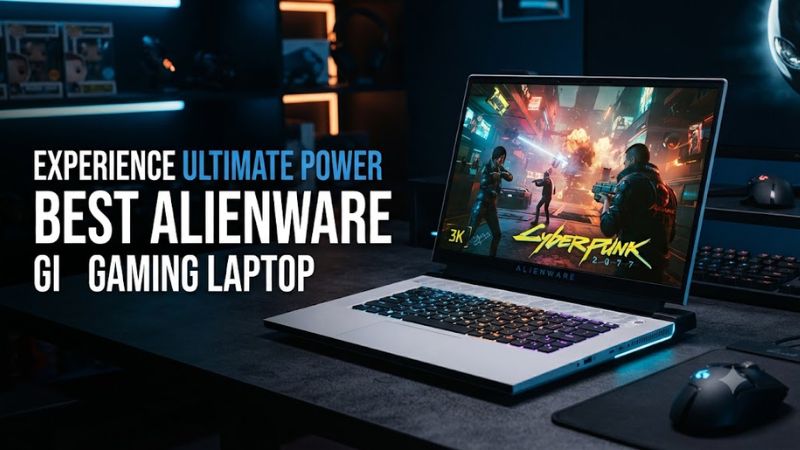
Best alienware gaming laptop choices now span 15-inch entry models, OLED Aurora systems, and large Area-51 flagships. The right pick depends on GPU class, display, memory, storage, and portability. Dell’s current range makes those differences substantial, so buyers should match the chassis to their games and daily use.
How to Choose an Alienware Gaming Laptop
The current Alienware range covers several performance classes, from RTX 5060 systems to RTX 5090 Area-51 configurations. Start with the GPU, then weigh display resolution, chassis size, memory, and storage. Dell confirms that configuration options differ substantially between the 15, Aurora, and Area-51 families; model names alone are not enough.
GPU and game performance
For demanding AAA gaming, GPU class matters more than cosmetic extras, especially at native WQXGA resolutions. The 16 Area-51 and 18 Area-51 can reach RTX 5090, while the 16X Aurora reaches RTX 5070 Ti and the 15 tops out at RTX 5060. That spread defines the main performance tiers.
For the best alienware gaming laptop, high-refresh gaming should start with the GPU rather than the processor name alone. Notebookcheck recorded 106.4 fps for the Alienware 18 RTX 5090 in F1 24 at 2560×1440 Ultra High, while Cyberpunk 2077 reached 166.5 fps at 1920×1080 Ultra with FSR off.
Display and refresh rate
Display priorities differ across the lineup. The 15 uses a 15.3-inch WUXGA 165Hz panel, while the 16X Aurora and 16 Area-51 offer 16-inch WQXGA OLED 240Hz configurations. The 18 Area-51 uses an 18-inch WQXGA 300Hz panel, favoring buyers who value screen size and refresh rate.
For the best alienware gaming laptop display, OLED is the stronger choice for contrast and color, while the 18-inch IPS design favors a large competitive canvas. Dell lists G-SYNC on the current 16X Aurora, 16 Area-51, and 18 Area-51, although exact panels vary by configuration and region, so check the selected build.
Memory and storage
Memory is straightforward because these laptops use DDR5, but capacities and speeds differ. The 16 Area-51 supports 16GB, 32GB, and 64GB at up to 6400 MT/s. The 16X Aurora supports up to 64GB DDR5, while the 18 Area-51 reaches 64GB and offers a 7200 MT/s XMP option.
For the best alienware gaming laptop aimed at current AAA games, 32GB is the sensible target when available, while 64GB suits heavier creation or multitasking. Storage also varies: Dell lists Gen4 and Gen5 NVMe options on Area-51 models, with larger capacities available on selected configurations.
Compatibility and portability
All four picks are complete laptops, so desktop socket, PSU connector, and PCIe-slot compatibility rules do not apply in the usual sense. The relevant checks are the factory CPU and GPU, supported DDR5 memory, SSD form factor, Windows version, charger, and physical weight before purchase, with upgrades limited to supported laptop components.
The 15 is the most practical portability choice at a listed minimum weight of 4.85 pounds, while the 18 Area-51 is a desktop-replacement class machine. The 16X Aurora and 16 Area-51 sit between them, so a best alienware gaming laptop for frequent travel should favor the smaller chassis over maximum GPU power.
Top Alienware Gaming Laptop Picks
The four picks cover the main buying cases in Dell’s current Alienware range. The 16 Area-51 is the broadest flagship, the 16X Aurora emphasizes OLED value, the 18 Area-51 targets maximum performance, and the 15 focuses on accessible gaming. Current Dell configurations support those distinctions.
Best Overall: Alienware 16 Area-51
The Alienware 16 Area-51 is the best overall pick because it combines a 16-inch format with high-end RTX 50-series graphics and an OLED option. Dell lists RTX 5070 through RTX 5090 configurations, up to 64GB DDR5, and storage options reaching 12TB depending on the build. It suits buyers wanting multiple performance tiers.
Independent results show the performance of this configuration class. PCWorld recorded 20,960 in 3DMark Time Spy for an RTX 5080 model, while Metro Exodus reached 92 fps at 1080p Extreme. Those results apply only to that configuration, not every Area-51 build, because GPU, power profile, and display choices can differ.
Best Value: Alienware 16X Aurora
The Alienware 16X Aurora is the value pick for buyers who want a premium 16-inch OLED without moving into the flagship Area-51 class. Dell lists RTX 5060, RTX 5070, and RTX 5070 Ti options, plus 16GB, 32GB, or 64GB DDR5 and a 240Hz WQXGA OLED display.
Notebookcheck measured the RTX 5070 Ti configuration at 16,911 in 3DMark Time Spy Overdrive and 16,581 in Performance mode, about a 2% difference. Its weakness is configuration cost: upgraded memory and storage can move the Aurora toward Area-51 pricing, so compare complete builds rather than chassis prices.
Best For: Maximum Performance — Alienware 18 Area-51
The Alienware 18 Area-51 is the choice for buyers who want the largest screen and highest graphics ceiling. Dell lists RTX 5060 through RTX 5090 options, up to 64GB DDR5, up to 12TB of listed storage, and an 18-inch WQXGA 300Hz display. It is a desktop-replacement machine.
Its main weakness is portability: a research-based review lists the RTX 5090 configuration at about 4.34kg before accessories. Notebookcheck recorded 52.2 fps at 3840×2160 Ultra High in F1 24 and 106.4 fps at 2560×1440 Ultra High. Buyers who travel often should favor a smaller model.
Best For: Lower-Cost Gaming — Alienware 15
The Alienware 15 is the accessible pick for buyers who want Alienware design and a smaller chassis without paying Area-51 prices. Dell lists Intel and AMD versions, up to an RTX 5060 Laptop GPU, and a 15.3-inch WUXGA 165Hz display. The AMD model starts at 4.85 pounds.
The main limitation is its lower performance ceiling and simpler display compared with the 16X Aurora and Area-51 families. Dell’s AMD model uses a 54Wh battery and supports USB-C charging up to 100W, but RTX 5060 suits entry-to-midrange gaming. Buyers seeking OLED or RTX 5070 Ti should step up instead.
| Product | Best For | Key Spec | Compatibility | Watch Out For |
| Alienware 16 Area-51 | Best Overall | Up to RTX 5090, 240Hz OLED | Windows 11, DDR5, M.2 NVMe | Heavy chassis |
| Alienware 16X Aurora | Best Value | Up to RTX 5070 Ti, 240Hz OLED | Windows 11, DDR5 SODIMM, M.2 | Configured price can rise |
| Alienware 18 Area-51 | Maximum Performance | Up to RTX 5090, 300Hz | Windows 11, DDR5 CSoDIMM, M.2 | Very large and heavy |
| Alienware 15 | Lower-Cost Gaming | Up to RTX 5060, 165Hz | Windows 11, DDR5, USB-C charging | Lower GPU ceiling |
FAQ
The best choice depends on performance needs and portability. The 16 Area-51 is the broadest fit, the 16X Aurora emphasizes OLED value, the 18 Area-51 prioritizes maximum performance, and the 15 focuses on accessible gaming. Those roles align with Dell’s current lineup, with distinct hardware ceilings and chassis sizes.
Is the Alienware 16 Area-51 worth buying?
Yes, the best alienware gaming laptop for a 16-inch flagship is the Alienware 16 Area-51 for high-end gaming in a 16-inch chassis. Its current range reaches RTX 5090, 64GB DDR5, and a 240Hz WQXGA OLED option, giving it more headroom than Aurora while avoiding the larger 18-inch format. It remains a heavy desktop laptop.
The trade-off is weight and price rather than limited hardware options. Independent results for an RTX 5080 configuration recorded 20,960 in 3DMark Time Spy, but battery life and chassis bulk remain reasons to consider a smaller or less powerful laptop when portability matters more than sustained plugged-in gaming.
Which Alienware laptop is best for the money?
The Alienware 16X Aurora is the strongest value-oriented choice when the goal is premium display quality below the flagship Area-51 range. Its lineup reaches RTX 5070 Ti and pairs that GPU class with a 240Hz WQXGA OLED panel, while memory can reach 64GB DDR5. That combination targets upper-midrange gaming buyers.
Value still depends on the exact configuration because Dell offers several memory and storage tiers. Notebookcheck found the RTX 5070 Ti model about 15% faster on average in gaming than the previous RTX 5070 version. That supports choosing the newer GPU when the price gap is reasonable.
Is the Alienware 18 Area-51 good for gaming?
The Alienware 18 Area-51 is built for high-end gaming and can be configured with an RTX 5090 Laptop GPU at up to 175W. Its 18-inch WQXGA 300Hz display and large cooling-focused chassis suit buyers who mainly play while plugged in and want a desktop-replacement experience. Daily travel is less practical.
The limitation is portability, not performance options. Notebookcheck recorded 106.4 fps in F1 24 at 2560×1440 Ultra High and 52.2 fps at 3840×2160 Ultra High on its RTX 5090 configuration. The machine is substantially heavier than the 15 or 16-inch choices, limiting its appeal for frequent travel and mobile gaming.
Is the Alienware 15 good enough for modern games?
The Alienware 15 is a reasonable choice for modern games when configured with its RTX 5060 Laptop GPU and used with settings appropriate to that class of hardware. Dell lists a 15.3-inch WUXGA 165Hz panel, Windows 11 options, and both Intel and AMD processor variants. Its smaller chassis suits daily carrying.
Its ceiling is lower than the Area-51 models, so it is less suitable for buyers targeting the highest native-resolution settings or demanding ray tracing. Its smaller chassis and lower tier suit mainstream gaming and mobility, while buyers seeking more performance should compare the 16X Aurora or 16 Area-51.
Final Thoughts
The best alienware gaming laptop is not automatically the largest or fastest model. The 16 Area-51 is the balanced flagship, the 16X Aurora is the OLED value choice, the 18 Area-51 is the desktop replacement, and the 15 is the practical entry point. Match GPU, display, memory, and chassis to your use.