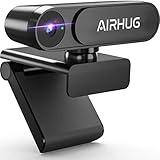
- Top Pick: AIRHUG 2K Webcam No Mic with Privacy Cover, USB Camera for Computer
- Best Value: Cyber Acoustics 1080p Full HD Webcam (WC-1000), Designed with No Microphone for Use with Headsets and Speakerphones, Autofocus, Low-Light Correction, USB-A Plug and Play
- Premium Choice: Logitech Brio 101 Full HD 1080p Webcam for Streaming and Meetings – Black
It might seem odd to want a webcam with no microphone, but for many setups it’s exactly the right call. If you already use a quality headset, dedicated mic, or speakerphone, a mic-free webcam avoids audio conflicts, echo, and the software confusion of multiple input devices, while often costing less too.
Whether you want a camera that genuinely lacks a mic or one where the mic can be disabled, here’s how to choose and which models deliver clean, reliable video without the audio baggage.
As an Amazon Associate we earn from qualifying purchases at no extra cost to you. Product prices and availability are accurate as of the date shown and are subject to change.





🎮 Get More From Your Setup — Free
Prime Gaming gives you free PC games every month, in-game loot, and a free Twitch channel sub — plus fast free shipping on all the gear above. New members get a 30-day free trial.
Watch: Webcam Without Microphone — Video Review
Design & Build
These cameras favor clean, functional designs with privacy in mind. The AIRHUG 2K and 4K models and the Cyber Acoustics WC-1000 are purpose-built without microphones and include physical privacy covers, ideal for security-conscious users and professional environments. Others like the Logitech Brio 101, C920e, and EMEET C950 are standard webcams where the microphone is either certified-disabled or easily switched off in software. Build quality is solid across the range, with sturdy clips that grip monitors and laptops securely.
Performance
Video quality is the whole point here, and these deliver. The AIRHUG 4K and Logitech Brio 101 produce crisp, detailed images with good color, while the Cyber Acoustics WC-1000 adds autofocus and low-light correction that keep you looking sharp in less-than-ideal lighting. Because there’s no active mic (or it’s disabled), your dedicated audio device handles sound cleanly with no risk of the webcam grabbing focus as the default input. For anyone plagued by echo or double-audio issues on calls, that reliability is a genuine relief.
Pros & Cons
- No audio conflicts: your headset or dedicated mic handles sound cleanly.
- Privacy focus: many include physical covers and no listening hardware.
- Sharp video: 1080p to 4K options with autofocus and low-light help.
- Often cheaper: dropping the mic can lower the price.
- Needs separate audio: you must already have a mic or headset.
- Fewer all-in-one options: true mic-free models are less common.
- Check the spec: some are mic-disabled rather than mic-free.
Alternatives to Consider
For a genuinely mic-free camera with privacy covers, the AIRHUG 2K or 4K and the Cyber Acoustics WC-1000 are the purpose-built picks. If you want premium video and don’t mind a disabled or unused mic, the Logitech Brio 101 offers excellent quality, while the C920e is a proven, certified option for corporate use. The EMEET C950 suits those who want a physical cover and the flexibility to toggle audio.
Related Guides
- Best Gaming Microphones with RGB (2026)
- Gaming Wireless Headset With Microphone (2026)
- Best Gaming Microphone PC (2026)
- Gaming Headphones With Microphone Wireless (2026)
- Best Gaming Microphone Best Buy (2026)
Frequently Asked Questions
Why buy a webcam without a microphone?
To avoid audio conflicts and echo when you already use a headset or dedicated mic. It also enhances privacy and can reduce cost.
Will my calls still have audio?
Yes, as long as you have another audio input like a headset, standalone mic, or speakerphone. The webcam simply handles video only.
What’s the difference between mic-free and mic-disabled?
Mic-free cameras have no microphone hardware at all, while mic-disabled models include one that’s turned off, either by certification or in software.
Do these support high resolution?
Absolutely. Options range from crisp 1080p like the Logitech Brio 101 to detailed 4K like the AIRHUG UHD model.
Verdict
A mic-free webcam is the clean, conflict-free choice when your audio is already handled. The AIRHUG 4K and Cyber Acoustics WC-1000 lead for true mic-free operation with privacy covers, while the Logitech Brio 101 is the pick if you want premium video and simply won’t use the mic. Match it to your existing audio setup and enjoy hassle-free calls.