Affiliate disclosure: As an Amazon Associate we earn from qualifying purchases. This post contains affiliate links — we may earn a small commission at no extra cost to you. This never affects our picks. Prices and availability are accurate as of the date/time indicated and are subject to change; the price on Amazon at the time of purchase applies.
- Top Thermal Pastes for Ryzen at a Glance
- How We Built This Guide
- Quick Comparison Table
- 1. ARCTIC MX-4 (incl. Spatula, 4 g) – Best Overall Value for Ryzen
- 2. ARCTIC MX-7 (8 g) – Best Long-Life Upgrade
- 3. Thermal Grizzly Kryonaut (1 g) – Best for Overclocked Ryzen
- 4. ARCTIC MX-4 (4 g) – Cheapest Ryzen Option
- 5. ARCTIC MX-6 (8 g) – Best for CPU, GPU and Laptop Repastes
- More Thermal Pastes for Ryzen Worth Considering
- How Much Does Thermal Paste Matter on Ryzen?
- How to Apply Thermal Paste on a Ryzen CPU
- When to Replace Thermal Paste on Ryzen
- Buying Guide: The Specs That Matter
- More Thermal Paste for Ryzen Questions
- Frequently Asked Questions
- Related Guides
- Related Articles
- About the Author
- Related Articles
Quick answer: The best thermal paste for Ryzen for most builders is the ARCTIC MX-4 (incl. Spatula, 4 g), because it is non-conductive, inexpensive and works on every Ryzen socket. For overclocked Ryzen 7 and Ryzen 9 chips, step up to the Thermal Grizzly Kryonaut or the ARCTIC MX-7 (8 g).
Choosing the best thermal paste for ryzen should start with safety: pick a non-conductive paste, because Ryzen CPUs have small capacitors beside the heat spreader. This guide compares fourteen thermal pastes for Ryzen in 2026, with the tube size, who each one suits and who should skip it.
Top Thermal Pastes for Ryzen at a Glance
How We Built This Guide
We did not run our own temperature tests. Each paste was compared using manufacturer specifications, published documentation, professional review coverage and recurring buyer feedback, then ranked by safety on Ryzen, tube size and price tier. Picks 1 to 5 are our core recommendations; the extra pastes below cover Noctua, Corsair and further Thermal Grizzly options.
Quick Comparison Table
| Pick | Thermal Paste | Best For | Price tier |
|---|---|---|---|
| 1 | ARCTIC MX-4 (incl. Spatula, 4 g) | Best value; safe default for any Ryzen | Budget |
| 2 | ARCTIC MX-7 (8 g) | Long-life upgrade, multiple builds | Mid |
| 3 | Thermal Grizzly Kryonaut (1 g) | Overclocked Ryzen 7 and Ryzen 9 | Mid-premium |
| 4 | ARCTIC MX-4 (4 g) | Cheapest repaste | Budget |
| 5 | ARCTIC MX-6 (8 g) | CPU, GPU and laptop repastes | Mid |
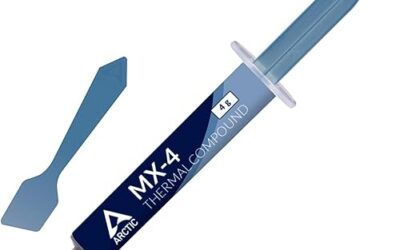
1. ARCTIC MX-4 (incl. Spatula, 4 g) – Best Overall Value for Ryzen
ARCTIC MX-4 is a carbon-based, non-conductive compound sold here in a 4 g tube with a spatula, and it is the safest default for a Ryzen CPU. Non-conductive paste matters on AM5, where small surface-mount capacitors sit right beside the heat spreader and a stray smear of conductive paste could short them. The tube covers several applications, and the included spatula helps you spread an even layer under a cooler base. Skip it if you want the last degree or two of cooling headroom; step up to the ARCTIC MX-7 or Thermal Grizzly Kryonaut.
- Pros: Very low price tier
Non-conductive, so a small overflow near the socket is safe
Spatula included for even spreading
Fits every Ryzen socket (AM4 and AM5) - Cons: Not the lowest-temperature paste for heavy overclocking
Basic tube with no applicator, so you spread it with the spatula or a card
2. ARCTIC MX-7 (8 g) – Best Long-Life Upgrade
ARCTIC MX-7 is ARCTIC’s newer “Ultimate Performance” paste, and the 8 g tube gives you enough for many CPU and GPU applications. It is the pick for builders who reapply paste on several PCs or who want a paste marketed for long durability. It is non-conductive, so it is safe around Ryzen’s socket and capacitors. Skip it if you only build one PC and will reapply once; the MX-4 does the same job for less.
- Pros: 8 g tube covers many applications
Marketed for long durability
Non-conductive and safe on AM4 and AM5 - Cons: Costs more than the MX-4
Gains over MX-4 are usually small on a normal air cooler
3. Thermal Grizzly Kryonaut (1 g) – Best for Overclocked Ryzen
Thermal Grizzly Kryonaut is a high-performance, non-conductive paste aimed at enthusiasts and overclockers, and it is the pick for a Ryzen 7 or Ryzen 9 on a large air cooler or liquid cooler. The 1 g tube is small, so it covers one or two CPU applications and is not a good fit for building several PCs. Skip it if you want a large tube for multiple builds; the ARCTIC MX-4 8 g or MX-7 8 g gives far more paste per dollar.
- Pros: Enthusiast-grade performance paste
Non-conductive
Small tube is cheap for a single build - Cons: 1 g covers only one or two applications
Costs more per gram than ARCTIC pastes
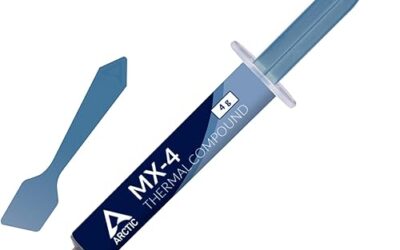
4. ARCTIC MX-4 (4 g) – Cheapest Ryzen Option
This is the same MX-4 compound as pick 1 in a plain 4 g tube without the spatula, and it is the cheapest way to repaste a Ryzen CPU. Use a plastic card or a clean spreader instead of the spatula, or just use the pea-size method and let the cooler mounting pressure spread it. Skip it if you want a spatula included; buy the MX-4 with spatula in pick 1 instead.
- Pros: Lowest cost in this guide
Non-conductive
Works on every Ryzen socket - Cons: No spatula in the box
Same compound as pick 1, so it adds nothing if you already own that one
5. ARCTIC MX-6 (8 g) – Best for CPU, GPU and Laptop Repastes
ARCTIC MX-6 is a non-conductive paste sold for CPUs, consoles, graphics cards and laptops, and the 8 g tube gives you enough for repasting a Ryzen CPU and a GPU, or a laptop, more than once. It sits between the MX-4 and the MX-7 in ARCTIC’s lineup. Skip it if you only need one CPU application; the MX-4 4 g is cheaper.
- Pros: 8 g tube suits multiple jobs
Non-conductive
Marketed for CPU, console, GPU and laptop use - Cons: Costs more than the MX-4
Little reason to pick it over the MX-7 if both are in stock
More Thermal Pastes for Ryzen Worth Considering
The five core picks lean on ARCTIC. These additional pastes add Noctua, Corsair and more Thermal Grizzly options, plus two other ARCTIC bundles, so you can match the tube to your cooler and your budget.
Noctua NT-H2 3.5 g AM5 Edition – Best for AM5 Builders Who Want a Guard
The AM5 Edition of Noctua NT-H2 comes with a thermal paste guard made for AMD AM5 processors, which keeps paste off the small components around the heat spreader. The listing also includes three cleaning wipes and says the tube covers 3 to 20 applications.
- Noctua NT-H2, 3.5 g
- Thermal paste guard for AMD AM5 CPUs
- 3 cleaning wipes included
- Listed for 3-20 applications
Pros: The guard protects the area around the AM5 heat spreader; easy to apply and clean; large tube for several builds. Cons: Costs several times more than ARCTIC MX-4. Skip it if you run an AM4 CPU, since the guard is made for AM5.
Noctua NT-H1 3.5 g – Best Proven Everyday Paste
NT-H1 is Noctua’s older general-purpose paste. The listing highlights easy application, easy cleanup and good long-term stability, with enough in the 3.5 g tube for 3 to 20 applications.
- Noctua NT-H1, 3.5 g
- Easy to apply and clean
- Good long-term stability
- Listed for 3-20 applications
Pros: Low cost for a branded tube; stable for years in a normal build. Cons: Not aimed at heavy overclocking. Skip it if you want the newest formulation; choose the NT-H2 instead.
Thermal Grizzly Kryonaut Extreme 2 g – Best for Overclocked Ryzen 9
Kryonaut Extreme is Thermal Grizzly’s paste for maximum thermal conductivity while overclocking, and it is the step up from the standard Kryonaut in pick 3. It makes sense only on a high-wattage Ryzen 7 or Ryzen 9 with a strong cooler, where every degree helps.
- Thermal Grizzly Kryonaut Extreme, 2 g
- Built for maximum thermal conductivity while overclocking
- Suited to CPU and GPU use
Pros: Enthusiast-grade cooling headroom. Cons: Small tube and a high price per gram. Skip it if your Ryzen runs at stock settings, because the gain over ARCTIC MX-4 is small.
Thermal Grizzly Duronaut 2 g – Best for Long-Term Stability
Duronaut is Thermal Grizzly’s long-life paste. The listing highlights high long-term stability, reduced pump-out, a non-curing formula, strong adhesion and that it is electrically non-conductive, which suits a Ryzen CPU that runs hot for hours.
- Thermal Grizzly Duronaut, 2 g
- Reduced pump-out and non-curing formula
- Electrically non-conductive
- Strong adhesion
Pros: Built to stay put for years; safe near capacitors. Cons: More expensive than ARCTIC pastes for a small tube. Skip it if you plan to repaste every year anyway.
Corsair XTM50 5 g – Best With Included Applicator
Corsair XTM50 is a 5 g tube sold with an applicator for desktop CPUs and GPUs, and the listing highlights ultra-low thermal impedance. It suits a first-time builder who wants a spreader in the box.
- Corsair XTM50, 5 g
- Applicator included
- Ultra-low thermal impedance
Pros: Applicator included; generous 5 g tube. Cons: Costs more than ARCTIC MX-4 with no clear Ryzen advantage. Skip it if you already have a spreader.
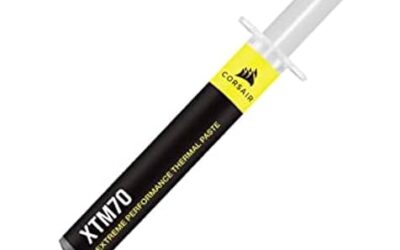
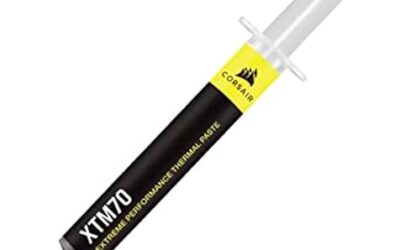
Corsair XTM70 3 g – Best Low-Viscosity Paste for High-Wattage CPUs
Corsair XTM70 is a 3 g low-viscosity paste for Intel and AMD processors up to 250 W and more of TDP. It ships with three cleaning wipes and an applicator kit.
- Corsair XTM70, 3 g
- Low viscosity, easy application
- For CPUs up to 250 W+ TDP
- 3 cleaning wipes and applicator kit
Pros: Easy to spread; wipes and applicator included. Cons: Premium price for 3 g. Skip it if you run a midrange Ryzen 5 at stock settings.
ARCTIC MX-7 4 g With MX-Cleaner – Best Bundle for a First Repaste
This is the MX-7 compound in a 4 g tube bundled with MX-Cleaner, which removes old paste from the CPU and cooler base before you apply new paste. It suits anyone replacing a stock cooler’s pre-applied paste.
- ARCTIC MX-7, 4 g
- MX-Cleaner included
- Marketed for long durability
Pros: Cleaner in the box; same MX-7 compound as pick 2. Cons: Costs more than a plain 4 g tube. Skip it if you already have isopropyl alcohol and lint-free wipes.
ARCTIC MX-6 4 g – Best Smaller MX-6 Tube
The same non-conductive MX-6 compound as pick 5, in a 4 g tube for a single Ryzen CPU repaste. The listing names CPUs, consoles, graphics cards and laptops as targets and highlights very high thermal conductivity and long durability.
- ARCTIC MX-6, 4 g
- Non-conductive
- For CPUs, consoles, graphics cards and laptops
Pros: Smaller, cheaper than the 8 g tube; non-conductive. Cons: Fewer applications per tube. Skip it if you want to repaste more than one machine; take the 8 g tube in pick 5.
How Much Does Thermal Paste Matter on Ryzen?
Less than most buyers expect. Published testing generally finds the difference between a good budget paste and a premium paste is a few degrees Celsius, so a reliable non-conductive paste such as ARCTIC MX-4, MX-6 or Noctua NT-H2 is enough for most Ryzen 5 and Ryzen 7 builds. Premium pastes like Thermal Grizzly Kryonaut Extreme only pay off on high-wattage Ryzen 9 chips under sustained load, and the cooler you choose usually matters far more than the paste.
How to Apply Thermal Paste on a Ryzen CPU
- Clean the CPU heat spreader and the cooler base with isopropyl alcohol and a lint-free cloth.
- Put a pea-size dot of paste in the center of the CPU heat spreader. Ryzen heat spreaders are compact, so a single dot is enough.
- Lower the cooler straight down and tighten the mounting screws in a cross pattern. Mounting pressure spreads the paste.
- Do not slide the cooler sideways. Wipe any overflow away from the socket and nearby capacitors straight away.
When to Replace Thermal Paste on Ryzen
Replace thermal paste when you swap coolers, when you remove the CPU, or when temperatures climb well above where they started on the same workload. Most non-conductive pastes in this guide are built to last several years in a normal desktop. If you use a pre-applied stock cooler, you do not need to add paste, but a fresh tube lets you reuse the cooler later.
Buying Guide: The Specs That Matter
Thermal Conductivity
From a data standpoint, higher W/mK moves heat faster; quality non-metal pastes drop temps a few degrees over stock, and liquid metal goes further for experts.

Conductivity and Safety
Looking at the numbers, non-conductive pastes such as every pick in this guide are safe and easy to apply; liquid metal can cool better but conducts electricity and can short the capacitors around a Ryzen heat spreader, so skip it unless you are experienced.
Application and Longevity
On specs, a pea-sized dot spreads under mounting pressure; good pastes resist drying for years before a reapplication is needed.
More Thermal Paste for Ryzen Questions
Which is the best thermal paste for Ryzen 5 and Ryzen 7?
The ARCTIC MX-4 (incl. Spatula, 4 g) is the best thermal paste for Ryzen 5 and Ryzen 7 for most builders, with ARCTIC MX-6 and Noctua NT-H2 as safe upgrades.
Is ARCTIC MX-4 or MX-6 better for Ryzen?
MX-6 is the newer paste and usually cools slightly better, while MX-4 costs less. Both are non-conductive, and the difference is a few degrees at most.
Do I need thermal paste on a new Ryzen CPU with a stock cooler?
No. Stock Ryzen coolers usually ship with paste already applied. You only need a separate tube when you fit an aftermarket cooler or remove and reinstall the cooler.
Is thermal paste conductive, and is it safe on AM5?
Most pastes in this guide are non-conductive, which makes a small overflow safe. Liquid metal is conductive and can short the small capacitors beside the AM5 heat spreader, so avoid it unless you are experienced.
How much thermal paste should I use on Ryzen?
Use one pea-size dot in the center of the heat spreader. More paste does not cool better and only increases the risk of overflow.
How often should I replace thermal paste on a Ryzen CPU?
Replace it whenever you remove the cooler, or when temperatures rise noticeably on the same workload. In a normal build, good non-conductive paste lasts several years.
Frequently Asked Questions
Which thermal paste ranks best in 2026?
The ARCTIC MX-4 (incl. Spatula, 4 g) is the best thermal paste for Ryzen for most builders because it is non-conductive, low cost and works on every Ryzen socket. The other picks cover overclocking, multiple builds and repasting laptops or GPUs.
How much should you spend on a thermal paste?
Most Ryzen builders should spend under $15 on thermal paste. ARCTIC pastes sit in the budget tier, while Noctua and Thermal Grizzly premium tubes cost more per gram for small gains. Spend more only if you overclock or run a Ryzen 9 on a large cooler.
What specs should you compare for gaming and everyday performance?
Higher W/mK moves heat faster; quality non-metal pastes drop temps a few degrees over stock, and liquid metal goes further for experts.
Which pick offers the best value?
The ARCTIC MX-4 (incl. Spatula, 4 g) and ARCTIC MX-4 (4 g) lead on value. The Thermal Grizzly Kryonaut is the pick if you want enthusiast-grade performance, and the ARCTIC MX-7 (8 g) is the pick for several builds. Check live pricing above.
Our verdict: the ARCTIC MX-4 (incl. Spatula, 4 g) is our top thermal paste pick for Ryzen, with options above for every budget. Check live Amazon pricing before you buy.
Related Guides
Related Articles
Looking for more on this topic? Browse the hand-picked guides below — each one applies the same scoring rubric used in this review.