Affiliate disclosure: As an Amazon Associate we earn from qualifying purchases. This post contains affiliate links — we may earn a small commission at no extra cost to you. This never affects our picks. Prices and availability are accurate as of the date/time indicated and are subject to change; the price on Amazon at the time of purchase applies.
- Quick Comparison Table
- 1. Logitech Lift Vertical Ergonomic: Best for smaller hands
- 2. Logitech MX Vertical: Best for larger hands and multi-computer desks
- 3. ProtoArc EM11 NL: Best for a simple wireless setup
- 4. Razer Pro Click V2 Vertical: Best for office work with light gaming
- 5. TKMARS Wireless Vertical Gaming Mouse: Best for macro-heavy use
- How to Choose
- Frequently Asked Questions
- About the Author
- Related Articles
Quick answer: The best vertical mouse for most desks is the Logitech Lift for smaller hands, with Logitech MX Vertical for larger ones. ProtoArc EM11 NL suits a simple wireless setup, Razer Pro Click V2 Vertical adds six buttons and Chroma RGB, and TKMARS is a gaming-leaning vertical with 12 buttons.
A vertical mouse turns your hand into a handshake position, which some people find easier on the wrist and forearm than a flat mouse. This guide compares five vertical models using only each listing’s published specs: connection type, button count, angle and battery details. We did not run our own benchmarks or comfort studies, and we cannot promise medical benefits. Use the table to narrow by style, then the checklist for sizing and adjustment.
Quick Comparison Table
| # | Model | Key specs (per listing) | Best for |
|---|---|---|---|
| 1 | Logitech Lift Vertical Ergonomic | Bluetooth or Logi Bolt USB-A receiver, quiet clicks, 4 of 6 buttons customizable, Windows/Mac | Smaller to medium hands |
| 2 | Logitech MX Vertical | Wireless ergonomic, 3-device switching across Windows and Apple computers, rechargeable | Larger hands and multi-computer desks |
| 3 | ProtoArc EM11 NL | 58-degree vertical design, 3 devices via Bluetooth/2.4G USB-A, 500mAh USB-C rechargeable | Simple wireless setup |
| 4 | Razer Pro Click V2 Vertical | 6 buttons, 2.4GHz, Bluetooth or USB-C wired, multi-device, Chroma RGB, one-click AI prompt | Office plus light gaming |
| 5 | TKMARS Wireless Vertical Gaming Mouse | Joystick, Bluetooth and 2.4G, 12 programmable buttons, 24000 DPI, rechargeable RGB | Macro-heavy and gaming use |
1. Logitech Lift Vertical Ergonomic: Best for smaller hands
Specs per the listing: Graphite finish, connects via Bluetooth or the included Logi Bolt USB-A receiver, quiet clicks, 4 of 6 buttons customizable, Windows and Mac compatible.
The Lift is sized for small to medium hands and uses a shallow vertical angle that eases people in from a regular mouse. The listing mentions quiet clicks, which helps in shared offices, and four of six buttons that can be customised.
Because its angle is gentler than the steepest vertical mice, it feels less dramatic, which is good for first-time users but may be too mild if you want the strongest forearm rotation. Large hands may find it cramped; the MX Vertical below is the bigger option.
- Pros: Suited to small and medium hands; Quiet clicks; Bluetooth or Logi Bolt receiver
- Cons: Not designed for large hands; Only four of six buttons customizable
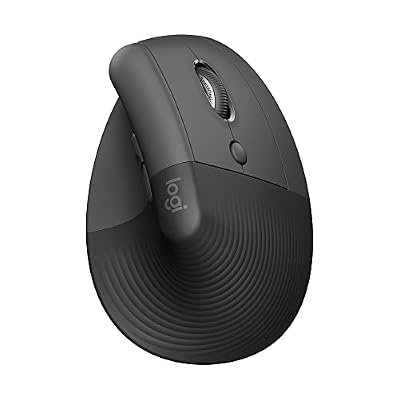
Logitech Lift Vertical Ergonomic Wireless Mouse - Graphite | Connect via Bluetooth or included Logi Bolt USB-A receiver, quiet clicks, 4 of 6 buttons customizable, Windows Mac compatible
Included for 'Best Vertical Mouse Options for Wrist Comfort at a PC Desk' as a representative home product in this roundup; selection reflects the product set returned for this topic.
View on Amazon2. Logitech MX Vertical: Best for larger hands and multi-computer desks
Specs per the listing: Graphite, wireless ergonomic design, easy switching between 3 Windows and Apple computers, rechargeable; the listing says it reduces muscle strain.
The MX Vertical is the full-size model in Logitech’s lineup, and the listing highlights switching between three computers, which suits a desk with a work laptop and a personal PC. It is rechargeable, so you avoid replacing batteries.
The vertical angle is steeper than the Lift, which many people find more effective but takes time to get used to. The strain-reduction line in the title is the maker’s own claim, so treat it as a design goal rather than a clinical promise. This is an older model, so check the maker page for current software support.
- Pros: Three-computer switching; Rechargeable; Larger body for bigger hands
- Cons: Steeper angle needs adjustment time; Strain claim is the maker’s own

Logitech MX Vertical Wireless Mouse Ergonomic Design - Graphite | Reduces muscle strain, move content between 3 Windows and Apple computers, rechargeable
Included for 'Best Vertical Mouse Options for Wrist Comfort at a PC Desk' as a representative home product in this roundup; selection reflects the product set returned for this topic.
View on Amazon3. ProtoArc EM11 NL: Best for a simple wireless setup
Specs per the listing: Wireless ergonomic vertical mouse, 58-degree vertical design, connect 3 devices via Bluetooth or 2.4G USB-A, 500mAh USB-C rechargeable, black.
The EM11 NL keeps the feature list tight: a 58-degree angle, three-device connectivity and USB-C charging. It is a good fit for someone who wants vertical ergonomics without an ecosystem of software or extras.
Because the listing shows few extras, expect fewer customisation options than the Logitech or Razer models. ProtoArc is less well known, so look at the maker page for warranty terms and check how many buttons are programmable.
- Pros: 58-degree angle for a natural wrist posture; USB-C rechargeable; Three-device connectivity
- Cons: Warranty and software details not listed; Fewer customisation options

ProtoArc EM11 NL Wireless Ergonomic Vertical Mouse, Rechargeable, Black | 58° vertical design supports a natural wrist posture, connect 3 devices via Bluetooth/2.4G USB-A, 500mAh USB-C rechargeable.
Included for 'Best Vertical Mouse Options for Wrist Comfort at a PC Desk' as a representative home product in this roundup; selection reflects the product set returned for this topic.
View on Amazon4. Razer Pro Click V2 Vertical: Best for office work with light gaming
Specs per the listing: Vertical wireless mouse, 6-button ergonomic design, one-click AI prompt button, Windows and Mac, multi-device via 2.4GHz, Bluetooth or USB-C wired mode, Chroma RGB.
This is a productivity-focused mouse with Razer extras. The listing mentions a dedicated AI prompt button, three connection modes and Chroma lighting, so it feels at home on a desk that mixes office tasks and some gaming.
The lighting is a plus for some and a distraction for others, and the AI prompt feature depends on software, so read the maker page for how it works. Six buttons is enough for general use but less than a macro-focused gaming vertical mouse.
- Pros: Three connection modes including wired USB-C; Dedicated AI prompt button; 6 buttons with Chroma RGB
- Cons: AI button needs software; Fewer buttons than gaming vertical models

Razer Pro Click V2 Vertical Wireless Mouse, 6 Button Ergonomic Design | One Click AI Prompt, Supports Windows & Mac, Multi Device Connectivity via 2.4GHz, Bluetooth, or USB C Wired Mode, Chroma RGB
Included for 'Best Vertical Mouse Options for Wrist Comfort at a PC Desk' as a representative home product in this roundup; selection reflects the product set returned for this topic.
View on Amazon5. TKMARS Wireless Vertical Gaming Mouse: Best for macro-heavy use
Specs per the listing: Wireless ergonomic vertical gaming mouse with joystick, Bluetooth and 2.4G, 12 programmable buttons, adjustable 24000 DPI, rechargeable RGB, for PC and MacBook.
If you want many programmable buttons in a vertical shape, this is the unusual option: 12 buttons, a joystick and an adjustable DPI up to 24000. It suits people who run macros in games or productivity software.
The brand is less established than the others, so check warranty and software support on the maker page. The title does not give the vertical angle, and a joystick on a mouse takes some getting used to; this one is for tinkerers more than first-time vertical users.
- Pros: 12 programmable buttons and a joystick; Adjustable DPI up to 24000; Bluetooth and 2.4G
- Cons: Lesser-known brand; Vertical angle not listed

TKMARS Wireless Ergonomic Vertical Gaming Mouse with Joystick, Bluetooth & 2.4G, 12 Programmable Buttons, Adjustable 24000 DPI, Rechargeable RGB Computer Mouse for PC, MacBook & Laptops
Included for 'Best Vertical Mouse Options for Wrist Comfort at a PC Desk' as a representative home product in this roundup; selection reflects the product set returned for this topic.
View on AmazonHow to Choose
Match the size to your hand
A vertical mouse that is too small makes your fingers curl; one that is too large makes you stretch. Measure from your wrist crease to the tip of your middle finger and compare with the maker guide. The Lift suits smaller hands, the MX Vertical larger ones.
Angle and adjustment period
Steeper angles rotate the forearm more but feel odd at first. Expect a few days to adjust, especially for precise tasks. If you plan to do detailed photo work, try the mouse in short sessions first.
Connection, battery and buttons
Choose Bluetooth for a laptop and a USB receiver for a desktop. Check whether the mouse is rechargeable or uses batteries. Count the buttons you need: general office use needs 4 to 6, while gaming or macros may want more.
What to skip
Skip a vertical mouse that does not specify wireless or wired. Skip gaming mice that are merely shaped like a tall hump but not actually a vertical grip. Also skip a model if you have pain that persists; see a health professional rather than relying on a mouse.
Frequently Asked Questions
Does a vertical mouse prevent wrist pain?
We cannot promise that. A vertical grip can feel more comfortable for some users because it keeps the forearm in a handshake position, but results vary. If you have persistent pain, talk to a health professional.
How long does it take to get used to one?
Many people adjust in several days, though precise tasks may feel slower at first. Start with normal use for a few hours at a time and give yourself time before judging.
Can I use a vertical mouse for gaming?
Light gaming is possible, but vertical grips are less common in fast shooters. The TKMARS model offers more buttons for macros. For competitive play, many players still prefer a flat esports mouse.
Are they good for left-handed users?
Most vertical mice are right-handed designs. The listings here do not state a left-handed version, so check the maker page if you are left-handed.
Wireless or wired?
Wireless gives a cleaner desk and works on laptops. Wired avoids batteries and charging. The Razer model offers a USB-C wired mode, which is a convenient middle ground.