Affiliate disclosure: As an Amazon Associate we earn from qualifying purchases. This post contains affiliate links — we may earn a small commission at no extra cost to you. This never affects our picks. Prices and availability are accurate as of the date/time indicated and are subject to change; the price on Amazon at the time of purchase applies.
- Quick Comparison Table
- 1. Logitech MX Master 4: Best for All-Day Office and Creative Work
- 2. Logitech MX Vertical: Best for Wrist-Angle Relief
- 3. Razer Pro Click V2 Vertical: Best for Vertical Grip With Multi-Device Use
- 4. Razer DeathAdder V3 HyperSpeed: Best for Gamers Wanting a Sculpted Shape
- How to Choose
- Frequently Asked Questions
- About the Author
- Related Articles
Quick answer: For the best ergonomic mouse, the Logitech MX Master 4 is our top pick for all-day office and creative work. The Logitech MX Vertical and Razer Pro Click V2 Vertical suit people who want a handshake grip, and the Razer DeathAdder V3 HyperSpeed suits gamers who want a sculpted shape.
An ergonomic mouse aims to reduce wrist and forearm strain by changing the shape, grip angle or button layout compared with a standard mouse. This guide compares four ergonomic mice, two vertical designs and two sculpted designs, using the features their listings publish. We did not run our own comfort or sensor measurements, and comfort depends heavily on hand size, so use the descriptions here to narrow your choice rather than to settle it.
Quick Comparison Table
| # | Model | Key specs (per listing) | Best for |
|---|---|---|---|
| 1 | Logitech MX Master 4 | Wireless, haptic feedback, 8K DPI, quiet clicks, USB-C | All-day office and creative work |
| 2 | Logitech MX Vertical | Wireless, vertical design, rechargeable, switches between 3 computers | Wrist-angle relief |
| 3 | Razer Pro Click V2 Vertical | Wireless, 6 buttons, 2.4GHz, Bluetooth or USB-C wired, Chroma RGB | Vertical grip with multi-device use |
| 4 | Razer DeathAdder V3 HyperSpeed | Wireless, 55g, Focus X 26K sensor, up to 100 hr battery, USB-C | Gamers wanting a sculpted shape |
1. Logitech MX Master 4: Best for All-Day Office and Creative Work
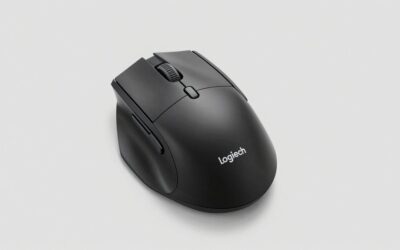
Specs per the listing: ergonomic wireless mouse, haptic feedback, ultra-fast scrolling, 8K DPI any-surface sensor, quiet clicks, wireless with USB-C, Windows and macOS support, graphite.
The MX Master line is the long-standing choice for people who spend whole days at a desk. It uses a sculpted right-hand shape with a thumb rest rather than a vertical grip, so the learning curve is gentle if you are coming from a standard mouse. The listing highlights haptic feedback, quiet clicks and an ultra-fast scroll wheel, which suit spreadsheets, long documents and timeline editing.
The shape is sized for larger hands, and left-handed users should check the maker page because the design is right-handed. Battery life and the exact number of buttons are not in the listing.
- Pros: Sculpted thumb rest; haptic feedback; quiet clicks and fast scrolling
- Cons: Right-handed shape; battery life not listed
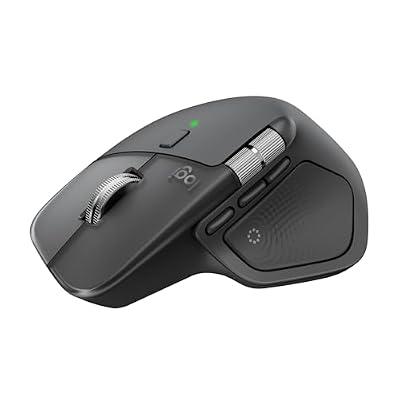
Logitech MX Master 4 Ergonomic Wireless Mouse with Haptics - Graphite | Advanced performance haptic feedback, Ultra-Fast Scrolling, 8K DPI Any-surface, Quiet Clicks, Wireless, USB-C, Windows/MacOS
Included for 'Best Ergonomic Mouse: Vertical and Sculpted Options Compared' as a representative home product in this roundup; selection reflects the product set returned for this topic.
View on Amazon2. Logitech MX Vertical: Best for Wrist-Angle Relief
Specs per the listing: wireless vertical ergonomic design, described as reducing muscle strain, moves content between 3 Windows and Apple computers, rechargeable, graphite.
The MX Vertical turns your hand to a handshake position, which reduces forearm twist compared with a flat mouse. That is the main reason people try it: if your wrist or forearm aches after long sessions, a vertical angle can feel different from the first minute. The listing also notes the ability to move content between three computers, which helps in mixed Windows and Mac setups.
Vertical mice take a few days to adjust to, and precision tasks such as fine photo retouching can feel awkward at first. Gaming is not its purpose.
- Pros: Handshake grip; cross-computer content transfer; rechargeable
- Cons: Adjustment period; not suited to fast gaming

Logitech MX Vertical Wireless Mouse Ergonomic Design - Graphite | Reduces muscle strain, move content between 3 Windows and Apple computers, rechargeable
Included for 'Best Ergonomic Mouse: Vertical and Sculpted Options Compared' as a representative home product in this roundup; selection reflects the product set returned for this topic.
View on Amazon3. Razer Pro Click V2 Vertical: Best for Vertical Grip With Multi-Device Use
Specs per the listing: vertical wireless mouse, 6-button ergonomic design, one-click AI prompt button, Windows and Mac support, 2.4GHz, Bluetooth or USB-C wired modes, Chroma RGB.
Razer’s take on the vertical format offers three connection options: the 2.4GHz dongle, Bluetooth and a wired USB-C mode. That makes it flexible for people who move between a laptop, a desktop and a work machine. It has six buttons, including a programmable one the listing ties to AI prompts, which is a niche perk but may suit people who use chat assistants through the day.
Chroma RGB lighting adds styling that the Logitech vertical model lacks. If you prefer a plain look, the lighting can be adjusted in software.
- Pros: Three connection modes; six buttons; vertical design
- Cons: RGB styling may not suit offices; battery life not listed

Razer Pro Click V2 Vertical Wireless Mouse, 6 Button Ergonomic Design | One Click AI Prompt, Supports Windows & Mac, Multi Device Connectivity via 2.4GHz, Bluetooth, or USB C Wired Mode, Chroma RGB
Included for 'Best Ergonomic Mouse: Vertical and Sculpted Options Compared' as a representative home product in this roundup; selection reflects the product set returned for this topic.
View on Amazon4. Razer DeathAdder V3 HyperSpeed: Best for Gamers Wanting a Sculpted Shape
Specs per the listing: ergonomic wireless gaming mouse, 55g, Focus X 26K optical sensor, optical switches Gen-3, HyperSpeed wireless, up to 100 hour battery, USB-C charging.
The DeathAdder shape has long been associated with comfort for palm and claw grips, and the V3 HyperSpeed version keeps the weight to 55 grams. It is the pick in this list for people who want an ergonomic right-hand shape without moving to a vertical mouse. A claimed battery life of up to 100 hours means you can go many sessions between charges.
It is built for gaming rather than for office features such as multi-computer switching, so it is not as strong an all-day productivity mouse as the Logitech MX Master 4.
- Pros: Sculpted ergonomic shape; 55g weight; up to 100 hours of battery
- Cons: Right-handed shape; few productivity features

Razer DeathAdder V3 HyperSpeed Ergonomic Wireless Gaming Mouse, 55g, Black | Lightweight, Focus X 26K Optical Sensor, Optical Switches Gen-3, HyperSpeed Wireless, Up to 100 Hr Battery, USB-C Charging
Included for 'Best Ergonomic Mouse: Vertical and Sculpted Options Compared' as a representative home product in this roundup; selection reflects the product set returned for this topic.
View on AmazonHow to Choose
Choose a grip style first
Sculpted mice keep your hand in a natural position with a thumb rest, and they feel familiar. Vertical mice rotate your hand about 57 to 90 degrees, which can reduce forearm pronation but takes time to learn. If you have wrist pain, a trial of a vertical model is reasonable, but see a health professional for persistent symptoms.
Match size to your hand
Measure from your wrist crease to the tip of your middle finger. Mice that are too small cause cramped claw grips, and mice that are too large force stretching. The listings do not give mouse dimensions, so check the maker page for length and width before buying.
Think about the work you do
For office and creative work, look for quiet clicks, fast scroll and multi-device switching. For gaming, look for low weight, a strong sensor and a low-latency wireless mode. Do not assume a vertical mouse suits fast shooters, because the grip makes quick flicks harder.
Check connectivity and charging
Mice with both Bluetooth and a USB dongle give you flexibility. A rechargeable battery with USB-C avoids buying AA cells. Left-handed users should look for symmetrical or left-handed designs, since many ergonomic mice are right-handed only.
Skip gimmicks
No-name vertical mice with many programmable buttons and huge DPI claims often skip software support and quality control. A well-supported brand matters more than a large number of buttons.
Give yourself a trial period
Switching to an ergonomic mouse changes muscle use, so expect some soreness or awkwardness for the first week. Keep your old mouse nearby for precision tasks while you adapt, and pair the new mouse with good habits: a relaxed shoulder, a forearm supported by the desk and regular breaks. Adjust pointer speed in software so you move your arm less. If the grip feels wrong after two weeks, return it and try a different style, because ergonomic comfort is personal.
Frequently Asked Questions
Do ergonomic mice really prevent wrist pain?
They can reduce strain for some people, but results vary. Posture, desk height and break habits matter as much as the mouse. For ongoing pain, see a health professional.
How long does it take to adjust to a vertical mouse?
Most people need a few days to a couple of weeks. Start with everyday tasks and add precision work gradually as the grip becomes natural.
Can I game with a vertical mouse?
You can for casual play, but fast aim and flick shots are harder with a vertical grip. Gamers usually prefer a sculpted shape such as the DeathAdder.
Is wireless or wired better for ergonomics?
Wireless removes cable drag and gives you freedom of movement. Wired mice avoid battery charging. Both are fine, so choose by your desk setup and habits.
Are there left-handed options?
Few ergonomic mice are designed for left hands. Check the maker page for the exact model, as most in this list are right-handed shapes.