🛒 Best Price Today on Amazon
Prime members get fast, free shipping on everything above, plus member-only deals. New members get a 30-day free trial — cancel anytime.
- Top Budget Wireless Gaming Mice Picks for 2026
- Best Budget Wireless Gaming Mice at a Glance
- 1. Logitech G305 LIGHTSPEED Wireless Gaming Mouse
- 2. FFJ Tri-Mode Wireless Gaming Mouse, RGB, Rechargeable
- 3. Redragon M725 Honeycomb Shell Wireless Gaming Mouse, 49g, 8000 DPI Tri-Mode
- 4. Redragon Wireless Gaming Mouse, 8000 DPI with Fire Button
- 5. Redragon M656 Gainer Lightweight Wireless Gaming Mouse
- 6. Uineer Wireless Gaming Mouse, RGB, Multi-DPI, Rechargeable
- How to Choose a Budget Wireless Gaming Mouse
- Frequently Asked Questions
- Related Guides
- About the Author
- Related Articles
Top Budget Wireless Gaming Mice Picks for 2026
Here are our current top budget wireless gaming mice picks, compared on real Amazon owner reviews, price, and features. Live prices update below.
As an Amazon Associate we earn from qualifying purchases at no extra cost to you.







By Sarah Mitchell
PC Gaming Universe is reader-supported. When you buy through links on our site, we may earn an affiliate commission at no extra cost to you. As an Amazon Associate we earn from qualifying purchases.
For years the advice was simple: if you cared about competitive play, you bought a wired mouse. Wireless meant lag, dead batteries and a premium that put good cordless mice well out of budget territory. That advice is now out of date. In 2026 the best budget wireless gaming mice deliver the kind of low-latency 2.4GHz performance that used to cost three figures, and they do it for the price of a couple of new releases. If you have been holding off on cutting the cord because of cost, this is the year to stop waiting.
The span runs from a proven name-brand classic to feather-light honeycomb shells and tri-mode models that pair over a dongle, Bluetooth or USB-C cable. We focused on the things that actually matter in a budget wireless mouse: a reliable 2.4GHz connection, a sensor that tracks cleanly, sensible weight, and battery life long enough that you are not charging it mid-session.
A quick note on what “budget” means here. What you should expect is honest wireless gaming performance for the money — the core experience of cable-free aiming without a latency penalty — plus a few genuinely useful extras like adjustable DPI, extra buttons or tri-mode connectivity. Read on for the at-a-glance table, then a closer look at why each mouse earns its place on the list.
Best Budget Wireless Gaming Mice at a Glance
| Model | Best For | Key Spec | Price Tier |
|---|---|---|---|
| Logitech G305 LIGHTSPEED | Trusted name-brand pick | HERO sensor, 12K DPI, AA battery | Varies |
| FFJ Tri-Mode Wireless | Connection flexibility | Tri-mode, RGB, rechargeable | Varies |
| Redragon M725 Honeycomb 49g | Lightest budget option | 49g honeycomb, 8000 DPI, tri-mode | Varies |
| Redragon 8000 DPI Wireless | Extra buttons on a budget | 8000 DPI, fire button | Varies |
| Redragon M656 Gainer | Cheapest reliable wireless | Lightweight, long battery | Varies |
| Uineer Wireless Gaming Mouse | Absolute lowest price | RGB, multi-DPI, rechargeable | Varies |
1. Logitech G305 LIGHTSPEED Wireless Gaming Mouse

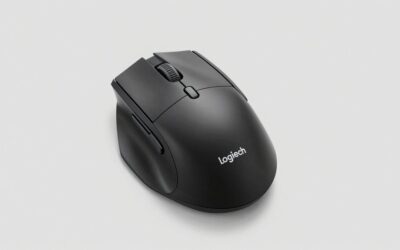
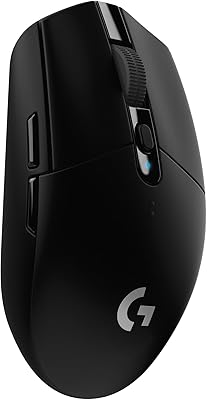
Logitech G305 Lightspeed Wireless Gaming Mouse - Black | 12,000 DPI, Lightweight, 6 Programmable Buttons, 250h Battery, On-Board Memory, Compatible with PC and Mac


As an Amazon Associate we earn from qualifying purchases. Product prices and availability are accurate as of the date/time indicated.
If you want a budget wireless gaming mouse from a name you already trust, the Logitech G305 LIGHTSPEED is the obvious starting point. That AA design is a genuine advantage for some buyers: instead of waiting for a recharge you can swap in a fresh cell on the spot and keep playing.
In daily use the G305 feels like the budget mouse least likely to disappoint. The HERO sensor tracks cleanly across normal DPI ranges, LIGHTSPEED wireless is genuinely low-latency rather than just “good enough,” and Logitech’s reputation for reliable connections means you are not fighting dropouts in the middle of a match. Battery life on a single AA stretches for months of typical use, so this is also one of the lowest-maintenance picks here.
The trade-offs are about age and weight rather than performance. The G305 uses an older shape, weighs more than the ultralight honeycomb mice further down this list, and its single-AA design is not rechargeable. But if your priority is a budget wireless gaming mouse that simply works, from a brand with a long track record, the G305 LIGHTSPEED is the safest money you can spend in this range.
Pros: Proven LIGHTSPEED wireless and HERO sensor, reliable connection, swappable AA battery, trusted brand.
Cons: Heavier than ultralight rivals; older shape; single AA rather than rechargeable.

2. FFJ Tri-Mode Wireless Gaming Mouse, RGB, Rechargeable

FFJ Wireless Gaming Mouse, 24000 DPI, Rechargeable Gaming Mice for PC, Mac | Tri-Mode 2.4G/USB-C/Bluetooth 5.3 Gaming Mouse Wireless, RGB Programmable Mouse Gamer, 75Hrs Battery Life, Black


As an Amazon Associate we earn from qualifying purchases. Product prices and availability are accurate as of the date/time indicated.
Tri-mode means you get a low-latency 2.4GHz dongle for serious play, Bluetooth for pairing with a laptop or tablet, and a wired USB-C mode that doubles as charging. That single feature makes it far more versatile than the single-mode mice that dominate this price bracket.
This is the budget wireless gaming mouse for someone whose setup is not just one gaming PC. If you bounce between a desktop, a work laptop and a tablet, the FFJ lets you keep one mouse and switch connection modes on the fly — dongle on the gaming rig, Bluetooth on the laptop, cable when the battery runs low. It adds RGB lighting for the players who want some color, and the rechargeable battery means no buying AA cells.
At this price the sensor and build are entry-level rather than premium, and the software is basic compared with the big brands. But as a do-everything tri-mode mouse for under twenty dollars, the FFJ punches well above its weight and is hard to beat on sheer flexibility per dollar.
Pros: Tri-mode connectivity (2.4GHz, Bluetooth, USB-C), RGB lighting, rechargeable, very low price.
Cons: Entry-level sensor and build; basic software.
3. Redragon M725 Honeycomb Shell Wireless Gaming Mouse, 49g, 8000 DPI Tri-Mode

Redragon M725 Honeycomb Shell Gaming Mouse Wireless Lightweight 49g -Black | 8000 DPI Tri-Mode BT5.1/2.4GHz/Type-C Wired Gamer Mouse with 2 Side Buttons, Macro Programmable for PC/Mac/Laptop


As an Amazon Associate we earn from qualifying purchases. Product prices and availability are accurate as of the date/time indicated.
The Redragon M725 is the lightest mouse on this list and the most aggressive ultralight value play in the budget wireless category. It pairs that low weight with an 8000 DPI sensor and tri-mode connectivity.
Weight is the headline here, and it changes how the mouse plays. At 49 grams there is simply less mass to start and stop, so fast flick shots and quick tracking corrections feel effortless and your wrist tires less over a long session. Tri-mode connectivity (2.4GHz, Bluetooth and wired) makes it as flexible as pricier mice, and with a strong user rating it is one of the better-reviewed budget picks you can find.
The honeycomb design exposes more of the internals, so it is a little less ideal if you game with sweaty hands or in a dusty room, and the software stays basic. But for a budget player who wants the modern ultralight experience without paying flagship prices, the M725 is the standout choice.
Pros: Ultralight 49g honeycomb shell, 8000 DPI, tri-mode wireless, excellent value, strong reviews.
Cons: Open shell less ideal for sweaty or dusty conditions; basic software.
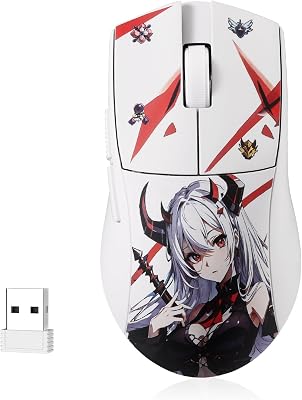
4. Redragon Wireless Gaming Mouse, 8000 DPI with Fire Button

Redragon Gaming Mouse, Wireless Mouse Gaming with 8000 DPI, PC Gaming Mice with Fire Button, RGB Backlit Programmable Ergonomic Mouse Gamer, Rechargeable, 70Hrs for Windows, Mac Gamer, Black


As an Amazon Associate we earn from qualifying purchases. Product prices and availability are accurate as of the date/time indicated.
The Redragon 8000 DPI wireless mouse is the budget pick for players who want extra functional buttons rather than the lightest possible shell.
Think of this as the alternative for someone stepping up from a basic office mouse or a budget wired model who wants more control without spending much. The fire button adds a real gaming function the minimalist mice on this list omit, the 8000 DPI ceiling is far higher than most players ever need, and the wireless connection frees you from a cable for well under thirty dollars. For a secondary rig or a first proper gaming mouse, it covers the basics and then some.
You give up the ultralight weight of the honeycomb mice and the flagship sensor consistency of the name brands, and the build is plainer plastic. But as a feature-forward budget wireless mouse with a useful extra button, it delivers more than its price suggests.
Pros: 8000 DPI sensor, dedicated fire button, multiple programmable inputs, low-latency wireless.
Cons: Heavier than ultralight rivals; plainer build; entry-level sensor.
5. Redragon M656 Gainer Lightweight Wireless Gaming Mouse

Redragon M656 Wireless Optical Gaming Mouse 4000 DPI Remapping Keys | Cable-Free 0 Delay, Smooth Precise Tracking, Custom Macro Keybinds, Ergonomic Grip Body Comfort




As an Amazon Associate we earn from qualifying purchases. Product prices and availability are accurate as of the date/time indicated.
The Redragon M656 Gainer is the cheapest mouse here that still feels like a real gaming mouse rather than a generic office cordless.
This is the budget wireless gaming mouse for the player who wants something lightweight and dependable without overthinking it. The shape is comfortable for claw and fingertip grips, the lighter body makes quick movements feel snappy, and the battery comfortably lasts through long sessions before needing a top-up.
At this price you are not getting flagship sensor tuning, premium switches or deep software, and the materials are basic. But the M656 nails the fundamentals — light, wireless, reliable, cheap — which is exactly what most budget buyers are actually looking for.
Pros: Very low price, lightweight shell, long rechargeable battery, stable 2.4GHz connection.
Cons: Basic sensor and switches; minimal software; entry-level materials.
6. Uineer Wireless Gaming Mouse, RGB, Multi-DPI, Rechargeable

Uineer Wireless Mouse, 2.4GHz Rechargeable Computer Mouse, Battery Display | Stable 2.4GHz USB-A connection, rechargeable battery display and 4 adjustable DPI levels.




As an Amazon Associate we earn from qualifying purchases. Product prices and availability are accurate as of the date/time indicated.
For that money you still get the core feature set a budget player wants: a wireless 2.4GHz connection, adjustable multi-level DPI, RGB lighting and a rechargeable battery, so there is no ongoing cost for AA cells.
This is the mouse for the buyer on the tightest budget, or anyone who needs an inexpensive second wireless mouse for another room or a spare rig. Despite the price it covers the essentials — you can switch DPI levels to match different games, the wireless connection frees you from a cable, and the RGB adds a little personality. For a younger gamer’s first wireless mouse or a low-stakes backup, it does the job for the price of lunch.
Expectations should match the cost: the sensor, switches and build are entry-level, and there is no serious software ecosystem. But as the cheapest legitimate wireless gaming mouse here, the Uineer proves how far the budget end of the range has come.
Pros: Lowest price on the list, multi-level DPI, RGB lighting, rechargeable battery.
Cons: Entry-level sensor, switches and build; no real software ecosystem.
How to Choose a Budget Wireless Gaming Mouse
Start with connection type. A 2.4GHz dongle is what you want for actual gaming — it delivers the low latency that makes wireless feel like wired. Bluetooth is convenient for laptops and travel but adds lag, so treat it as a bonus rather than your primary gaming mode. Tri-mode mice like the FFJ and the Redragon M725 give you a dongle for play and Bluetooth for everything else, which is the most flexible setup at this price.
Weight is the next big decision. Ultralight honeycomb mice such as the M725 sit around 49 grams and make fast aim feel effortless, but the open shell is less ideal in dusty or sweaty conditions. If you prefer a solid, sealed shell and do not chase the lowest weight, a classic body like the G305 will feel more familiar and durable.
Then think about battery. Rechargeable mice save you from buying AA cells but mean occasional downtime on the charger; an AA-powered mouse like the G305 lets you swap a cell instantly but adds an ongoing cost. Finally, match DPI and buttons to your games — a fire button helps in shooters, while most players never need more than a fraction of an 8000 DPI ceiling. Pick the mouse whose trade-offs line up with how you actually play.
Frequently Asked Questions
Are budget wireless gaming mice good enough for competitive FPS?
Yes, as long as you use the 2.4GHz dongle rather than Bluetooth. A good budget wireless mouse on its dongle delivers latency that is effectively indistinguishable from wired for the vast majority of players. The honeycomb and tri-mode picks on this list are light and responsive enough for competitive shooters; the bigger differences versus flagships are software depth and sensor tuning, not raw playability.
Is 2.4GHz wireless or Bluetooth better for gaming?
For gaming, always use the 2.4GHz dongle. It is built for low latency and a stable connection during fast play. Bluetooth introduces noticeable input delay and is better suited to web browsing, office work or pairing with a laptop. Tri-mode mice let you keep both: dongle for the gaming PC, Bluetooth for secondary devices.
How long do budget wireless gaming mice last on a charge?
It varies by model and whether RGB is on. Rechargeable budget mice typically run for many days to a couple of weeks of regular use per charge, while AA-powered mice like the Logitech G305 can stretch for months on a single cell. Turning off RGB lighting and using a lower polling rate both extend runtime noticeably.
Do I need a lightweight honeycomb mouse?
Not necessarily. A lighter mouse makes quick flick shots and long sessions easier on the wrist, which is why ultralight honeycomb shells are popular for FPS. But the open shell collects dust and is less comfortable for sweaty hands, and plenty of players prefer the feel of a solid shell. Choose based on grip style and play habits, not just the weight number.
Will these mice work on Mac, laptops and consoles?
All of them work on Windows and macOS over the 2.4GHz dongle or, where supported, Bluetooth. Tri-mode models with Bluetooth are the most flexible for laptops and tablets. Console support is hit or miss and depends on the system, so check your platform’s compatibility before counting on a budget mouse for console play.
Related Guides
- Best Wireless Gaming Mouse in 2026
- Best Gaming Mice in 2026
- Best Logitech Wireless Mouse in 2026
- Best Wireless Mouse For Laptop in 2026
- Best Ergonomic Gaming Mouse in 2026
- Best Wired Gaming Mouse in 2026
- Best Logitech G Pro X Superlight Alternatives 2026
Top picks from this guide
 RedragonRedragon M916AK Wireless 42G Ultra-Light Mouse 26K DPI Remapping Keys…$37 \xc2\xb7 99/100Logitech GLogitech G305 Lightspeed Wireless Gaming Mouse - Black | 12,000…$30 \xc2\xb7 99/100UineerUineer Wireless Mouse, 2.4GHz Rechargeable Computer Mouse, Battery Display |…$13 \xc2\xb7 97/100
 Logitech GLogitech G305 Lightspeed Wireless Gaming Mouse - White | 12,000…$35 \xc2\xb7 97/100