🛒 Best Price Today on Amazon
Prime members get fast, free shipping on everything above, plus member-only deals. New members get a 30-day free trial — cancel anytime.
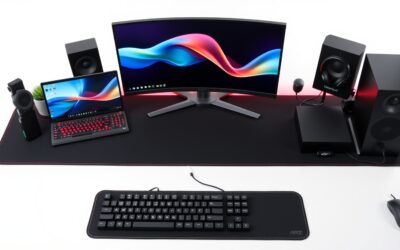
Choosing the best xxl desk mat means finding enough room for your keyboard and mouse without sacrificing desk space, comfort, or control. This guide compares four established gaming mats by dimensions, surface material, construction, and intended use to help you choose a practical option for your setup.
How to Choose an XXL Desk Mat
The right desk mat should fit your desk, accommodate your mouse movements, and provide a surface that feels comfortable during long gaming sessions. Start by measuring the usable desktop rather than relying on XL or XXL labels, which vary between manufacturers. Then consider surface texture, thickness, edge construction, and how easily the mat can be cleaned.

1. Measure the Width and Depth
An extended mat typically sits beneath both a keyboard and mouse, creating a shared surface for gaming and everyday computer use. A mat around 900 × 400 mm (35.4 × 15.7 inches) is a useful starting point for many setups, while larger formats provide additional room for low-sensitivity mouse movements.
Measure the flat area available on your desk before choosing a size. Account for monitor stands, speaker bases, desk accessories, and the space needed near the front edge. A mat measuring 1,200 × 550 mm will not fit comfortably on a desktop with less usable depth, even if its width seems suitable.
2. Choose a Surface That Matches Your Play Style
Cloth surfaces are common on extended gaming mats because they provide a comfortable resting area for your forearms and accommodate broad mouse movements. The weave and surface treatment affect friction, so two cloth mats can feel noticeably different even when their dimensions are similar.
Control-oriented cloth can suit players who prefer more resistance when making small aiming adjustments. Faster hybrid surfaces generally prioritize lower friction, although the feel depends on the specific material and mouse feet. Neither type automatically improves accuracy; your sensitivity, technique, and personal preference remain important.
3. Check Thickness, Base Grip, and Edge Construction
Thickness influences how much cushioning the mat provides and how its front edge feels against your forearms. Mats around 3–4 mm thick offer a useful balance for many desks, while thicker options can provide additional padding. A thicker mat is not necessarily more comfortable if its edge presses against your wrists.
A rubber base helps prevent unwanted movement during rapid mouse swipes. Stitched edges can reduce fraying, especially when the mat receives frequent use, but stitching quality and edge height still matter. If your wrists regularly cross the perimeter, look for a low-profile seam rather than a bulky border.
4. Consider Cleaning and Desk Compatibility
A gaming desk mat should suit the conditions in which you use your computer. If you eat or drink near your keyboard, a surface with a documented spill-resistant treatment may be easier to maintain than untreated cloth. However, spill resistance is not the same as waterproofing, and liquids can still reach exposed edges or the desktop.
Also consider the mat’s color, pattern, and interaction with your peripherals. A neutral surface works with most gaming setups, while a printed design can make the desk more distinctive. Standard cloth mats do not require a particular mouse brand, but the actual surface feel and tracking behavior can vary between mouse and sensor combinations.
Top XXL Desk Mat Picks
These four options cover different priorities, from a familiar cloth surface to spill-resistant construction and larger desk coverage. The comparison focuses on published product specifications and intended use rather than claiming firsthand performance results. Check the exact size and current US availability before buying, since product variants and retail listings can change.
| Product | Best For | Key Spec | Compatibility | Watch Out For |
| SteelSeries QcK Heavy XXL | Thick, control-oriented cloth | 900 × 400 mm; 4 mm thick | Most standard mouse-and-keyboard setups | No stitched edges listed in the commonly documented version |
| Razer Gigantus V2 XXL | Everyday gaming value | 940 × 410 mm; 4 mm thick | Full-size and compact keyboards with a mouse | Unstitched edges |
| Corsair MM350 PRO Extended XL | Spill-conscious setups | 930 × 400 mm; 4 mm thick | Desks with sufficient flat space for an extended mat | Spill resistance does not make it waterproof |
| Logitech G840 XL | Logitech-oriented gaming setups | 900 × 400 mm; 3 mm thick | Compatible with a wide range of gaming mice | Less cushioning than 4 mm alternatives |
1. SteelSeries QcK Heavy XXL — Best for Thick Control Cloth
The SteelSeries QcK Heavy XXL is a strong option for players who prefer a thick cloth surface and a substantial mat beneath their keyboard and mouse. Its commonly documented dimensions are 900 × 400 mm, with a 4 mm profile. The micro-woven cloth surface and rubber base suit conventional gaming desk arrangements.
Choose this mat if you want a broad, padded surface without moving to a full-desk format. Its dimensions accommodate many keyboards and provide room for mouse movement, although the exact available sweep depends on keyboard width and sensitivity settings. Measure your desktop first if you use a large monitor stand.
The main trade-off is edge construction: the commonly documented QcK Heavy XXL version does not feature stitched edges. If long-term edge protection is a priority, a stitched alternative may be a better fit. Buyers who need substantially more depth should also consider a larger desk mat rather than another 900 mm-wide option.
2. Razer Gigantus V2 XXL — Best for Everyday Gaming
The Razer Gigantus V2 XXL measures approximately 940 × 410 × 4 mm. Its textured micro-weave cloth surface, high-density rubber foam, and anti-slip base make it a practical choice for players who want a little more width than a 900 mm mat provides.
Its extra width can help when placing a full-size keyboard beside a mouse, particularly when you prefer lower mouse sensitivity. The surface is designed for broad mouse movement, while the 4 mm thickness provides cushioning beneath your hands. It is also available in a range of editions, although specific designs depend on the market and size.
The key drawback is its unstitched perimeter. Frequent friction against the edges can make construction quality an important consideration over time. Choose another model if stitched edging is essential, or consider the 3XL version if you need more front-to-back space than the XXL provides.
3. Corsair MM350 PRO Extended XL — Best for Spill-Conscious Setups
The Corsair MM350 PRO Extended XL measures 930 × 400 × 4 mm and uses a micro-weave cloth surface with stitched edges and a spill-resistant treatment. These features make it worth considering for a gaming desk that doubles as a workspace, especially when you want edge protection and some resistance to accidental splashes.
The 4 mm thickness provides a padded surface under your keyboard and mouse, while the extended footprint keeps both peripherals on the same material. Its dimensions are close to those of other conventional XXL mats, so switching from another mat in this size class may not require major desk rearrangement.
The important limitation is that spill resistance should not be treated as full waterproofing. A substantial spill can still reach the edges, seams, or desktop, so clean up liquids promptly. If your priority is the largest possible mouse area, a 3XL mat may be more appropriate than this extended XL model.
4. Logitech G840 XL — Best for a Simple Gaming Setup
The Logitech G840 XL measures 900 × 400 × 3 mm and uses a cloth surface with a rubber base. Logitech describes its surface texture as tuned for its gaming mice, but the mat is not limited to Logitech peripherals. It can also work with compatible gaming mice from other manufacturers.
Its 3 mm thickness makes it a relatively slim choice among these four options. That can suit players who prefer less padding and a flatter transition at the front of the desk. The large surface also provides space for a keyboard and mouse without requiring a particularly deep desktop.
The trade-off is the thinner profile and lack of stitched edges on the commonly documented version. If extra cushioning or perimeter reinforcement matters more to you, compare it with the QcK Heavy XXL or MM350 PRO. Its official US listing has shown a $39.99 price, but confirm the current price before making a purchase decision.
FAQ
What size should an XXL desk mat be?
An XXL desk mat around 900 × 400 mm is a practical starting point for many gaming setups. It usually provides room for a keyboard and mouse, but the available mouse area depends on your keyboard’s width and how far you move your mouse. Measure your usable desk space before selecting a larger format.
Is a cloth or hybrid XXL desk mat better for gaming?
A cloth mat is generally a versatile choice for everyday gaming, while a hybrid surface may suit players who prefer lower friction. The better option depends on your preferred mouse movement, mouse feet, and game genre. If you play competitive shooters, prioritize a consistent surface and enough room for your normal aiming movements rather than relying on material alone.
Does an XXL desk mat improve gaming performance?
An XXL desk mat can provide more room for mouse movement and keep your keyboard and mouse on a consistent surface, but it does not directly increase FPS or guarantee better aim. Its practical benefit is having enough space for your preferred sensitivity and keeping your peripherals comfortably positioned during long sessions.
How do you clean and maintain a large gaming desk mat?
Clean a gaming desk mat according to its manufacturer’s care instructions. For routine maintenance, remove dust and loose debris, and address spills promptly with an appropriate cleaning method. Avoid aggressive scrubbing or excessive heat unless the manufacturer explicitly permits it, as these can damage the surface, backing, or stitching.
Final Thoughts
The best xxl desk mat depends on your available desk space, preferred mouse feel, and need for edge protection. The Razer Gigantus V2 XXL suits everyday gaming, the SteelSeries QcK Heavy XXL favors thicker cloth, and the Corsair MM350 PRO adds spill-resistant treatment. Measure your desktop and compare current prices before choosing.