🛒 Best Price Today on Amazon
Prime members get fast, free shipping on everything above, plus member-only deals. New members get a 30-day free trial — cancel anytime.
Choosing between these Elgato controllers comes down to how many shortcuts you need and whether physical dials would improve your workflow. This stream deck comparison (xl vs mk.2 vs neo vs plus) explains the key differences in controls, desk space, software, and value so you can choose the right device for gaming, streaming, or everyday productivity.
How to Choose an Elgato Stream Deck
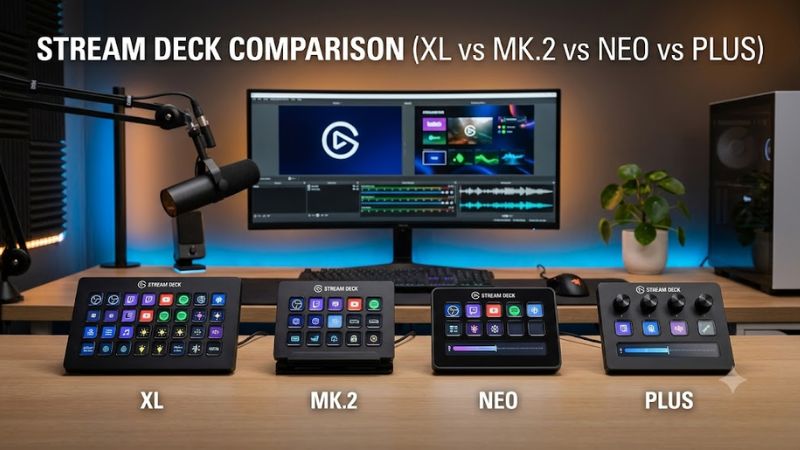
The right model depends on how you use shortcuts, not simply how many buttons a device has. Stream Deck XL prioritizes capacity, MK.2 provides a familiar 15-key layout, Neo focuses on compact everyday control, and Plus adds dials and a touch strip. All four use Elgato’s Stream Deck software, but their physical controls serve different needs.
1. Decide How Many Actions Must Stay Visible
The Stream Deck XL has 32 customizable LCD keys, making it suitable for streamers who want dedicated buttons for scenes, audio controls, sound effects, chat actions, and application shortcuts. Keeping more actions visible can reduce the need to navigate folders or switch pages during a broadcast.
The MK.2 offers 15 LCD keys, while Neo provides eight. Those smaller layouts can still handle extensive workflows through profiles, folders, pages, and multi-action commands. For a compact desk or a simple streaming setup, buying more keys than you regularly use may not offer much practical benefit.
2. Consider Whether You Need Dials
The Stream Deck Plus is different because it combines eight customizable LCD keys with four multifunction dials and a touch strip. The dials can support compatible controls such as audio levels, depending on the application and available plugin or action. This makes it especially interesting for creators who adjust several settings frequently.
XL and MK.2 prioritize direct button access, while Neo adds a different kind of navigation through its touch points and information bar. If your main tasks are switching scenes, triggering sound effects, launching applications, and entering shortcuts, physical dials are optional rather than essential.
3. Match the Device to Your Desk
The Neo is designed for a small footprint, with an integrated stand offering three positions. Its eight keys, touch points, and information bar give it a distinct layout without requiring a larger control surface. It is a sensible starting point for a student, casual streamer, or desktop user who wants a few frequently used actions within reach.
The MK.2 is also compact, with a removable magnetic stand and 15 keys. XL occupies more desk space because of its larger 32-key grid. Plus requires room for its keys, dials, and touch strip, so consider where your keyboard, microphone, mouse, and monitor already sit before choosing.
4. Check Compatibility and Software Needs
Elgato’s desktop software supports Windows and macOS, and the four devices use the same general software ecosystem of profiles, actions, and plugins. This means you should compare physical controls and workflow requirements rather than assume that the larger model automatically offers a completely different software experience.
Check the current system requirements for your operating system and the specific plugins you plan to use. USB connectivity, available ports, and any required adapters also matter. Some integrations depend on third-party applications, accounts, or supported versions, so a particular workflow may require more than simply plugging in the controller.
Stream Deck XL vs MK.2 vs Neo vs Plus: Full Comparison
The main differences become clearer when the four models are compared by key count, physical controls, and intended workflow. None is automatically best for every creator: XL favors visible shortcuts, MK.2 balances capacity and footprint, Neo keeps everyday actions accessible, and Plus suits workflows that benefit from adjustable dials.
Comparison Table: Features at a Glance
| Feature | Stream Deck XL | Stream Deck MK.2 | Stream Deck Neo | Stream Deck Plus |
| Customizable LCD keys | 32 | 15 | 8 | 8 |
| Physical dials | No | No | No | 4 |
| Touch strip | No | No | No; uses touch points | Yes |
| Stand | Removable magnetic stand | Removable magnetic stand | Integrated, three positions | Integrated stand |
| Main advantage | Large shortcut grid | Balanced button capacity | Compact everyday controls | Button and dial control |
| Best for | Complex streaming setups | General streaming and gaming | Small desks and basic workflows | Audio and creative workflows |
| Main limitation | Takes up more desk space | No physical dials | Fewer dedicated keys | Fewer LCD keys than XL or MK.2 |
Specifications are based on Elgato’s published product and comparison information. Confirm the exact hardware revision and regional listing before purchase.
Elgato Stream Deck XL — Best for Complex Streaming
The Stream Deck XL is the strongest fit when you want 32 customizable LCD keys available on one surface. Its larger grid suits multi-scene OBS setups, broadcast controls, soundboards, application macros, and workflows involving many distinct commands. Each key can display a custom icon that helps identify its assigned action.
The trade-off is physical size and the absence of dials. The XL measures approximately 182 × 112 × 34 mm without its stand, and the manufacturer lists a USB-C connection and a 1.5-meter cable. Choose it if you regularly need many visible actions; consider the MK.2 if 15 keys and software navigation are enough.
Elgato Stream Deck MK.2 — Best All-Rounder
The MK.2 provides 15 customizable LCD keys in a compact format, giving streamers room for common scene changes, microphone controls, media playback, and frequently used shortcuts. Its removable magnetic stand makes it easier to position on a desk, while the established Stream Deck software supports profiles and plugins for different applications.
Its main limitation is that it lacks the Plus model’s physical dials and touch strip. You can still control compatible settings through buttons, actions, or keyboard shortcuts, but continuously adjusting a value may require a different interaction. The MK.2 makes the most sense when dedicated buttons matter more than analog-style control.
Elgato Stream Deck Neo — Best Compact Option
Neo has eight customizable LCD keys, two touch points for navigating layouts, and an information bar. Its integrated stand offers three positions, and its smaller body makes it a practical fit for desks where a full-sized controller would crowd other equipment. The layout is intended for everyday productivity as well as streaming-related shortcuts.
Eight keys are sufficient for a focused set of controls, but they provide less immediate access than the MK.2 or XL. Pages and profiles can extend the workflow, although switching layouts introduces another step. Choose Neo if you value a compact controller and straightforward navigation over a large bank of dedicated buttons.
Elgato Stream Deck Plus — Best for Audio and Creative Control
The Stream Deck Plus combines eight LCD keys, four multifunction dials, and a touch strip. This arrangement suits workflows where you want both one-press actions and adjustments such as compatible audio levels or other application parameters. It can be useful for streamers, podcasters, video editors, and creators who work across multiple applications.
The limitation is its smaller number of LCD keys compared with MK.2 and XL. The dials also depend on supported actions and integrations; their presence does not mean every application exposes every control. Pick Plus when turning a dial is more useful than having 15 or 32 separate buttons, and favor MK.2 or XL when button density is your priority.
Which Model Offers the Best Value?
The best value depends on how many dedicated controls you will use regularly. Neo can be sufficient for a few essential shortcuts, while MK.2 offers more buttons without moving to XL’s larger layout. Plus earns its place when the dials solve a real workflow problem, rather than merely adding hardware you rarely touch.
XL can make sense for a busy broadcast desk where many actions need to remain visible. However, more keys do not automatically make a stream better, and the software can organize additional actions behind folders or profiles on smaller models. Compare actual US prices for the exact model and condition before deciding; prices and promotions can change, and a discounted device is only a good deal if its controls fit your needs.
FAQ
1. Is Stream Deck XL better than MK.2?
The XL is better for workflows that need many visible shortcuts, while MK.2 is better for users who prefer a smaller controller. XL has 32 customizable LCD keys compared with MK.2’s 15. Both support profiles, folders, plugins, and multi-action workflows, so the decision mainly concerns button capacity and desk space.
2. Is Stream Deck Neo good for gaming?
Yes, Neo can be useful for gaming-related shortcuts, streaming controls, and everyday desktop tasks. Its eight LCD keys can launch applications, trigger supported actions, and activate configured shortcuts. It is less suitable if you need dozens of dedicated controls immediately accessible without switching layouts.
3. Should I buy Stream Deck Plus or MK.2?
Choose Plus if its four dials and touch strip are useful for controlling compatible audio or creative applications. Choose MK.2 if you prefer 15 dedicated LCD buttons for scenes, macros, and shortcuts. Neither model is universally better; the right choice depends on whether adjustable controls or more visible buttons matter more.
4. Do all four Stream Deck models use the same software?
Yes, all four belong to Elgato’s Stream Deck software ecosystem and support configurable actions and profiles. However, available controls depend on the hardware, software version, plugins, and application integration. Before purchasing, confirm the current operating-system requirements and support for any essential third-party application.
Final Thoughts
This stream deck comparison (xl vs mk.2 vs neo vs plus) comes down to four priorities: button capacity, compactness, navigation, and physical adjustment controls. Choose XL for complex broadcasts, MK.2 for balanced control, Neo for everyday shortcuts, or Plus for dial-based workflows. Compare current prices and your actual needs before buying.