🛒 Best Price Today on Amazon
Prime members get fast, free shipping on everything above, plus member-only deals. New members get a 30-day free trial — cancel anytime.
A best desk pad for gaming should give your mouse enough room, keep your keyboard stable, and match the surface feel you prefer. Current extended models range from simple cloth mats to RGB-equipped designs, so desk depth, thickness, surface texture, and extra features matter more than branding alone.
How to Choose a Gaming Desk Pad
The right gaming desk pad comes down to four practical checks: desk coverage, surface feel, thickness and base construction, and compatibility with your setup. These criteria separate the SteelSeries QcK XXL, Razer Gigantus V2 XXL, Logitech G840 XL, and Corsair MM700 RGB Extended without relying on FPS claims that desk mats cannot substantiate.
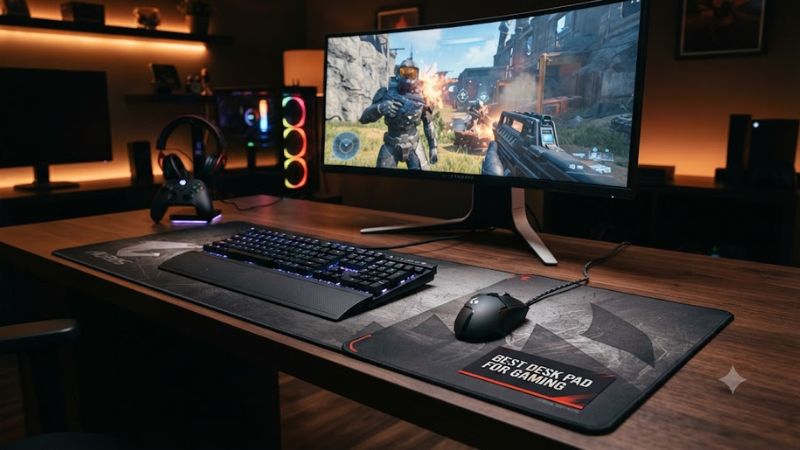
Measure the desk before choosing coverage
A large mat should fit the usable desktop area without covering cable channels, monitor stands, or front edges you regularly use. The SteelSeries QcK XXL measures 900 × 400 mm, while the Razer Gigantus V2 XXL is 940 × 410 mm, so both suit typical keyboard-and-mouse layouts but require enough front-to-back clearance.
The best desk pad for gaming is not necessarily the largest model available. Razer also offers the Gigantus V2 in 3XL at 1,200 × 550 mm, while SteelSeries lists QcK sizes reaching 1,600 × 800 mm. Measure the desk first, then leave enough exposed surface for cables and other peripherals.
Match surface feel to mouse movement
Cloth remains a practical choice when you want a familiar balance between control and glide. SteelSeries describes the QcK’s micro-woven cloth as suitable for optical and laser sensors, while Logitech describes the G840 XL as having moderate surface friction intended for both fast and slow mouse movements.
Razer’s Gigantus V2 uses a textured micro-weave cloth surface, with a high-density foam construction underneath. That makes it a useful choice for players who want a slightly thicker pad while keeping a conventional cloth surface. Surface preference is subjective, so the best desk pad for gaming depends partly on the glide you already prefer.
Consider thickness and the rubber base
Thickness changes how much cushioning the pad provides and how noticeable the transition between desk and surface feels. The QcK XXL is 2 mm thick, the G840 XL is 3 mm, and the Gigantus V2 XXL is 4 mm, giving buyers several levels of cushioning without changing the basic extended-pad layout.
The base also matters because a wide mat can bunch or move if its underside does not grip the desk properly. Logitech specifies a rubber base for the G840 XL, while Razer uses a high-density rubber foam base with an anti-slip underside. These designs require no special PC hardware and work with ordinary wired or wireless mice and keyboards.
Check whether you actually need electronics
A conventional cloth mat needs no software, power connection, or operating-system support, which makes the QcK XXL, Gigantus V2 XXL, and G840 XL simple additions to almost any desktop PC. Their mouse surfaces function independently of Windows, macOS, motherboard chipset, or USB version.
The Corsair MM700 RGB Extended is different because its lighting and integrated USB hub require a USB connection. Corsair specifies Windows 10 or newer and macOS 10.13 or newer for the product, with a USB 2.0/3.x port or better and iCUE for software features.
Top Picks
These four picks cover the main buying cases without treating subjective surface preference as a measurable FPS advantage. The QcK XXL prioritizes a straightforward cloth design, the Gigantus V2 XXL adds thickness and extra width, the G840 XL emphasizes moderate friction, and the MM700 RGB Extended adds lighting and USB features.
| Product | Best For | Key Spec | Compatibility | Watch Out For |
| SteelSeries QcK XXL | Best Overall | 900 × 400 × 2 mm, micro-woven cloth | Standard mouse and keyboard; no software required | Thinner 2 mm construction |
| Razer Gigantus V2 XXL | Best Value | 940 × 410 × 4 mm, micro-weave cloth | Standard mouse and keyboard; no software required | No built-in USB or RGB |
| Logitech G840 XL | Best For Low-DPI Sweeps | 900 × 400 × 3 mm, moderate-friction cloth | Standard mouse and keyboard; no software required | Fewer desk-accessory features |
| Corsair MM700 RGB Extended | Best For RGB Setups | 930 × 400 × 4 mm, RGB cloth | Windows 10+, macOS 10.13+, USB 2.0/3.x | Requires USB connection for features |
SteelSeries QcK XXL — Best Overall
The SteelSeries QcK XXL is the straightforward choice for buyers who want an extended cloth surface without RGB, USB hardware, or configuration software. It measures 900 × 400 mm and is 2 mm thick, with a micro-woven cloth surface and non-slip rubber base. SteelSeries also lists support for optical and laser mouse tracking.
The main weakness is its relatively thin 2 mm construction, so buyers seeking extra cushioning may prefer the 3 mm G840 XL or 4 mm Gigantus V2 XXL. The QcK XXL also makes less sense for someone who specifically wants integrated lighting or USB ports. Current independent pricing has placed the QcK XXL around the 25–30 range, although retail prices vary.
Razer Gigantus V2 XXL — Best Value
The Razer Gigantus V2 XXL suits buyers who want a little more depth and cushioning without moving into feature-heavy RGB territory. Its 940 × 410 mm footprint is slightly larger than the QcK XXL, while its 4 mm thickness uses high-density rubber foam and an anti-slip base.
The trade-off is simplicity: there is no integrated lighting or USB hub, and Razer’s V2 range uses a non-stitched edge according to its family specifications. That makes it less suitable for buyers specifically seeking illuminated desk accessories. Razer currently lists the XXL around $30 in its US store, subject to configuration and availability.
Logitech G840 XL — Best For Low-DPI Sweeps
The Logitech G840 XL is aimed at large mouse movements, with a 900 × 400 mm surface and 3 mm thickness. Logitech describes its surface as having moderate friction and its rubber base as keeping the cloth stable during broad movements, making it a logical match for low-DPI users who need substantial horizontal space.
Its weakness is the absence of desk-mat extras such as RGB lighting or a USB hub. That is not a drawback for someone who wants a simple surface, but it limits its appeal for elaborate setups. The G840 XL works with standard desktop mice and keyboards without requiring a special motherboard, operating system, or peripheral ecosystem.
Corsair MM700 RGB Extended — Best For RGB Setups
The Corsair MM700 RGB Extended is the feature-heavy option here, combining a 930 × 400 mm micro-weave cloth surface with 4 mm rubber construction, RGB lighting around the edge, and a two-port USB hub. Corsair lists a detachable USB Type-C connection and three-zone RGB lighting controlled through iCUE.
The real weakness is the added dependency on USB power and software for its extra functions. Corsair specifies Windows 10 or newer and macOS 10.13 or newer, plus an available USB 2.0/3.x port or better; iCUE requires an internet connection for downloading the software. Buyers who want a cable-free, no-software surface should choose a conventional cloth model instead.
FAQ
The main questions about an extended gaming mat usually concern size, mouse compatibility, performance expectations, and whether RGB features justify a higher price. None of these requires a gaming benchmark: desk pads affect the physical surface beneath the mouse and keyboard rather than directly changing CPU, GPU, memory, or display performance.
Is a desk pad better than a normal mouse pad?
A desk pad is better when you want the keyboard and mouse to share one continuous surface, while a conventional mouse pad is better when you only need coverage beneath the mouse. Extended models such as the QcK XXL, G840 XL, and MM700 RGB cover roughly 900 mm or more of width.
For a small desk, however, a full-width mat can consume useful working space. The best desk pad for gaming should therefore match the physical layout rather than simply maximize dimensions. Check the desk’s depth as carefully as its width, particularly when a monitor stand or front-mounted cable tray occupies part of the surface.
Does a gaming desk pad improve FPS?
A gaming desk pad does not directly increase FPS because it does not change the CPU, GPU, memory, storage, or graphics settings responsible for frame-rate output. Its effect is instead related to the physical surface available for mouse movement and keyboard placement.
That distinction matters when evaluating reviews. Current gaming-mat comparisons discuss surface feel, size, construction, and usability rather than a standardized FPS benchmark, so a claim that one cloth mat adds a specific number of frames should not be treated as a normal hardware benchmark.
Will any gaming mouse work on these desk pads?
These cloth desk pads are designed for ordinary gaming mice, with Razer and SteelSeries specifically describing their surfaces in relation to optical or broad sensor compatibility. The mouse itself still needs an appropriate sensor and functional tracking system, but the pad does not impose a DDR, PCIe, CPU-socket, or GPU compatibility requirement.
The Corsair MM700 adds one separate compatibility consideration because its electronics need USB connectivity and supported operating systems. If you only need the cloth surface, that connection is unnecessary on the simpler models, which can operate as passive surfaces without software.
Is RGB worth paying more for on a desk pad?
RGB is worth considering when lighting is part of the setup you want to control, but it does not provide a direct mouse-tracking advantage over a comparable cloth surface. The MM700 RGB Extended adds three-zone lighting, iCUE control, and two USB ports while retaining a 930 × 400 mm cloth layout.
For a simpler desk, those features can instead add cables and another software dependency. The best desk pad for gaming therefore depends on whether the extra electronics have a practical role in your setup; a passive QcK, Gigantus V2, or G840 may be sufficient when surface coverage is the main requirement.
Final Thoughts
Choosing the best desk pad for gaming starts with desk dimensions and mouse movement, then moves to surface texture, thickness, and optional features. The QcK XXL keeps things simple, the Gigantus V2 XXL adds cushioning, the G840 XL suits broad movements, and the MM700 adds RGB and USB connectivity for feature-focused setups.