🛒 Best Price Today on Amazon
Prime members get fast, free shipping on everything above, plus member-only deals. New members get a 30-day free trial — cancel anytime.
A best corner gaming desk should fit the two walls first, then provide enough depth for your monitor, keyboard, mouse and PC accessories without blocking doors or walkways. The strongest choices below cover large standing setups, value-focused electric desks, and fixed-height gaming spaces with different tradeoffs.
How to Choose a Corner Gaming Desk
Measure both walls, check the return direction, confirm usable depth, and compare the desk’s rated load before buying. For standing models, also check the height range and power requirements. The Vari suits large corners, VIVO covers flexible left/right layouts, FlexiSpot targets heavier sit-stand loads, and Eureka focuses on fixed-height gaming setups.
Measure the Corner and Return
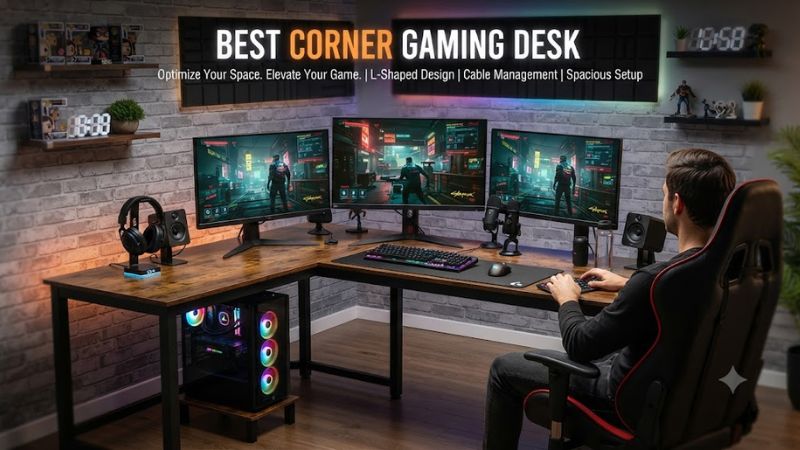
The first requirement for a best corner gaming desk is physical fit, not RGB lighting or accessory count. Measure each wall from the corner to nearby doors, windows and furniture, then leave enough clearance to move the chair. A reversible return is especially useful when the room layout can change later.
Vari’s 80×60-inch L-Shape Electric Standing Desk can place its short section on either side, while VIVO offers left- or right-side extension configurations. These layouts suit rooms where the corner is fixed but the gaming position may need to face either direction. Check the exact dimensions rather than relying on a generic L-shape label.
Prioritize Desktop Depth
Desktop depth determines how comfortably a monitor, keyboard and mouse can share the main gaming position. A long L-shape can look spacious while still feeling restrictive if the working edge is shallow, so measure the usable front-to-back area rather than only the advertised overall width.
Eureka’s L60 provides a 60-inch-wide by roughly 43-inch-deep overall footprint and a 30-inch fixed height, giving a straightforward arrangement for multiple displays. Its carbon-steel frame carries a manufacturer-rated 176-pound maximum load, which leaves room for ordinary PC peripherals and displays without requiring a standing frame.
Match the Desk to Your Setup
A best corner gaming desk should reflect whether the second wing will hold another monitor, speakers, a laptop, streaming equipment or simply open workspace. Standing desks add electrical controls and height adjustment, while fixed-height desks avoid motors and keep the configuration simpler.
FlexiSpot’s E7L uses three motors and supports up to 330 pounds of static load, with an adjustable height range of 25 to 50.8 inches. PC Gamer’s independent review also identified the E7L’s high load capacity and three-motor system as strengths, while noting the added cost of some desktop options.
Check Materials, Power and Accessories
For a best corner gaming desk, the frame and desktop construction matter more than cosmetic extras. Check whether the surface is laminate, engineered wood, bamboo or glass, then consider monitor-arm mounting, cable routing and power access. Standing models also need a suitable electrical outlet near the final position.
VIVO’s electric corner desk uses particle board and steel, supports up to 225 pounds, adjusts from 28.5 to 46.8 inches and accepts either left- or right-side extension layouts. It uses a single motor with memory controls, making it a simpler electric option than the triple-motor FlexiSpot E7L.
Top Picks
The table compares four current corner-friendly models by the factors that matter most to PC gamers: usable size, adjustment system, load rating, layout flexibility and the tradeoff that should be considered before purchase. None requires a special PC platform; the important compatibility checks are room dimensions, electrical access for powered desks, and accessory fit.
| Product | Best For | Key Spec | Compatibility | Watch Out For |
| Vari L-Shape Electric Standing Desk 80×60 | Best Overall | 79.5 x 60 in; 200 lb | Reversible left/right; 25–50.5 in | Large and heavy |
| VIVO DESK-E3CTB | Best Value | 63 x 55.2 in; 225 lb | Left/right extension; 28.5–46.8 in | Single motor |
| FlexiSpot E7L | Best For Heavy Setups | Up to 330 lb; 25–50.8 in | L-shaped, electric; desktop options vary | Desktop options can add cost |
| Eureka L60 | Best For Fixed-Height Gaming | 61.06 x 43.86 in; 176 lb | Left/right versions; fixed 30 in | No sit-stand adjustment |
Vari L-Shape Electric Standing Desk — Best Overall
The Vari L-Shape Electric Standing Desk is the best corner gaming desk choice for a large room where desktop space and sit-stand adjustment matter more than portability. It measures 79.5 by 60 inches, adjusts from 25 to 50.5 inches, and carries a 200-pound rated load. Its short section can be configured on either side.
The real weakness is physical size and weight. Tom’s Guide described the desk as bulky and heavy after its independent review, so it is poorly suited to a setup that may move frequently between rooms. Buyers in compact bedrooms should also measure the inner corner clearance before choosing this larger configuration.
VIVO DESK-E3CTB — Best Value
The VIVO DESK-E3CTB fits buyers who want a best corner gaming desk with electric height adjustment without moving to the larger Vari footprint. Its 63-by-55.2-inch configuration supports up to 225 pounds, adjusts from 28.5 to 46.8 inches, and allows the extension to be placed on either side.
Its limitation is the single-motor design, rather than the triple-motor arrangement used by FlexiSpot’s E7L. The VIVO also uses a 0.72-inch desktop, so buyers planning a very heavy monitor-arm and equipment arrangement should compare the complete load against the manufacturer’s 225-pound rating rather than assuming every configuration is equivalent.
FlexiSpot E7L — Best For Heavy Setups
The FlexiSpot E7L is aimed at buyers who need a best corner gaming desk with substantial load capacity and electric height adjustment. Its triple-motor frame supports up to 330 pounds, adjusts from 25 to 50.8 inches, and supports desktop configurations including 63-by-47-inch and 71-by-48-inch options.
The tradeoff is cost and configuration complexity. PC Gamer’s review noted that the frame offers good value but that a chipboard desktop can be relatively expensive, while installation may require more equipment depending on the chosen setup. Buyers wanting a simple fixed-height desk should not pay for the motorized frame they will not use.
Eureka L60 — Best For Fixed-Height Gaming
The Eureka L60 is the best corner gaming desk option for a straightforward fixed-height setup where electric adjustment is unnecessary. Its current specification lists a 61.06-by-43.86-inch footprint, 30.08-inch height and 176-pound maximum load, with a carbon-steel frame and engineered-wood desktop.
Its main weakness is the fixed 30-inch height, which gives less adjustment flexibility than the standing desks above. That makes it less suitable for households sharing one workstation at different heights, but it can be a sensible match for a dedicated gaming station where the chair and monitor position are already established.
FAQ
Is an L-shaped desk good for PC gaming?
Yes, an L-shaped desk is useful for PC gaming when the extra return provides meaningful space for monitors, peripherals or secondary equipment. The corner layout can separate the primary mouse-and-keyboard area from consoles, speakers, streaming gear or another display without requiring a second desk.
A best corner gaming desk still needs sufficient depth at the main seating position. A large advertised surface does not automatically create more comfortable mouse space, so check the dimensions of the working edge and the location of legs, supports and cable hardware before buying.
How much weight should a gaming desk support?
A gaming desk should have a manufacturer-rated load comfortably above the combined weight of the PC equipment, monitors, arms and accessories you intend to place on it. The four models here range from 176 pounds for the Eureka L60 to 330 pounds for the FlexiSpot E7L.
Do not treat a published maximum as a recommended everyday target for every configuration. Monitor arms can concentrate force on small mounting areas, while standing desks move their loads through motorized frames. Follow the manufacturer’s accessory and load guidance for the exact model and desktop configuration.
Is a standing corner desk worth it for gaming?
A standing corner desk can be useful when you want to alternate between seated and standing positions while keeping the same multi-monitor workspace. Vari, VIVO and FlexiSpot all provide electric height adjustment, but their ranges and motor systems differ, so the feature should be matched to your actual setup.
A fixed-height model remains practical when the desk is dedicated to one user and the existing chair and monitor positions already work. Choosing a standing frame only for its appearance adds motors, controls and electrical requirements that do not improve the setup if height adjustment will rarely be used.
What size corner desk is best for two monitors?
For two monitors, a corner desk around the 60-inch class can provide substantial working space, but the correct size depends on monitor width, stand or arm placement, keyboard depth and the room’s wall dimensions. The Eureka L60 and VIVO 63-inch configurations illustrate two different approaches.
Larger desks such as the Vari 80×60 provide more room for secondary equipment and separate work zones, but they require considerably more floor space. Measure both walls and the chair’s movement area before choosing the largest surface simply because it offers more desktop area.
Final Thoughts
The best corner gaming desk depends on the room and equipment rather than a single universal size. Vari targets large sit-stand workspaces, VIVO balances electric adjustment with a smaller footprint, FlexiSpot emphasizes high load capacity, and Eureka keeps the fixed-height gaming setup straightforward. Measure first, then match the desk to your actual gear.