🛒 Best Price Today on Amazon
Prime members get fast, free shipping on everything above, plus member-only deals. New members get a 30-day free trial — cancel anytime.
- Top 1440P 240Hz Monitors Competitive Fps Picks for 2026
- Best 1440p 240Hz FPS Monitors at a Glance
- 1. AOC 27 Inch QHD Gaming Monitor 240Hz (260Hz OC) IPS
- 2. Acer Nitro 27″ WQHD 2560×1440 IPS 240Hz
- 3. Acer Predator 26.5″ WQHD QD-OLED 240Hz
- 4. ASUS ROG Strix XG27AQDMG 27″ 1440P Glossy OLED 240Hz
- 5. LG 27GR83Q-B UltraGear 27″ QHD IPS 240Hz
- 6. MSI MAG 274QP QD-OLED X24 27″ WQHD 240Hz
- How to Choose a 1440p 240Hz Monitor for Competitive FPS
- Frequently Asked Questions
- Related Guides
- About the Author
- About the Author
- Related Articles
- Related Guides
Quick answer: For most people in 2026, the best 1440p 240hz monitors for competitive fps 2026 is the AOC 27" QHD 240Hz IPS — our #1 rated choice. See the full ranked comparison, alternatives and buying advice below.
Top 1440P 240Hz Monitors Competitive Fps Picks for 2026
Here are our current top 1440p 240hz monitors competitive fps picks, compared on real Amazon owner reviews, price, and features. Live prices update below.
For years the competitive FPS standard was 1080p at 240Hz or higher, trading resolution for the lowest possible latency. In 2026 that has changed. Modern GPUs push high frame rates at 2560×1440, and a wave of affordable IPS and QD-OLED panels has made 1440p at 240Hz the genuine sweet spot for competitive shooters. You keep the buttery 240Hz refresh that matters for Valorant, CS2, Apex and Overwatch, but you gain the sharper image and extra desktop space that 1440p brings. This guide rounds up six of the best 1440p 240Hz monitors for competitive FPS, spanning value IPS panels to premium QD-OLED.
PC Gaming Universe is reader-supported. When you buy through links on our site, we may earn an affiliate commission at no extra cost to you.
The spec that matters most here is the pairing itself. At 240Hz, each frame is on screen for roughly 4.2 milliseconds, so a fast pixel response is essential — a slow panel smears moving targets no matter how high the refresh number climbs. That is why panel technology is the headline decision: IPS panels with a rated 1ms gray-to-gray response are excellent value, while QD-OLED panels post a near-instant 0.03ms response with perfect blacks and vivid color. We have picked a deliberate spread so you can match the panel to your GPU and budget, from a sub-$200 IPS pick up to enthusiast QD-OLED screens.
Just as important is making sure your graphics card can feed the panel. There is little point buying a 240Hz monitor if your GPU only sustains 120fps in your main game at 1440p. Competitive shooters are generally light on the GPU compared with AAA single-player titles, so a mid-range or better card usually pushes well past 240fps at 1440p in esports titles. All six picks below support adaptive sync (G-Sync Compatible or FreeSync Premium) so frame rate dips stay tear-free. Prices in this guide range from around $160 to around $549.
Best 1440p 240Hz FPS Monitors at a Glance
| Model | Key Spec | Price | Rating | Best For |
|---|---|---|---|---|
| AOC 27″ QHD 240Hz IPS | IPS, 0.3ms, 260Hz OC | around $160 | 4.6/5 | Best value 240Hz |
| Acer Nitro 27″ WQHD 240Hz | IPS, FreeSync Premium | around $180 | 4.3/5 | Budget AMD pairing |
| Acer Predator 26.5″ QD-OLED | QD-OLED, 0.03ms, 240Hz | around $360 | 4.5/5 | Value OLED jump |
| ASUS ROG Strix XG27AQDMG | Glossy OLED, 0.03ms, 240Hz | around $549 | 4.4/5 | Premium glossy OLED |
| LG 27GR83Q-B UltraGear | IPS, 1ms, DisplayHDR | around $330 | 4.4/5 | Balanced IPS all-rounder |
| MSI MAG 274QP QD-OLED X24 | QD-OLED, WQHD, 240Hz | around $432 | 4.8/5 | Top-rated QD-OLED |
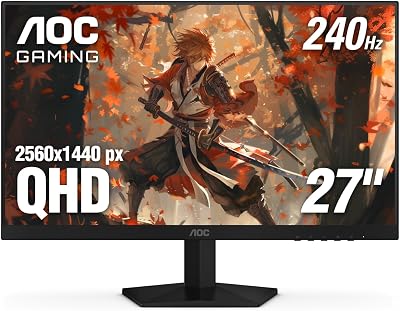
1. AOC 27 Inch QHD Gaming Monitor 240Hz (260Hz OC) IPS
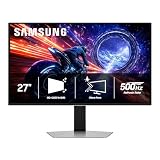
The AOC 27-inch QHD is the value champion of this lineup and the easiest recommendation for anyone building a competitive setup on a budget. You get a genuine 2560×1440 IPS panel running at 240Hz, with a 260Hz overclock available for the last sliver of refresh, and a rated response time fast enough to keep fast crosshair flicks crisp. At around $160 it costs less than many 1080p 240Hz panels did a couple of years ago.
IPS is the right choice at this price: you get wide viewing angles and accurate color without the smearing that afflicts cheaper VA panels in dark scenes. It is G-Sync Compatible, so a mid-range NVIDIA card stays tear-free even when frame rates dip below 240fps. For a first 1440p 240Hz monitor, or a second screen for a competitive rig, this is the spec-per-dollar leader in the guide.
Pros: Outstanding value, real 240Hz IPS with OC headroom, G-Sync Compatible.
Cons: Standard-gamut color and SDR-grade HDR; not an OLED contrast experience.
2. Acer Nitro 27″ WQHD 2560×1440 IPS 240Hz
The Acer Nitro 27 is the natural budget pick for AMD Radeon owners. It pairs a 2560×1440 IPS panel with up to 240Hz refresh and AMD FreeSync Premium, which means tear-free, low-latency frames on a Radeon GPU without paying any G-Sync premium. At around $180 it sits just above the AOC while adding Acer’s mature on-screen menus and gaming presets.
Nitro panels have a long track record in esports rooms because they keep the essentials right: a fast IPS response, low input lag and a clean 1440p image. FreeSync Premium adds low-framerate compensation so the experience stays smooth even in GPU-heavy moments. If you run a Radeon card and want a no-drama 1440p 240Hz panel, this is the sensible choice.
Pros: FreeSync Premium for Radeon, proven Nitro tuning, strong price.
Cons: IPS contrast rather than OLED; 240Hz cap with no overclock headroom.
3. Acer Predator 26.5″ WQHD QD-OLED 240Hz
The Acer Predator 26.5-inch is the most affordable way into QD-OLED in this guide, and it transforms the experience. QD-OLED delivers per-pixel light control, so blacks are truly black and contrast is effectively infinite — muzzle flashes, smoke and shadow detail in competitive maps look dramatically more defined than on any IPS. The 0.03ms response time all but eliminates motion blur, which is exactly what you want at 240Hz.
At around $360 it is priced as a serious upgrade rather than a luxury, and the 26.5-inch size keeps the whole frame within your field of view for FPS play. AMD FreeSync Premium keeps frames in sync. The usual OLED caveats apply — watch static HUD elements over very long sessions — but Acer includes the panel-care routines that modern QD-OLEDs use to manage that. This is the pick if you want the OLED motion and contrast advantage without stepping up to the most expensive screens here.
Pros: QD-OLED contrast and 0.03ms response at a competitive price, FreeSync Premium.
Cons: OLED static-image care needed; brightness lower than Mini-LED in bright rooms.

4. ASUS ROG Strix XG27AQDMG 27″ 1440P Glossy OLED 240Hz
The ASUS ROG Strix XG27AQDMG is the premium glossy-OLED option, and the glossy coating is the point. Where many OLEDs use a matte anti-glare layer that slightly veils the image, the Strix runs a glossy finish that makes colors pop and blacks look genuinely inky in a controlled-light room. Combined with the 240Hz refresh and a 0.03ms response, it produces some of the cleanest fast motion you can buy at 27 inches and 1440p.
At around $549 it is the most expensive monitor in this roundup, and it justifies the price with ROG’s tuning, robust stand and OLED care features. It is best suited to a competitive player who also values single-player immersion and runs in a room where they can manage ambient light to get the most from the glossy panel. If you want one screen that does esports motion clarity and cinematic contrast equally well, this is it.
Pros: Glossy OLED with stunning contrast, 240Hz, 0.03ms, premium ROG build.
Cons: Most expensive here; glossy finish wants controlled lighting.
5. LG 27GR83Q-B UltraGear 27″ QHD IPS 240Hz
The LG 27GR83Q-B UltraGear is the balanced IPS all-rounder for buyers who want a known brand and a reliable everyday panel as well as a competitive one. It runs 2560×1440 at 240Hz with a 1ms gray-to-gray response and carries a DisplayHDR rating, so SDR esports and the occasional HDR single-player session both look good. LG’s UltraGear line is a fixture in competitive setups for good reason.
At around $330 it sits between the budget IPS picks and the OLEDs, and it earns that spot with consistent factory color, a sturdy ergonomic stand and clean menus. It is G-Sync Compatible and FreeSync-friendly, so it pairs happily with either GPU brand. If you want a dependable 1440p 240Hz IPS from a major manufacturer with no surprises, the 27GR83Q-B is the safe, smart middle of this guide.
Pros: Trusted LG UltraGear tuning, 1ms IPS, DisplayHDR, dual-brand adaptive sync.
Cons: Pricier than budget IPS; IPS contrast can’t match the OLED picks.

6. MSI MAG 274QP QD-OLED X24 27″ WQHD 240Hz
The MSI MAG 274QP QD-OLED X24 is the highest-rated monitor in this guide at 4.8 out of 5, and it is the pick if you want flagship QD-OLED performance without paying ultra-premium money. It runs a 27-inch 2560×1440 Quantum Dot OLED panel at 240Hz with the same 0.03ms response that makes OLED so good for fast FPS, plus MSI’s well-regarded panel-protection suite to keep the screen healthy over time.
At around $432 it slots neatly between the value Acer QD-OLED and the premium ASOG Strix, offering 27 inches of QD-OLED at a strong price-to-performance point. The Quantum Dot layer boosts color volume so HDR highlights and saturated game art look vivid, while the perfect blacks give a real competitive edge in shadowed corners of a map. For most players chasing top-tier motion clarity and contrast, this is the standout buy of the lineup.
Pros: Top 4.8/5 rating, 27″ QD-OLED, 240Hz, 0.03ms, robust panel protection.
Cons: Premium price vs IPS; OLED care routines still required.
How to Choose a 1440p 240Hz Monitor for Competitive FPS
Start with panel type, because it shapes everything else. IPS panels are the value play: a rated 1ms response, accurate color and excellent viewing angles for under $200 to around $330. QD-OLED panels cost more but deliver a 0.03ms response, perfect blacks and far higher contrast, which genuinely helps you pick targets out of shadow in competitive maps. If your budget tops out below $250, buy a good IPS; if you can reach $360 or more and play in a light-controlled room, QD-OLED is the bigger upgrade.
Next, match the monitor to your GPU. 240Hz only pays off if your graphics card actually delivers high frame rates at 1440p in your main games. The good news is that competitive shooters such as CS2, Valorant, Apex and Overwatch are relatively light, so a mid-range or better GPU typically pushes well past 240fps at 1440p in those titles. Heavier AAA games will sit lower, but adaptive sync keeps those tear-free. Confirm your card can sustain the frame rate before paying for the refresh.
Pay attention to response time and overdrive, not just the refresh number. A 240Hz panel with sluggish pixels still smears, so look for a credible 1ms IPS rating or the 0.03ms of OLED. Then check connectivity: you want DisplayPort for full 240Hz at 1440p, and HDMI 2.1 is a bonus for consoles. Finally, decide whether you value glossy OLED pop, matte glare control or the brightness and longevity of IPS. Get the panel type right for your room and budget, make sure your GPU can feed it, and any monitor in this guide will serve you well.
Frequently Asked Questions
Is 1440p at 240Hz too much for competitive gaming?
Not at all — it has become the modern competitive sweet spot. You keep the 240Hz refresh that matters for fast shooters while gaining sharper image quality and more desktop space than 1080p. The only requirement is a GPU strong enough to sustain high frame rates at 1440p, which most mid-range and better cards manage easily in esports titles.
IPS or QD-OLED for competitive FPS?
Both work well. IPS is the value choice with a 1ms response and accurate color for under $330. QD-OLED costs more but offers a 0.03ms response, perfect blacks and much higher contrast, which helps you spot enemies in shadowed areas. If you can afford it and control your room lighting, QD-OLED is the bigger upgrade; otherwise a quality IPS is excellent.
What GPU do I need to drive a 1440p 240Hz monitor?
For esports titles such as CS2, Valorant and Apex, a current mid-range or better GPU usually pushes well past 240fps at 1440p. For heavier AAA games you will sit lower, but adaptive sync (G-Sync Compatible or FreeSync Premium, which all picks here support) keeps those frames tear-free. Check your specific game’s frame rate before buying for the refresh.
Do OLED monitors suffer burn-in for gaming?
Modern QD-OLED panels include pixel-shift, logo-dimming and panel-refresh routines that make burn-in unlikely with normal mixed use. The main risk comes from static HUD elements displayed at high brightness for many hours. Use the built-in care features, vary content and you can game on these panels for years without issue.
Is DisplayPort or HDMI better for 1440p 240Hz?
Use DisplayPort for PC: it comfortably carries 2560×1440 at 240Hz and is the standard connection on every monitor here. HDMI 2.1 is useful if you also connect a current-gen console, but for a competitive PC setup DisplayPort is the connection to run.
Related Guides
- Best Gaming Monitors
- VA vs OLED Gaming Panels
- HDR400 vs HDR600 vs HDR1000
- BenQ vs LG Gaming Monitors
- HDMI 2.1 vs DisplayPort 2.1
- Mini-LED vs OLED Monitors
- Best GPUs for High Refresh Gaming
- Best Gaming CPUs
About the Author
David Park is the Displays Editor at PC Gaming Universe. He has spent eight years testing and calibrating gaming monitors, from 1080p esports panels to high-refresh QD-OLED ultrawides, and pays particular attention to the specs that change how a panel actually plays: real refresh behaviour, response time, panel technology, HDR implementation and the trade-offs between IPS, VA and OLED for competitive and immersive gaming alike.
Affiliate Disclosure: As an Amazon Associate, we earn from qualifying purchases. If you click a link and make a purchase, we may earn a small commission at no extra cost to you. Prices and availability are accurate as of publication and may change.
Ready to decide? Our #1 pick for 2026 is the AOC 27" QHD 240Hz IPS.
Live price & availability on Amazon.