The 12vhpwr vs 12v 2×6 connector explained comparison matters when choosing a power supply for a modern NVIDIA GeForce graphics card. Both connectors use a compact 16-pin design, but the newer revision changes contact geometry to improve connection detection and reduce risks associated with incomplete insertion.
What 12VHPWR and 12V-2×6 Really Come Down To
The main difference is the connector’s internal contact geometry and how it detects a properly seated connection. Both standards retain the familiar 16-pin arrangement and support high-power graphics cards, but 12V-2×6 revises the GPU-side and PSU-side socket design to improve connection reliability.
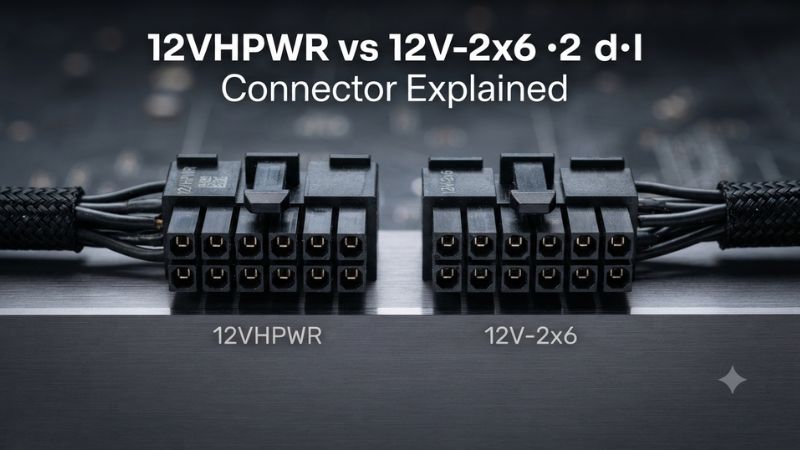
1. Understanding the 16-Pin Connector Design
Both connectors combine 12 larger power contacts with four smaller signal contacts, commonly described as a 12+4-pin configuration. This arrangement allows a graphics card to receive substantial power through one compact connection rather than several separate PCIe power plugs.
The original 12VHPWR connector arrived with the PCIe 5.0-era hardware ecosystem and was adopted by high-performance graphics cards, including NVIDIA GeForce RTX 40 Series models. The revised 12V-2×6 connector belongs to the newer PCIe 5.1 and ATX 3.1 ecosystem.
2. The Main Difference: Power and Sense Pins
The most important engineering change involves the lengths of the contacts inside the connector sockets. In the 12V-2×6 design, the main power terminals are longer, while the four smaller sense contacts are shorter than their original 12VHPWR counterparts.
This arrangement helps ensure that the main power contacts engage before the sense contacts establish the connection signal. If the connector becomes partially disconnected, the shorter sense contacts can disengage earlier, allowing the graphics card to recognize an inadequate connection.
3. Why the Original Connector Raised Safety Concerns
The 12VHPWR connector attracted attention after reports of overheating and melted power connections involving high-end graphics cards, particularly the GeForce RTX 4090. NVIDIA acknowledged the reports and identified incomplete insertion as a common factor in its initial investigation.
A partially inserted connector can create poor electrical contact. When substantial current passes through an inadequate connection, resistance and localized heat can increase. Cable tension, sharp bends near the plug, and sideways pressure can make an already poor connection worse.
4. What the New Design Does Not Change
12V-2×6 is not a completely new power-delivery system. It retains the same general connector arrangement and supports the same maximum 600W connector power rating as 12VHPWR under the relevant implementation. The updated geometry improves connection detection rather than increasing GPU performance.
It also does not make incorrect installation harmless. A damaged cable, incompatible modular PSU cable, contaminated contacts, or poorly seated connection can still create electrical problems. Correct installation and manufacturer-approved components remain essential.
12VHPWR vs 12V-2×6: Detailed Comparison
Choosing between these connectors is primarily a compatibility and safety decision, not a graphics performance decision. The comparison below highlights the differences that matter when buying a power supply, upgrading a GPU, or reusing existing cables in a gaming PC.
| Comparison | 12VHPWR | 12V-2×6 |
| Connector arrangement | 16-pin (12+4) | 16-pin (12+4) |
| Standard association | ATX 3.0 / PCIe 5.0 | ATX 3.1 / PCIe 5.1 |
| Power contact length | Original design | Longer power contacts |
| Sense contact length | Original design | Shorter sense contacts |
| Connection detection | Original detection arrangement | Improved insertion detection |
| Maximum connector power | Up to 600W | Up to 600W |
| Cable compatibility | Compatible with appropriate 12V-2×6 sockets | Backward compatible with appropriate 12VHPWR devices |
| GPU performance | No inherent advantage | No inherent advantage |
| Main consideration | Correct insertion and cable routing | Correct insertion and cable routing |
1. Power Delivery and Maximum Wattage
Neither connector automatically gives a graphics card more power or higher gaming performance. Both support up to 600W through the connector when implemented according to the applicable specifications. Actual GPU power consumption depends on the graphics card’s design, firmware, and manufacturer-defined power limits.
It is important to distinguish connector capacity from the graphics card’s actual power requirement. A GPU that uses substantially less than 600W does not automatically draw the connector’s full rated capacity. The power supply must still meet the complete system’s requirements.
2. Safety and Connection Detection
The shorter sense contacts are the most meaningful improvement in the newer connector. They help prevent a graphics card from treating an inadequately seated connection as fully established. This is particularly relevant for powerful GPUs that place substantial electrical demands on their power connections.
However, 12V-2×6 should not be interpreted as protection against every possible connector failure. Its revised geometry reduces a particular installation-related risk, but it cannot compensate for damaged terminals, unsuitable cables, excessive cable tension, or poor PSU quality.
3. Cable and Graphics Card Compatibility
One important detail in the 12vhpwr vs 12v 2×6 connector explained comparison is that the cable itself did not receive the same fundamental redesign as the socket. The major changes are associated with the GPU-side and PSU-side connector interfaces.
This means an appropriate existing 12VHPWR cable can work with a 12V-2×6 device, provided the PSU manufacturer confirms compatibility. Seasonic and CORSAIR both document backward compatibility for their applicable cable and power supply configurations.
4. ATX 3.0 vs ATX 3.1 Power Supplies
ATX 3.0 power supplies introduced support for the original 12VHPWR ecosystem, while ATX 3.1 products incorporate the updated 12V-2×6 connector specification where implemented. This makes ATX 3.1 a useful specification to look for when purchasing a new PSU.
However, an ATX 3.1 label alone does not establish that every cable included with a particular model has identical features. Check the actual PSU specifications, included cable configuration, and manufacturer compatibility documentation before purchasing.
A quality ATX 3.0 power supply is not automatically unsuitable for a newer graphics card. If its manufacturer confirms compatibility and its capacity meets the GPU requirements, it may remain a perfectly reasonable option.
How to Choose and Install the Right Connector
For most gaming PC builders, the decision should begin with the graphics card’s power input and the exact PSU model. A newer connector is useful, but replacing a functional power supply solely because it uses 12VHPWR is not necessarily worthwhile. Prioritize verified compatibility, appropriate wattage, and careful cable installation.
1. Check Your Graphics Card’s Power Requirements
Start with the official specifications for your exact graphics card model. Identify its required power connector, recommended PSU capacity, and any additional manufacturer instructions. Do not assume that every graphics card in the same GPU family uses identical power connections.
For example, different board-partner versions of an NVIDIA GeForce RTX graphics card can have different power requirements and connector arrangements. Check the specific model rather than relying exclusively on the GPU chipset name.
2. Verify the PSU Cable Before Connecting It
If your graphics card uses 12V-2×6, check whether your existing PSU cable is approved for that connection. A compatible native cable provides a direct connection from the appropriate modular PSU output to the graphics card.
Never assume that modular cables from different PSU brands or product families are interchangeable. Even when the plugs physically fit, their PSU-side wiring arrangements may differ. Use only cables explicitly approved for the exact power supply model.
3. Install the Connector Correctly
Before installation, switch off the computer, turn off the PSU, and disconnect its AC power cable. Align the 16-pin connector with the GPU socket and insert it straight until the locking mechanism engages and the plug is fully seated.
Inspect the connection from multiple angles to ensure there is no visible gap between the plug housing and socket. Avoid pulling the cable sideways or forcing a tight bend immediately beside the connector. Follow the graphics card and PSU manufacturers’ specified cable-routing guidance.
4. Inspect the Connection During Maintenance
Check the connector and surrounding cable during routine PC maintenance, especially after moving the computer or changing cable routing. Look for discoloration, damaged insulation, deformation, unusual smells, or signs of overheating.
If you notice any damage, shut down the computer and disconnect power before further inspection. Do not continue using a visibly damaged connector. Contact the graphics card or PSU manufacturer for appropriate replacement or warranty guidance rather than attempting an improvised repair.
Frequently Asked Questions
The right connector depends on your GPU, PSU, and cable configuration. These frequently asked questions address common upgrade concerns, including whether older power supplies remain usable, whether the newer design improves gaming, and what precautions matter during installation.
1. Can a 12VHPWR Cable Work With a 12V-2×6 GPU?
Yes, a compatible 12VHPWR cable can work with a 12V-2×6 graphics card. The revised socket maintains backward compatibility with the original cable design, so replacing every older PSU cable is not automatically necessary.
However, compatibility must be confirmed against the PSU manufacturer’s documentation. A physically compatible plug does not mean every modular PSU cable is electrically compatible. Never substitute an unapproved cable from another power supply.
2. Is 12V-2×6 Safer Than 12VHPWR?
Yes, 12V-2×6 improves connection detection through shorter sense contacts and longer power contacts. This helps reduce the risk associated with incomplete insertion compared with the original design.
Nevertheless, installation quality still matters. Both connector types require full insertion, appropriate cable routing, and undamaged contacts. The newer design should be viewed as an engineering improvement rather than a guarantee against overheating.
3. Does 12V-2×6 Improve Gaming Performance?
No, changing from 12VHPWR to 12V-2×6 does not inherently increase FPS, GPU clock speeds, or rendering performance. Both connectors support the same maximum 600W connector power rating.
Gaming performance depends on the GPU architecture, power limits, cooling, drivers, and system configuration. The newer connector primarily improves connection reliability rather than changing graphics processing capabilities.
4. Should I Replace My ATX 3.0 PSU With an ATX 3.1 Model?
Not necessarily. An existing ATX 3.0 PSU may remain suitable if its manufacturer confirms cable compatibility and its rated capacity meets your graphics card’s requirements.
When purchasing a replacement, an ATX 3.1 PSU with a native 12V-2×6 cable is a sensible choice for a new high-end gaming build. Compare electrical specifications, protections, warranty coverage, and cable compatibility rather than choosing solely by the connector label.
Final Thoughts
The 12vhpwr vs 12v 2×6 connector explained comparison comes down to improved connection detection, not additional gaming performance. For new builds, choose a quality ATX 3.1 PSU with a compatible native cable. Existing 12VHPWR owners can often keep their hardware after verifying compatibility and installation.